Ergo View James Joseph
Use this command to install Ergo View with WinGet:
winget install --id=JamesJoseph.ErgoView -e A responsive TUI for exploring and managing Ergo task graphs.
winget install --id=JamesJoseph.ErgoView -e A responsive TUI for exploring and managing Ergo task graphs.
Ergo View is a responsive terminal companion for Ergo. It turns local epics, tasks, dependencies, journals, and activity into a fast Bubble Tea interface while keeping Ergo itself in charge of every change.
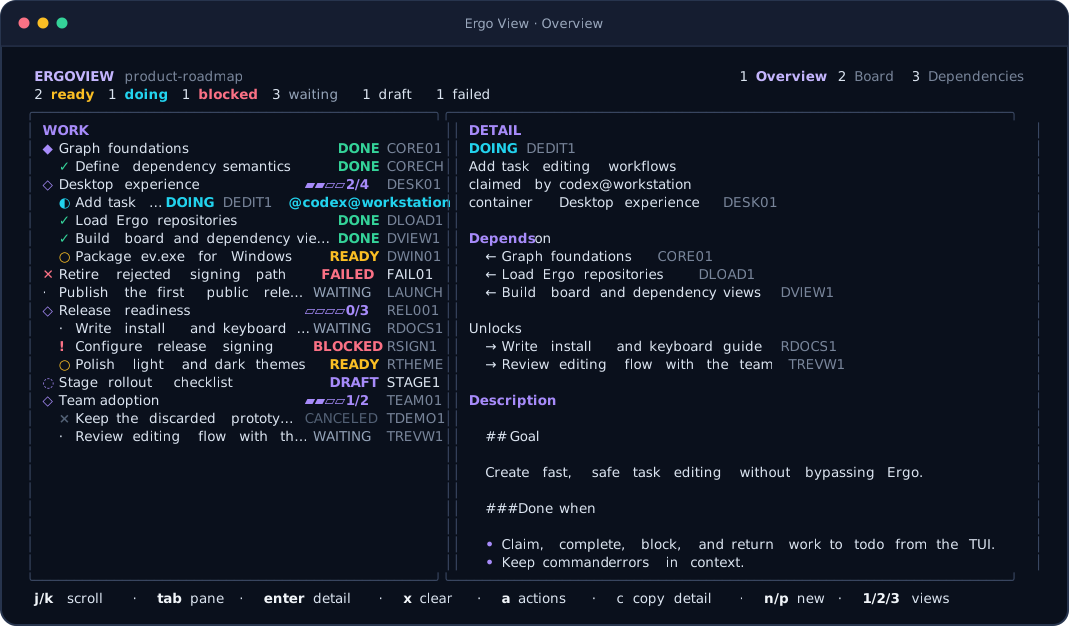
Ergo View requires Go 1.25.8 or newer when building from source and a released Ergo 1–6 executable available as ergo on PATH for task actions. Ergo 6 is recommended for draft staging, failed outcomes, and independent results.
On macOS with Homebrew:
brew install --cask jamestjsp/tap/ergoview
On Windows with WinGet:
winget install --id JamesJoseph.ErgoView --exact
Or install from source with Go:
go install github.com/jamestjsp/ergoview/cmd/ev@latest
Tagged releases also provide ev archives for macOS and Linux and ev.exe ZIP files for Windows. Download the archive for your platform from Releases, extract it, and put the executable on PATH. New WinGet packages become available after Microsoft validates and merges their catalog submission.
Run ev anywhere inside an Ergo project:
cd my-project
ev
Use --dir to start discovery elsewhere, --agent to set the identity used by claims, or --ergo when the Ergo executable is not on PATH:
ev --dir ../my-project --agent codex@workstation
ev --ergo /opt/tools/ergo
Ergo View walks upward from the starting path to find .ergo. It reads the current .ergo/backlog.jsonl format, the older .ergo/plans.jsonl format, the legacy .ergo/events.jsonl filename, and the shared .ergo/journal.jsonl introduced by Ergo 5. Released standalone events, transaction batches, and compacted snapshots are all supported.
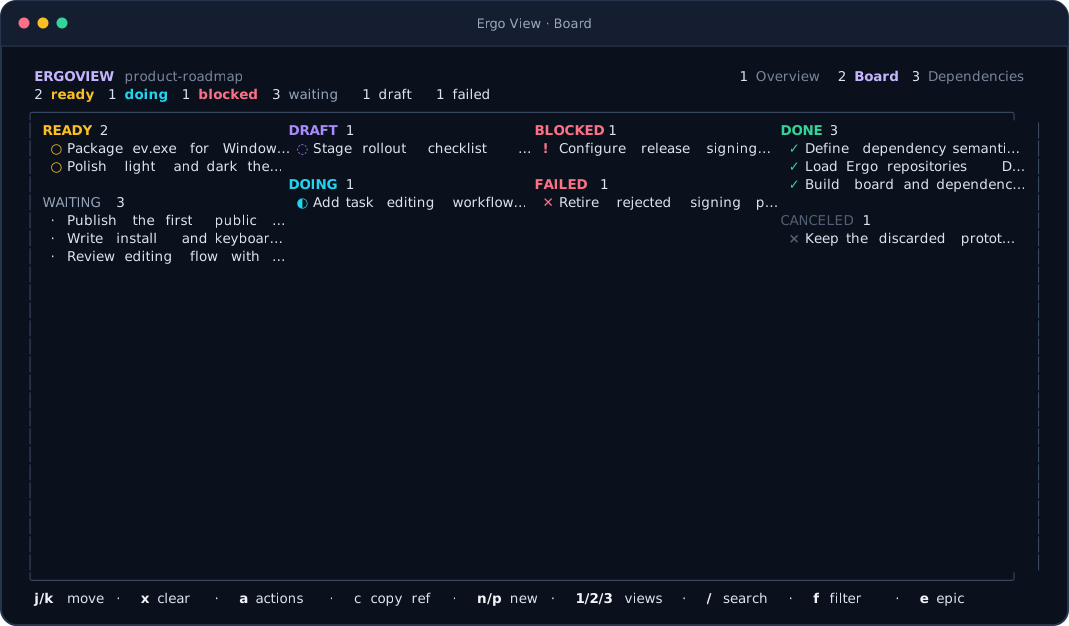
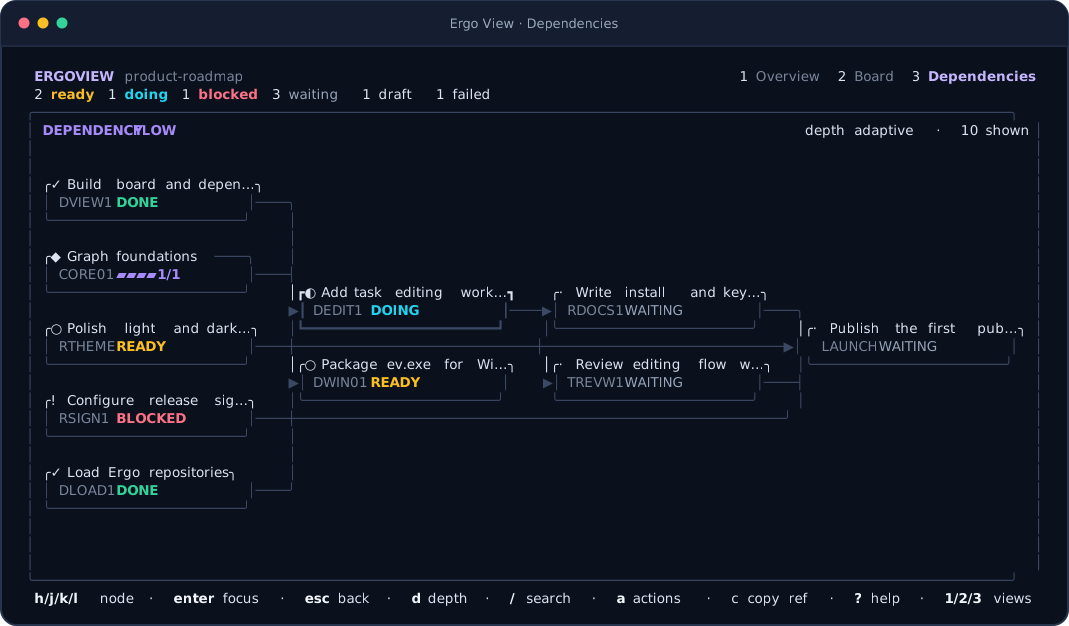
All views share selection, fuzzy search, state filtering, and container focus. Ergo View reloads external changes once per second without losing the selected task.
Press c or click the copy control in the footer to copy the selected task or container as ID Title. When the Overview detail pane is focused, the same control copies the whole visible detail as clean Markdown.
In the dependency graph, use the arrow keys or h/j/k/l to move spatially between cards. Enter makes the selected card the exploration focus, Esc returns to the previous focus, and d cycles direct, adaptive, and full-lineage depth. The adaptive default spends the available terminal cells on the nearest upstream and downstream context; selecting an overflow card reveals more. Mouse clicks select cards directly.
Press n to create a task, p to create an epic plan, or a to open actions for the selected task. Ergo View detects the selected Ergo executable once and maps each action to that release generation. Task actions can:
Lifecycle actions accept an optional message. Ergo 1–4 can attach a result path during a lifecycle action; Ergo 5–6 expose results as their own summary-and-optional-file action. Multiline fields use Ctrl+S to continue. Destructive or state-reopening operations ask for confirmation.
Ergo View never edits the event log. It invokes the official Ergo CLI for every mutation, then reloads the resulting snapshot. Errors stay in the dialog so input is not lost.
| Key | Action |
|---|---|
j / k, ↑ / ↓ | Move selection or scroll details |
h / l, ← / → | Move across dependency graph nodes |
home / G | First / last task |
page up / page down | Move one page |
1 / 2 / 3 | Overview / board / dependencies |
/ | Fuzzy search ID, title, body, or agent |
f | Cycle state filter |
e | Focus the selected container |
x | Clear search and filters |
tab / enter (overview) | Switch or focus overview panes |
enter / esc (graph) | Focus graph node / return to previous graph focus |
d | Cycle direct / adaptive / lineage graph depth |
c | Copy the selected ID and title, or the focused detail as Markdown |
a | Open selected task actions |
n / p | New task / container plan |
? | Toggle complete in-app help |
q / Ctrl+C | Quit |
Mouse selection and wheel scrolling are also supported.
Ergo View preserves released Ergo storage and command compatibility by generation:
events.jsonl and plans.jsonl, standalone events, JSON task creation, plan, and release.backlog.jsonl, atomic transaction records, compacted snapshot blocks, title-based task and epic creation, and release.result records, and release.open in place of release.Draft work is visible but never ready. Failed work is finished and releases dependencies while remaining distinct from successful completion. A completed epic is failed when any child failed, canceled when none failed and at least one child was canceled, and done otherwise.
Reading tolerates one partially written final backlog or journal record. Malformed complete records, unsupported versions, invalid compacted-snapshot ordering, and checksum mismatches are reported with their source path and line. Ergo View never rewrites these files.
Set NO_COLOR=1 for terminals that should not receive color styling. The executable is named ev on macOS and Linux and ev.exe on Windows. Release builds cover AMD64 and ARM64 for all three operating systems.
git clone --recurse-submodules https://github.com/jamestjsp/ergoview.git
cd ergoview
go test -race ./...
go vet ./...
go build -o ev ./cmd/ev
Existing clones can initialize the pinned upstream compatibility reference with git submodule update --init. The upstream/ergo submodule points to the original sandover/ergo v6.0.0 release and supplies immutable released-major fixtures for regression tests; Ergo View does not import Ergo internals or ship the submodule in binary archives.
Render fixtures and documentation images are reproducible:
UPDATE_GOLDEN=1 go test ./internal/ui -run 'TestRenderSnapshots|TestDocumentationScreenshots'
The data adapter is read-only and UI-independent. The action layer exposes intent-level Ergo operations and owns CLI-generation adaptation, which keeps the UI version-neutral without duplicating Ergo's mutation rules.