中文文档 · English
LanTransfer
A local-first browser workspace for transferring files and plain-text notes across devices on the same LAN.




LanTransfer keeps file sharing and quick text handoff in one lightweight local service. Run it on a computer, open the browser UI from a phone, tablet, or another computer on the same trusted network, and transfer directly between devices without an account or cloud service.
Product tour
| English UI | 简体中文 UI |
|---|
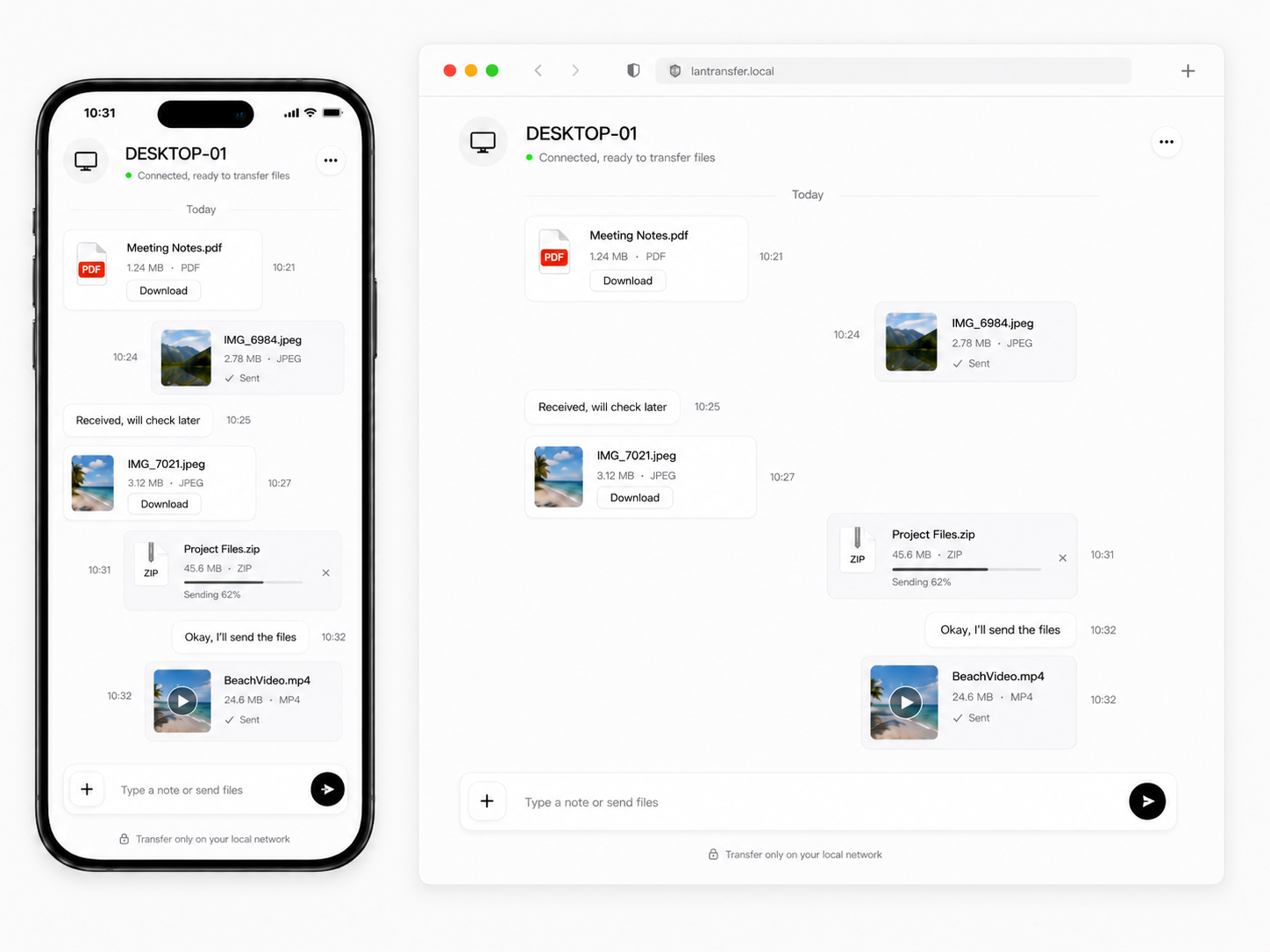 | 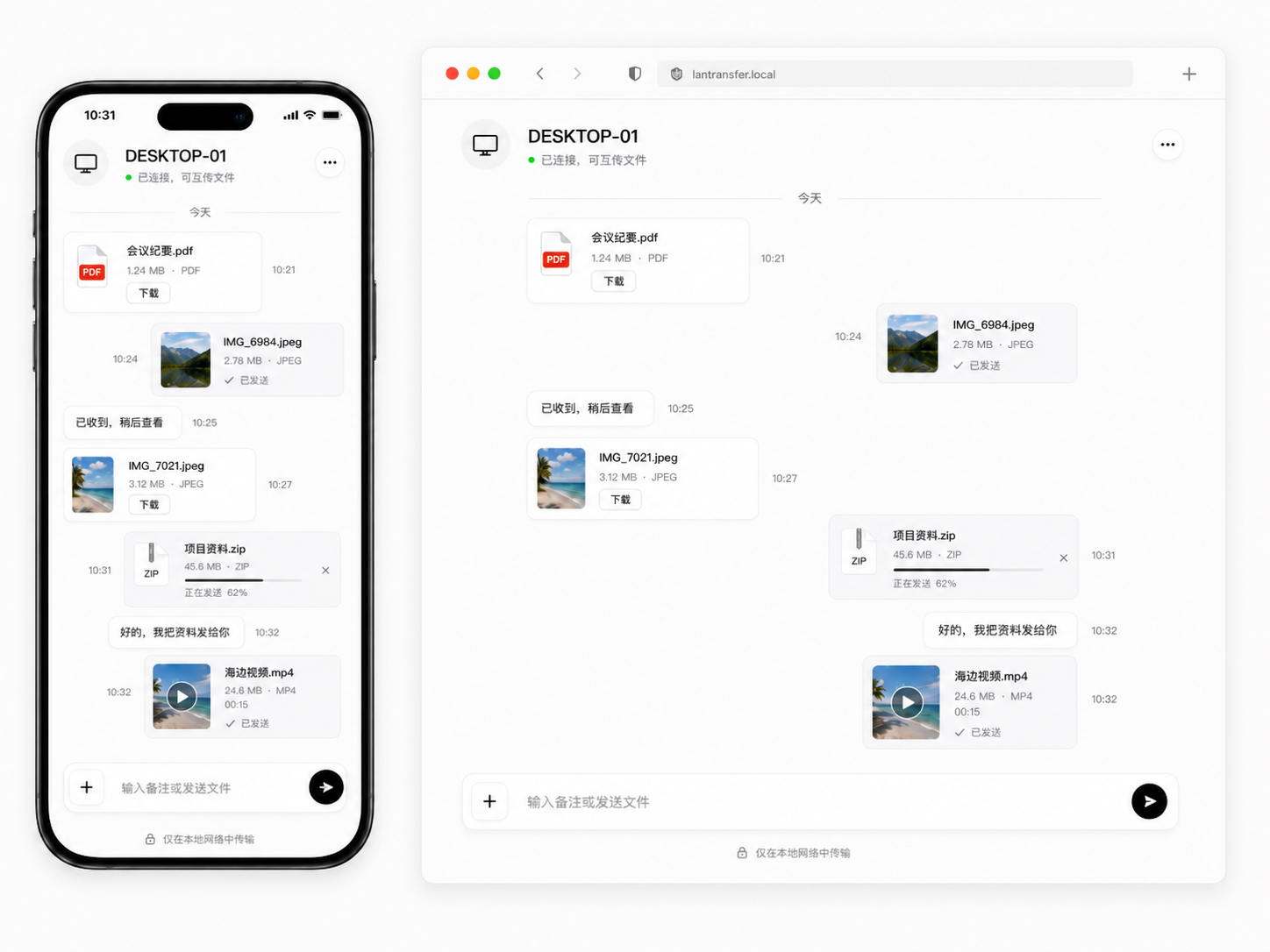 |
| Browser-based file transfer, downloads, and text notes across devices. | 在桌面电脑和手机之间传输文件、下载文件和发送文本。 |
What it does
| Area | Capability |
|---|
| File transfer | Upload files from any modern browser, stream them to local storage, download them from other devices, and copy shareable file links |
| Text handoff | Send and persist plain-text notes alongside transferred files |
| Device connection | Detect usable LAN addresses, show a QR code, and let you switch between multiple network adapters |
| Cross-platform host | Run the receiver on Windows, macOS, or Linux with .NET 10 |
| Host controls | Delete text history, move received files to the LanTransfer trash, and reveal file locations in Windows Explorer |
| Safe storage | Protect against path traversal, handle duplicate names readably, and use temporary .uploading files while receiving |
| Localization | Lightweight English, Simplified Chinese, and Traditional Chinese browser UI |
| Windows integration | Single-instance behavior, default-browser launch, and an optional tray icon with Open/Exit actions |
Quick start
- Download the Windows installer or portable build from GitHub Releases, or run it from source as shown below.
- Start LanTransfer on the computer that will receive files.
- The app listens on
http://0.0.0.0:8765 and opens the local page in your default browser.
- On another device connected to the same LAN, open
http://:8765, or choose Connect new device on the host and scan the QR code.
- Drag files into the page or enter a plain-text note. Received files can be downloaded from any connected browser.
Run from source:
dotnet run --project src/LanTransfer.Host
Useful addresses:
- Same computer:
http://localhost:8765
- Another device on the LAN:
http://:8765
> [!IMPORTANT]
> The first version intentionally uses HTTP on the local network, not HTTPS. Use LanTransfer only on a trusted private Wi-Fi/LAN, or configure your own VPN, tunnel, or network boundary for other environments.
Requirements
| Requirement | Notes |
|---|
| Receiver | Windows, macOS, or Linux with the .NET 10 runtime when running from source |
| Sender | Any modern browser on Windows, macOS, Linux, Android, or iOS |
| Network | Devices must be on the same local network unless you provide routing, VPN, or tunneling yourself |
| Windows extras | Windows host actions can reveal a received file in Explorer; the tray integration is Windows-only |
Self-contained release packages include the runtime, so users do not need to install .NET separately.
Security and privacy
LanTransfer is local-first: files and text are stored on the host computer, and the application does not require an account or send content to a cloud service.
By default, the service is reachable by devices that can access the listening port on the local network. Set AccessToken to require an access token for protected API calls. The token can be supplied as X-LanTransfer-Token or ?token=...; generated connection URLs include it when configured.
The optional token helps prevent accidental access, but HTTP does not provide confidentiality against someone who can observe or modify traffic on a hostile network. Do not expose the service directly to the public internet, and avoid sharing token-bearing URLs outside the trusted network.
Configuration
LanTransfer reads the LanTransfer section from src/LanTransfer.Host/appsettings.json.
{
  "LanTransfer": {
    "Port": 8765,
    "StorageDirectory": null,
    "MaxFileSizeBytes": 1073741824,
    "MaxMessageLength": 4000,
    "OpenBrowserOnStart": true,
    "EnableWindowsTray": true,
    "AccessToken": null
  }
}
| Setting | Default | Description |
|---|
Port | 8765 | HTTP listening port. If it is unavailable, LanTransfer selects an available port. |
StorageDirectory | null | Received-file and text storage location. The default is under the current user's local application-data directory. |
MaxFileSizeBytes | 1073741824 | Maximum accepted file size, 1 GiB by default. |
MaxMessageLength | 4000 | Maximum length of a plain-text note. |
OpenBrowserOnStart | true | Open the host page in the default browser after startup. |
EnableWindowsTray | true | Enable the Windows tray icon when running on Windows. |
AccessToken | null | Optional token for protected API calls and connection URLs. |
Environment variables can override configuration values using the LanTransfer__ prefix:
LanTransfer__Port=9000 dotnet run --project src/LanTransfer.Host
On PowerShell:
$env:LanTransfer__Port = "9000"
dotnet run --project src/LanTransfer.Host
API overview
| Method | Endpoint | Purpose |
|---|
GET | /api/health | Return service status, name, and host device name |
GET | /api/capabilities | Report host-only UI capabilities |
GET | /api/connect | Return usable LAN connection URLs |
GET | /api/connect/qr?url=... | Return a locally generated SVG QR code |
GET / POST | /api/messages | List or add plain-text notes |
DELETE | /api/messages/{id} | Delete a note from the host computer |
POST | /api/files/upload | Upload one multipart file field named file |
GET | /api/files | List received files |
GET | /api/files/{fileName} | Download a received file |
POST | /api/files/{fileName}/reveal | Open a file's location in Windows Explorer on the host |
DELETE | /api/files/{fileName} | Move a received file to .lantransfer/trash on the host |
History deletion and file-location actions are restricted to the host computer. Common stable error codes include file_too_large, invalid_file_name, invalid_message, unauthorized, upload_failed, delete_failed, host_only_action, and network_error.
Development
Build and test
dotnet restore LanTransfer.sln
dotnet build LanTransfer.sln --configuration Release
dotnet test LanTransfer.sln --configuration Release
Run the built executable directly:
src/LanTransfer.Host/bin/Release/net10.0/lantransfer
On Windows:
.\src\LanTransfer.Host\bin\Release\net10.0\lantransfer.exe
Portable builds and Windows installer
Create a self-contained Windows x64 publish and build the installer with Inno Setup 6 installed:
.\scripts\build-installer.ps1 -Version 0.7.0
The installer uses a per-user location, %LOCALAPPDATA%\Programs\LanTransfer, requires no administrator privileges, and can optionally create a desktop shortcut or start LanTransfer at sign-in. Received files remain under %LOCALAPPDATA%\LanTransfer\uploads and are not removed when the application is uninstalled.
Release
After committing and pushing the intended changes, run:
.\scripts\release.ps1 0.6.2
The script runs the test suite, creates an annotated v0.6.2 tag, and pushes it. GitHub Actions then builds self-contained packages for Windows x64, Linux x64/ARM64, and macOS x64/ARM64, builds the Windows installer, and creates the GitHub Release.
To preview the release checks without creating a tag:
.\scripts\release.ps1 0.6.2 -DryRun
Project structure
LanTransfer/
├─ src/
│  ├─ LanTransfer.Core/
│  └─ LanTransfer.Host/
│     └─ wwwroot/
├─ tests/
│  └─ LanTransfer.Tests/
├─ docs/
├─ installer/
├─ screenshots/
├─ scripts/
├─ README.md
├─ README.zh-CN.md
└─ LanTransfer.sln
Roadmap
- Optional expiring pairing-code approval flow
- Rename actions for received files
- Better image and file thumbnails
- Desktop notifications
- Stronger authentication for non-trusted networks
License
MIT
Built for simple, direct transfers on your local network.