atref







Claude Code's @ file picker — everywhere.
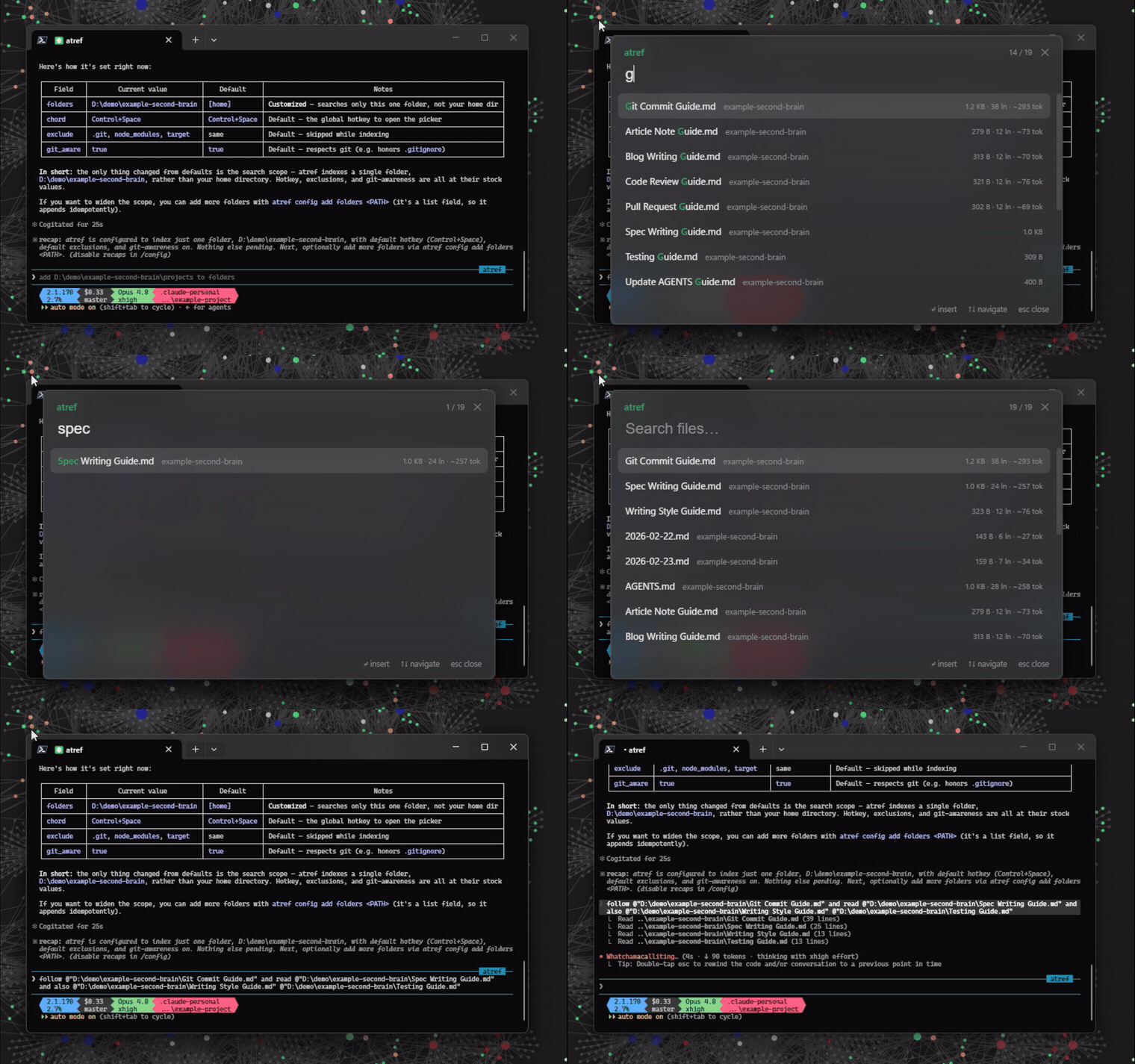
A global file-reference picker for Windows. Press a keyboard chord anywhere —
terminal, browser, Obsidian, chat app, IDE — and an unobtrusive fuzzy picker pops
up near the caret. Type to filter, hit Enter, and an @""
reference to the selected file is inserted right where you were typing. It runs in
the system tray, and it doubles as a config CLI so agents can set it up.
> Windows-only today (it uses WebView2 + Win32 for the picker, caret, and
> insertion). macOS/Linux are a future port.
Features
- Summon anywhere — a global chord (default
Ctrl+Space) over whatever app is
focused; Enter inserts @"" at the caret, Esc dismisses.
- Fuzzy + frecency —
nucleo matching (basename-weighted, smart-case,
CamelHumps); recent/most-used files lead an empty query and break near-equal ties.
- Rich result rows — the chars your query matched are highlighted (the
ranker's own match, not a re-derivation); every row shows file size, with line
count and a ~token estimate (tiktoken
o200k) filling in — what will this
@-ref cost in context? — and images get an inline thumbnail.
- Cloud-safe — OneDrive/Dropbox cloud-only files are never content-read, so
browsing results can't trigger downloads.
- Multi-folder, git-aware — index many folders, prune excludes, follow
.gitignore, and a live file-watcher picks up new/changed files.
- Instant + persistent — an on-disk redb cache launches the picker immediately
and reconciles against the filesystem in the background.
- Hot-reload config — edits to
config.json (by hand or via the CLI) apply to
the running app with no restart.
- Agent config CLI —
atref describe / atref config get|set|add|remove
configure atref from any shell; validated, atomic, JSON output.
- Raycast-style UI — a transparent, borderless WebView2 window with native
acrylic (Tauri 2).
Installation
WinGet
winget install JuanjoFuchs.atref
Scoop
scoop bucket add atref https://github.com/JuanjoFuchs/atref
scoop install atref
PowerShell
irm https://raw.githubusercontent.com/JuanjoFuchs/atref/main/install.ps1 | iex
Direct download
Grab atref--windows-x64.exe from the
latest release and run it.
Every path installs the same portable executable (requires the Microsoft Edge
WebView2 runtime, which ships with Windows 11).
Quick Start
- Launch
atref — it lives in the system tray.
- Press the chord (default Ctrl+Space) in any text field.
- Type to fuzzy-filter your indexed files; recents lead an empty query.
- Enter inserts
@"" at the caret; Esc dismisses.
Right-click the tray icon to open the config, reload it, or quit.
Let an agent set it up. atref is self-describing — paste this into Claude Code:
> Run atref describe and configure atref to index my dev folders.
atref describe emits structured JSON (the command surface, the config schema,
and the config-file path), so an agent can wire up your folders via
atref config add folders … without you reading the rest of this README.
Screenshots
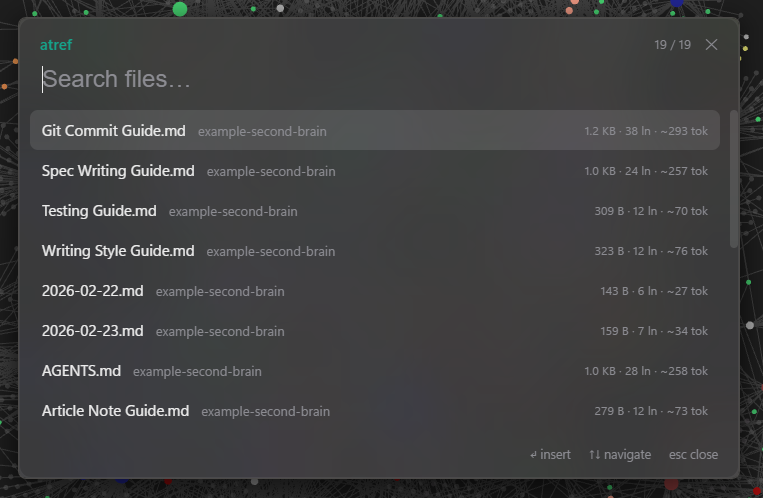
Summon anywhere — an empty query leads with your recent and most-used files.
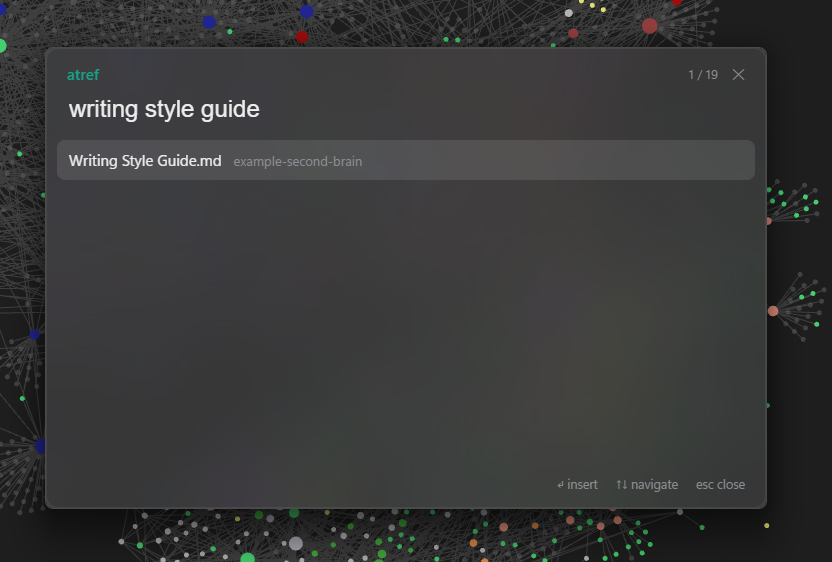
Type to fuzzy-filter — "writing style guide" narrows straight to the file.
Configure
Config is JSON at %APPDATA%\atref\config.json (created on first run). Edits are
hot-reloaded — no restart, no manual reload:
{
  "folders": ["C:\\Users\\you\\dev", "C:\\Users\\you\\vault"],
  "exclude": [".git", "node_modules", "target"],
  "chord": "Control+Space",
  "git_aware": true
}
| Key | Meaning |
|---|
folders | Directories to index, recursively. |
exclude | Directory names pruned during traversal. |
chord | The global summon hotkey (global-hotkey syntax). |
git_aware | Follow .gitignore in Git repos (skip ignored, still show untracked). |
CLI (for agents)
The same binary is a small config CLI. Discover the surface with atref describe
(JSON), then mutate config.json — validated, atomic, and hot-reloaded by the
running app:
atref describe                            # JSON schema of the commands + config
atref add                                 # add the current directory to folders
atref config add folders D:\proj          # add a folder
atref config set chord "Control+Alt+Space"
atref config get                          # print the current config as JSON
atref                            Launch the tray app
atref describe                   Print the command + config schema as JSON
atref config get [KEY]           Print the whole config, or one KEY, as JSON
atref config set     Set a scalar field (chord, git_aware)
atref config add     Add to a list field (folders, exclude)
atref config remove    Remove from a list field
atref add [PATH]                 Add PATH (default: current dir) to folders
atref --version | --help
Build from source
cargo build --release    # produces target\release\atref.exe (frontend embedded)
cargo test               # headless tests (live-GUI e2e are #[ignore]d)
atref is built with Rust + Tauri 2; the ui/ frontend is
plain static HTML, embedded into the binary by tauri-build (no Node toolchain).
Requirements
- Windows 10/11 (x64).
- Microsoft Edge WebView2 runtime — preinstalled on Windows 11.
Why
Claude Code's @ file picker is excellent — and it only exists inside Claude
Code. atref is "that, but everywhere": cross-vault, cross-project,
cross-application, on the OS rather than inside one editor.
License
MIT