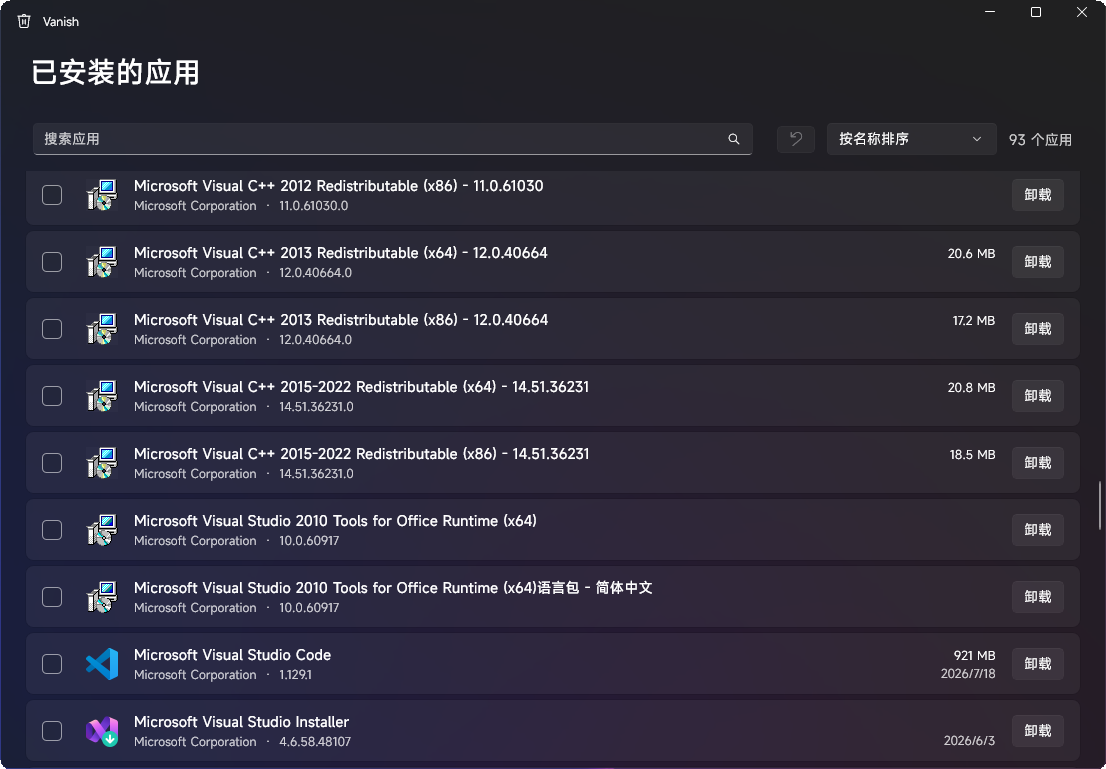
Vanish is a modern, open-source uninstaller for Windows designed to provide clean and reversible application removal. Built using WinUI 3, it offers a sleek interface with Fluent design principles and supports both classic desktop programs and MSIX/Store apps.
Key Features:
Complete App Inventory: Lists all installed applications, including classic desktop programs (64-bit, 32-bit, per-user) and MSIX/Store apps, with sortable views by name, size, or installation date.
Silent Uninstaller: Automatically detects MSI, Inno Setup, NSIS, and Squirrel installers to derive silent uninstall switches, ensuring quiet and efficient removal.
Batch Processing: Manages multiple app removals in a sequential queue, preventing failures from blocking the process.
Leftover Scan: Fingerprint apps before uninstallation, then identify leftover files, folders, registry entries, Run entries, and Start Menu shortcuts. Results are ranked by confidence to simplify safe cleanup.
Reversible Cleanup: Files go to the Recycle Bin, and registry keys are backed up as .reg files for one-click restoration of changes made during the last session.
Safety First: Hard-coded system path blocklists prevent accidental deletions, and every action requires explicit user confirmation.
Target Audience and Benefits:
Ideal for tech-savvy users and system administrators seeking precise control over app removal. Vanish ensures clean installations and reversible operations, eliminating guesswork and reducing the risk of system instability or data loss.
Available via Winget, you can install Vanish via winget or deploy it using the winget command line for seamless integration into automated workflows.
README
Vanish
A modern, open-source uninstaller for Windows.Uninstall anything cleanly — silent uninstall, leftover scanning, safe cleanup — and every deletion is reversible.
Actually modern — a native WinUI 3 interface with Fluent design, light/dark theme, and full localization
Reversible by design — files go to the Recycle Bin, registry keys are backed up to .reg before removal, and Undo last cleanup brings them back in one click
Smart, not noisy — silent switches derived automatically per installer type; leftovers ranked by confidence so you never guess what's safe to remove
Zero footprint — no ads, no bundled offers, no background services, no telemetry
Features
Complete app inventory — classic desktop programs (64-bit, 32-bit, per-user) and MSIX/Store apps, with search and sorting by name, size, or install date
Silent uninstall — automatically detects MSI, Inno Setup, NSIS, and Squirrel installers and derives the correct silent switches; falls back to the interactive uninstaller when unknown
Batch queue — check multiple apps and uninstall them sequentially; a failure never blocks the rest of the queue
Leftover scan — fingerprints each app before uninstalling (executable metadata + install paths), then finds leftover files, folders, registry keys, Run entries and Start Menu shortcuts; every finding is tagged with a confidence level (High / Medium / Low) and only High is pre-selected
Undo — one click restores the registry entries removed by the last cleanup from automatic .reg backups
Safety by design
Deleting the wrong thing is the one mistake an uninstaller must never make. Vanish is built around that:
Files are always moved to the Recycle Bin, never permanently deleted
Registry keys are exported to .reg backups before removal, restorable via
A hard blocklist of system paths (Windows, System32, Common Files, Microsoft app data, …) is enforced twice: during scanning and again inside the deletion engine
Nothing is ever deleted without your explicit confirmation — there is no "auto clean"
Every deletion is recorded in an audit log (%LocalAppData%\Vanish\Logs)
Vanish-setup-*.exe — recommended. Installer with Start Menu shortcut and clean uninstall
Vanish-*-win-x64.zip — portable. Unzip and run Vanish.exe, no installation
Both are self-contained — no .NET runtime or any other prerequisite required. Requires Windows 10 2004 (build 19041) or later, x64.
Build from source
git clone https://github.com/ky3-git/Vanish.git
cd Vanish
dotnet build Vanish.slnx -c Release
dotnet test Vanish.slnx -c Release
Requires the .NET 10 SDK. The app is unpackaged WinUI 3 (Windows App SDK, self-contained), so F5 in Visual Studio or dotnet run inside src/Vanish.App just works.
Architecture
src/Vanish.Core    enumeration, uninstaller detection, leftover scanning,
                   deletion engine — pure logic, no UI dependency, unit tested
src/Vanish.App     WinUI 3 front end (MVVM, CommunityToolkit.Mvvm)
tests/             unit tests for matching, planning and safety guards
Languages
English and 简体中文, following your Windows display language. Translations live in src/Vanish.App/Strings — PRs for new languages are very welcome.
Roadmap
Install monitoring (before/after snapshots)
Portable app detection (apps without registry entries)