Envoy is a local Windows desktop app for job seekers. It scores how likely a job posting is a waste of your time (a ghost job) and shows the evidence behind every score. It keeps a scoreboard of your hunt: ghosts dodged, hours saved, your streak, and your application-to-response rate. It also includes a human-gated apply copilot that tailors your resume and fills application forms while you review and submit, and a job search that reads public ATS feeds. Everything runs on your machine and your data stays there.
README
Envoy
Envoy is the scoreboard for your fight against a rigged job market. It spots ghost jobs before you waste time on them, then counts every one you dodge.
It runs on your own Windows PC. Your resume and data never leave it.
You tailor the resume, fill out the same fields again, hit submit, and never hear back. Some of those postings were never real openings. Envoy helps you spot them before you waste the afternoon. And because dodging a fake posting is a win nobody else counts, Envoy counts it.
What it does
Scores how likely a posting is a ghost job and lists the actual reasons behind the score. It won't call a company a fraud. When the evidence is thin, it stays neutral.
Keeps a scoreboard of your hunt: ghosts dodged, hours saved, your day streak, and your application-to-response rate. It's the first thing you see when the app opens.
Ghost detection and job search work the second you open it. No account, no API key, no cloud. Your resume stays on your machine.
It can also tailor your resume and fill out an application for you, but you read it over and click submit yourself. Always.
Windows 10/11. Signed installer or a portable zip. Nothing else to install.
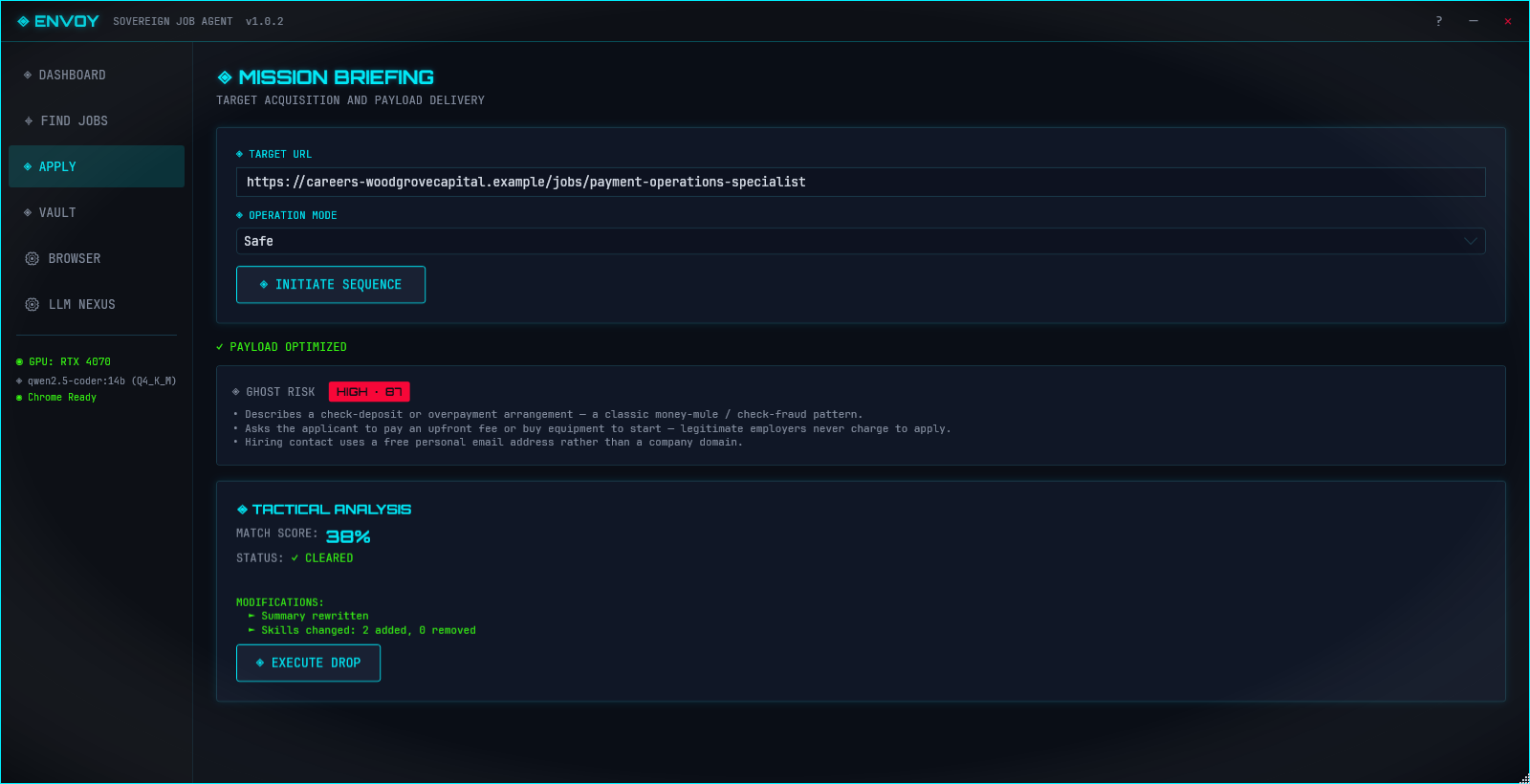
The Ghost Risk panel: the band, the score, and the reasons behind it. Demo data shown; company and posting are fictional.
Early beta: testers and contributors wanted
Envoy is in early beta. It works end to end and every release is signed, but so far it has run on a small number of machines against a limited slice of real postings. That is the gap you can close.
Test it. Install it, run your real searches, and open an issue for anything that looks wrong: a real job flagged as risky, an obvious ghost scored OK, a crash, a screen that confused you. A five-minute report genuinely moves the project.
Contribute. Five starter issues are open, graded easy to moderate, including two self-contained ghost signals and a new job-board source. CONTRIBUTING.md has the step-by-step, including how to hand a signal spec to a coding agent.
Everyone who helps gets credited. Merged PRs are listed in the notes of the release they ship in, and so are the people whose bug reports and test sessions led to a fix. If you would rather not be named, say so in your issue or PR.
A winget package is under review in the community repo.
The installer is signed, but since the app is new, Windows SmartScreen may warn you the first couple of times until the signature earns some reputation. The publisher will read LXBSTUDIO LLC, and the checksum confirms the rest.
> Ghost detection and Find Jobs work right away with no LLM, no Ollama, and no API key. You only need a local model for the resume-tailoring copilot.
The Scoreboard
The first thing Envoy shows you is not a form. It is the score.
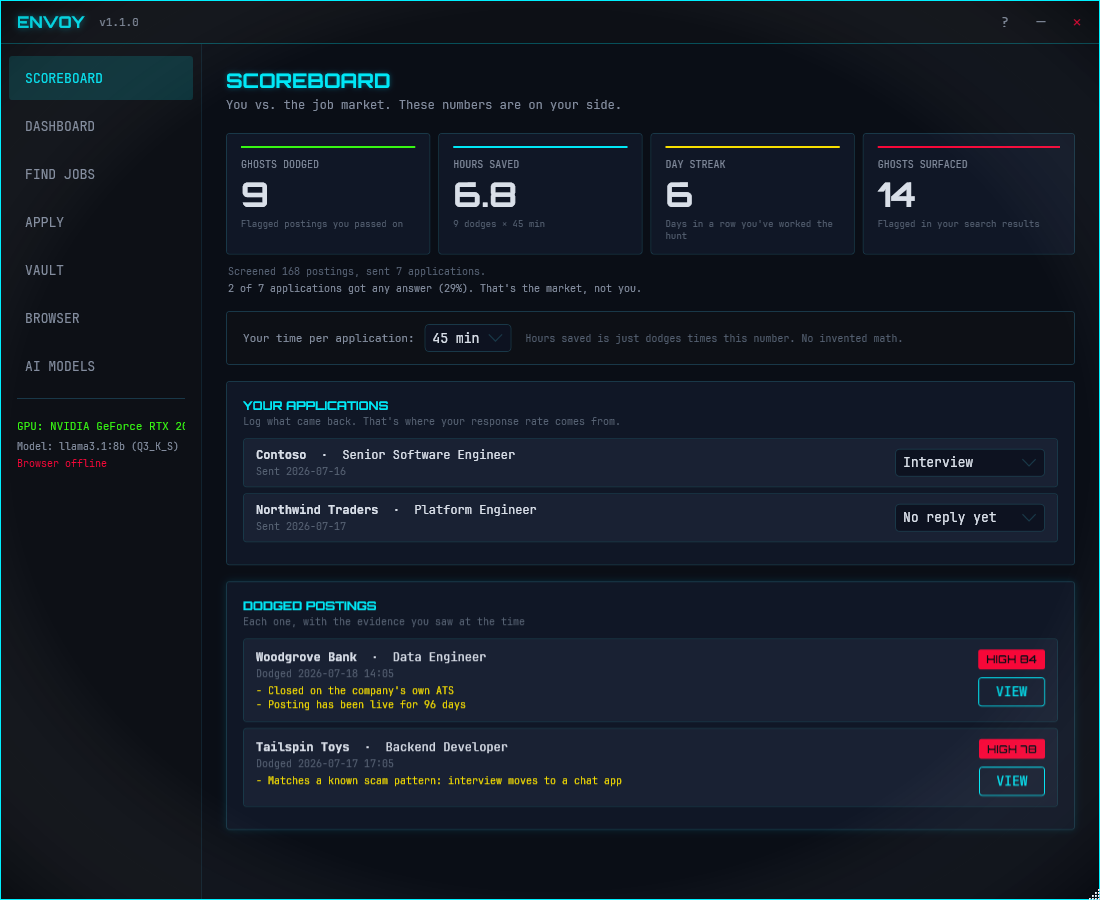
Ghosts dodged. Flagged postings you passed on. Only an explicit act counts, a skip in Find Jobs or a cancel at the submit gate, so the number stays honest. A flagged posting merely showing up in your results never counts as a dodge.
Hours saved. Dodges times your own time-per-application estimate. The math is printed on the board and the estimate is adjustable right there. Envoy doesn't pretend to measure what it can't.
Day streak. Consecutive days you worked the hunt.
Ghosts surfaced. How much noise the engine flagged in your results. The other side gets counted too.
Every dodge is listed with the evidence that was on screen when you passed on it, so you can always check the board's work. Your submitted applications sit below with a dropdown to log what came back, and once five are out, Envoy shows your application-to-response rate. Rejections count as responses, because the stat measures whether anyone answered at all.
There is no setup. Run a search in Find Jobs and the board starts counting. All of it lives in a local ledger inside envoy.db on your machine, and none of it is uploaded anywhere.
The Scoreboard: your dodges, your hours back, and what actually came back. Demo data shown; companies and postings are fictional.
Ghost Detection
Envoy checks each posting with a handful of independent signals. Every signal returns a number, a confidence level, and a plain-English reason, and the app rolls those up into one risk band. There's no bare "fake" stamp on anyone.
Signals come in three tiers:
Deterministic is hard evidence. For example, the role is open on a job aggregator but already closed on the company's own ATS, or the text matches a known scam pattern.
Probabilistic is a strong correlation. For example, the posting has been live far longer than most roles at its level.
Weak is a softer hint that still counts for something. For example, the description is a near-duplicate of another company's post.
Four signals run in the app today, all unit-tested:
Signal
Tier
Data
ATS Cross-Check
Deterministic
Network (public Greenhouse and Lever APIs)
Posting Age
Probabilistic
Local (posting date from the discovery feed)
Duplicate JD
Weak
Local (cross-company text match within a batch)
Scam Pattern
Deterministic
Local regex (off-platform redirects, upfront fee or PII asks, crypto and gift-card payment, check and overpayment fraud)
A fifth signal, Repost Frequency, watches for listings that get re-posted to look new. Its stronger path needs listing history across sessions, which this build doesn't keep yet, but a timestamp fallback can already fire when a posting's own dates show it was bumped long after it first went up.
Each signal says whether it needs the network. That lets Envoy score a whole list locally in the Find Jobs view and save the network calls for when you open a single posting.
Risk bands
GhostScorer combines the signals into one of three bands:
Band
Meaning
When it triggers
Neutral
No strong ghost signals.
The default when signals are absent or weak.
Elevated
A few signals line up and suggest caution.
Two or more probabilistic signals at 0.60 or higher.
High
Strong deterministic evidence that this one may waste your time.
A deterministic signal at 0.80 or higher, with confidence 0.70 or higher.
Envoy leans toward precision. Flagging a real job is worse than missing a ghost, so when it isn't sure, it stays Neutral. Worth knowing: the Elevated band needs two probabilistic signals, and only Posting Age is active right now, so in practice a posting lands on Neutral or High.
Find Jobs
Envoy has a built-in job search (Envoy.Discovery) in the Find Jobs view. It only reads public, unauthenticated sources:
Public ATS APIs from Greenhouse, Lever, Ashby, Workable, and Recruitee.
An optional web search through the official Brave Search API. You bring your own key, stored encrypted; without one, search just uses the ATS feeds.
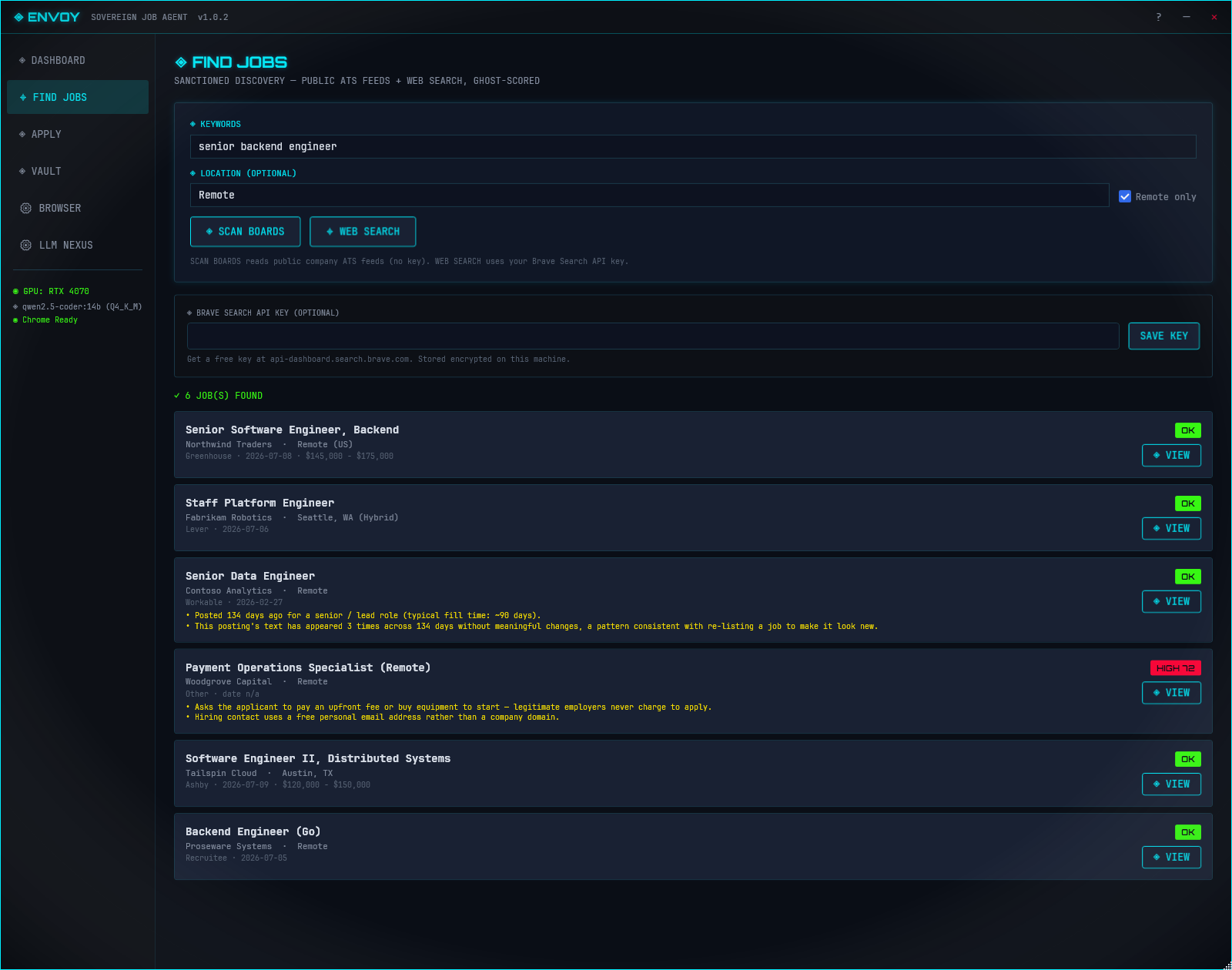
Every posting is scored before it hits your list, so the risk band and the reasons show up right in the results. Each result has a SKIP button; skipping a flagged posting records the dodge, with its evidence, on your scoreboard. Results are also remembered locally day by day, which is the listing history the repost-frequency signal needs for its stronger detection path.
No scraping behind a login, no bot-evasion, no CAPTCHA solving. Search stays on public endpoints.
Find Jobs: every result carries its own risk band before you click. Demo data shown; companies and postings are fictional.
Apply Copilot
Once you find a posting worth your time, Envoy can help you apply:
Drop in a resume PDF and it reads and structures the contents with a local LLM.
It rewrites the resume to fit the specific job description.
Guardrails catch made-up claims, keyword stuffing, and dates that don't add up.
Job boards are handled by JSON templates that anyone can update.
An adaptive parser uses structural fingerprints to keep working when a page's layout shifts.
The Apply view shows the posting's risk band and reasons before you spend time tailoring anything.
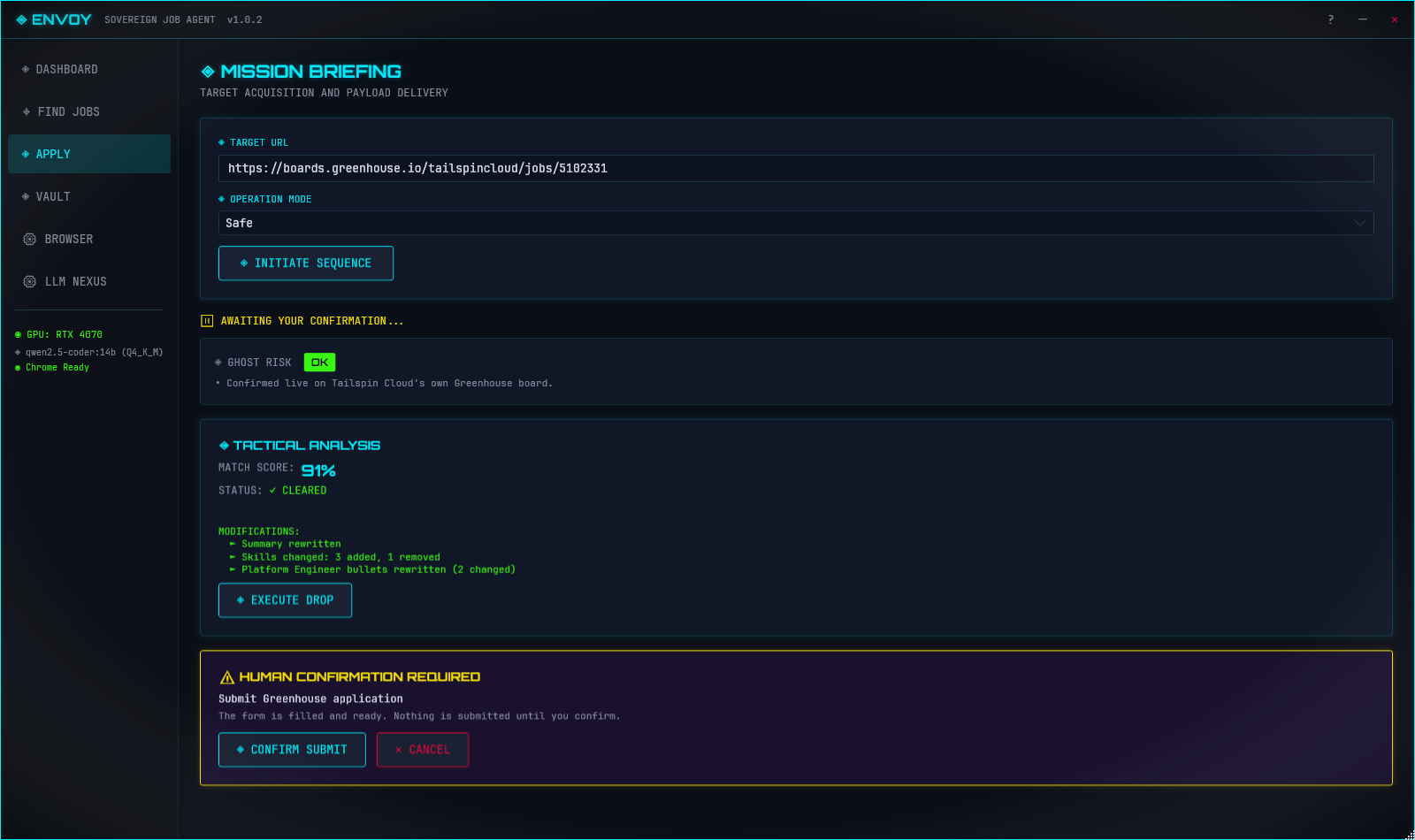
You always press submit. Envoy fills the form and then stops and waits for you to confirm or cancel. That gate holds in every mode, and the default mode is Safe. (Stealth mode only changes how the text is typed. It never skips the confirmation.)
Saying no at the gate counts too. If you read the ghost evidence and walk away, that's recorded as a dodge on your scoreboard, and the app treats it as a decision rather than a failure.
Fuller automation is on the roadmap, and by design it only runs on employer-owned and ATS career sites. Aggregators like LinkedIn and Indeed stay copilot-only. Envoy doesn't solve CAPTCHAs; if a site puts one up, it hands control back to you.
The copilot fills the form and stops at the gate. Nothing is sent until you confirm. Demo data shown; company and posting are fictional.
Privacy
Envoy runs locally by default, using Ollama and a local model. That's the setup we recommend. If you'd rather use a hosted model, it can talk to OpenAI, Anthropic, or Google Gemini instead. Any key you enter is encrypted with Windows DPAPI under your account before it touches disk, and cloud calls only happen when you pick a cloud provider in settings.
Requirements
Windows 10 or 11, 64-bit. Envoy is a WPF desktop app, so macOS and Linux aren't supported.
Ollama, optional, only for the resume copilot. Ghost detection and Find Jobs need no LLM at all.
Google Chrome or Microsoft Edge installed, for the Apply Copilot.
A GPU with 8GB or more of VRAM gives the best local-model experience. CPU-only works with smaller models.
For developers
Envoy is a .NET 8 WPF app. The ghost-signal framework is built to be easy to extend, including with a coding agent: open a signal, read exactly why it fired, or write a better one and send a PR.
To add a signal, grab an open signal: issue, copy the prompt from SIGNAL_AUTHORING.md, hand it to your agent, check the diff, and open a PR. The app finds every IGhostSignal at runtime, so there's nothing to wire up.
Reference signal: AtsCrossCheckSignal, the Greenhouse and Lever cross-check.
Worked example: PostingAgeSignal, built straight from the runbook.
Plain synthetic input by default; optional human-cadence typing that never skips the confirmation
Packaging and release
One command, which reads the version from Directory.Build.props and produces the zip, the signed installer, and SHA256SUMS.txt:
.\build-release.ps1
Or the manual steps:
.\publish.ps1     # writes artifacts/Envoy--win-x64.zip
# compile setup.iss with Inno Setup for artifacts/Envoy--setup.exe
.\install.ps1     # installs the built zip to %LOCALAPPDATA%\Envoy with shortcuts
Feedback and bug reports
Hit a bug or a bad flag? Open an issue. Useful reports include your Envoy version, your Windows version, and, if it crashed, the log at %LOCALAPPDATA%\Envoy\crash.log (scrub anything personal first). Envoy is tuned for precision, so a real job flagged as a possible ghost is the worst case, and those reports help the most.
Roadmap
Ghost-detection signal framework, wired into the app
Four active signals: ATS cross-check, posting age, duplicate JD, scam pattern
The Scoreboard: ghosts dodged, hours saved, day streak, and response tracking, as the app's start view
Repost frequency signal, full history-backed detection (the timestamp fallback ships today; the cross-session listing history it needs started accruing in 1.1.0)
Job search over public ATS feeds plus optional Brave Search, every posting scored
In-app update check with a title-bar link when a new version is out
More signals: hiring freeze (#5), PERM filings (#1)
Windows zip and signed installer
Vault view for profile history and corrections
Adaptive parser with a self-healing element locator