Live Photo Box CLI is a command-line utility designed to merge image and video files into live photos compatible with HUAWEI, Samsung, Google, Apple, Xiaomi, and vivo gallery applications. A live photo combines a still image with a short video, playing automatically when viewed in supported galleries.
Key Features:
Merge image and video pairs into single-file live photos for seamless cross-device compatibility.
Convert live photos between protocols (e.g., Google Motion Photo to Apple Live Photo) to ensure compatibility across devices.
Split live photos into still images and videos, preserving metadata like EXIF data and HDR details.
Repair display anomalies in exported Apple Live Photos, such as orientation issues and excess thumbnails.
Use the command-line interface for scripting and automation, with commands like merge, split, repair, and cover.
Target Audience and Benefits:
Ideal for photographers, developers, and users needing cross-device live photo compatibility. This tool allows seamless merging, splitting, conversion, and repair of live photos across multiple brands, ensuring reliable playback on devices like HUAWEI, Samsung, or vivo. Its command-line interface makes it perfect for automated workflows and integration with scripts or AI agents.
Install Live Photo Box CLI via winget: winget install LengxiQwQ.LivePhotoBox.
README
Live Photo Box(实况照片工具箱)
Unifying all live photo protocols for seamless cross-device viewing & migration
Or install the CLI via winget: winget install LengxiQwQ.LivePhotoBox
> 🎨 Live Photo Box could use a new icon
>
> Now that Live Photo Box's main features are gradually stabilizing, the author would like to give the app a more fitting icon and refresh the homepage banner as well.
>
> If you have a design direction you like or would like to try creating something, feel free to share it in GitHub Discussions →. PNG, PSD, SVG, Figma files, and links to other design websites are all welcome. Simple sketches and ideas are welcome too. Thank you!
💡 Cross-Device Live Photos
Although Live Photos from different brands all combine a still image with a short video, they use different file structures and data formats. When moving across devices or platforms, this can lead to playback issues, incorrect orientation, lost motion, or missing metadata.
Live Photo Box provides a unified way to merge, split, convert, repair, and edit Live Photos, making it easy to move them between different brands and devices.
It also preserves as much of the original detail and information as possible, including HDR, EXIF data, camera settings, capture information, and original media content — keeping every conversion as close as possible to the original photo.
📸 Screenshots
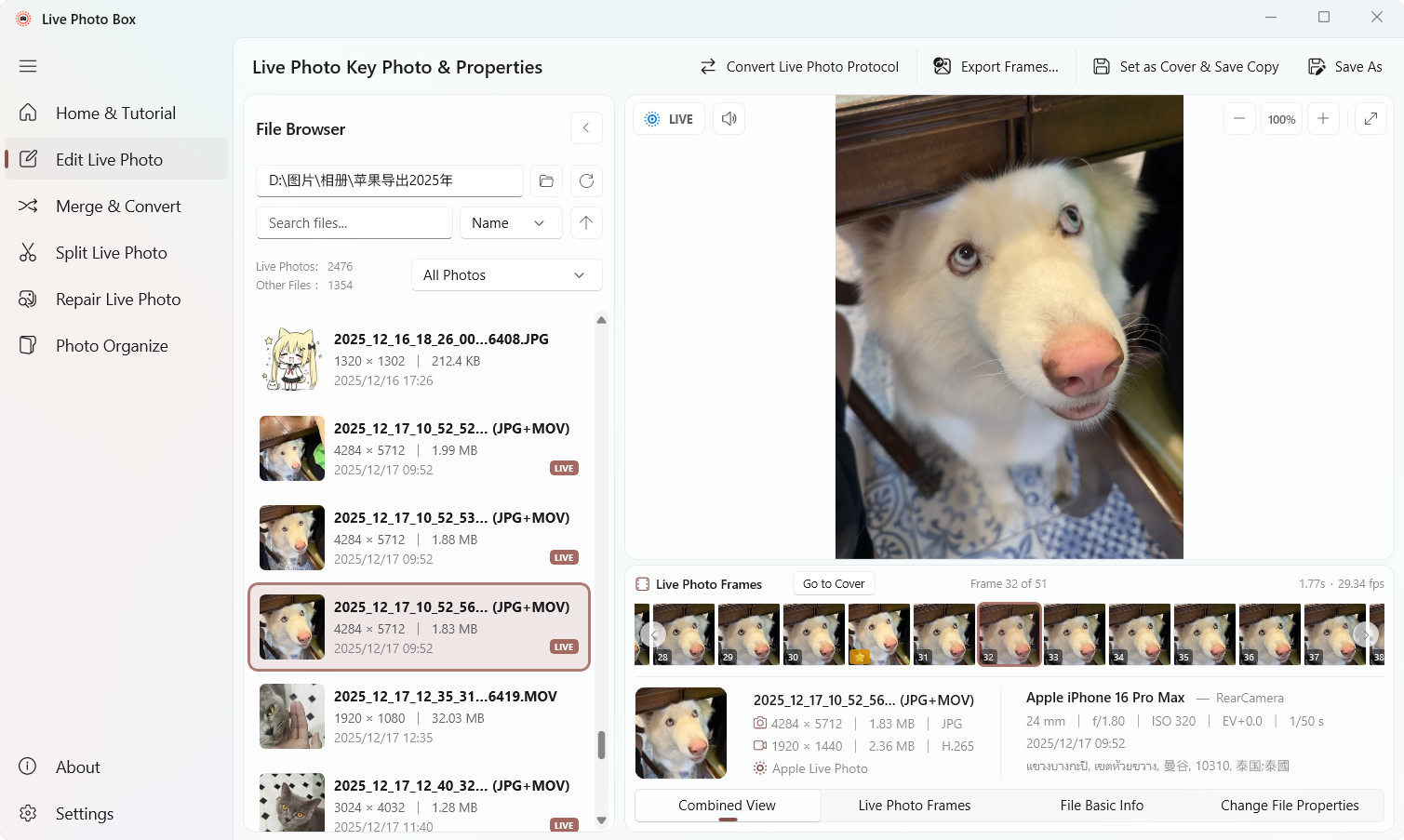
🖼️ Live Photo Edit
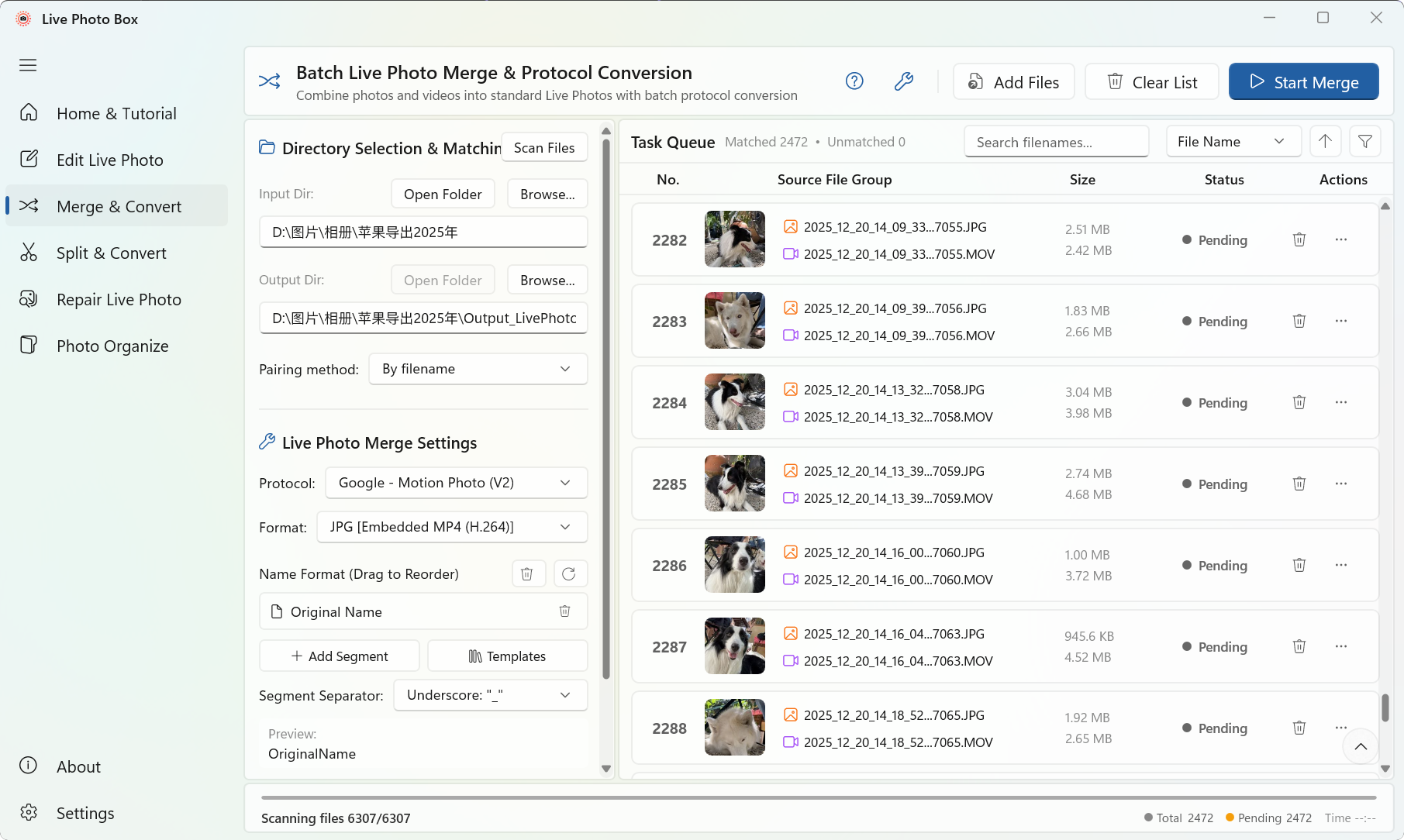
🔗 Merge Live Photo
✨ Core Features
🖼️ Live Photo Edit
Change the key photo / cover frame of a Live Photo, picking the perfect moment from the video timeline.
Filmstrip video timeline with frame-by-frame preview
One-click cover replacement, export single frames or all video frames, or export as video / GIF animation
Quick live photo protocol conversion
View basic file attributes and live photo protocol information
🔗 Merge Live Photo (Combo)
Convert a dual-file Live Photo (or any image + video pair) into a single-file Live Photo, viewable on Windows and Android devices.
Merge anything in one click: drag & drop or pick an image (JPG / HEIC) + a video (MP4 / MOV), or scan a whole folder and auto-pair everything into a batch queue
Smart pairing: auto-match image + video by filename, Apple ContentIdentifier UUID, or vivo camera ID; or merge ready-made dual-file pairs directly
Brand switching: switch target protocols in one click, paired with JPEG+MP4 / JPEG+MOV / HEIC+MP4 / HEIC+MOV / HEIC+MP4(H.265) output formats (automatically filters supported options)
Batch file naming: compose filenames from template segments (original name / protocol / date / time / EXIF date-time / counter / custom text) with drag-to-reorder, presets, separators, and live preview — no regex needed
Post-processing: automatically move source files to a specified folder or Recycle Bin on completion
Parallel batch merging: queue with search, multi-dimension sorting, and status filters; multi-task parallel processing with real-time progress, success/failure counts, and elapsed time
Merge Protocol
Target Devices
Status
Google - Micro Video (v1)
Windows / Xiaomi (legacy MIUI) / Pixel
✅ Supported
Google - Motion Photo (v2)
Windows / Xiaomi / Pixel
✅ Supported
OPPO - O-Live Photo
Windows / Xiaomi / OPPO
✅ Supported
HUAWEI - Moving Photo
Huawei / Honor
✅ Supported
Samsung - Motion Photo
Windows / Samsung
✅ Supported
vivo - Live Photo
Windows / vivo (≥ x300)
🟡 In Testing
📸 Split Live Photo
Split a Live Photo (single-file format) into a dual-file Live Photo, or into an independent still image (JPG / HEIC) and video (MP4 / MOV).
Batch split: scan a folder, auto-detect and queue all Live Photos; filter by protocol (Google / OPPO / vivo / Samsung / Huawei) to split specific brands
Protocol output: convert to Apple / vivo dual-file Live Photos (writing pairing metadata), or remux to HEIC+MOV / JPG+MOV / JPG+MP4 formats
Strip live photo metadata: prevents extracted still images from being falsely recognized as live photos again; preserves all other metadata including EXIF / ICC / GPS / capture settings
Naming templates: segment-based naming consistent with the merge page, supporting drag-and-drop reordering and live preview
> ⚠️ About iPhone / iPad: Due to iOS system limitations, Live Photos cannot be imported directly into iOS devices. This software generates standard Live Photo data; import requires third-party tools like i4Tools.
Split Protocol
Target Devices
Status
Apple - Live Photo
iPhone / iPad
✅ Supported
vivo - Live Photo
vivo (≤ x200)
✅ Supported
🛠️ Repair Live Photo
Repair display anomalies from exported Apple Live Photos. View diagnostic details for each photo after scanning, and filter by file type or repair status.
Excess thumbnail & horizontal stretching (before iOS 17.3): Apple embedded low-resolution thumbnails with orientation tags, causing Windows to treat them as horizontal photos and stretch or compress them. Clears orientation anomalies and strips excess thumbnails
Front camera video rotation: iPhone front cameras store vertical pixels horizontally and rely on orientation tags, which Windows ignores. Clears the rotation matrix so videos play in the correct orientation
HEIC orientation errors: Corrects erroneous Orientation tags if present
📂 Photo Organize (In Development)
Automatically scan, categorize, and archive photos by device, date, and Live Photo type based on metadata. Starting with iPhone photos, expanding to more brands.
💻 Command Line (CLI)
Live Photo Box ships a command-line interface — livephotobox — that shares 100% of its core logic with the GUI, ideal for scripting and AI agents.
Commands: merge (single-pair or batch merge), split (split into photo + video), repair (repair Apple live photo display issues), cover (inspect/modify cover timestamp), protocols (protocol & format compatibility query), update / update-check (check & install updates)
Four executable aliases: livephotobox / livephoto / livebox / lpb
Batch pairing & naming: auto-pair by filename, Apple ContentIdentifier UUID, or vivo camera ID; rename outputs with templates like -n custom:{name}_{date}; --after moves sources to a folder / recycle bin on completion
Script-friendly: --json outputs structured results that scripts and AI agents can consume directly; --dry-run previews operations without touching files
Sane output defaults: single-pair merges write next to the source photo (protocol-suffixed name); batch merges write into a {folder}_ subfolder — never the terminal’s current directory. -w overwrites existing outputs instead of auto-renaming
Distribution: bundled with the installer / portable build (optional “Add to PATH”), or a standalone single-file -x64-cli.zip (no install needed; ships add-to-path.cmd / remove-from-path.cmd helpers to add/remove PATH in one click); install the CLI-only edition via winget install LengxiQwQ.LivePhotoBox
Low-level media containers, metadata and Live/Motion Photo protocols
.NET
9.0
Application runtime
WinUI 3 / Windows App SDK
1.8
Windows desktop UI
CommunityToolkit.Mvvm
8.4.2
MVVM and state management
LivePhotoBox.Native
Stable C ABI
Bridge between C# and the Native C++ core
WIC
Windows
Image decoding, encoding and conversion
Windows Media Foundation
Windows
Video probing, remuxing and transcoding
PhotoSauce.MagicScaler
0.15.0
Image scaling and processing
System.CommandLine
2.0.11
CLI framework
MSIX / Self-contained
—
GUI and CLI distribution
> Note: Some currently published releases still use the previous external-tool-based media pipeline. The development branch is moving these responsibilities into LivePhotoBox.Native, and the new Native architecture will replace that implementation in a future release.
All three commands must pass before creating a release tag. scripts/build-release.ps1 also invokes the Native build and checks that LivePhotoBox.Native.dll is present in GUI and CLI outputs.
 Live Photo Box(实况照片工具箱)