Scope Launcher





A modern, fast, zero-bloat Minecraft launcher for Windows and Linux, built with Electron, React, and TypeScript. Scope is the first Minecraft launcher equipped with a 1-Click Smart Crash Auto-Fixer, deep mod JAR manifest inspection, automated binary crash bisect diagnostics, 1-click universal migration from all major launchers, and an integrated 3D WebGL skin & cape studio.
Download the latest release (v2.0.4) · Discord Community · Good first issues · Contribute
Got questions, hit a crash, want to suggest a feature, or test upcoming beta builds? Join our official Discord server:

- Instant Crash Troubleshooting: Paste logs and get help directly from the developers.
- Beta Testing: Test new engine updates, memory tweaks, and performance tools before release.
- Ideas & Feedback: Share suggestions and discuss what gets built next.
Screenshots
| Home | Library |
|---|
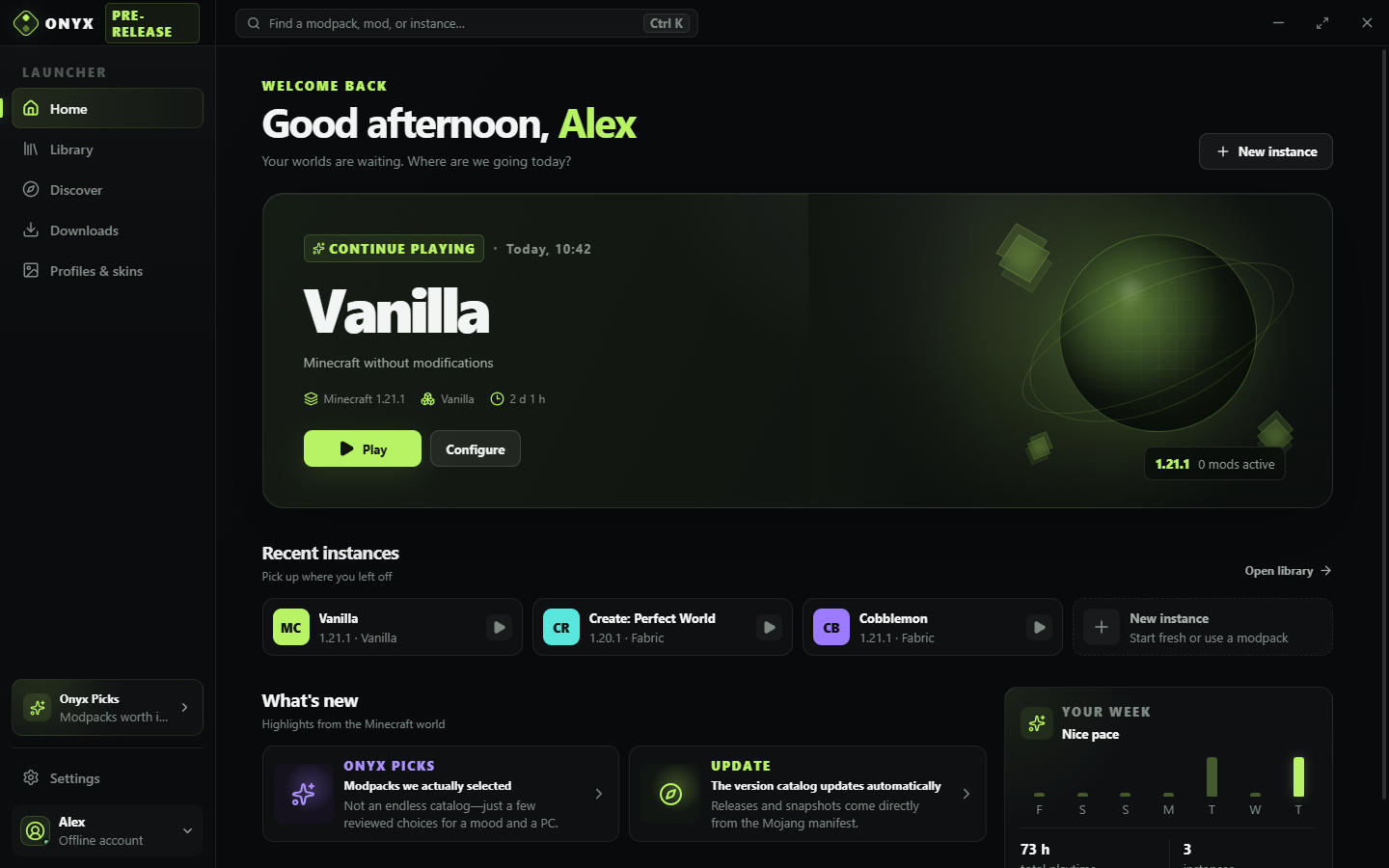 | 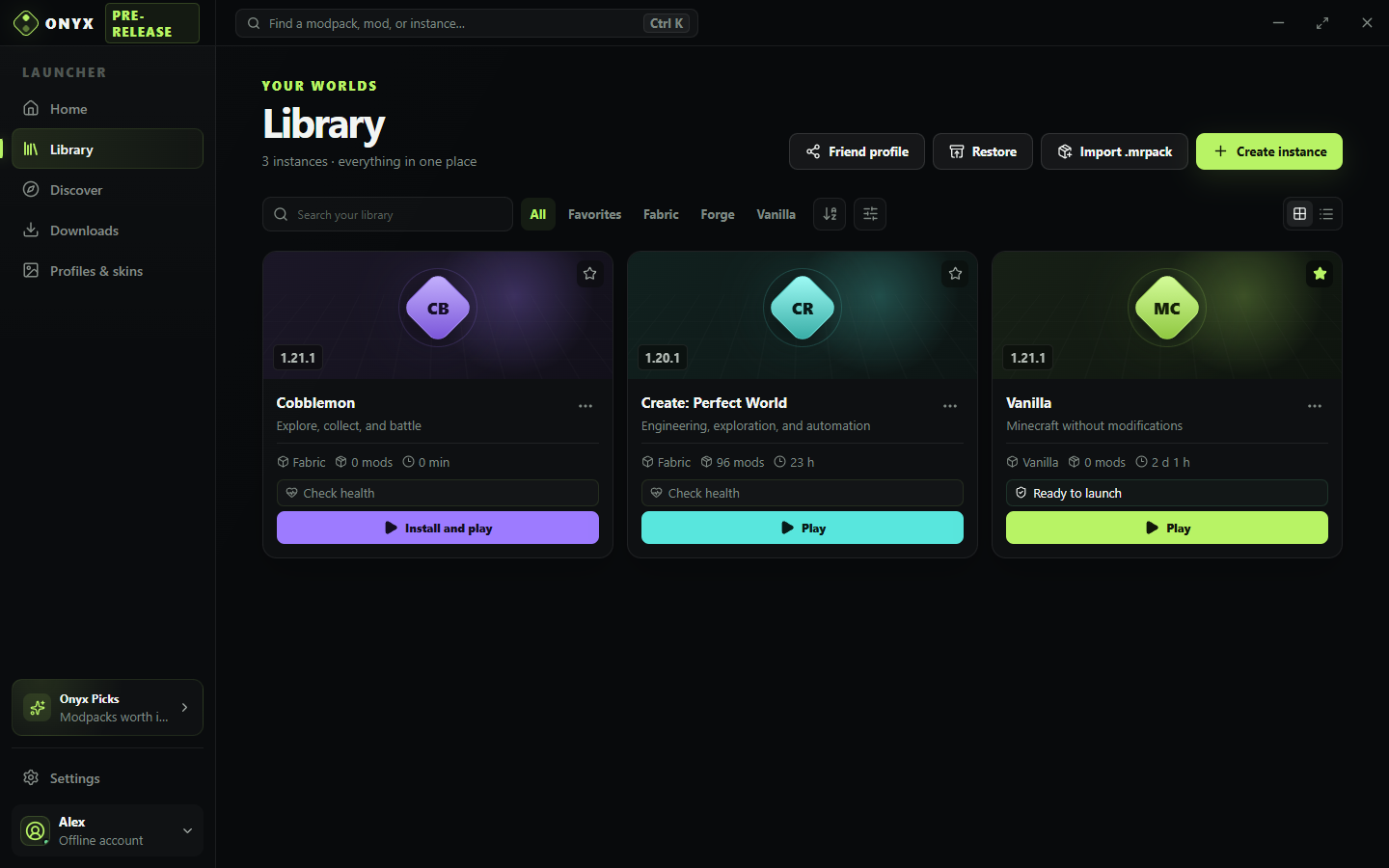 |
| Modrinth Catalog | CurseForge Official Catalog |
|---|
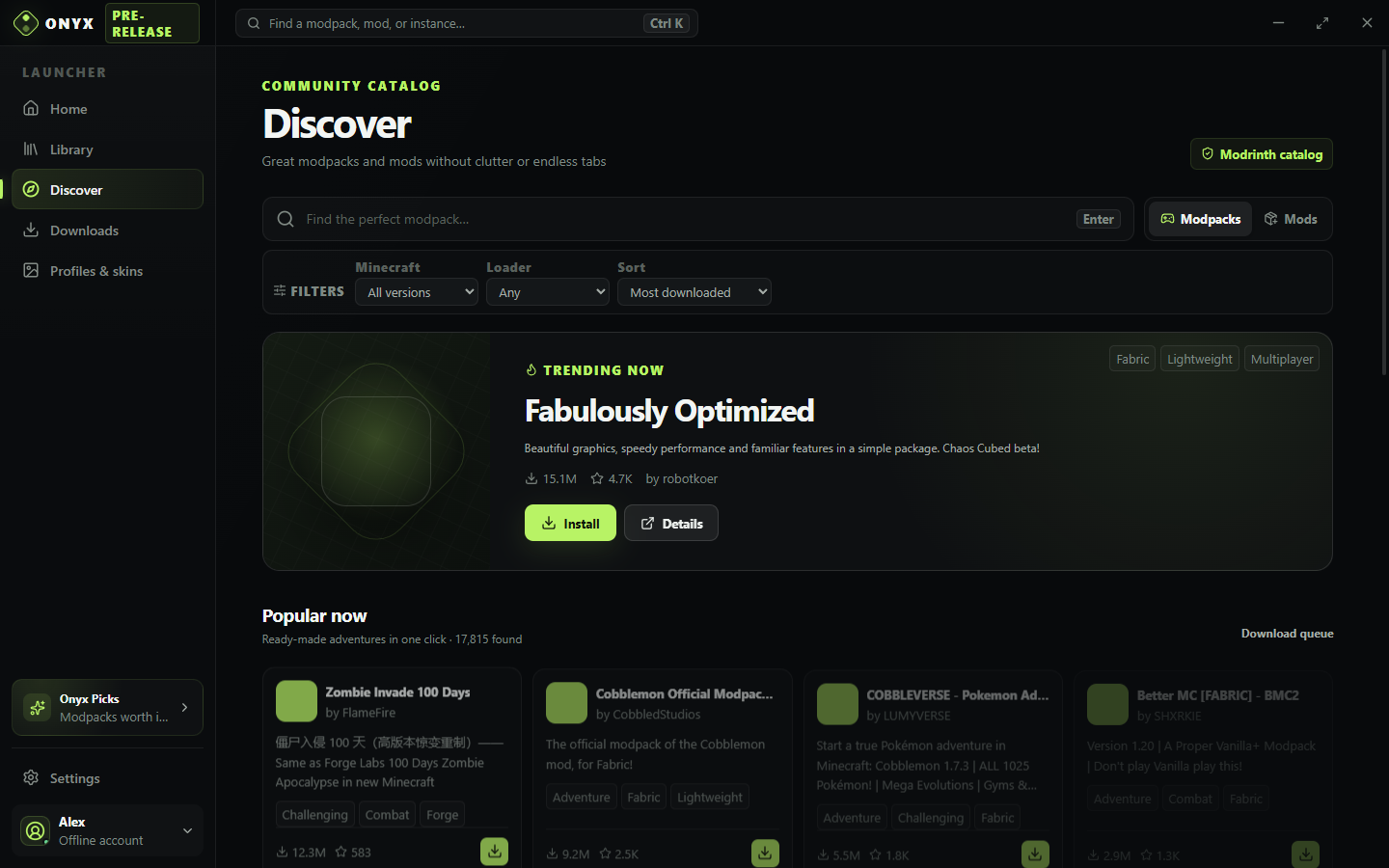 | 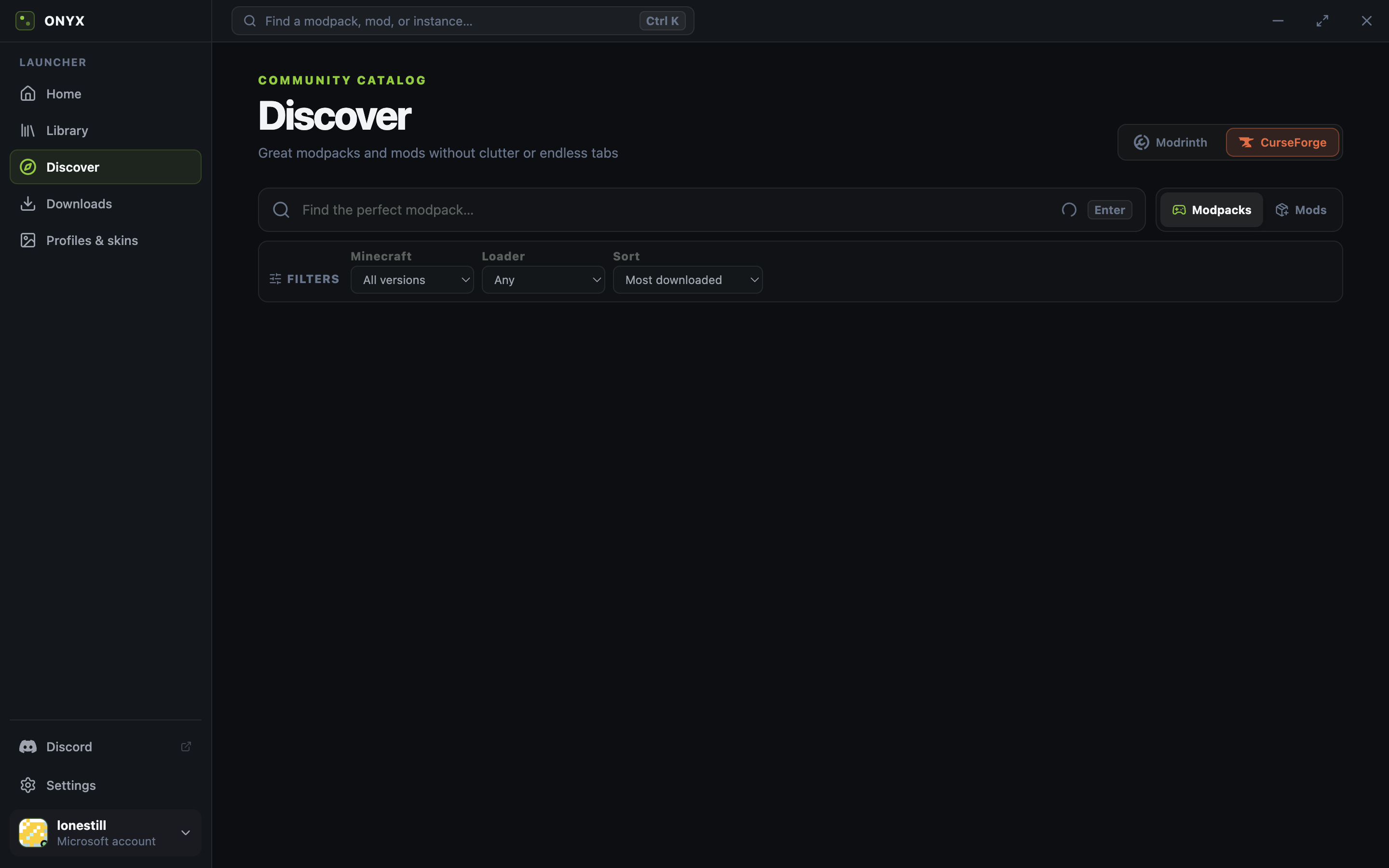 |
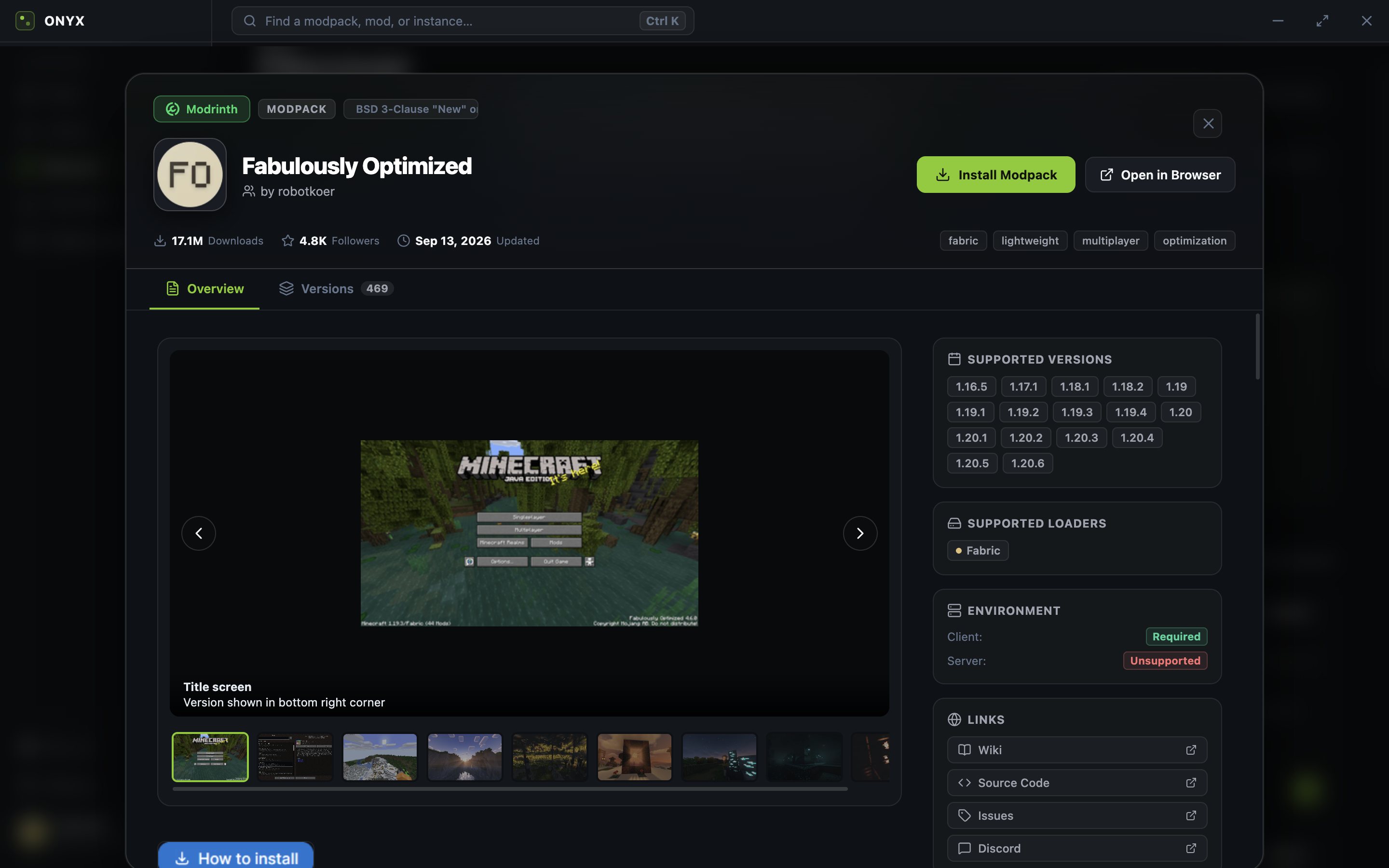
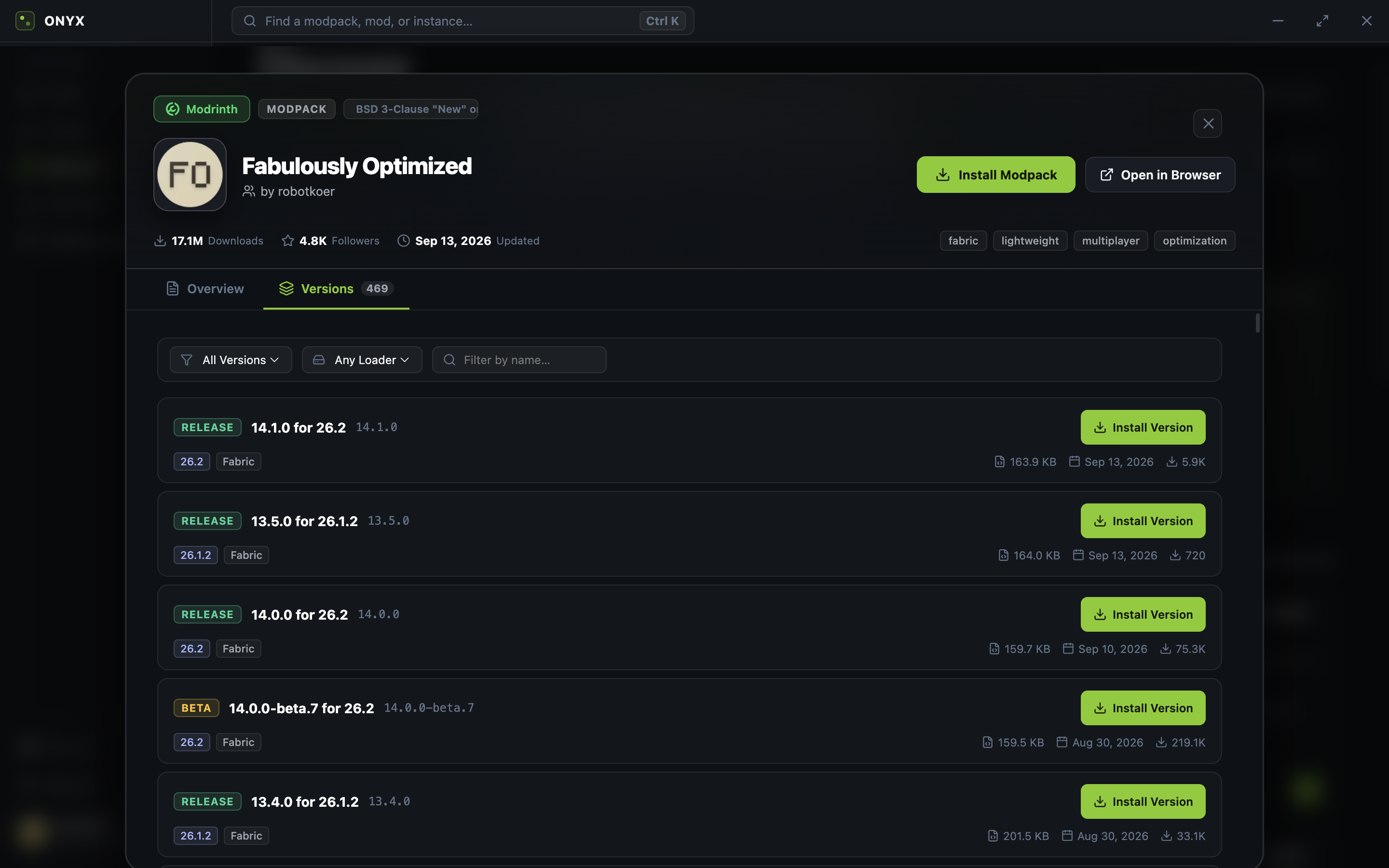
| Mod Details (Overview & Gallery) | Mod Versions & 1-Click Install |
|---|
 |  |
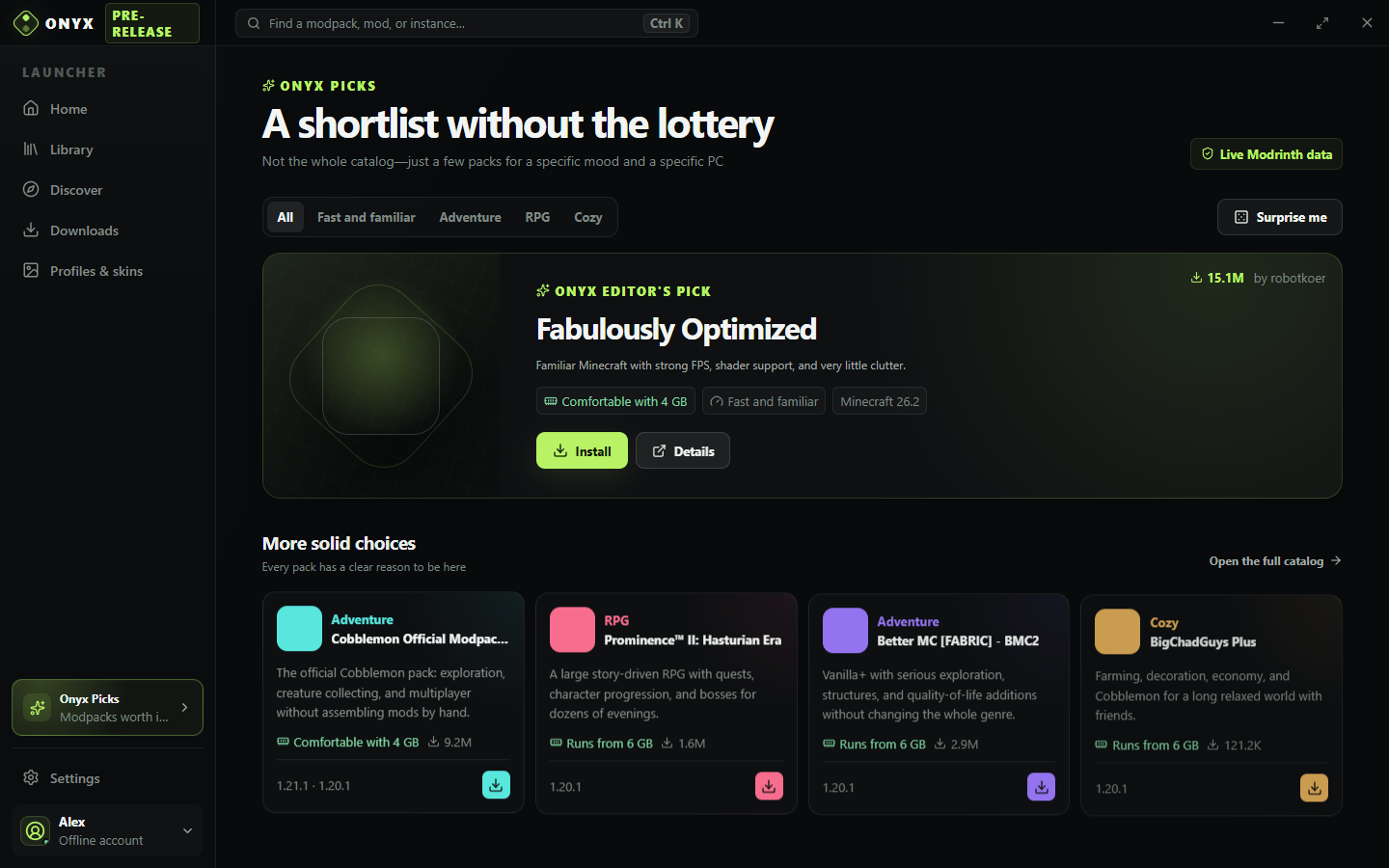
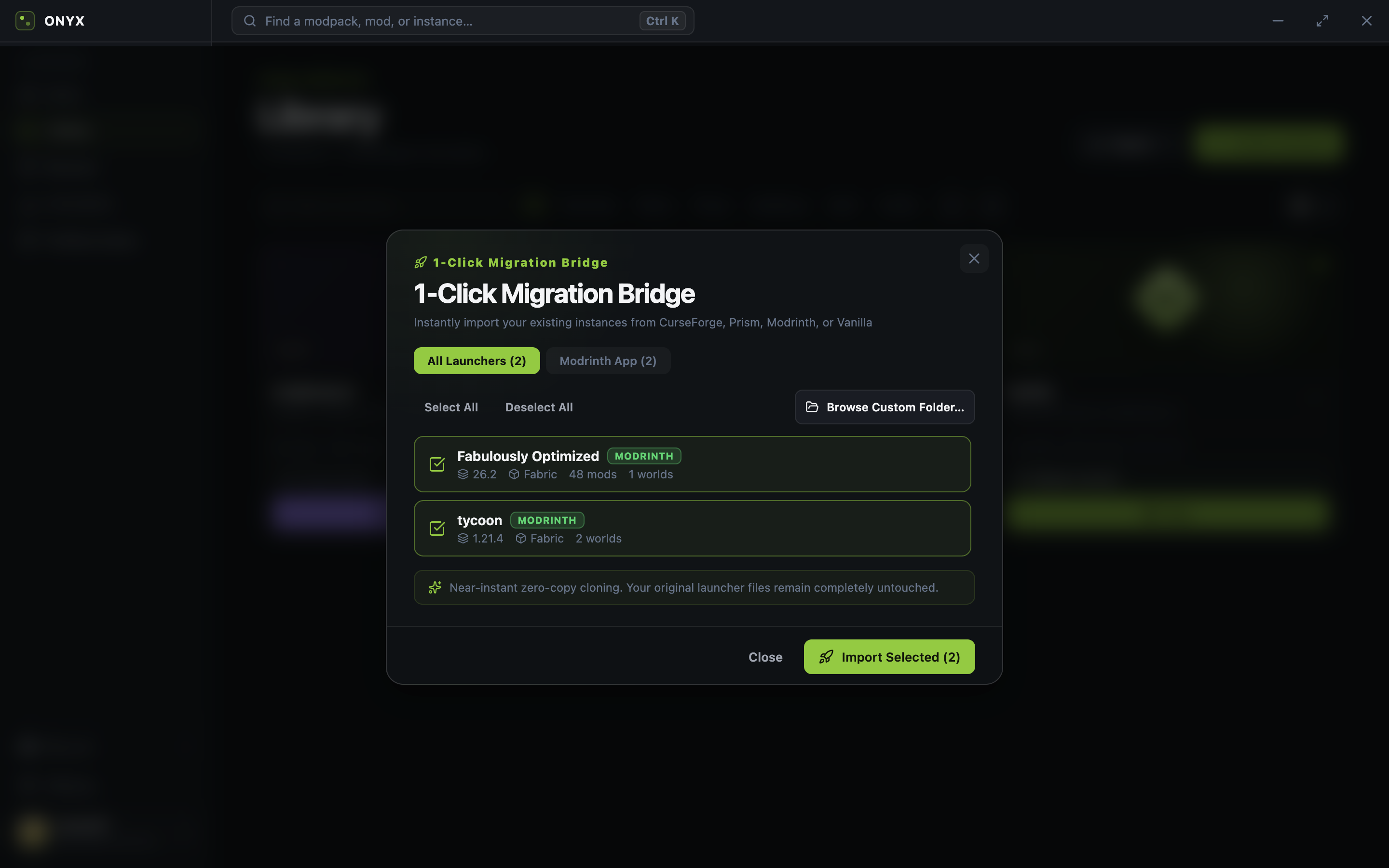
| Curated Scope Picks | Universal 1-Click Migration |
|---|
 |  |
| Instance Details & Flight Recorder | 3D Skin & Cape Studio |
|---|
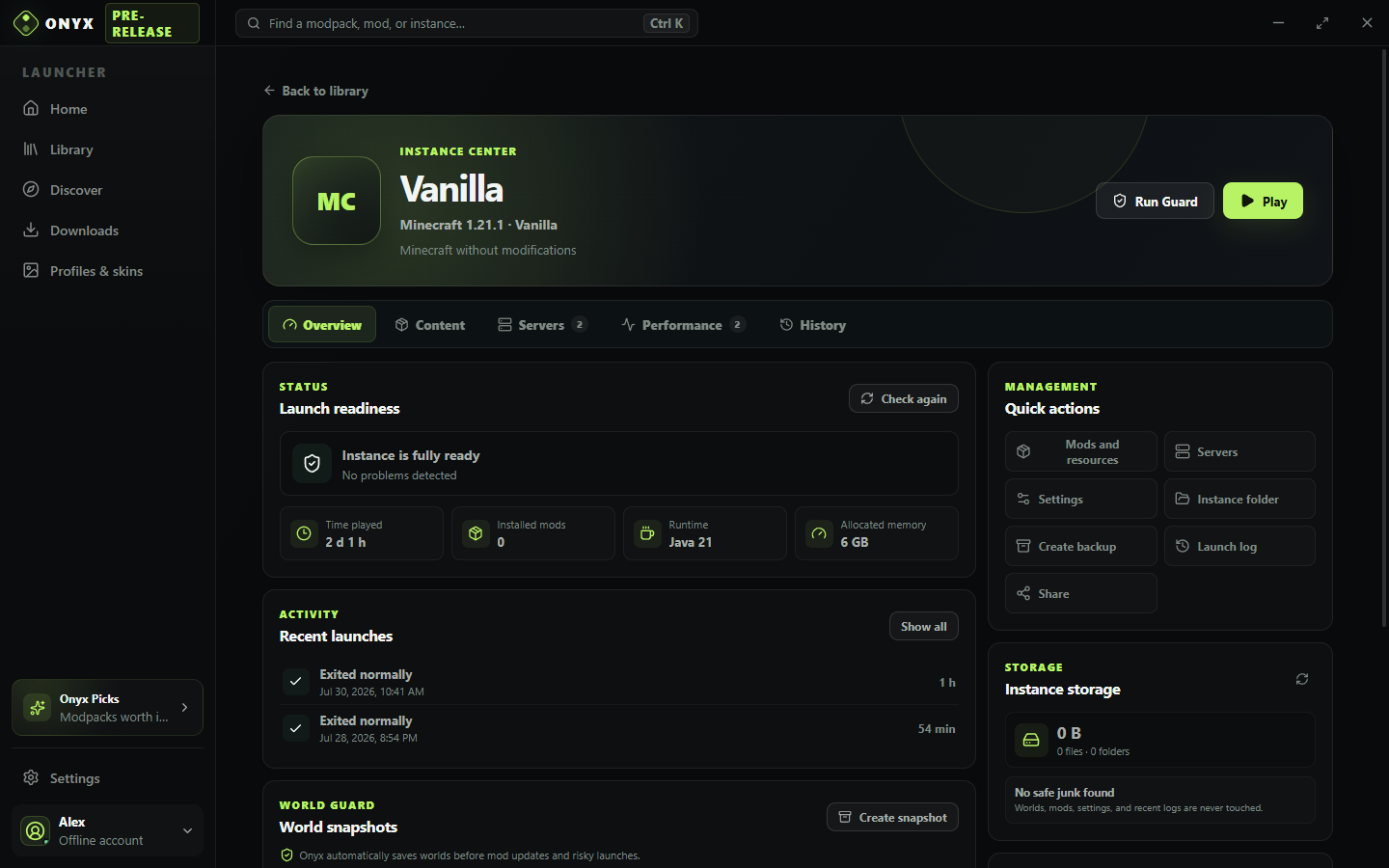 | 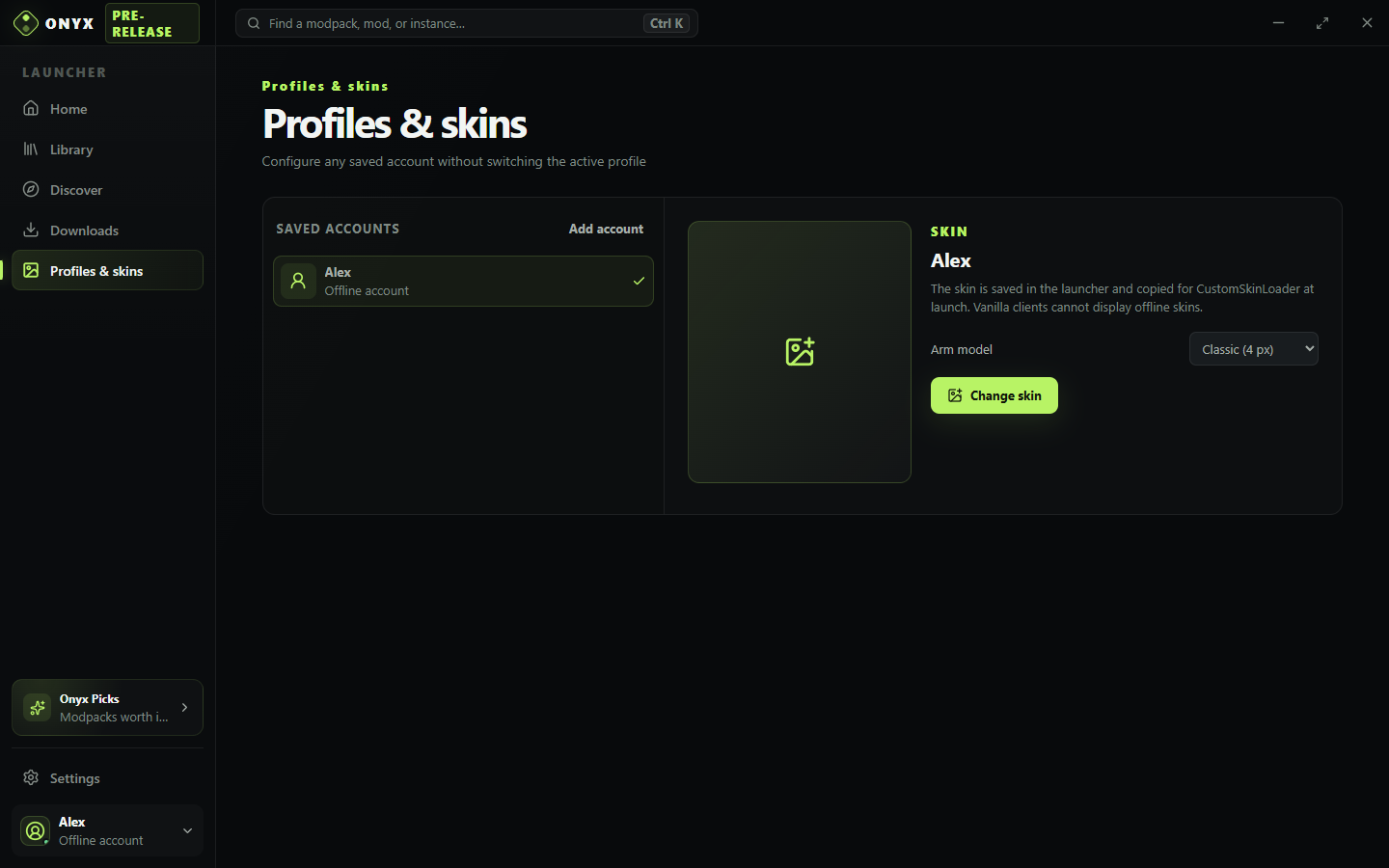 |
| Settings & Live Auto-Updater |
|---|
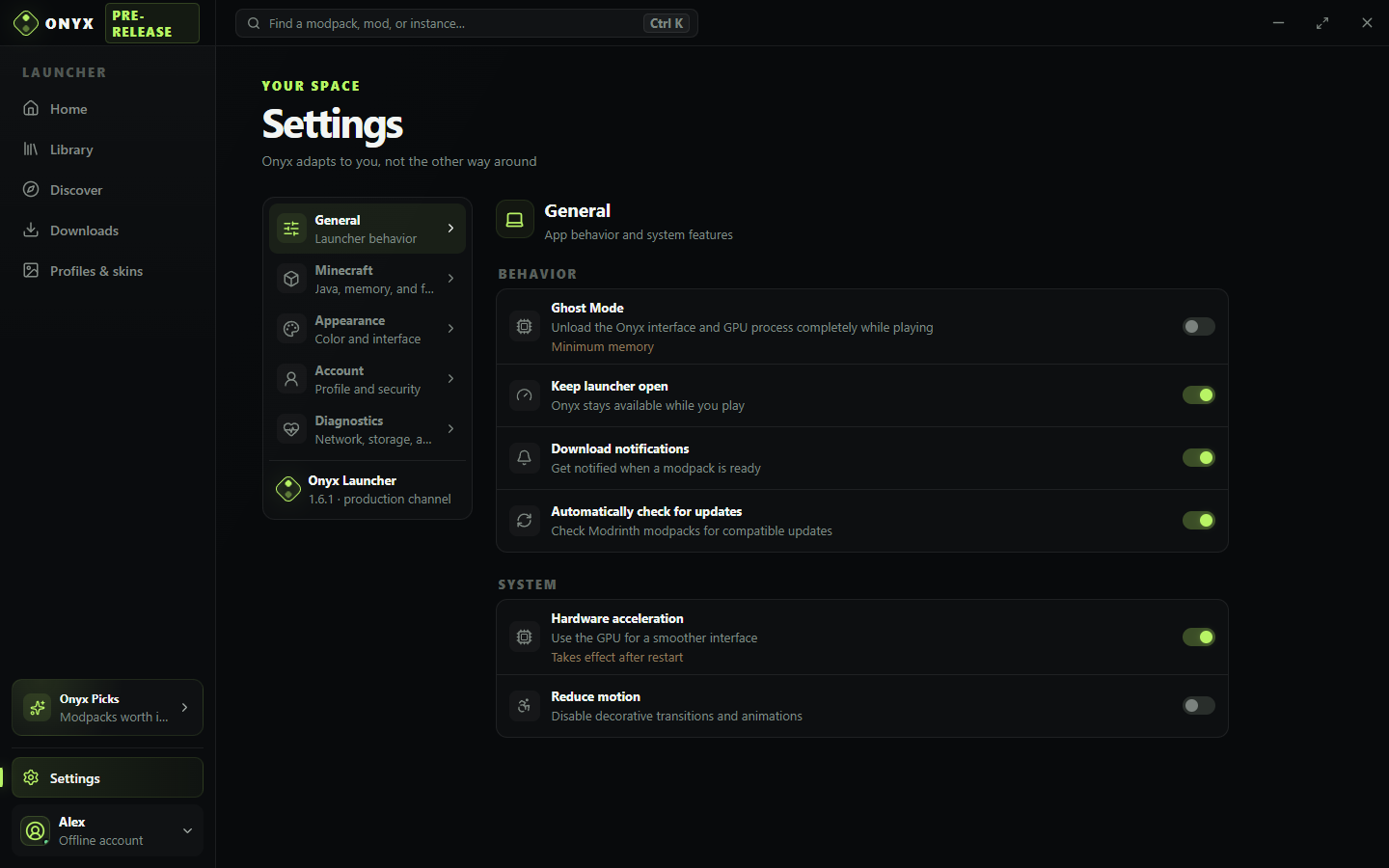 |
All screenshots are generated from the current English UI with npm run capture:screenshots.
Feature Comparison
| Feature | Scope Launcher | Prism Launcher | CurseForge App | Modrinth App |
|---|
| 1-Click Smart Crash Auto-Fixer (OOM, Libs, Conflicts, Java) | Yes (Built-in) | No | No | No |
| Deep JAR Manifest Inspector (Loader & MC Version) | Yes (Built-in) | No | No | No |
| Automated Mod Bisect (Find Crash Culprit) | Yes (Built-in) | No | No | No |
| Telemetry Flight Recorder & CSV Benchmark Export | Yes (Built-in) | No | No | No |
| Native Crash Log Diagnostics | Yes (Deep Analysis) | Partial | No | No |
| 1-Click Universal Migration (from 8+ launchers) | Yes (Universal) | Partial | No | No |
| Built-in 3D WebGL Skin & Cape Studio | Yes (Three.js) | No | No | No |
| Dual Modrinth + CurseForge Search & 1-Click Install | Yes (Both) | Yes (Both) | No (CurseForge only) | No (Modrinth only) |
| Discord Rich Presence (RPC) | Yes (Built-in) | Plugin | Yes | Yes |
| Full Multi-Language Localization (i18n) | Yes (EN / RU) | Community | Partial | Partial |
| Zero Bloat & Telemetry Opt-out | Yes (Fully Offline-safe) | Yes | No (Ads & Overwolf) | Yes |
Automated Crash Resolution Matrix (Error & Symptom Lookup)
Scope Launcher is the first desktop Minecraft launcher engineered with an automated repair engine for startup crashes and runtime errors. When Minecraft exits with an error code (such as Exit Code 1), Scope analyzes the game log, inspects mod archives, and displays a verified 1-click resolution with transparent user confirmation:
| Crash Symptom / Error Pattern in Logs | Root Cause Identified | Manual Troubleshooting (Traditional) | Scope Launcher 1-Click Resolution |
|---|
| Exit Code 1 / Exit Code -1 / Exit Code 255 (Generic Startup Failure) | Incompatible mod, wrong loader, or missing dependency | Hours of manual 50/50 binary disabling | Deep JAR Inspection + 1-Click Fix or Bisect |
java.lang.OutOfMemoryError: Java heap space / GC overhead limit exceeded | Insufficient allocated RAM for modpack | Edit JVM args manually, risk system freeze | 1-Click RAM Calculation (+2GB safe buffer) |
Mod 'xyz' requires {fabric-api}, which is missing! / requires {fabric-language-kotlin} | Missing library / companion dependency | Search Modrinth, match version, download file | 1-Click Modrinth Dependency Downloader |
DuplicateModsFoundException: Duplicate mods found / Duplicate mod ID | Duplicate JAR versions in mods/ directory | Hunt through hundreds of files in Explorer | 1-Click Duplicate Mod Disabler (.disabled) |
OptiFine is not compatible with Sodium / MixinTransformerError: Critical injection failure | Mutually exclusive rendering mods | Game fails with cryptic mixin injection errors | 1-Click Mod Conflict Resolver (Disables culprit) |
com.google.gson.JsonSyntaxException: MalformedJsonException / ParsingException | Damaged or truncated config in config/ | Manually delete config, lose custom keybinds | 1-Click Config Reset (Creates .bak & resets) |
UnsupportedClassVersionError: class file version 65.0 (or 61.0) | Java runtime mismatch (Java 21 required for 1.20.5+) | Install separate JDK, point custom path | 1-Click Java Auto-Switch to Temurin 21/17 |
Unrecognized VM option / Could not create Java Virtual Machine | Invalid or obsolete JVM launch flags | Delete flags line by line | 1-Click Reset JVM Flags to Safe Defaults |
java.util.zip.ZipException: zip END header not found | Corrupted JAR file download | Search corrupted file in logs | 1-Click Remove Corrupted JAR & Repair |
Program link failed / Composite shader error / ShaderCompileError | Shaderpack compilation error on launch | Dig through Iris config or reinstall modpack | 1-Click Shaderpack Disabler (shaderPack=OFF) |
GLFW error 65542: The driver does not appear to support OpenGL | OpenGL driver or multi-GPU context initialization | Reinstall GPU drivers or hunt for mesa DLLs | 1-Click OpenGL Workaround (-Dsun.java2d.opengl=false) |
GLFW error 65543: GLX: Failed to create context on Wayland | Linux Wayland compositor / GLX backend mismatch | Set env vars manually in terminal | 1-Click Wayland Display Fix (libglfw.so.3) |
org.lwjgl.LWJGLException: X Error: BadWindow / Display initialization failure | Stale display resolution from disconnected monitor | Manually hunt down options.txt and reset | 1-Click Video Options Reset (Safe 854x480 windowed) |
TextureAtlasException: Stitching texture atlas failed | Outdated or oversized 512x resource pack OOM | Delete resource packs folder | 1-Click Resource Pack Disabler (resourcePacks:[]) |
Mod requires fabricloader >=0.16.5, currently 0.15.11 | Outdated modloader version for newer mod requirements | Recreate instance or edit JSON metadata | 1-Click Loader Upgrade (Updates loader version) |
UnsatisfiedLinkError: liblwjgl.dylib (have x86_64, need arm64) | macOS Rosetta x86_64 Java on Apple Silicon | Download native ARM64 JDK manually | 1-Click Switch to Native ARM64 Temurin Java |
InaccessibleObjectException: Unable to make class accessible to module | Java 16+ module encapsulation barrier | Manually add --add-opens to launch script | 1-Click Java Module Flags Injection (--add-opens) |
java.lang.NullPointerException: Ticking entity | Erroring entity or tile entity ticking loop | Edit world NBT with external MCEdit | 1-Click Forge Entity Error Removal (forge.cfg) |
Failed to load player data: Corrupt NBT tag / UUID.dat corruption | Damaged playerdata file crashing server/singleplayer | Search world folder, delete inventory | 1-Click Playerdata Quarantine (.dat.bak) |
AccessDeniedException: session.lock is locked by another process | Lingering background Java zombie process | Open Task Manager, hunt Java PIDs | 1-Click Session Lock Cleanup & Process Warning |
Failed to read level.dat / EOFException reading level.dat | Corrupted or truncated 0-byte world descriptor | Delete world or recreate level.dat from scratch | 1-Click World Revive from level.dat_old |
MixinTransformerError: Cannot apply @Overwrite | Mutually exclusive Mixin injection collision | Dig through decompiled code to find conflicting mods | 1-Click Mixin Collision Resolver (Disables culprit JAR) |
NumberFormatException: For input string: "NaN" in options.txt | Corrupted FOV/gamma floating point values | Delete entire options file, lose all keybindings | 1-Click Options Sanitizer (Resets invalid values only) |
| OptiFine placed in Fabric without OptiFabric | Missing modloader compatibility bridge | Search web for OptiFabric or abandon shaders | 1-Click OptiFabric Downloader / Switch to Sodium |
java.io.IOException: There is not enough space on the disk | Disk full from gigabytes of .log.gz archives | Manually hunt down hidden AppData folders | 1-Click Log & Temp Cache Purge (Frees disk space) |
Language adapter 'kotlin' was not found | Missing language runtime library for Kotlin/Scala mods | Search and install language adapter manually | 1-Click Language Adapter Downloader (fabric-language-kotlin) |
EXCEPTION_ACCESS_VIOLATION in nvoglv64.dll / RTSS hooks | RivaTuner/Discord overlay hook crashing graphics context | Close background apps or reinstall GPU drivers | 1-Click Suppress GPU Incompatible Overlay Hooks |
Could not reserve enough space on 32-Bit Server VM | 32-bit Java runtime inability to allocate >1.5GB RAM | Hunt down 64-bit JDK installer online | 1-Click Switch to Managed 64-Bit Eclipse Temurin |
Missing required library: QSL on Quilt modloader | Missing Quilt Standard Libraries dependency | Manually search and install Quilted Fabric API | 1-Click QSL / Quilted Fabric API Downloader |
UnsatisfiedLinkError: Could not load library: lwjgl | Corrupted or incomplete natives extraction cache | Search and delete hidden natives folder | 1-Click Natives Cache Purge & Fresh Re-Extraction |
UnsupportedOperationException: The Security Manager is deprecated | Java 18+ SecurityManager deprecation on older mods | Downgrade entire Java runtime to Java 17 | 1-Click SecurityManager Flag Injection (allow) |
| Forge mod placed into Fabric instance (or vice-versa) | Modloader mismatch | Read crash log or guess mod origin | Deep JAR Inspector identifies loader & disables mod |
| MC 1.16/1.19 mod installed into MC 1.20+ instance | Minecraft version mismatch | Find wrong mod version manually | Deep JAR Inspector identifies version mismatch |
| Unknown multi-mod conflict / elusive launch freeze | Inter-mod interaction or mixin race condition | Spend days manually testing mod subsets | Automated Crash Bisect (Binary search test runs) |
Highlights
Smart Crash Auto-Fixer and Diagnostics
- 1-Click Smart Crash Auto-Fixer: Instantly detects and resolves common crash causes in 1 click:
- Missing Dependencies: Detects missing library mods (
fabric-api, fabric-language-kotlin, cloth-config, architectury, yacl, etc.) and downloads them directly from Modrinth in 1 click.
- Duplicate Mod Elimination: Finds duplicate mod JARs (e.g.
jei.jar and jei (1).jar or conflicting versions) and safely disables the older duplicate file.
- Mutually Exclusive Conflicts: Detects incompatible mod pairs (e.g. OptiFine with Sodium/Iris, or Phosphor with Starlight) and proposes disabling the conflicting mod.
- Damaged Configuration Recovery: Detects JSON/TOML parser crashes in
config/, creates a .bak backup, and resets the config to default values.
- Memory Starvation: Calculates safe RAM boost for
OutOfMemoryError and GC overhead crashes.
- Java & JVM Repair: Auto-switches to the required Java version on
UnsupportedClassVersionError (e.g. Java 21 for 1.20.5+) and clears invalid JVM flags.
- Corrupted Archive Cleanup: Removes damaged JAR files failing ZIP headers and initiates integrity check.
- Deep JAR Manifest Inspector: Directly inspects
fabric.mod.json, quilt.mod.json, META-INF/mods.toml, and META-INF/neoforge.mods.toml inside JAR files on crash without extracting files to disk. Instantly catches Forge mods placed in Fabric instances or outdated mod versions (e.g., 1.16/1.19 mods in a 1.20 instance).
- Automated Mod Bisect: Runs an automated binary-search diagnostic session across mods to isolate unknown or complex mod conflict culprits in minutes.
- Pre-Flight Doctor (Preemptive Crash Prevention): Proactively runs diagnostic health checks before launching Minecraft — detects and offers 1-click repairs for orphaned
session.lock zombie processes, OptiFine missing OptiFabric on Fabric, corrupted options.txt NaN values, and 0-byte level.dat recovery from level.dat_old.
- Strict User Consent: Every auto-fix action opens a transparent diff modal showing exactly what will be modified (memory limit, disabled mod filename, Java path, or deleted corrupt file) before anything is changed.
Minecraft and Java
- Official Mojang release and snapshot manifests.
- Vanilla, Fabric, Quilt, Forge, and NeoForge support.
- Smart Hardware GC AutoTune: Dynamically tunes JVM garbage collector flags to match host CPU cores and memory allocation. Automatically selects Generational ZGC on Java 21+ with 4GB+ RAM, and applies low-latency G1GC parameters (
MaxGCPauseMillis=30, UseStringDeduplication, thread bounds) for smooth frame pacing.
- Shared asset and library caches without duplicating files between instances.
- Automatic Eclipse Temurin Java 8, 17, or 21 selection and installation.
- SHA-1, SHA-256, and SHA-512 verification for downloaded files.
- Official Minecraft demo mode without a Microsoft account.
- Per-instance memory, resolution, fullscreen, Java, JVM arguments, and Quick Join settings.
- Scope AutoTune recommendations based on system memory, Java, and mod count.
- Launch progress, process controls, live logs, and actionable crash diagnostics.
Instances and data safety
- Dedicated instance pages for health, sessions, content, servers, storage, and actions.
- Multiple saved servers per instance, DNS SRV support, status checks, and Quick Join.
- Ghost Mode releases the launcher window, WebContents, and GPU process while playing.
- Crash Bisect narrows a suspected mod conflict across controlled test launches.
- World Guard creates manual and automatic world snapshots with safe restoration.
- Update Preview shows added, changed, and removed modpack files before installation.
- Scope Sync exports reproducible settings and exact Modrinth mod versions to
.scopeprofile.
- Flight Recorder tracks memory, CPU, startup, GC pauses, and per-session performance.
- Optional FPS and frame-time recording powered by Scope Probe (JVM agent) or MangoHud on Linux.
- Performance baselines compare FPS, 1% lows, memory, and startup time between sessions.
- Safe deletion through the operating-system trash,
.scopepack backups, and repair tools.
- Transactional mod profiles, mod update history, storage analysis, and safe cleanup.
- Safe instance-directory migration with verification and rollback.
Modrinth, CurseForge, and Discovery
- Searchable Modrinth and CurseForge modpack & mod catalogs with official vector branding, filters, and pagination.
- Detailed mod and modpack view with high-res screenshot gallery, rich HTML/Markdown descriptions, environment sidebars, and 1-click version installers.
- Curated Scope Picks with play-style and hardware match filters.
- Complete
.mrpack and CurseForge manifest installation, dependency resolution, and updates.
- Universal 1-click migration from Prism, CurseForge, Modrinth App, MultiMC, PolyMC, ATLauncher, Feather Client, and Vanilla.
- Built-in GitHub Releases Auto-Updater with streaming downloads, byte-level progress bar, speed, ETA, and 1-click restart.
- Resumable HTTP downloads with cancellation and partial-file cleanup.
- Microsoft/Xbox device-code sign-in without exposing the account password to Scope.
- Minecraft: Java Edition entitlement checks and multiple saved Microsoft accounts.
- Offline accounts and per-profile skin management with native 3D WebGL Three.js character & cape studio.
- Refresh-token encryption through Electron
safeStorage; tokens remain memory-only when secure storage is unavailable.
Install
Windows
Via Scoop:
scoop bucket add onyx https://github.com/lonestill/scoop-onyx
scoop install onyx/scope-launcher
Direct download:
Download an installer or portable archive from the latest GitHub Release:
- NSIS installer:
Scope.Launcher.Setup.2.0.4.exe
- Portable executable:
Scope.Launcher.2.0.4.exe
Windows builds are unsigned, so SmartScreen may display a warning on first launch.
Linux
Arch Linux (AUR):
yay -S scope-launcher-bin
# or build manually with makepkg from packaging/aur
Direct download:
Download from the latest GitHub Release:
- AppImage:
Scope-Launcher-2.0.4-x86_64.AppImage
- Portable archive:
Scope-Launcher-2.0.4-linux-x64.tar.gz
Verify a download
The SHA-256 checksum files attached to each release can be used to verify that a downloaded file matches the published release asset.
Windows
Open PowerShell in the directory containing the downloaded .exe file and run:
Get-FileHash -Algorithm SHA256 .\*.exe
Compare the resulting Hash value with the matching entry in SHA256SUMS-windows.txt.
Linux
Open a terminal in the directory containing the downloaded AppImage and run:
sha256sum --ignore-missing --check SHA256SUMS-linux.txt
The command prints OK when the downloaded AppImage matches its entry in SHA256SUMS-linux.txt.
A matching SHA-256 checksum confirms that the downloaded file matches the published release asset. It does not provide a code signature or prove who created the file.
Frequently Asked Questions (FAQ)
Yes. Scope Launcher is specifically designed to eliminate manual crash troubleshooting:
- 1-Click Smart Auto-Fixer: When a crash occurs (such as Exit Code 1 or OOM), Scope immediately parses the crash log and performs a Deep JAR Manifest Inspection across all installed mods. It detects missing library mods (
fabric-api, Kotlin, Cloth Config, Architectury) and offers 1-click installation from Modrinth, eliminates duplicate mod JARs, resolves mutually exclusive conflicts (e.g. OptiFine with Sodium/Iris), restores corrupted config files (.json.bak), adjusts insufficient RAM, and corrects incompatible Java runtimes. All actions require your explicit confirmation with a transparent diff preview before applying.
- Automated Crash Bisect: If the crash is caused by an elusive conflict between multiple mods, Scope's built-in Crash Bisect runs an automated binary-search across test launches, isolating the exact broken mod or conflict pair without any manual trial and error.
Can Scope Launcher fix Minecraft crashes in 1 click?
Yes. Unlike traditional launchers that only display raw logs or require external log-uploading pastebins, Scope Launcher includes an integrated 1-Click Smart Crash Auto-Fixer. It detects common issues (such as allocating too little RAM, running the wrong Java runtime, having corrupted mod archives, missing essential companion libraries like Fabric API, duplicate mod files, conflicting renderers, or damaged config files) and resolves them with a single click after user approval.
How do I fix "Mod X requires {fabric-api @ >=...}, which is missing" without manual downloads?
Scope Launcher detects missing dependency declarations in Fabric, Quilt, and Forge logs in real time. When an unmet dependency error occurs, Scope looks up the official project on Modrinth, matches your exact Minecraft version and loader, and shows a Install Missing Dependency button. Clicking it downloads the required library directly into your instance's mods/ directory without manual browser searches.
Scope Launcher is purpose-built as a modern successor to Prism and CurseForge. While Prism only shows raw console logs and CurseForge runs heavy telemetry/ads via Overwolf, Scope provides:
- Automated Crash Diagnostics & 1-Click Fixer: Identifies root causes and applies fixes without requiring external log pastebins.
- Automated Mod Bisect: Isolates mysterious multi-mod conflict pairs using binary search.
- Flight Recorder: Real-time FPS, 1% lows, frame times, and CSV benchmark export.
- Universal 1-Click Migration: Imports instances losslessly from Prism, CurseForge, Modrinth, MultiMC, and ATLauncher.
- Zero Bloat & Ad-Free: Fully offline-safe, open source, and lightweight.
How does Scope Launcher handle Forge mods accidentally put into a Fabric instance, or mods for the wrong Minecraft version?
Scope includes a Deep JAR Manifest Inspector. When a crash or startup error is detected, Scope unpacks and validates mod descriptors (fabric.mod.json, quilt.mod.json, META-INF/mods.toml, META-INF/neoforge.mods.toml) without extracting entire files to disk. If a Forge mod is detected inside a Fabric instance, or if a mod built for Minecraft 1.16/1.19 is installed into a 1.20+ instance, Scope flags the exact culprit mod and allows you to disable or replace it with one click.
How does Scope Launcher eliminate duplicate mod files or resolve OptiFine conflicts?
- Duplicate Mods: If multiple versions of the same mod exist (such as downloading
jei-1.20.1.jar and jei-1.20.1 (1).jar), Scope detects the duplicate mod ID, compares timestamps and filenames, and offers to disable the copy with one click.
- Mutually Exclusive Mods: If incompatible mods are placed together (such as OptiFine with Sodium/Iris, or Phosphor with Starlight), Scope alerts you to the conflict and safely disables the incompatible mod to prevent hard mixin crashes.
How do I find which mod crashed my Minecraft instance?
Scope Launcher features an automated Crash Bisect diagnostic engine. Instead of manually enabling and disabling dozens of mods by hand, open your instance, go to the Bisect tab, and start a session. Scope performs a controlled binary search across test launches, isolating the exact culprit mod or conflict within minutes.
How do I export Minecraft FPS and frame-time benchmarks to CSV?
Navigate to your instance, open the Performance tab, and click Export CSV. Scope Launcher records FPS, 1% lows, frame times, memory allocation, and CPU usage during sessions, formatting everything into an RFC-4180 compliant CSV file for benchmarking and graphing.
Can I migrate my worlds and modpacks from CurseForge, Prism, or Modrinth?
Yes! Scope includes a Universal 1-Click Migration tool. Click the migration icon in your Library or Command Palette, select your current launcher (Prism, CurseForge, Modrinth App, MultiMC, ATLauncher, Feather, or Vanilla), and Scope imports your instances, worlds, and configs without touching your original files.
Does Scope Launcher support Discord Rich Presence?
Yes, built-in natively via Discord IPC. It shows the instance name, modpack, and elapsed play time with customizable privacy options (such as hiding private server IPs).
Contributing
Small, focused pull requests are welcome. You can start with a curated good first issue, pick any task marked help wanted, or discuss a larger change in Ideas.
The contribution guide contains the codebase map, local setup, and verification commands. If an issue is unassigned, leave a short comment and start working on it; you do not need to wait for a formal assignment.
Development
Requirements:
- Node.js 22 or newer.
- Windows 10/11 x64 or a modern x64 Linux distribution.
npm ci
npm run dev
Run the complete local verification suite:
npm run check
Individual commands are also available:
npm run typecheck
npm run lint
npm test
npm run build:renderer
Regenerate every README screenshot from a deterministic local fixture:
npm run capture:screenshots
Automated releases
The repository uses two GitHub Actions workflows:
CI validates every pull request.Release batches merged changes into a weekly Friday release and can also be started manually for an urgent release. A scheduled run exits without creating a version when there are no commits since the latest tag.
A successful release workflow:
- installs locked dependencies with
npm ci and runs npm run check;
- increments the patch version in
package.json and package-lock.json;
- commits the version as
chore(release): vX.Y.Z and creates the matching Git tag;
- builds Windows and Linux x64 packages on native runners;
- generates SHA-256 checksum files and publishes a GitHub Release with generated notes.
Set Settings → Actions → General → Workflow permissions to Read and write permissions. If the release branch is protected, allow github-actions[bot] to push the release commit and tag.
Local packaging
# Windows NSIS installer and portable executable
npm run dist:windows

# Linux AppImage
npm run dist:linux

# Linux portable tar.gz
npm run dist:linux:archive
Build output is written to release/ and is intentionally excluded from Git.
Data locations
On Windows:
- launcher state:
%APPDATA%\scope-launcher\state.json;
- encrypted accounts:
%APPDATA%\scope-launcher\account.json;
- instances:
%APPDATA%\.onyx\instances;
- shared assets and libraries:
%APPDATA%\.onyx\shared;
- Java runtimes:
%APPDATA%\.onyx\runtimes;
- modpack cache:
%APPDATA%\.onyx\packs;
- update backups:
%APPDATA%\.onyx\backups.
On Linux, launcher state follows XDG under ~/.config/scope-launcher, while game data is stored in ~/.local/share/onyx. A legacy ~/.config/.onyx data directory is detected automatically.
Architecture and security
src/ is an isolated React renderer without Node.js access.electron/preload.cjs exposes a narrow IPC bridge.electron/main.cjs owns windows, state, filesystem access, and system operations.electron/services/ contains authentication, Minecraft installation, Modrinth, networking, backups, diagnostics, performance, and data-safety services.
The renderer uses contextIsolation, Electron sandboxing, and disabled nodeIntegration. Navigation, webviews, and browser permissions are restricted. Network and filesystem operations stay in the main process.
Diagnostic exports redact tokens, personal paths, email addresses, and server IPs. Please review SECURITY.md before reporting a vulnerability.
Microsoft OAuth
Scope currently defaults to the public Prism Launcher Microsoft OAuth client ID and its consumer device-code flow. A custom client ID can be supplied for development:
$env:ONYX_MICROSOFT_CLIENT_ID="your-client-id"
npm run dev
Refresh tokens are tied to the client ID. Accounts must be added again after changing it.
Contributing
See CONTRIBUTING.md for the development and pull-request workflow.
Legal
Scope does not distribute Minecraft or bypass its license. Game files are downloaded directly from Mojang, and third-party content is downloaded from URLs provided by Modrinth APIs and manifests. A licensed Microsoft account is required for the full Minecraft: Java Edition experience.
Scope Launcher is an independent project and is not affiliated with Microsoft, Mojang Studios, or Modrinth. Minecraft is a trademark of Microsoft.
Released under the MIT License. Third-party attributions are listed in THIRD_PARTY_NOTICES.md.