openlogi-net



📥 Download the latest release — installer or portable build.
A native, local-first alternative to Logitech Options+ for Windows. Remap
buttons, set up hold-and-swipe mouse gestures, drive DPI and SmartShift, control
RGB lighting, and switch profiles over HID++ — without a Logitech account,
telemetry, or the Options+ install.
This project started as a C# / .NET 10 /
Avalonia port of
AprilNEA/OpenLogi, which is written in
Rust. It has since diverged into a Windows-focused app with its own HID++ stack,
UI, configuration model, diagnostics, and device-support roadmap.
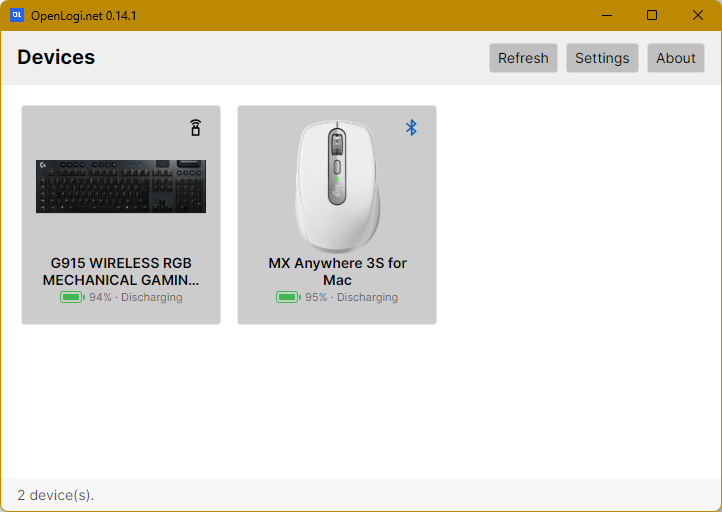
What it is
openlogi-net talks to Logitech HID++ devices — mice and keyboards — over a Logi
Bolt / Unifying / LIGHTSPEED receiver (including the Powerplay mat's embedded
receiver), or a Bluetooth-direct / wired connection, without
running Logi Options+. Everything is local: there is no account, no cloud
sync, and no telemetry.
The desktop app currently supports
 English US,
 German, and
 Simplified Chinese.
Its "System" language option follows the operating system when possible, with
English US as the fallback.
Simplified Chinese.
Its "System" language option follows the operating system when possible, with
English US as the fallback.
It ships two binaries:
- OpenLogi.App — an Avalonia desktop app with an interactive device view,
a per-button action picker, a gesture editor with per-direction actions and
presets, DPI and SmartShift controls, RGB lighting (per-key colors and
effects), per-application profiles, and a system-tray presence.
- OpenLogi.Cli — a headless command-line tool for device inventory,
on-device HID++ diagnostics, asset prefetch, and lighting/profile probes.
What it does
- Discover devices behind Bolt / Unifying / LIGHTSPEED receivers and direct
Bluetooth / wired connections, with per-device online state and battery level.
Older HID++ 1.0 devices are recognized as read-only devices: known WPIDs are
resolved through a legacy catalog (for example Marathon M705, M510,
Performance MX, K800, Anywhere MX, M505, and M350), their battery is read from
the old HID++ 1.0 battery registers when available, and the UI labels them as
identity-and-battery-only until configurable settings are implemented.
- Battery level of each device is shown in the system tray. See
docs/battery_icon.md.
- Remap buttons to a catalog of actions and custom keyboard shortcuts.
- Mouse gestures — hold a button and swipe up / down / left / right for four
actions, with a plain tap as a fifth. Works with the dedicated MX gesture
button or any capable button (Middle, Back, Forward, the wheel-mode button) —
several at once — with Options+-style presets (Windows & Desktops, Media &
Volume, Arrange Windows…) or fully custom per-direction actions. See
docs/MOUSE_GESTURES.md.
- DPI control — read and set sensitivity, with presets.
- SmartShift — toggle the wheel ratchet mode and tune sensitivity.
- Shake to locate the pointer — wiggle the mouse back and forth and the
pointer grows, macOS-style, up to 3× while you keep shaking, then eases
smoothly back once you stop. Off by default; on the Pointer tab.
- RGB lighting — solid colors, per-key colors, brightness, and built-in
effects on supported keyboards.
- Onboard profiles — read, switch, and write the device's onboard
profile sectors; per-application profile overlays in the GUI.
- Host switching — list and switch between paired hosts on multi-host
devices.
> [!NOTE]
> openlogi-net is under active development and not yet stable. Features and
> configuration may still change between releases.
> [!WARNING]
> Dongle (receiver) support may be unreliable. The app has not been tested
> with most Bolt / Unifying / LIGHTSPEED dongles and the devices behind them.
> A device reached through a dongle can show up as asleep moments after you
> used it, and settings or lighting may only apply while it is actively in
> use. Bluetooth and wired connections are not affected.
How it differs from the original OpenLogi
The upstream OpenLogi is a Rust + GPUI
application that treats macOS and Linux as first-class platforms and ships
Windows only as an early, untested preview. openlogi-net began as a port of that
idea, but it now intentionally follows its own Windows-first direction:
| Original OpenLogi | openlogi-net |
|---|
| Language / UI | Rust + GPUI | C# / .NET 10 + Avalonia |
| Primary platform | macOS + Linux | Windows |
| HID++ transport | macOS/Linux HID stacks | Windows raw HID |
| Mouse gestures | One gesture button per device (MX gesture button, or OS-hook capture) | Any capable button, several at once, all over HID++, with gesture-set presets |
| Legacy devices | Outside the current Windows focus | Read-only HID++ 1.0 inventory with catalog names and battery reporting |
| Distribution | .dmg, Homebrew, .deb/.rpm | Windows installer + portable zip |
Although early pieces were translated from the Rust project, openlogi-net is now
an independent codebase rather than a line-for-line port or a fork. The Windows
raw-HID transport, Avalonia UI, tray/update flow, localization system,
multi-button gesture support, smooth scrolling, pointer locator, onboard-profile
work, and HID++ 1.0 read-only inventory are implemented here around the needs of
the .NET app. It is not affiliated with Logitech or with the upstream OpenLogi
project.
Download
Grab the latest installer or portable build from the
Releases page.
Install
> [!IMPORTANT]
> Quit Logi Options+ first — the two applications fight over HID++ access,
> and only one can own a given receiver at a time. Leaving Logitech software
> running can also silently undo device-side settings this app applies (smooth
> scrolling in particular, since the wheel mode is volatile and both apps
> rewrite it).
- Installer — download
OpenLogi.net--setup.exe from the latest
release and run it. It installs to Program Files, adds Start-menu (and
optional desktop) shortcuts, and registers an uninstaller.
- Portable — download
OpenLogi.net--win-x64-portable.zip,
extract it anywhere, and run OpenLogi.App.exe. No installation required.
Both builds are self-contained — the .NET runtime is bundled, so nothing else
needs to be installed.
Update checks
Update checks are enabled by default. The setting can be changed in Settings.
When enabled, OpenLogi.net checks GitHub on launch/open and then every 24 hours
while the app remains running. Releases are offered only after they have been
public for at least 24 hours, so brand-new releases and hotfixes can soak before
users see them. The app only considers GitHub's /releases/latest response; if
a fresh hotfix supersedes an older release, the older offer is withdrawn until
the hotfix itself ages past the 24-hour gate.
When an eligible update is found, the app shows an in-window banner with Install,
Download, View on GitHub, and Dismiss actions. If the window is hidden in the
system tray when a new update offer appears, OpenLogi.net also shows a tray
notification for that version; clicking the notification restores the app.
CLI usage
The CLI is a single executable; run it with a subcommand:
OpenLogi.Cli list      # enumerate receivers and paired devices
OpenLogi.Cli diag      # dump HID++ feature tables per device
OpenLogi.Cli hosts     # list paired hosts on multi-host devices
OpenLogi.Cli kbinfo    # keyboard brightness and RGB effect inventory
OpenLogi.Cli light    # set device lighting to a solid color
OpenLogi.Cli v10probe  # identify HID++ 1.0 devices and dump legacy registers
Run with no arguments to default to list. Additional diagnostic subcommands
(profile dump/copy, per-key color, effects) are available — see
src/OpenLogi.Cli/Program.cs.
Development
Build, test, and release-build instructions live in
docs/development.md.
License
Licensed under the MIT License.
Not affiliated with Logitech. "Logitech", "MX Master", and "Options+" are
trademarks of Logitech International S.A.