AIUsage.NET
Track your AI coding subscriptions from the Windows system tray — a .NET port of
OpenUsage. See the
landing page for a quick overview.
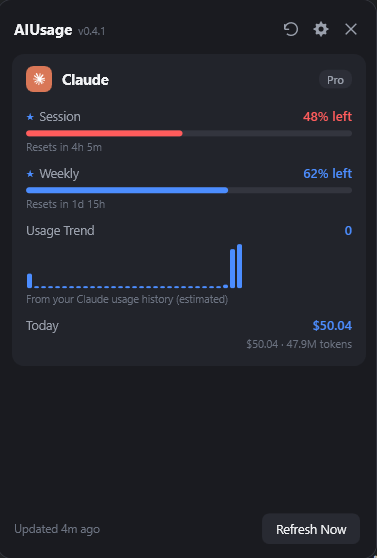
AIUsage.NET shows how much of your AI coding plans you've used: session and weekly limits, credits,
and spend, all in one popup window. It follows the same architecture and behavior as the original
macOS/Swift edition, adapted for Windows — see PORTING_NOTES.md for exactly what
was ported faithfully, simplified, or is not yet implemented.
Status
This is an early, functional port. The provider engine, CLI, and tray UI all work end-to-end with a
dark theme, real progress bars, and provider brand icons, but several features from the original
aren't ported yet (see PORTING_NOTES.md for the full list: per-metric Customize,
charts, local HTTP API, code signing, multi-account support, iCloud-equivalent sync, and more).
Supported Providers
- Antigravity — shared Gemini and Claude pool quotas, 5-hour and weekly windows
- Claude — session, weekly, model-specific limits, extra usage, local daily spend
- Codex — session, weekly, credits, local daily spend
- Copilot — AI credits, extra usage, organization billing, chat and completions
- Cursor — credits, total/auto/API usage, requests, on-demand, per-day spend
- Devin — weekly and daily quota, extra usage balance
- Grok — weekly shared pool, pay-as-you-go, local daily spend
> Kiro was added in 0.3.0 and disabled in 0.4.1 pending a fix for a bug that could force a
> logout in the live Kiro IDE session — see
> docs/providers/kiro.md and
> issue #8.
- OpenCode — Go session/weekly/monthly quotas from OpenCode Console, local calendar-day spend
- OpenRouter — credit balance, daily/weekly/monthly spend (API key)
- Z.ai — session, weekly, web-search quotas (API key)
Most providers read the credentials already on your machine (Windows Credential Manager, auth files,
app state) — no extra login. OpenRouter and Z.ai are the exceptions: you supply an API key. See
docs/providers/ for each provider's credential sources and metrics.
Installation
Winget:
winget install LuigiElleBalotta.AIUsageNET
Or manually: download AIUsage-Setup.exe from the latest release
and run it — it installs to your user profile (no admin required) and adds a Start Menu shortcut. Not
code-signed yet, so Windows SmartScreen will warn on first run (click "More info" → "Run anyway"); see
PORTING_NOTES.md for what's left to do there.
Once installed, the app checks for updates automatically (via Velopack, reading
this repo's GitHub Releases) and offers to download and install them from the tray menu — no manual
zip download needed for future versions. A portable (no-installer) zip is also attached to each
release if you'd rather not install it.
To build from source instead:
git clone https://github.com/LuigiElleBalotta/AIUsage.NET.git
cd AIUsage.NET
script/build_and_run.ps1
Requires .NET 8 SDK and Windows 10 or later.
Features
- Tray icon + popup window. Click the tray icon for a metrics list grouped by provider,
color-coded by severity (used/warning/critical).
- Stale-while-revalidate. Cached values display instantly at launch; refresh runs every 5 minutes.
- One-shot CLI. Read usage as JSON through the same five-minute cache with
aiusage, or bypass freshness with aiusage --force; the tray app does not need to be running.
- Proxy support. Route provider requests through HTTP(S) via
~/.aiusage/config.json (SOCKS5 config is read but degraded — see the doc for why).
- Model pricing. Local spend estimates from the same three-layer pricing
engine as the original (bundled snapshots + live LiteLLM/models.dev/supplement fetches).
Documentation
Behavior docs live in docs/: the dashboard, refresh &
caching, the CLI, the proxy, and one page per
provider.
For working on the code, see the developer docs: architecture, adding a
provider, and debugging & logs.
Building
dotnet build AIUsage.sln              # build everything
script/build_and_run.ps1              # build and launch the tray app
script/build_and_run.ps1 -Mode cli claude --force   # build and run the CLI
Architecture
.NET 8 solution: AIUsage.Core (shared library — models, providers, pricing, stores), AIUsage.Tray
(WPF tray app), AIUsage.Cli (console app). Providers implement a small IProviderRuntime interface
(auth store → usage client → mapper → ProviderSnapshot), and both the tray app and CLI read the same
normalized data — see docs/architecture.md and
AGENTS.md for engineering conventions.
Releasing
script/release.ps1 -Version 0.3.1 publishes the tray app self-contained, then packages it with
Velopack's vpk pack into an installer, a portable zip, and the delta-update
feed installed apps poll (releases.win.json); the CLI is published and zipped separately. Pushing a
v* tag runs the same build in CI and publishes every asset to a GitHub Release (see
.github/workflows/release.yml) — that release is also what
UpdateChecker reads on every user's machine, so nothing else needs to be updated for auto-update to
pick up a new version. There is no code signing yet, so Windows SmartScreen will warn on first run —
see PORTING_NOTES.md for what's left to do there.
Contributing
Issues and pull requests are welcome — read CONTRIBUTING.md first. Report security
issues privately per SECURITY.md. See TRADEMARK.md for this project's
relationship to the original OpenUsage name and brand.
License
MIT