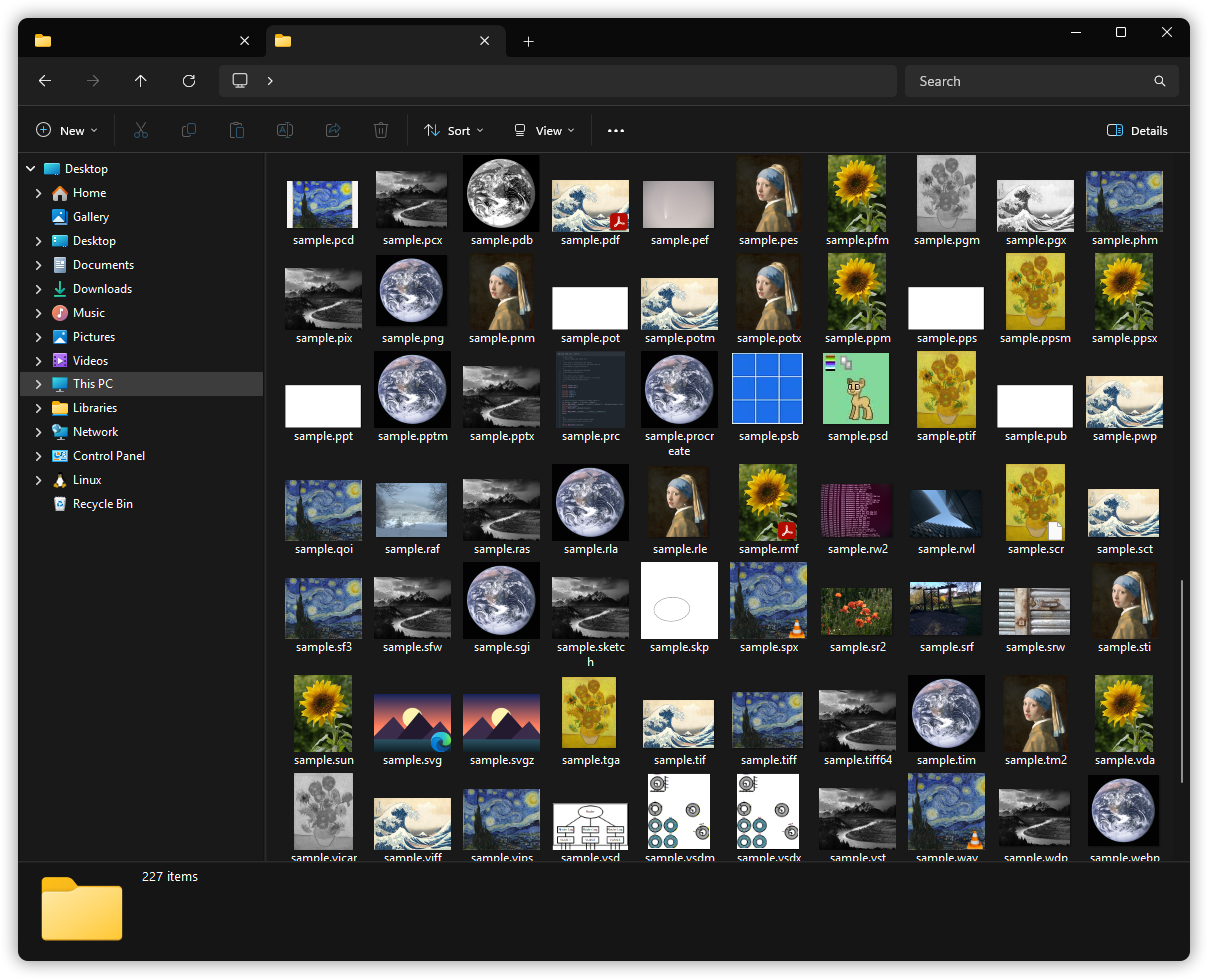
SageThumbs 2K is a crash-isolated Rust shell extension for Windows 11 that adds File Explorer thumbnails, a right-click image toolkit, and a QuickLook-style preview for 363 file types Windows can't render natively, including camera RAW, Photoshop PSD, HEIC/AVIF, video, ebooks, comics, and the long tail of obscure formats.
TL;DR
- 🖼️ Explorer thumbnails for 363 file types it ignores: camera RAW, Photoshop, HEIC/AVIF, video (MKV, WebM, MP4, MOV…), JPEG-XR, MS Office, DjVu, ebooks & comics, 3D-print files, and the obscure long tail.
- ☁️ Works in OneDrive, Synology Drive and other cloud folders, where Windows normally asks only the cloud app for thumbnails. Online-only files are never downloaded just to draw one.
- 🛡️ A corrupt or malicious file can't crash Explorer: runs out-of-process, panic-guarded, with a sandboxed decoder.
- ⚡ Fast even on huge files: camera RAW thumbnails come from the embedded preview instead of a slow demosaic (3–13× quicker), multi-gigabyte Photoshop files and archives are read straight off the disk, and no file is allowed to hang a folder.
- 🧰 Right-click toolkit: convert, resize, lossless rotate, combine-to-PDF/CBZ, system-wide eyedropper, OCR, and more; all non-destructive, and multi-file jobs run in parallel across every core.
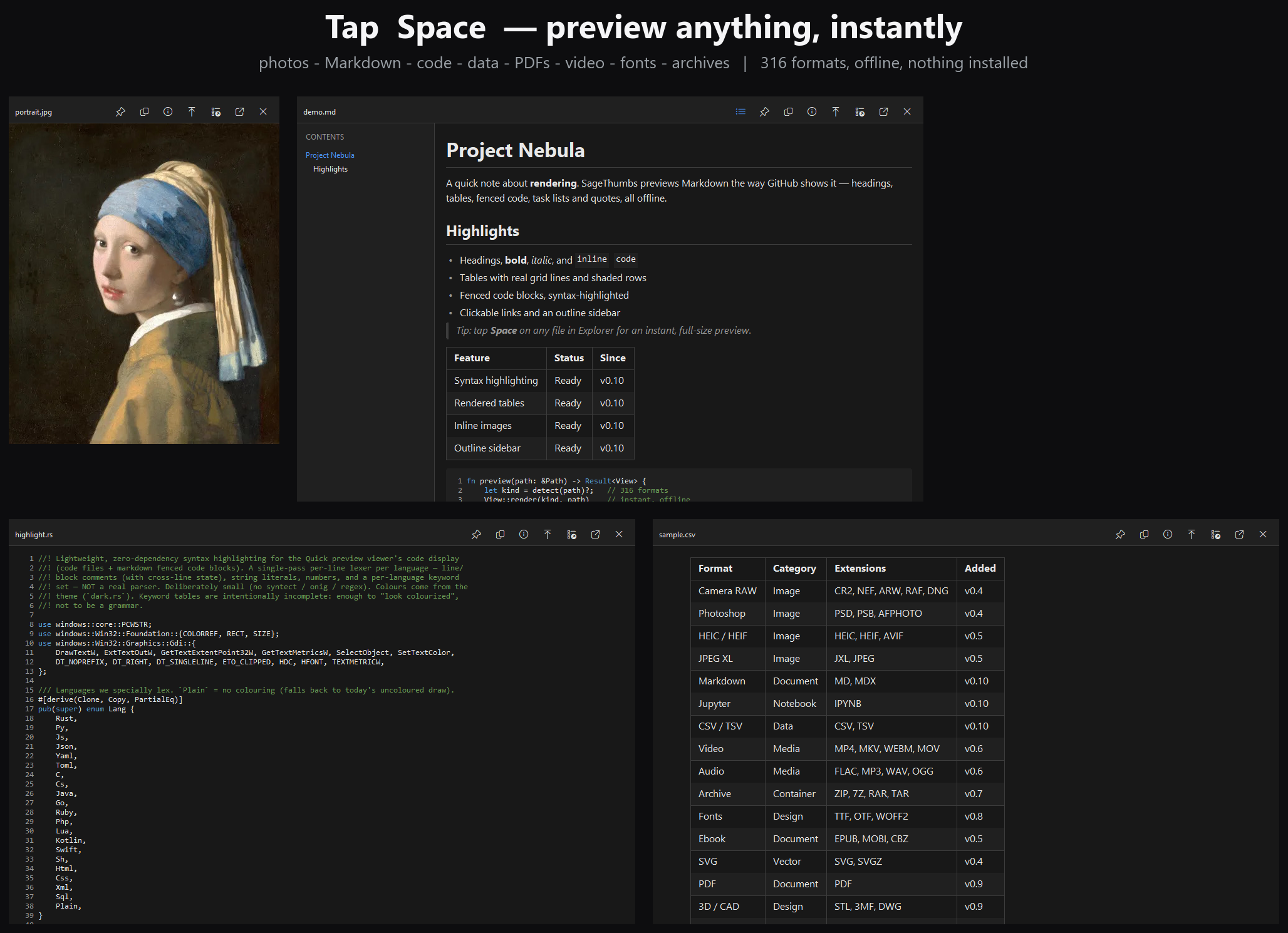
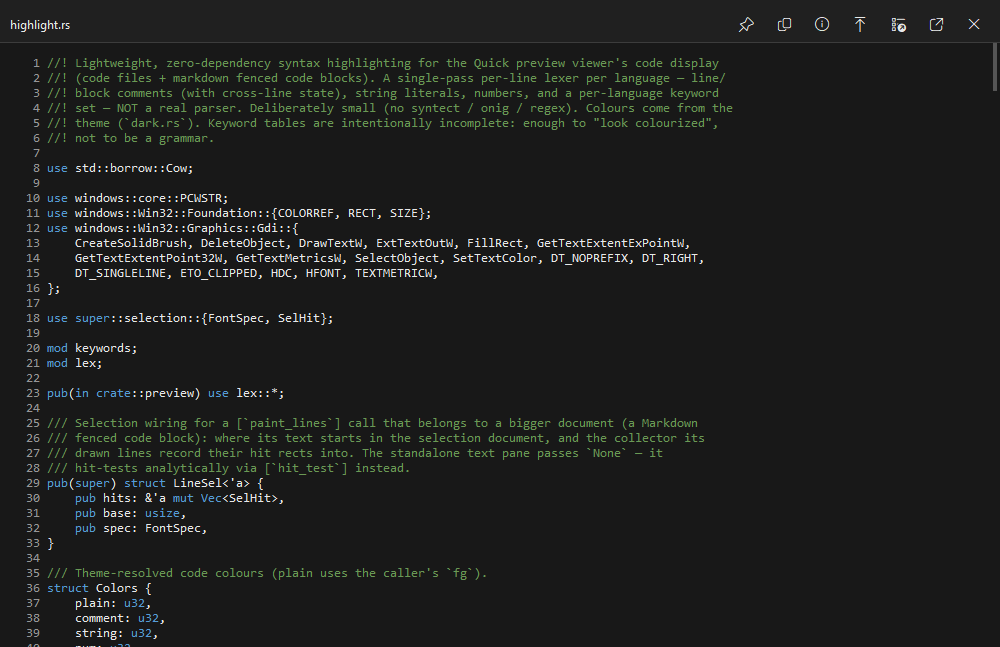
- 👁️ Press Space to preview any file, QuickLook-style: video & audio play, code is syntax-highlighted, Markdown renders, PDFs page, and email, SQLite databases and 3D models open read-only. Works in Explorer, on the Desktop, in Everything search results, and inside any app's Open/Save dialog.
- 🔤 Copy text off your screen: drag a region and the words land on your clipboard, in an editable window so you can fix a misread. Uses Windows' own recognizer, so it adds nothing to the download.
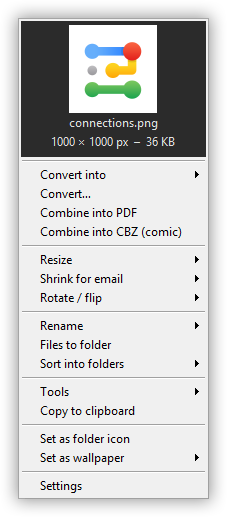
- 🎛️ Make the menu yours: drag-reorder (and show/hide) every right-click entry and its dividers; the context menu mirrors your layout exactly.
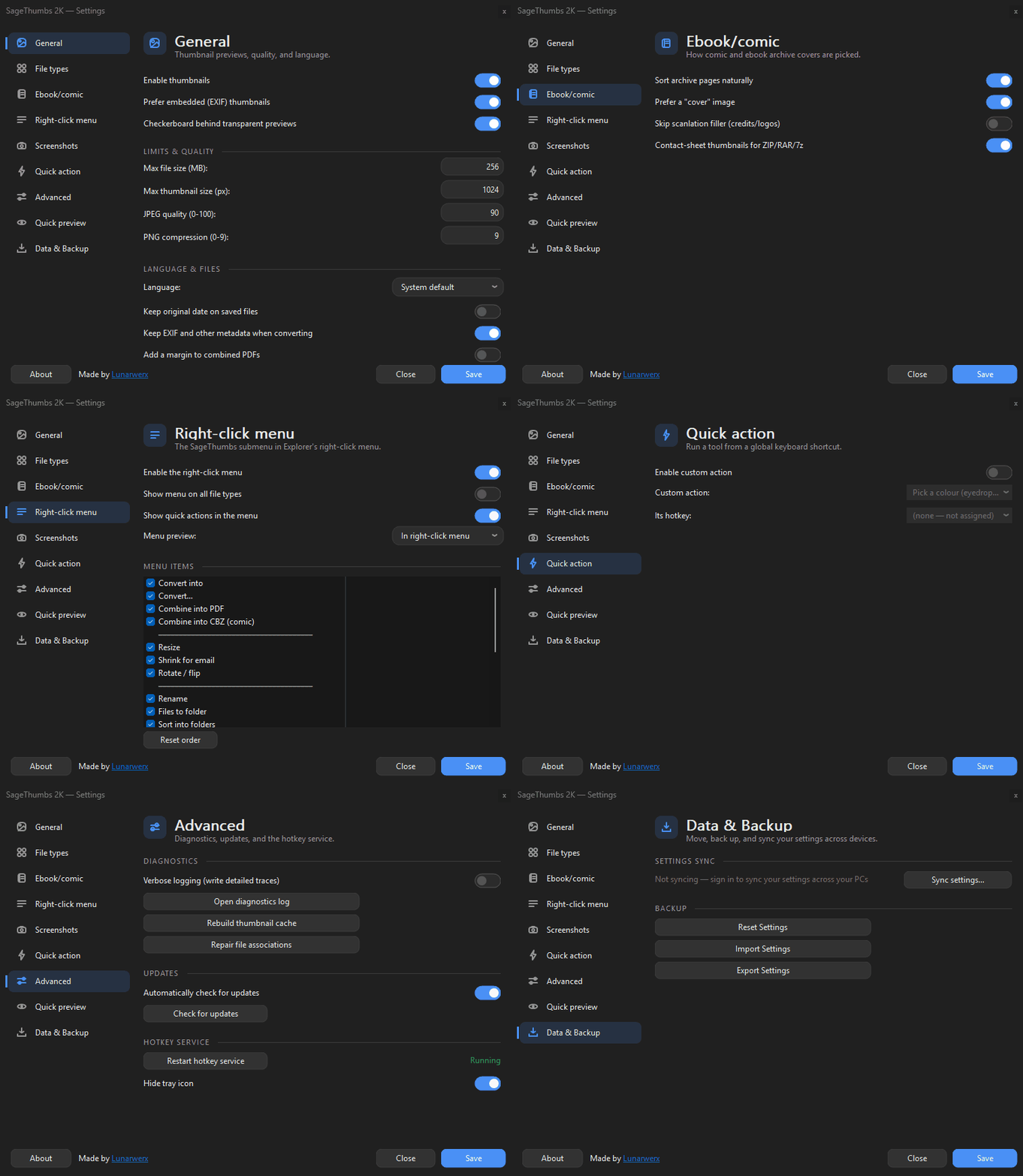
- 🎨 Redesigned Settings: a Win11-style category nav rail with toggle switches, a search box that finds any setting on any page, system-following dark mode, 36 languages.
- 🦀 100% clean-room Rust, free for personal use (PolyForm Noncommercial); no GFL.
> Download the installer → Two clicks and your File Explorer just... works.
Note from the Developer
> I'm a huge fan of SageThumbs. There are 4 things I always install on a new build, Chrome, XnShell, Everything and SageThumbs. Having noticed multiple system crashes from SageThumbs recently and no update in almost a decade, I decided it was time to right this injustice...
>
> After about a week, and an embarrassing amount of tokens, we now have a ground-up, rust native, alternative that now supports hundreds of formats, extensive red teaming, obsessively optimized for speed with carefully audited packaging, dozens of iterations through UI/UX for simplicity, menu editors, a color picker, screenshot tool, etc.
>
> Please tell your friends, star the repo and if you find anything broken, please let me know.
The story
The original SageThumbs was a Windows legend. It made Explorer show thumbnails for hundreds of formats nothing else could. Then it stopped: no updates since ~2017, built on the proprietary, frozen GFL library.
SageThumbs 2K rebuilds it from scratch in safe Rust (a maintained decode pipeline, real crash isolation, and a native Windows 11 look) while keeping the one thing that made it great: thumbnails for the files nothing else will show.
✨ Features
| |
|---|
| 🖼️ 363 formats | Camera RAW (Canon/Nikon/Sony/Fuji/…), PSD, GIMP XCF, DICOM, OpenEXR, FITS, HEIC/AVIF, JPEG-2000/XL/XR, Targa, SGI, and more |
| 📚 Ebooks & comics | EPUB, MOBI/AZW (Kindle), FB2, CBZ/CB7/CBR/CBT: real covers in Explorer (a native-Rust DarkThumbs port). Plain ZIP/RAR/7Z archives within the configured file-size limit get a contact-sheet thumbnail of the images inside, too |
| 🎨 Art / CAD / 3D / design | PSD/PSB, Affinity, Clip Studio, Krita, OpenRaster, Blender, 3MF, FreeCAD, G-code, SketchUp, Rhino, AutoCAD DWG, 3ds Max, Adobe XD, InDesign, Visio, CorelDRAW, Fusion 360 (.f3d): preview pulled straight from inside the file (no host app needed) |
| 📄 DjVu | Pure-Rust, zero-GPL decode via djvu-rs; scanned books show their text |
| 🔊 Docs & audio | PDF first page, Microsoft Office (Word/Excel/PowerPoint) & OpenDocument, and album art for MP3/FLAC/Ogg/Opus/M4A/WMA/DSF (DSD)/… (WMA/ASF and DSD/.dsf via hand-rolled parsers; lofty can't read either) |
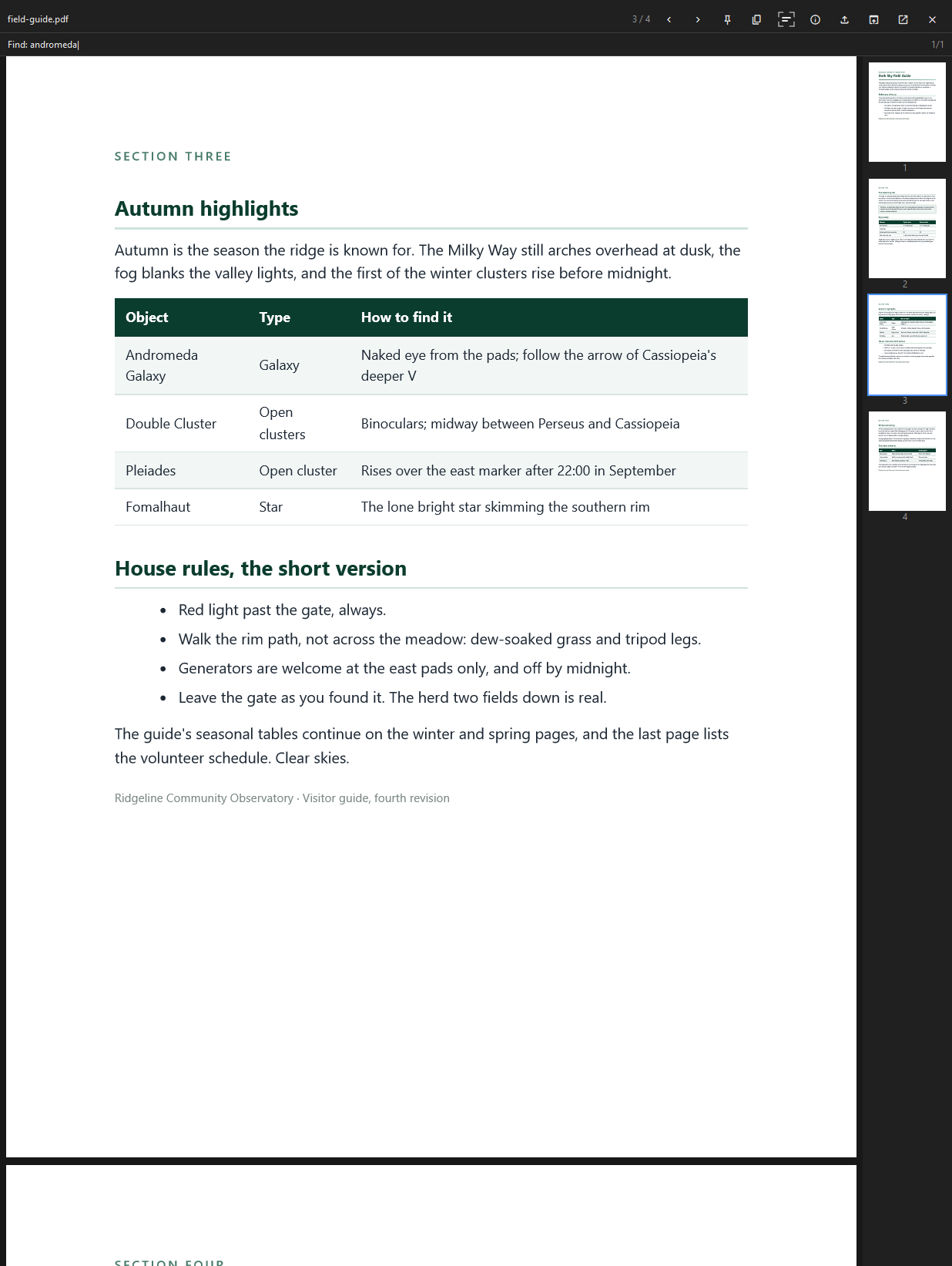
| 👁️ Space-bar preview | Tap Space in Explorer or on the Desktop for an instant full-size preview of any supported format, plus video & audio playback, syntax-highlighted code, rendered Markdown, a PDF viewer with page thumbnails and Ctrl+F search, font specimens, archive listings, SQLite databases and email (read-only), a hex dump for anything else, Save (Ctrl+S), Print (Ctrl+P), ←/→ folder browsing and double-click (or F11) full-screen. Off by default; opt in from Settings |
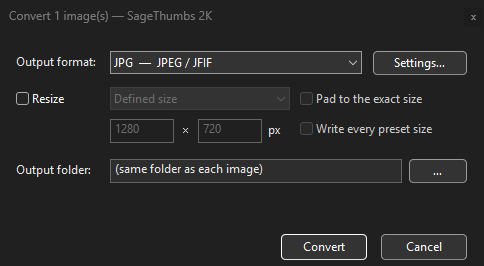
| 🧰 Right-click toolkit | Convert (29 targets) with an optional watermark, resize, shrink-for-email, lossless JPEG rotate/flip, combine→PDF/CBZ (or a searchable PDF with an invisible OCR text layer), batch rename from EXIF/tags or from a pattern you write, eyedropper, set-as-folder-icon, set as wallpaper (Fill · Fit · Span · …) or lock screen, OCR, strip metadata, upload & copy the link (it shows when the link expires), copy as data URI. A batch that partly fails can be retried for just the files that failed |
| ⚡ Parallel batch | Multi-file Convert / Resize / Rotate / Strip and Combine-to-PDF fan out across all CPU cores (6–15× faster): a tiny dependency-free scoped thread pool, no rayon bloat in the shell DLL |
| 🎛️ Make the menu yours | The Settings "Menu items" list lets you drag-reorder every right-click entry and its group dividers: the menu mirrors your layout exactly (WYSIWYG). Tick items off to hide them, or hit Reset order for the default |
| 🤖 CLI + MCP server | st2k.exe: thumbnail · convert · batch · rotate · ocr · pdf · cbz · … as a scriptable/AI-agent toolbox (st2k --mcp); batch parallel-processes whole folders in one process. The MCP server adds view (decode any supported format to a PNG block so an AI agent can see the file) and compress tools |
| 📇 Details pane & columns | An IPropertyStore handler surfaces image dimensions, EXIF camera info and audio tags in Explorer's Details pane, hover tooltips, and sortable/groupable columns, for the 363 formats Windows can't read itself. Read-only and panic-isolated, like the thumbnailer |
| 🎨 Colour management | Embedded ICC profiles and wide-gamut images (Display P3 / Adobe RGB) render in correct sRGB instead of over-saturated; AVIF/HEIC read their colr box (incl. the iPhone-HEIC CICP Display-P3 signal), and CMYK JPEGs are colour-managed through their embedded profile; pure-Rust, no C deps |
| 🔧 Repair file associations | One button in Settings ▸ Diagnostics re-registers SageThumbs for every enabled format when another app has hijacked the thumbnails, then clears the thumbnail cache |
| 🛡️ Crash-isolated | Out-of-process, catch_unwind under panic = "abort", sandboxed ImageMagick child (CPU-time budget + kill-timeout), decompression-bomb guards |
| 🌗 Native Win11 UI | Redesigned Settings: a Win11-style category nav rail (General · Appearance · File types · Ebook/comic · Right-click menu · Screenshots · Quick action · Advanced · Quick preview · Data & Backup) with toggle switches, Common-Controls v6, a search box that finds any setting on any page, light/dark theme (follow Windows, or pick your own), 36 languages |
| 🔤 Screen OCR | Copy text (OCR) from the screenshot editor (Ctrl+T), the Quick preview toolbar, the tray or a global hotkey: drag a region and the words land on your clipboard and in an editable window, so a misread is fixable before you paste |
| 💬 Send feedback | A box in the About card mails a suggestion, bug report or format request straight to the developer: no GitHub account, no email address required (leave one only if you want a reply), just a tick promising you are not being a jerk. A failed send puts your text on the clipboard so nothing is lost |
| ⌨️ Keyboard & screen readers | The Quick preview's caption toolbar and video controls are reachable with Tab, walked with the arrow keys and pressed with Enter or Space, with a visible focus ring; Escape returns to the content. Every category in the Settings nav rail reports its name and selected state, so Narrator and NVDA announce where you are |
| 🔍 True transparency | Real premultiplied-ARGB alpha, so Explorer shows the folder background through a transparent PNG instead of a baked-in grey grid. Prefer the classic look? One switch puts the checkerboard back |
🧹 One install, a whole stack gone
One shell extension and one st2k.exe do the jobs of the utilities people reinstall on every new Windows box, with no account and no cloud service.
| Instead of installing... | You already have it |
|---|
| A thumbnail or codec pack (MysticThumbs, FastPictureViewer, Icaros) | Thumbnails for hundreds of formats, crash-isolated |
| A preview-pane add-on | A large preview handler in the reading pane and Open dialogs |
| A Space-bar preview app (QuickLook, Seer) | Tap Space for an instant full-size preview |
| An EXIF viewer (ExifToolGUI, Opanda IExif) | EXIF, GPS and audio tags as sortable Explorer columns |
| A batch converter (XnConvert, IrfanView) | Right-click Convert to ~29 formats, batched across every core |
| A resizer (PowerToys Image Resizer) | Right-click Resize presets and Shrink for email |
| jpegtran, or IrfanView's lossless-rotate plugin | Lossless JPEG rotate / flip |
| A color picker (PowerToys, Just Color Picker) | A system-wide eyedropper with a 10x loupe |
| A metadata scrubber (ExifCleaner, BatchPurifier) | Right-click Strip metadata, ICC profile kept |
| A screenshot + annotate app (ShareX, Greenshot, Snagit) | Region or window capture with a delay, annotations and quick-save |
| An OCR tool (Capture2Text, PowerToys Text Extractor) | Copy text off a file or any region of the screen; tables keep their columns |
| An image uploader (ShareX, Imgur apps) | Upload (copy link) to a keyless host, no account |
| A PDF / CBZ maker (PDF24, manual 7-Zip) | Combine into PDF or CBZ |
| ImageMagick for scripts and AI agents | st2k.exe: a full CLI and an MCP server |
A dozen-plus tools in one download, every decoder isolated from Explorer. Nothing stays running unless you turn on the screenshot hotkey or the Space-bar preview.
Fine print: a few exotic formats lean on codecs already in Windows (WIC) or the bundled ImageMagick; SageThumbs 2K wires them into Explorer. Several tools above are free too; the point is one install instead of a dozen.
⭐ Like it? Help it grow
Built in the open by one person, free for personal use, no ads, no paywall. If SageThumbs 2K earns a spot on your "install on every new PC" list, a few seconds of support goes a long way:
Hit a bug, or a format that won't thumbnail? Open an issue, that helps just as much.
📦 Install
- Download
SageThumbs2K-Setup-.exe and run it.
- That's it: open any folder of exotic images.
- There is one payload: the bundled ImageMagick engine is always installed, so every
supported format works out of the box. (Older releases offered a cut-down "Compact" choice
that dropped it; upgrading replaces that with the complete engine.)
- ARM64 ships as a separate
SageThumbs2K-Setup--arm64.exe for Windows on
Arm, running natively rather than emulated, with the same engine as x64, so format
coverage is identical on both.
> The installer registers a classic shell extension via regsvr32 and trusts a self-signed cert for the Win11 modern menu. It's a classic extension by design (not an MSIX sandbox) because it spawns ImageMagick as a subprocess.
> First run / SmartScreen: every release since 3.0.0 is code-signed by LUNARWERX LLC (right-click the installer, Properties, Digital Signatures). A brand-new signed release can still meet a blue "Windows protected your PC" screen while it builds download reputation: click More info → Run anyway. Every line of the code is right here for you to inspect.
Installer vs. portable zip
Prefer nothing touching the registry outside your own account, or can't run an installer at all? Grab the portable zip from the same releases page instead. It covers most of the app, but not quite everything:
| Installer | Portable zip |
|---|
| Explorer thumbnails | ✅ | ✅ (per-user, no admin) |
| Classic right-click menu | ✅ | ✅ (per-user, no admin) |
| Settings, Convert/Resize, Quick preview, screenshots, OCR, eyedropper, CLI | ✅ | ✅ |
| Explorer preview pane | ✅ | ❌ |
| Details pane (columns, EXIF/tags) | ✅ | ❌ |
| Modern Windows 11 right-click menu | ✅ | ❌ |
The three ❌ rows all need machine-wide registration, which is exactly what the portable zip is built to avoid. If you want those too, use the installer.
A portable copy never sets itself to start with Windows, since that would outlive its folder. To have its tray helper (screenshot hotkeys, Quick preview's Space key) start when you sign in, put a shortcut in your Startup folder (shell:startup) whose target ends in --screenshot-daemon, for example "D:\Apps\SageThumbs2K\SageThumbs2K.exe" --screenshot-daemon. Without that argument the shortcut opens Settings. Thumbnails need nothing running.
🦀 How it works
IThumbnailProvider  →  runs in Explorer's isolated dllhost surrogate
        │  (first tier that decodes wins; SVG detected up front → resvg)
   image crate  →  WIC (OS codecs)  →  ImageMagick (sandboxed child)  →  headerless-Targa
  (safe Rust)      HEIC/RAW            the obscure long tail             fallback
  AVIF: our own decoder (container + colour code, rav1d for AV1) in a throwaway child
        │
        ▼   premultiplied-BGRA top-down DIB  →  Explorer (real alpha)
One DLL exposes three COM coclasses: the thumbnail provider, the modern IExplorerCommand menu, and a classic IContextMenu fallback. Settings live in HKCU\Software\SageThumbs2K.
🛠 Built like it matters
Most thumbnail handlers are a weekend hack. This one's been put through the wringer:
- Crash-proof by design: a malformed file can't take down Explorer.
- Zero runtime dependencies, pure memory-safe Rust core, installs clean every time.
- Zero-warning linting, supply-chain audits, fuzzing, Miri, and a full test + render-regression suite gate every release.
- Hardened against hostile input and code-signed by LUNARWERX LLC on every release.
- Color-managed (ICC/wide-gamut → sRGB) and obsessively tuned for speed, size, and a native feel.
363 extensions across Image, RAW, Ebook/comics, Document, Audio and Video
- RAW: 3fr, arw, cr2/cr3/crw, dng, erf, iiq, mef, mrw, nef/nrw, orf, pef, raf, rw2, sr2/srw, x3f, …
- Pro / scientific: dcm (DICOM), dpx, cin, exr, fits, hdr, pfm
- Photoshop / paint: psd/psb, xcf, psp/pspimage (Paint Shop Pro), iff/ilbm/lbm (Amiga ILBM / Deluxe Paint), pcx, miff, cut
- Common + modern: png, jpg, gif, bmp, tiff, webp, heic/heif, avif, jp2, jxl, jxr/wdp/hdp (JPEG XR / HD Photo), dds (game textures: every block format BC1 to BC7, HDR BC6H included, decoded natively), vtf/ktx (Valve and Khronos textures, through the same decoders), six/sixel (terminal graphics), avifs, ico, tga, qoi, svg
- Vector & metafile: svg/svgz, wmf, emf/emz
- Ebook & comics: epub, mobi/azw/azw3, prc (Mobipocket), fb2/fbz, cbz/cb7/cbr/cbt
- Project / design / CAD: psd, afphoto/afdesign/afpub, clip, kra, ora, pxo (Pixelorama), aseprite/ase (Aseprite, rendered), spla (SpriteLoop, rendered), sldprt/sldasm/slddrw (SolidWorks), mcworld/mctemplate/mcpack/mcaddon (Minecraft Bedrock), blend, 3mf, fcstd (plus FreeCAD's fcbak/fcstd1 backups), gcode, bgcode (PrusaSlicer binary), eps (embedded raster preview only), sketch, procreate (digital art), skp (SketchUp), 3dm (Rhino), dwg (AutoCAD), max (3ds Max), c4d (Cinema 4D), xd (Adobe XD), cdr/cdt/cmx (CorelDRAW / Corel Exchange), dxf (AutoCAD preview), xmind (mind maps), nupkg/vsix (package icons)
- Icons: ico, cur, ani (animated cursors), icns (Apple)
- Docs & audio: pdf, doc/docx/docm, xls/xlsx/xlsm/xlsb, ppt/pptx/pptm/ppsx (MS Office), odt/ods/odp, key/pages/numbers (Apple iWork), indd/indt (InDesign), vsd/vsdx/vsdm/vstx/vssx (Visio), pub (Publisher), djvu + mp3/flac/ogg/opus/m4a/wma/dsf (DSD)/ape/…
- Video: mkv/webm, mp4/m4v/mov, avi, wmv, flv, mpg/mpeg/m1v/m2v/mpv/mp2v/m2p, vob, 3gp/3g2, ts/m2ts/mts, ogv, divx, …: a representative frame (30% in by default, adjustable in Settings) via the OS Media Foundation codecs, plus FLV (VP6 / Sorenson Spark), HDR VP9 (Profile 2/3, 10- and 12-bit) and MPEG-1/2 (VideoCD-era
.mpg, bare .m1v/.m2v, DVD-style .vob, and MPEG-2 inside .ts/.m2ts/.mts recordings) decoded by SageThumbs itself in a short-lived helper process
(PostScript without an embedded raster preview and font-only ImageMagick coders are excluded for safety; PDF uses the in-box OS renderer. Video frames normally come from Windows' own Media Foundation codecs. Where Windows has no codec (FLV's VP6 and Sorenson Spark, VP9 Profile 2/3 HDR, 10-bit H.264, and MPEG-1/2 in program, elementary and transport streams), SageThumbs decodes the frame itself in a separate short-lived process, so a corrupt file costs one thumbnail rather than disturbing Explorer. Anything neither side can decode keeps its default icon.)
🔧 Build from source
Requires the MSVC Rust toolchain, VS Build Tools (Desktop C++), and (for the installer) Inno Setup.
$env:RUSTFLAGS = '-C target-feature=+crt-static'   # static CRT: see note below
cargo build --release            # sagethumbs2k.dll + SageThumbs2K.exe + st2k.exe
.\scripts\build-release.ps1      # full pipeline → dist\SageThumbs2K-Setup-.exe
.\scripts\build-release.ps1 -Architecture arm64  # ARM64 installer
> ARM64 cross-builds additionally need the ARM64 MSVC C++ tools installed through Visual
> Studio Build Tools. The ARM64 release path produces a separately named
> installer; it is not a replacement for the x64 Full build.
> scripts\build-release.ps1 always sets crt-static itself, so a release build is
> reproducible from a fresh clone either way, but a plain cargo build --release
> without it links the DLL against the MSVC CRT dynamically, which can fail
> regsvr32/DllRegisterServer with 0x8007007E (ERROR_MOD_NOT_FOUND) on a machine
> missing the VC++ Redistributable. Set the flag yourself (as above) if you're building
> the DLL directly rather than through the release pipeline.
FAQ
Is SageThumbs 2K free?
Yes, for personal use, under the PolyForm Noncommercial License 1.0.0. Commercial
use needs a commercial license per Windows installation, sold two ways: US$2.99 a month,
cancel any time, or US$49 once for a perpetual licence with 12 months of updates. On the
one-time plan the app keeps working as it is afterwards, and another 12 months of updates is
US$29, bought with your key; a monthly licence stops entitling the machine when the
subscription ends. Security fixes are delivered to every licensed installation regardless.
Bought monthly
or once
(the checkout page calls what it emails you a "redemption code"; that is the seat key below,
same thing). For volume or site licenses, purchase orders or bank transfer,
request a quote.
A business license comes as a seat key (esk_...); redeem it under
Settings ▸ Licence and the app takes it from there. The installer asks whether a copy is
for personal or business use, and that answer only changes by reinstalling, there's no toggle
for it in Settings. A portable copy has no installer to ask, and counts as business use as soon
as a key is redeemed on it. A business copy starts a 7-day evaluation with every feature; after
that it asks for a key for 3 more days, then thumbnails, previews and the right-click menu stop
until one is entered. Once a key is in, the license check runs quietly in the background and
tolerates being offline for about a week. Personal use has no ads and no paywall, just a single
free download built and maintained by one person.
What are the system requirements?
Windows 11, 64-bit. It ships as a native x64 installer, plus a separately built native ARM64
installer for Windows on Arm with the same format coverage. There's also a portable zip for
per-user use with no admin rights. No other software is required: the installer bundles
everything it needs, including the ImageMagick engine used for the more obscure formats.
Does it replace File Explorer, or install its own file browser?
Neither. It's a shell extension that plugs into the existing File Explorer: same windows, same
navigation, just real thumbnails, a right-click toolkit, and a Space-bar preview added on top.
Nothing about how you browse files changes.
Why did Windows or my antivirus flag the installer?
3.0 and later are code-signed by LUNARWERX LLC through Azure Artifact Signing, every
installer, the shell extension, the app and the command-line tool. Right-click the file,
Properties, Digital Signatures, and the signer is there to check. The signature is what removes
the machine-learning "unknown binary" verdicts that releases up to 2.5 collected.
Scanners that judge what a program does while it installs (Kaspersky's among them) are a
separate case. Since 3.7.1 setup no longer writes itself into the Windows Run list, creates its
scheduled tasks through schtasks.exe, or ends Explorer to restart it. Measured on 2026-10-08,
every 3.7.1 file, both installers included, had 0 detections on VirusTotal, Kaspersky clean.
Releases before 3.0 were unsigned, and every release is a brand-new file the world has never
seen. That is a reputation verdict, not a finding about the code, and the detection names
say so themselves: Microsoft's Wacatac.B!ml ends in !ml, its own marker for "a
machine-learning model guessed"; Fortinet reports PossibleThreat; Rising reports
Undefined; Skyhigh reports BehavesLike. None of them claims to have recognised anything
specific.
Two measurements, taken on 2026-08-31 on the unsigned builds, if you would rather not take our
word for it. They are dated on purpose: these numbers move, which is the entire point being
made.
- The count moves on its own, with no change to the software. A freshly built installer,
the same product, scanned the same day: 2 of 71 engines. The published build of that
identical version, four days and a few hundred downloads later: 9 of 71. Same program,
same code, engines simply score a file more as it circulates. Older releases settle back
down again (1.2.2 sits at 1 of 75).
- Removing half the installer changes nothing. We built a variant with the entire bundled
ImageMagick engine stripped out, halving the download, and scanned both within ten minutes of
each other: 2 of 71 with it, 3 of 70 without. The size and contents are not what is being
scored.
Every release is code-signed by LUNARWERX LLC and lists each file's SHA-256, so you can check
that the file you downloaded is the one published. For the current engine ratio and the exact
detection names, look that SHA-256 up on VirusTotal rather than trusting one popup's opinion.
If your antivirus quarantines it, reporting it as a false positive to your vendor genuinely
helps, those reports are what clear it for everyone else using that product, and since 3.0
there is a signed publisher for them to attach it to.
SmartScreen's "Windows protected your PC" screen is a separate thing: it is a no-history-yet
reputation prompt rather than a malware verdict, and a signature does not silence it on day
one. Reputation is earned per publisher over downloads, so it can still appear for a while
after 3.0. Click More info, then Run anyway.
How is it different from the original SageThumbs, or a tool like MysticThumbs?
It's a clean-room rebuild of the classic, decade-abandoned SageThumbs (2004-2017, GPLv2, no
GFL reused), written from scratch in memory-safe Rust. Compared to a codec-pack style
thumbnailer like MysticThumbs, its thumbnail provider runs out-of-process and panic-guarded, so
a corrupt or hostile file can't take down Explorer the way an in-process crash can.
Does the Space-bar preview work with the Everything search tool?
Yes, both Everything 1.4 and 1.5, installed or portable. Click a result first, since Space typed
into the search box just types a space. If Everything itself runs as administrator, Windows
blocks the keypress from reaching any normal program; binding a hotkey with Ctrl, Alt, or Shift
in Settings works around that, because Windows delivers hotkeys differently than typed keys.
How many formats does it support, and can more be added?
363 as of this README, across image, camera RAW, ebook/comic, document, audio, and video; run
st2k formats for the live, per-category count. New formats are considered when they can be
read without a heavy dependency, many "project" file formats bake in a preview image that's
cheap to extract. Request one through Send Feedback in the app or a GitHub issue.
📜 License
PolyForm Noncommercial License 1.0.0: free to use, modify, and share for any noncommercial purpose. Commercial use requires a separate license, per Windows installation, sold two ways: US$2.99 a month (cancel any time; the machine stops being entitled when the subscription ends) or US$49 once for a perpetual licence with 12 months of updates. On the one-time plan the app keeps working as it is afterwards; another 12 months of updates is US$29, bought with your key. Security fixes are delivered to every licensed installation regardless. Bought monthly or once (card via Stripe; one key per installation is emailed on payment). It comes as a seat key (esk_...), redeemed under Settings ▸ Licence. For volume or site licences, purchase orders or bank transfer, request a quote. The installer asks Personal or Business up front and that choice only changes by reinstalling; a business copy gets a 7-day evaluation with every feature, then 3 days of reminders, then thumbnails and previews stop until a key is entered; once it is, the background license check tolerates about a week offline. © 2026 Lunarwerx.
SageThumbs 2K is a clean-room rewrite, not a derivative of the GPLv2 C++ original, and it uses no GFL. Every decoder is pure-Rust or an OS codec (RAR/CBR comics use the pure-Rust rars crate, no proprietary UnRAR), so the project's own code is entirely original and its dependencies are permissively licensed, which is what lets us license it as we choose. The optional bundled ImageMagick (for the exotic long tail) ships under its own permissive license and runs only as a sandboxed subprocess.
🙏 Credits
A from-scratch successor to Nikolay Raspopov's original SageThumbs (2004–2017, GPLv2, now unmaintained), rebuilt clean-room in Rust, with our thanks for the classic that inspired it. Built on image-rs, resvg, windows-rs, djvu-rs, and ImageMagick.
With thanks to the projects that shaped specific features:
- DarkThumbs: the model for the ebook & comic cover thumbnails (EPUB / MOBI / FB2 / CBZ…).
- Flameshot: inspiration for the screenshot capture + annotation flow.
- XnShell / XnView: inspiration for the right-click image toolkit and shell-menu UX.
- Calibre: reference for ebook formats and cover extraction.
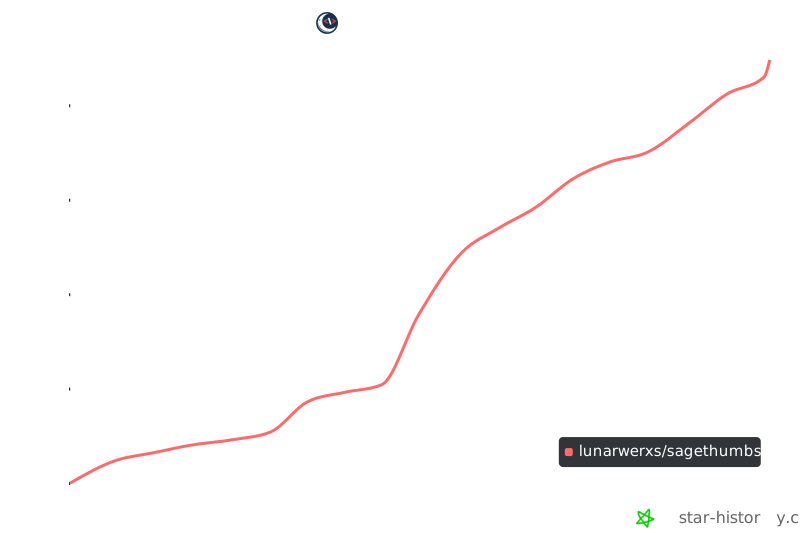
⭐ Star history