mp3rgain





Lossless MP3/AAC volume adjustment - a modern mp3gain / aacgain replacement written in Rust
mp3rgain changes the volume of MP3 and AAC files without re-encoding. It rewrites the global_gain value stored in each frame, the same field mp3gain and aacgain edit, so the audio is never decoded and compressed again and no quality is lost. It runs ReplayGain track and album analysis, writes standard REPLAYGAIN_* tags, and stores an undo tag so the change can be reverted.
🌐 Website: mp3rgain.tyna.ninja: install guide, CLI reference, FAQ and tool comparison
- Lossless: only the per-frame
global_gain field changes. Works on MP3, AAC in M4A/MP4 (including the audio track of a video MP4) and raw ADTS .aac.
- Reversible:
-u restores the original gain from the undo tag. A frame whose gain would pass the 0..255 limit is clamped instead, cannot be restored exactly, and triggers a warning.
- ReplayGain: defaults to ReplayGain 1.0 with mp3gain-identical values.
--rg2 (ReplayGain 2.0, -18 LUFS) and --r128 (EBU R128, -23 LUFS) use BS.1770 loudness instead. --tags-only writes the tags and leaves the audio alone.
- mp3gain compatible: mp3gain's flags, TSV output and
MP3GAIN_UNDO tag, so scripts and tools built around mp3gain keep working.
- Built for whole libraries: recursive scans (
-R), one album per folder or per release, parallel processing, JSON and TSV output.
- One binary: no runtime or codecs to install. macOS (universal), Linux and Windows, each on x86_64 and ARM64.
- GUI:
mp3rgui, a desktop app with drag and drop.
> [!IMPORTANT]
> AAC files that crackle after a gain change by mp3rgain 2.8.0 to 3.11.1: those versions left some frames of FDK-AAC encodes at their original volume (#402). Undo such files with the old version first (mp3rgain -u, or Undo Selected in mp3rgui), then upgrade and apply the gain again. Undoing them with 3.12.0 or later makes it worse: the new version also moves the frames the old one never changed, so they end up louder than the original. If you have already upgraded, the 3.11.1 downloads are on its release page. MP3 files, and AAC files that do not crackle, need nothing. Details are in the 3.12.0 release notes.
Preparing DJ tracks for rekordbox and CDJs? Bake'n Deck has mp3rgain built in and adds true peak ceiling gain for FLAC, AIFF and WAV, key + BPM playlist sorting, and a CDJ-safe MP3 export.
Installation
Windows installer (GUI, no terminal needed)
Download mp3rgui for Windows (permanent link: ). One installer covers x64 and ARM64, adds a Start Menu entry and an uninstaller, and needs no admin rights.
Command line (mp3rgain)
| Platform | Command |
|---|
| macOS (Homebrew) | brew install M-Igashi/tap/mp3rgain |
| Windows (winget) | winget install M-Igashi.mp3rgain |
| Debian 12+ / Ubuntu 22.04+ (apt, 26.04 included) | Add the apt repository, then sudo apt install mp3rgain |
| Arch Linux (AUR, third-party) | yay -S mp3rgain-bin |
| Nix | nix profile install github:M-Igashi/mp3rgain |
| pkgx (macOS / Linux) | pkgx mp3rgain |
| Android (Termux, from the Termux User Repository) | pkg install tur-repo && pkg install mp3rgain |
| Docker | docker pull ghcr.io/m-igashi/mp3rgain:latest |
| Cargo (Rust 1.85+) | cargo install mp3rgain |
GUI (mp3rgui)
| Platform | Command |
|---|
| macOS (Homebrew) | brew install --cask M-Igashi/tap/mp3rgui |
| Windows (winget) | winget install M-Igashi.mp3rgui (portable; use the installer above for a Start Menu entry) |
| Debian 13+ / Ubuntu 24.04+ (apt, 26.04 included) | Add the apt repository, then sudo apt install mp3rgui |
| Arch Linux (AUR) | yay -S mp3rgui |
Debian and Ubuntu apt repository
Every release is also published as a signed apt repository for amd64 and arm64, so both packages update with apt upgrade:
sudo install -d -m 0755 /etc/apt/keyrings
sudo curl -fsSLo /etc/apt/keyrings/mp3rgain.gpg https://github.com/M-Igashi/mp3rgain/releases/latest/download/mp3rgain-archive-keyring.gpg
echo "deb [signed-by=/etc/apt/keyrings/mp3rgain.gpg] https://github.com/M-Igashi/mp3rgain/releases/latest/download/ ./" | sudo tee /etc/apt/sources.list.d/mp3rgain.list
sudo apt update && sudo apt install mp3rgain
The signing key's fingerprint is 54E7 BDDA 7581 ED3A 9689 0E9D 1697 D52D 7E5A 289D. The repository lives in the assets of the latest release, so for a few minutes after a new release is published apt update may report that it has no Release file; the next update succeeds. The .deb files can also be installed one at a time from GitHub Releases with sudo apt install ./mp3rgain_*_amd64.deb, without updates.
The Ubuntu PPA is deprecated. ppa:m-igashi/mp3rgain and ppa:m-igashi/mp3rgui keep receiving updates until 2026-12-31 and stop after that. The apt repository covers Ubuntu 26.04 too, and for the same version its packages take precedence over the PPA's, so adding it is all it takes to move over. Then remove the PPA with sudo add-apt-repository --remove ppa:m-igashi/mp3rgain (and ppa:m-igashi/mp3rgui for the GUI).
Notes:
- Archives for every platform are on GitHub Releases. The install guide covers checksum verification and troubleshooting (Windows Defender false positives, missing OpenGL, Ubuntu releases older than 22.04).
- On macOS the GUI app and DMG are signed with a Developer ID and notarized. The CLI binary is not signed.
- Windows binaries and the installer are not code-signed.
mp3rgain-bin on the AUR is maintained by a third party. This project publishes only mp3rgui there.mp3rgui is not on crates.io. To build it from a clone, run cargo build --release --manifest-path mp3rgui/Cargo.toml (on Linux, install the GTK 3, xkbcommon and Wayland development packages first).
Quick Start
mp3rgain song.mp3                       # Analyze only: print the recommended gain, change nothing
mp3rgain -r song.mp3                    # Apply track gain (ReplayGain)
mp3rgain -a *.mp3                       # Apply album gain: every file given is one album, as in mp3gain
mp3rgain -a --album-by=tag -R /music    # Whole library, one album per release (from tags)
mp3rgain -a --album-depth 2 -R /music   # Whole library, one album per Artist/Album folder
mp3rgain -s R -a *.mp3                  # Album gain from stored tags; rescan only if a file lacks them
mp3rgain -r --tags-only *.mp3           # Write ReplayGain tags, leave the audio alone
mp3rgain -g 2 song.mp3                  # Manual gain: +2 steps = +3.01 dB (1 step = 1.5051 dB)
mp3rgain -n -r *.mp3                    # Dry run: show what would change
mp3rgain -u song.mp3                    # Undo
Run mp3rgain -h for every option, or see the full CLI reference (analysis modes, tag handling, exit codes, recipes). Files are processed in parallel by default; -j 1 forces serial processing (design and benchmarks).
-a on its own pools every file you give it into one album, exactly as mp3gain -a does, so a per-album script written for mp3gain keeps working. To album-tag a whole library in one run, split it with --album-by=tag (tagged library), --album-depth 2 (untagged Artist/Album tree) or --album-by=dir (alias --per-directory, when one folder is one album).
| Format | Gain and analysis | Where the tags go |
|---|
| MP3 (MPEG-1, 2 and 2.5 Layer III) | Yes | REPLAYGAIN_* in ID3v2, undo data in APEv2 (-s a: all APEv2, -s i: all ID3v2) |
| AAC-LC in M4A/MP4 | Yes | iTunes freeform atoms (replaygain_*, mp3rgain_undo) |
Raw ADTS AAC-LC (.aac) | Yes | ID3v2 tag at the start of the stream |
| HE-AAC (v1 and v2), ALAC, DRM-protected M4P | Skipped with a message | |
| FLAC, Opus, Ogg, WAV | Not supported | |
-R collects .mp3, .m4a, .aac and .mp4 files. The format itself is detected from the file content, not the extension.
HE-AAC is skipped because global_gain only reaches its AAC core: the SBR high band would keep its original level, and the decoder used for analysis does not reconstruct it either (#403). Undo still works on HE-AAC files adjusted by earlier versions.
Migrating from mp3gain?
mp3rgain is a drop-in replacement for most setups: the flags, the TSV output and the APEv2 MP3GAIN_UNDO tag match mp3gain, so existing scripts and parsers (e.g. beets) keep working. Migration is usually a one-line substitution:
sed -i 's/\bmp3gain\b/mp3rgain/g' your_script.sh
Two defaults differ. mp3rgain writes REPLAYGAIN_* to ID3v2, where players look, and keeps the undo data in APEv2, where mp3gain looks; -s a puts everything in APEv2 exactly as mp3gain does. And it re-analyzes every file, where mp3gain reuses stored values; -s R restores mp3gain's behaviour.
See docs/migrating-from-mp3gain.md for the flag equivalence table, the tag layout and the other intentional differences. Bit-level verification against mp3gain lives in docs/compatibility-report.md.
GUI Application
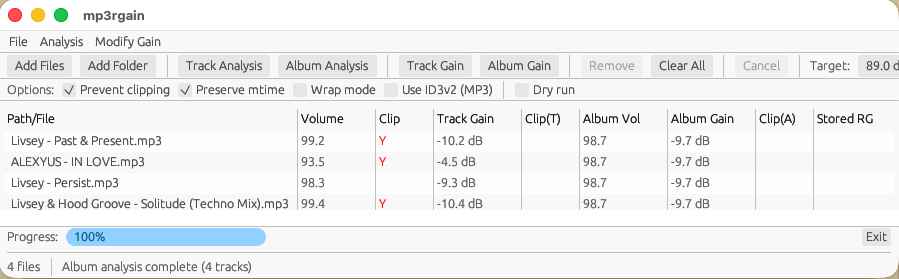
mp3rgui covers the CLI's core workflow: track and album analysis and gain (ReplayGain 1.0, 2.0 or EBU R128), a target volume, manual and per-channel gain, undo, stored tag inspection and deletion, each file's bitrate and CBR/VBR, and clipping prevention. Drag files or folders onto the window; a progress bar and a Cancel button track the batch. It runs the same apply code as the CLI. Install it from the table above.
Where it differs from the CLI:
- Album analysis groups files per folder by default (also "By tags" or "Single album"), while CLI
-a pools every file into one album.
- Clipping prevention and timestamp preservation are on by default (
-k and -p are off in the CLI).
- There is no tags-only mode and no true-peak option; use the CLI for those.
Platform notes: the macOS app needs macOS 11 or later. macOS and Linux draw with OpenGL 2.0+; Windows uses Direct3D 12 or Vulkan with a software fallback, and MP3RGUI_RENDERER=glow switches it to OpenGL. If the window cannot open, mp3rgui shows a dialog explaining why and pointing to the CLI. File names in Japanese, Chinese or Korean are rendered with a CJK font already installed on your system; set MP3RGUI_FONT to a font file path to pick a different one.
Docker / CI
Multi-arch images (linux/amd64, linux/arm64) are published to GHCR as ghcr.io/m-igashi/mp3rgain with tags latest, vX (e.g. v3) and vX.Y.Z. The image is FROM scratch (~2 MB) with no shell; the entrypoint is the binary itself, so all flags work as on the host:
docker run --rm --user "$(id -u):$(id -g)" -v /path/to/music:/music ghcr.io/m-igashi/mp3rgain:latest -r -R /music
Library Usage
use mp3rgain::{apply_gain, analyze};
use std::path::Path;

let frames = apply_gain(Path::new("song.mp3"), 2)?;  // +3.0 dB
let info = analyze(Path::new("song.mp3"))?;
apply_gain and analyze are low-level MP3 helpers: apply_gain rewrites the frames and writes no undo tag. The pipeline the CLI and GUI share (atomic write, undo and ReplayGain tags, MP3 and AAC) is apply::apply_with_options. API documentation: docs.rs/mp3rgain.
Why mp3rgain?
The original mp3gain has had no release since 1.6.2, and aacgain none since 2.0.0 (2019); their release builds still carry known CVEs (docs/security.md). mp3rgain is a memory-safe Rust replacement that covers both formats in one tool. It defaults to mp3gain-identical ReplayGain 1.0 values, with BS.1770 loudness (--rg2 / --r128) as an opt-in. How it compares to rsgain, loudgain, foobar2000 and ffmpeg, and when to use those instead, is covered in the tool comparison and docs/COMPARISON.md.
Documentation
- CLI Reference: options, analysis modes, exit codes, output formats, recipes
- Install Guide: all platforms, verification, troubleshooting
- Migration Guide: flag equivalence, substitution patterns, tag layout, beets config
- Technical Comparison: mp3gain, aacgain and other ReplayGain tools
- Compatibility Report: bit-level verification against the original mp3gain
- Parallel Performance:
-j / --threads design and benchmarks
- Use Cases: integration examples (beets, Bake'n Deck, etc.)
- Design Decisions: things that look like defects but are deliberate, and where each was decided
- Security: memory safety and CVE analysis
- Roadmap: development plans
- Man page: installed by the
.deb packages (apt repository) and the PPA
- FAQ · Download Stats
Contributing
Contributions welcome! See CONTRIBUTING.md.
License
MIT License. See LICENSE.
See Also