Use this command to install TempestData with WinGet:
winget install --id=MABeatty1978.TempestData -e
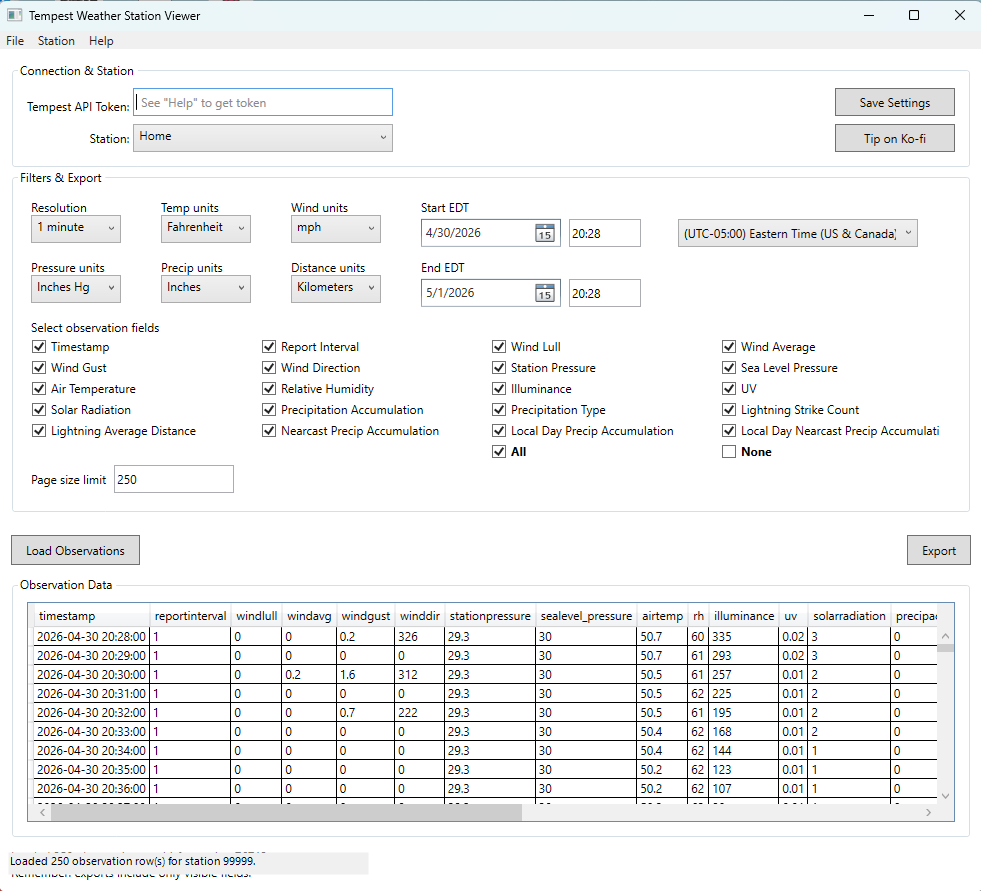
TempestData is a desktop application designed to view and export observation data from your WeatherFlow Tempest weather station. It provides a user-friendly interface for analyzing weather data with precision.
Key Features:
Live station discovery that connects directly to the Tempest API.
Flexible field selection, allowing users to choose specific observations like temperature, wind speed, humidity, UV levels, and more.
Configurable time range settings, enabling users to select any date and time frame for data analysis.
Export capabilities in multiple formats, including CSV, JSON, Excel (.xlsx), and PDF.
Audience & Benefit:
Ideal for meteorologists, weather enthusiasts, or professionals who need precise weather data. TempestData simplifies the process of accessing, analyzing, and exporting weather observations, saving users time and effort while ensuring accuracy.
This application can be installed via winget, making it easy to integrate into your workflow.
README
TempestData – Tempest Weather Station Viewer
A Windows desktop application for viewing and exporting observation data from your
WeatherFlow Tempest weather station.
Screenshot
Features
Live station discovery — connects to the Tempest API and lists all stations
associated with your API token.
Flexible field selection — choose exactly which observation fields to load
(temperature, humidity, wind, pressure, UV, lightning, battery, and more).
Configurable time range — pick any start/end date and time, displayed in your
chosen timezone.
Timezone-aware display — timestamp column is automatically converted from UTC
to the timezone you select.
Unit preferences — choose your preferred units for temperature, wind speed,
pressure, precipitation, and distance.
Bucket resolution — aggregate observations at 1 min, 5 min, 30 min, 3 hr, or
1 day resolution.
Export in multiple formats — CSV, JSON, Excel (.xlsx), and PDF.
Numeric column sorting — click any column header to sort by true numeric value.
Large-dataset warning — warns you before loading more than ~2 000 rows.
Settings persistence — API token, station, units, and field preferences are
saved automatically between sessions.
You are free to use, copy, and modify this software for personal and non-commercial
purposes, provided you give appropriate credit. Commercial use or resale requires
explicit written permission from the author.
Support
If you find this app useful, please consider leaving a small tip — it helps me keep
building and maintaining free tools like this!