Ports Controller
A glass, Apple-style Windows desktop app to see every open port, who's using it, and kill it in one click.



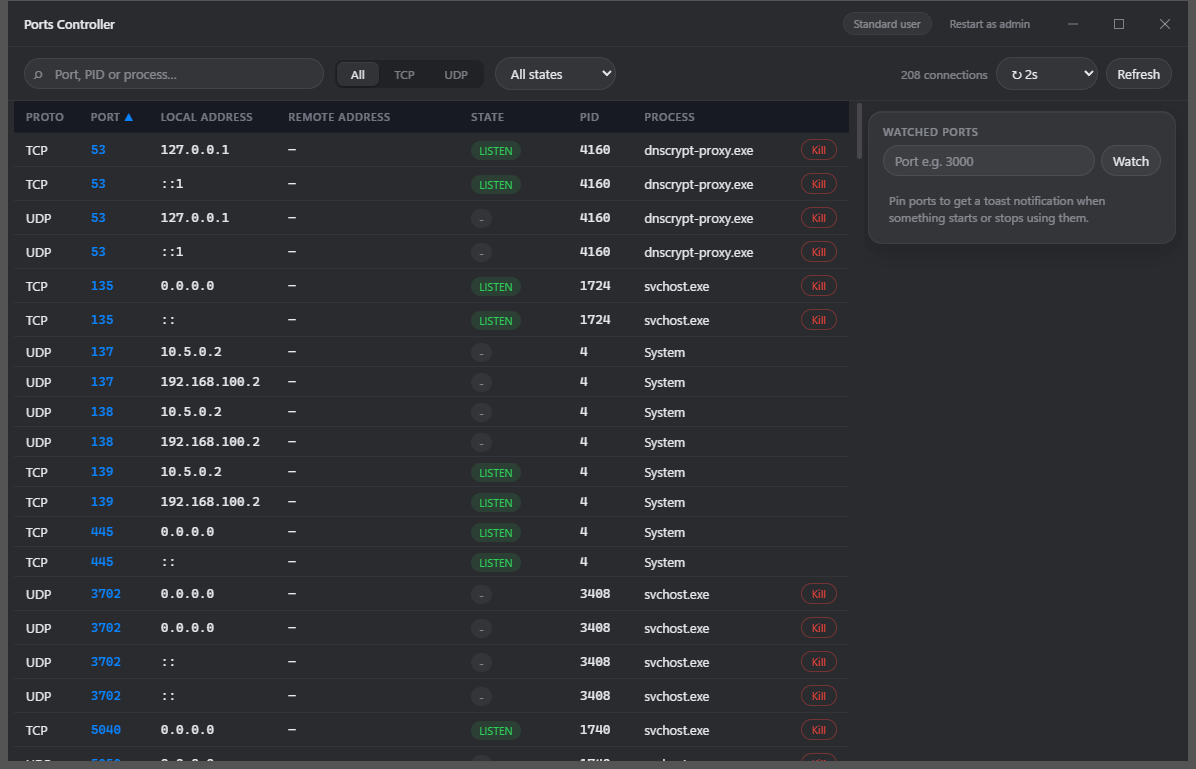
Ever hit EADDRINUSE: port 3000 already in use and had to dig through netstat -ano and taskkill? Ports Controller replaces that dance with a live, filterable table of every TCP/UDP socket on your machine — with the owning process next to it and a Kill button.
Features
- Live port table — every TCP/UDP connection with local/remote address, state, PID and process name. Auto-refreshes (1s/2s/5s or paused); new connections flash green, closed ones fade out.
- Search & filter — type a port, PID, process name or address; segmented TCP/UDP filter; state filter; sortable columns.
- One-click kill — per-row Kill button with inline confirm. If Windows denies access, the app offers to restart itself as Administrator.
- Process details — click any row: exe path, command line, user, start time, memory, CPU, parent process.
- Watch & notify — pin ports you care about (3000, 8080, …). A Windows toast fires when something starts or stops using them. Watches persist across restarts.
- System tray — closing the window hides to the tray. Right-click the tray icon for a live glance of listening ports (your dev ports first); click one to open the app filtered to it.
- Glass UI — translucent acrylic window with a fast, minimal interface. ~10 MB portable exe, native performance (Tauri + Rust).
Install
One-liner (PowerShell)
Downloads the latest release and installs it per-user (no admin needed):
powershell -ExecutionPolicy Bypass -c "irm https://raw.githubusercontent.com/Magicianhax/ports-controller/main/install.ps1 | iex"
Download (easiest)
Grab the latest from Releases:
PortsController_x.y.z_x64-setup.exe — installer (per-user, no admin required, Start Menu entry, reliable toast notifications)PortsController_x.y.z_portable.exe — single portable exe, no installation
winget
winget install Magicianhax.PortsController
> Note: available once microsoft/winget-pkgs#400464 is merged. Until then, use the one-liner or direct download above.
Scoop
scoop install https://raw.githubusercontent.com/Magicianhax/ports-controller/main/packaging/scoop/ports-controller.json
From source
Scripted — clones, builds, and installs in one go, and offers to install any missing prerequisite (Git, Node.js, Rust) via winget:
git clone https://github.com/Magicianhax/ports-controller.git
cd ports-controller
.\install.ps1 -FromSource
Manual — requirements: Node.js 20+, Rust (MSVC toolchain), Windows 10/11:
git clone https://github.com/Magicianhax/ports-controller.git
cd ports-controller
npm install
npm run tauri build
Outputs land in src-tauri/target/release/ (portable exe) and src-tauri/target/release/bundle/nsis/ (installer). For a dev build with hot reload, use npm run tauri dev.
Usage tips
- Killing protected processes: the app runs unelevated by default. Killing a SYSTEM/service process shows an "Access denied" banner with a one-click Restart as Administrator option.
- Quitting: the ✕ button hides to the tray (so port watching keeps working). To exit fully, right-click the tray icon → Quit.
- Toast notifications are most reliable with the installer (Windows wants a Start Menu shortcut for toasts from portable exes).
Architecture
| Layer | Tech |
|---|
| Socket enumeration | Rust — netstat2 (GetExtendedTcpTable/GetExtendedUdpTable) |
| Process info & kill | Rust — sysinfo + Win32 (OpenProcess/TerminateProcess) |
| Watcher & tray | Rust background threads, Tauri events, toast via tauri-plugin-notification |
| UI | React + TypeScript (Vite), custom glass design, acrylic window effect |
| Shell | Tauri 2 |
Development
npm install
npm run tauri dev      # run with hot reload
cd src-tauri
cargo test             # backend tests (port enumeration, kill, tray glance)
Releases are automated: pushing a tag v* runs the release workflow, which tests, builds, and uploads the installer + portable exe to a GitHub Release.
License
MIT