Mailwing
> A native, multi-provider desktop email client built with Electron.
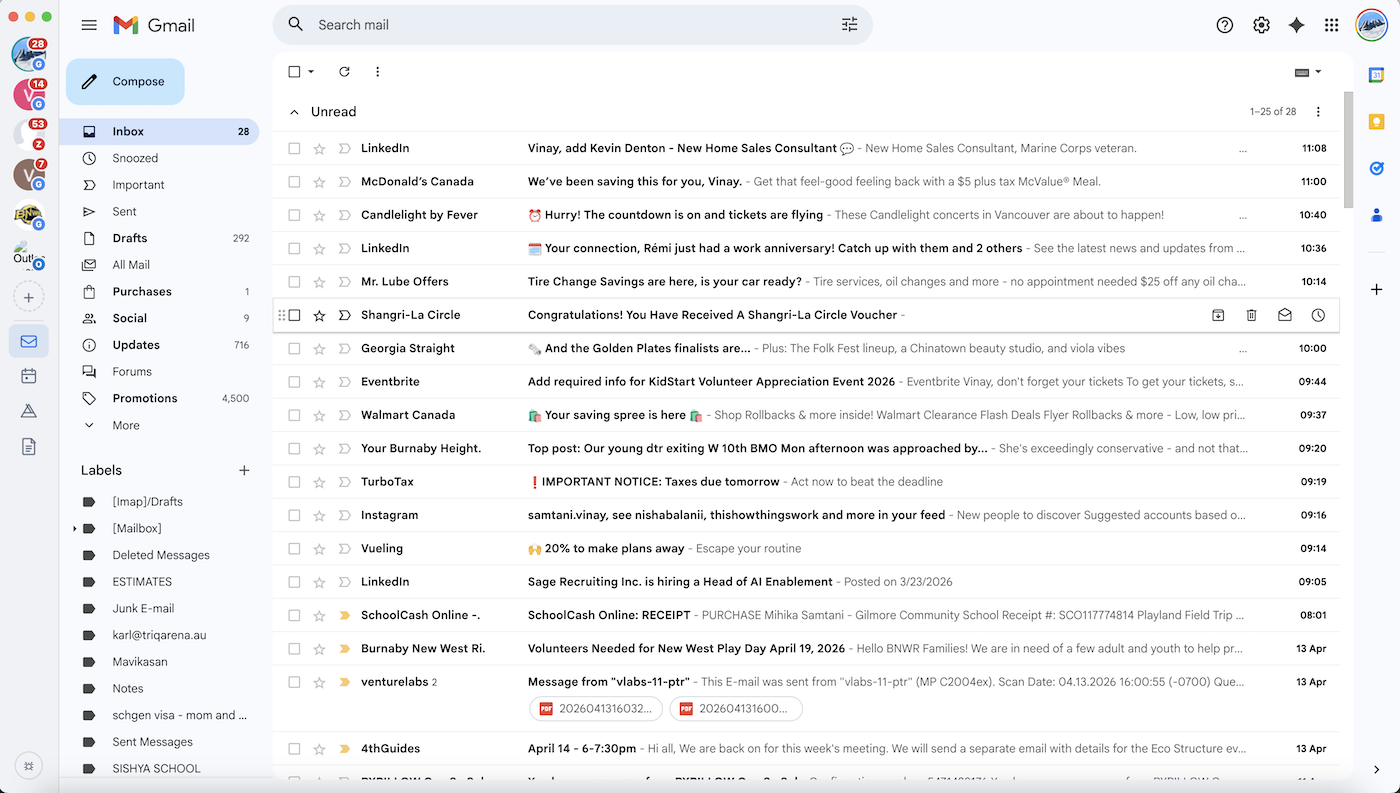
Mailwing wraps Gmail, Outlook Web, Zoho Mail, Fastmail, Yahoo Mail, and ProtonMail — along with their companion apps — in a single native window. Each account gets a fully isolated browser session, a live unread badge, and desktop notifications that click straight to the right inbox.





Download
All releases are built automatically by CI on every tag push — see Releases.
macOS — first launch
Mailwing is signed with an Apple Developer ID certificate and notarized by Apple, so it opens with a normal double-click — no Gatekeeper workaround required.
> If you ever see "Mailwing is damaged and can't be opened", the download was corrupted in transit — re-download the DMG. As a last resort, clear the quarantine flag:
>
> bash > xattr -dr com.apple.quarantine /Applications/Mailwing.app >
Screenshot
Features
| Feature | Details |
|---|
| Multi-provider | Google (Gmail, Calendar, Drive, Docs), Outlook (Mail, Calendar, OneDrive, People), Zoho (Mail, Calendar, WorkDrive, Writer), Fastmail (Mail, Calendar, Contacts), Yahoo (Mail, Calendar), ProtonMail (Mail, Calendar, Drive) |
| Multiple accounts | Add any number of accounts per provider; each gets a fully isolated session (cookies, localStorage, login state) |
| Live unread badges | Inbox counts shown on account buttons, the macOS dock icon, and the system tray |
| Desktop notifications | Native OS notifications when new mail arrives; click to jump to the right inbox |
| System tray | Quick-access menu for all accounts; app persists when the window is closed on macOS |
| mailto: handler | Registers as the default mail client; clicking mailto: links anywhere opens a compose window |
| Ad & tracker blocking | Network-level request filter that leaves all provider domains untouched |
| Dark mode | Follows the OS light/dark preference automatically |
| Window state | Remembers size, position, and maximised state between launches |
| Drag-to-reorder | Drag account avatars in the sidebar to rearrange them |
| Accent colours | Right-click any account to assign a custom colour or remove it |
| Keyboard shortcuts | Switch accounts and reload the active view without touching the mouse |
| Cross-platform | macOS (Intel + Apple Silicon), Windows, Linux |
Requirements
Installation
# 1. Clone the repo
git clone https://github.com/vinaysamtani/mailwing.git
cd mailwing

# 2. Install dependencies
#    (postinstall automatically generates the app icons in build/)
npm install

# 3. Launch
npm start
On first launch the sidebar is empty — click + to add your first account.
Adding accounts
- Click the + button at the bottom of the sidebar
- Choose a provider from the native popup menu
- Sign in through the page that opens; sessions are isolated per account
- Your avatar and live unread count appear automatically after login
- Right-click any avatar to change its accent colour or remove the account
- Drag avatars to reorder them in the sidebar
Keyboard shortcuts
| Shortcut | Action |
|---|
Cmd/Ctrl + 1 | Switch to account 1 |
Cmd/Ctrl + 2 | Switch to account 2 |
Cmd/Ctrl + 3 – 9 | Switch to accounts 3 – 9 |
Cmd/Ctrl + R | Reload the current view |
Packaging for distribution
npm run dist           # build for the current platform
npm run dist:mac       # macOS DMG (universal: x64 + arm64)
npm run dist:win       # Windows NSIS installer
npm run dist:linux     # Linux AppImage
Built artefacts land in dist/. electron-builder is already listed in devDependencies.
> Cross-compiling (e.g. building a Windows installer on macOS) requires additional tooling. See the electron-builder multi-platform docs.
Setting Mailwing as your default mail client
| Platform | Steps |
|---|
| macOS | The OS prompts you automatically the first time a mailto: link is opened |
| Windows | Settings → Default apps → Email → select Mailwing |
| Linux | xdg-settings set default-url-scheme-handler mailto mailwing |
Project structure
src/
  shared/
    constants.js        IPC channel names and shared constants
    providers.js        Provider registry — the only file to edit when adding a provider
  main/
    index.js            App bootstrap, window creation, mailto: handling
    accounts.js         Account CRUD (persisted via electron-store)
    viewManager.js      BrowserView lifecycle and layout management
    sessionManager.js   Per-account session partitions and ad-block hooks
    adBlockList.js      Ad/tracker domain blocklist
    tray.js             System tray and macOS dock badge
    notifications.js    Desktop notification firing and click routing
    windowState.js      Window size/position persistence
    darkMode.js         nativeTheme watcher
    ipcHandlers.js      All IPC channel registrations
  renderer/
    index.html          Sidebar shell HTML
    preload.js          contextBridge API exposed to the renderer as window.mailwing
    renderer.js         Sidebar logic, account/service switching, keyboard shortcuts
    styles.css          Sidebar layout and dark-mode styles
scripts/
  generate-icons.js     Generates PNG icons at build time (runs as postinstall)
build/                  Generated icons (git-ignored; recreated by npm install)
Adding a new provider
All provider configuration lives in src/shared/providers.js. No other files need changing — add a new key to the PROVIDERS object:
myProvider: {
id: 'myProvider',
label: 'My Provider',
color: '#ff0000', // sidebar accent colour
services: [
{ id: 'mail', label: 'Mail', url: 'https://mail.example.com' },
{ id: 'calendar', label: 'Calendar', url: 'https://calendar.example.com' },
],
defaultService: 'mail',
// Extract unread count from the page title
unreadTitleRegex: /\((\d+)\)/,
// JS snippet injected into the mail page for DOM-based unread polling
unreadScript: `(function(){
var el = document.querySelector('.unread-count');
return el ? parseInt(el.textContent, 10) : -1;
})()`,
// CSS selector for the user avatar <img />
avatarSelector: '.avatar img',
// Build the compose URL for mailto: links
mailtoComposeUrl: (rawUrl) =>
\`https://mail.example.com/compose?mailto=\${encodeURIComponent(rawUrl)}\`,
// Domains the ad-blocker must never block
safeDomains: ['example.com'],
},
Contributing
Contributions are welcome. A few guidelines:
- Fork the repository and create a feature branch from
main.
- Keep changes focused — one feature or fix per pull request.
- Test manually on the platforms your change affects.
- No build step — the project is plain CommonJS; avoid introducing a transpiler or bundler.
- Open an issue first for significant changes so the approach can be discussed before you invest time in an implementation.
To report a bug, open a GitHub issue with:
- Your OS and version
- Steps to reproduce
- What you expected vs. what actually happened
License
MIT