WinDV 2

A small Windows tool for moving DV video between a camcorder and disk over FireWire
(IEEE 1394):
- Capture: pull DV from a camcorder and write type-1 or type-2 AVI files, with
automatic scene splitting on timecode discontinuities and date/time-based filenames.
- Record: push AVI files back out to DV tape, optionally concatenating several
files into one continuous recording.
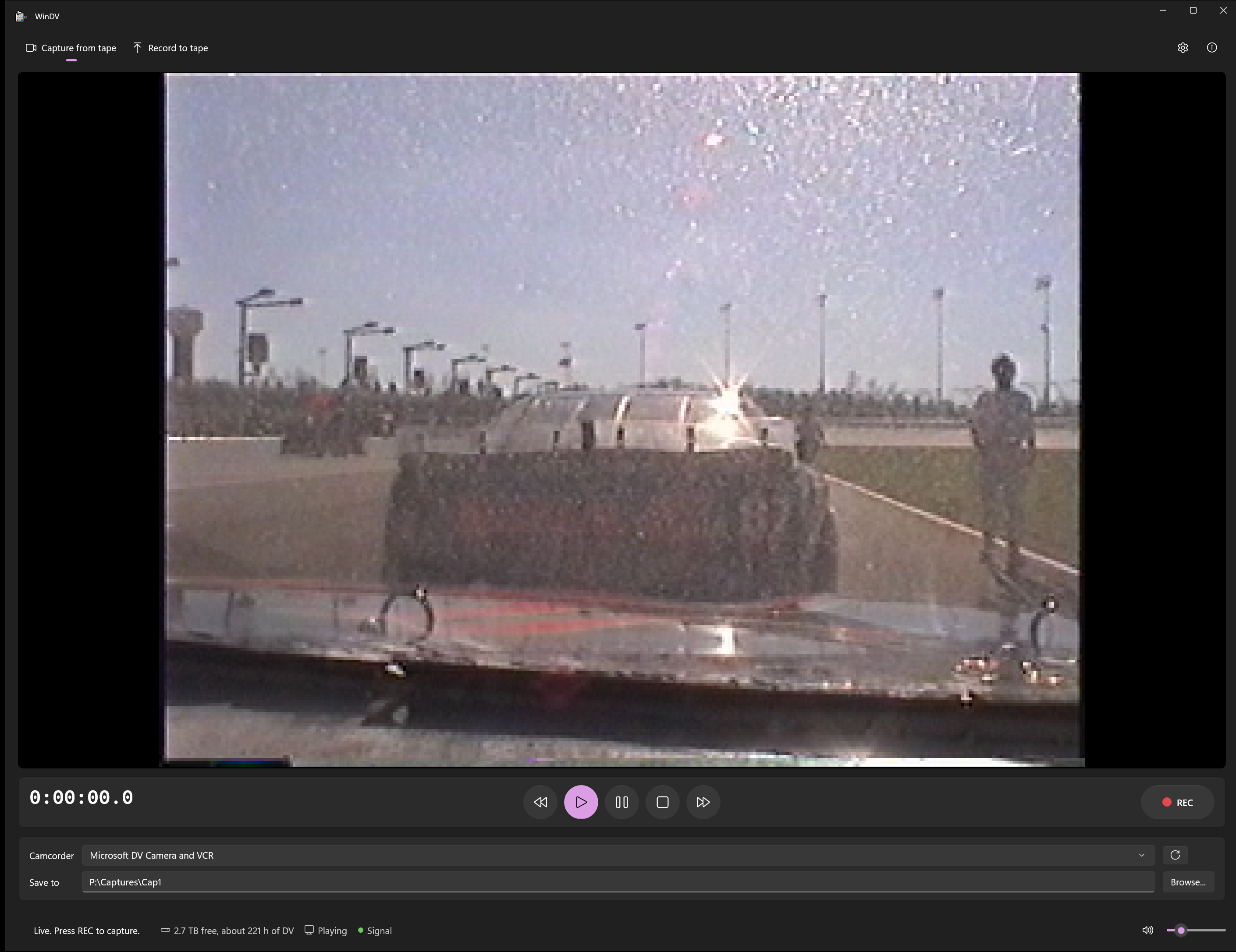
WinDV 2 is by Makoto, .
Download
Go to the latest release and pick
one file:
WinDV-x.y.z-x64-Setup.exe is the right choice for most people. Run it and
WinDV 2 appears in the Start menu. It installs for your user account only, so it doesn't ask
for administrator rights, and you can remove it from Settings > Apps.WinDV-x.y.z-x64-portable.zip needs no installing. Right-click the zip, choose
Extract All..., then run WinDV.exe in the extracted folder. (The app folder next
to it holds the rest of the program and must stay there.)
The x86 files are only for 32-bit Windows.
WinDV tells you when a new version is out. At most once a day, it asks GitHub for the
number of the latest release and nothing else, and it never downloads anything by
itself. You can turn this off in Settings.
The downloads are not code-signed, so Windows may show "Windows protected your PC"
the first time. Click More info, then Run anyway.
Thanks
WinDV was written by Petr Mourek (2002–2003, ), and for two
decades it has been the tool people reach for to get their DV tapes onto a computer.
He published its source so that others could build on it, and WinDV 2 is built on it:
his DV capture engine is still at the heart of this version. Thank you, Petr.
What's new in 2.0
WinDV 2 starts from the 1.2.3 source and modernizes it. It builds with Visual Studio
2026 as a Unicode C++20 application for both x86 and x64, and a number of long-standing
bugs are fixed (see Changes from the original). File
naming and registry settings are unchanged, so an existing WinDV configuration carries
over.
The front end is a new WinUI 3 app (ui/, C#) over the same DirectShow engine. It
has a Windows 11 look (Mica, Fluent controls, light and dark themes) and VCR-style
transport controls: Rewind, Play, Pause, Stop, Fast-forward, plus a separate red REC
button that writes AVI files while the tape runs.
The original MFC dialog was kept alongside it, unchanged, until the new app had been
tested with a camcorder. That's now done, and the MFC app has been retired to
legacy/app/ (kept for reference; not part of the build).
Requirements
- Windows 10 or 11
- Visual Studio 2026 with these components:
- Desktop development with C++
- C++ MFC for latest v145 build tools (x86 & x64). This one is easy to miss and
is not part of the default C++ workload. The engine needs it for ATL (
atlbase.h),
which on this toolset only comes bundled with MFC. Without it the build fails.
- Windows 11 SDK (10.0.26100 or similar)
- .NET desktop development or just the .NET 10 SDK, for the WinUI app. The
Windows App SDK comes from NuGet at restore time, so the first build needs network
access.
No DirectX SDK is required. The DirectShow base classes are vendored in this repo;
see external/baseclasses/.
Building
Open WinDV.sln in Visual Studio and build, or from a shell:
& "C:\Program Files\Microsoft Visual Studio\18\Community\MSBuild\Current\Bin\MSBuild.exe" `
  WinDV.sln /restore /p:Configuration=Release /p:Platform=x64
Platform is Win32 or x64; Configuration is Debug or Release. (For the C#
project the solution maps Win32 to x86.) Output:
| What | Where |
|---|
| New WinUI app (run this folder as is) | ui\bin\\\net10.0-windows10.0.26100.0\win-\WinDV.exe |
| Engine DLL used by it | \\WinDV.Native.dll, copied next to the app |
| Tests | \\WinDV.Tests.exe |
| Portable-zip launcher | \\WinDVLauncher.exe |
The C++ code is warning-free at /W4 and the C# at the default level; both treat
warnings as errors. Everything links the CRT statically, and the WinUI app is
self-contained (.NET and the Windows App SDK runtime are in its folder), so neither
app needs anything installed.
Packaging a release
After a Release build of a platform, build/package.ps1 publishes
the WinUI app as Native AOT and writes the two downloads to dist\. AOT compiles the C#
app into one native WinDV.exe, so .NET's runtime isn't shipped, and only WinUI's
English resources are kept. That makes the app about 60 MB instead of 170 MB. A normal
build still runs on the JIT. The installer needs Inno Setup 6
(winget install JRSoftware.InnoSetup), and -NoInstaller builds only the zip.
build\package.ps1 -Arch x64 # or x86 (after a Win32 build)
WinDV---Setup.exe: built from
installer/WinDV.iss.WinDV---portable.zip: the top level holds a small launcher
(launcher/, built as WinDVLauncher.exe and renamed WinDV.exe) and this README.
The launcher starts app\WinDV.exe, and the app's runtime stays in app\.
CI runs the same script for both architectures.
Tests
The solution also builds WinDV.Tests.exe in the same \\
folder as WinDV.Native.dll. It covers the logic that doesn't need a camcorder: DV
timestamp decoding, capture file numbering,
date/time format validation, command-line parsing, the frame queue, and what each
transport button asks the deck to do.
x64\Release\WinDV.Tests.exe
The DirectShow and UI code still needs a real device to test: capture type-1 and
type-2 AVIs, check the scene split on a timecode gap, record back to tape, and try
DV transport control on and off.
Running
Connect a DV camcorder over FireWire, set it to
VTR/VCR (tape) mode, and it appears in the Camcorder list.
In the WinUI app:
- Capture from tape. The transport buttons drive the camcorder, and the preview
follows the tape. Fast-forward and Rewind wind a stopped tape, and cue (search with a
picture) while it is playing or paused. REC starts and stops writing AVI files.
With Let WinDV run the tape turned on in Settings, REC also starts the tape.
- Record to tape. Choose or drop AVI files, then press Play. Pause holds the current
frame on the output, and Stop ends the recording.
- Keyboard: Ctrl+Space play, Ctrl+P pause, Esc stop, Ctrl+Left/Right rewind and
fast-forward, Ctrl+R REC.
> DirectShow DV capture is exclusive. Only one process can hold the camcorder at a
> time. If another copy of WinDV (or any other capture program) is already using the
> device, the status bar shows
> Error: Can't connect to the DV device (is another program using it?).
> Close the other program first.
If the camcorder is in stills/photo mode, Windows loads its still-image driver instead
of the DV one and it will not show up as a capture device.
Command line
WinDV capture [-exit] [[HH:]MI:]SS[.ss]
WinDV record  [-exit]  [ ...]
A capture duration of 0 captures until stopped. -exit closes WinDV when the
capture or recording finishes. Quote paths that contain spaces.
Repository layout
WinDV.sln                    Solution: all projects below
ui/                          WinDV.UI: the WinUI 3 app (C#, .NET 10, unpackaged, self-contained)
  Interop/                   P/Invoke over windv_api.h, and the DVEngine wrapper
  ViewModels/MainViewModel   Transport commands, status polling, pipeline lifecycle
  Views/                     Settings screen, About dialog
  Services/SettingsStore     Registry settings (the same key WinDV has always used)
  Services/UpdateChecker     Asks GitHub for the latest release (the "new version" notice)
native/                      WinDV.Native: the engine as a DLL with a flat C API (windv_api.h)
engine/                      WinDVEngine: the DirectShow engine (Win32 + ATL, no MFC)
core/                        WinDVCore: standard C++ logic with no MFC or DirectShow
tests/                       WinDV.Tests: doctest unit tests for core/
launcher/                    WinDVLauncher: the portable zip's WinDV.exe, starts app\WinDV.exe
installer/                   Inno Setup script for the release installer
build/package.ps1            Packages a built app: installer + portable zip (used by CI)
docs/screenshot.png          The screenshot above (the preview shows a synthetic image)
external/baseclasses/        Vendored DirectShow base classes (MIT, Microsoft)
external/doctest/            Vendored doctest 2.4.12 (MIT)
legacy/                      Reference only, not part of the build: original VC6
                             WinDV.dsp/.dsw/.clw, a stale CppProperties.json, and
                             legacy/app/ (the original MFC front end, retired once the
                             WinUI app was hardware-tested)
Each project folder keeps its .cpp and .h files side by side. Build output goes to
\\ at the repository root for every project.
The DirectShow engine
engine/ has one file pair per piece: FrameInterfaces.h, FilterGraph,
InputGraph, OutputGraph, DVDevice (enumeration, transport, camcorder in and out),
AviSource, AviWriter, Monitor and DVEngine (the controller).
It is built around two interfaces: CFrameSource produces DV frames and
CFrameHandler consumes them. A windv::FrameQueue ring buffer sits between them so
capture and disk I/O run on separate threads.
Sources and sinks are custom DirectShow filters (CInputGraph wraps a CBaseInputPin,
COutputGraph a CBaseOutputPin). These let the application see raw DV frames rather
than letting the graph handle everything internally:
Sources (CFrameSource) | Sinks (CFrameHandler) |
|---|
CDVInput: camcorder | CDVOutput: out to DV tape |
CAVIReader: one AVI file | CAVIWriter: out to an AVI |
CAVIJoiner: several AVIs | CMonitor: on-screen preview |
DVEngine owns the pipeline, holds the state machine
(Idle/Capturing/Recording/…), runs the capture and record worker threads, and
sends deck transport commands (DVTransport; the button logic is in
core/TransportLogic). It reports to a DVEngineEvents sink; WinDV.Native passes
those events to the C# app as callbacks.
WinDV.Native runs the engine on a thread of its own in the COM multithreaded
apartment and forwards every API call to it, because the WinUI UI thread is
single-threaded. The preview is a plain Win32 child window that the C# app positions
over a placeholder in the layout. XAML can't draw over it, so it is hidden while
settings or dialogs are showing.
Errors are thrown as DShowError, which carries the HRESULT and a message saying
what failed. Errors on worker threads are stored in DVEngine, and the front end is
notified; the WinUI app shows them in an InfoBar.
Changes from the original
Bugs fixed
- The device picker listed only every other device (a loop incremented its index twice).
- An exception on a worker thread terminated the process. This happened when a new
capture file could not be created (full disk, bad path) or when the next file of a
multi-file recording failed to open. These errors now appear in the status bar.
- Typing an invalid
% code into the date/time format box in the settings passed it
straight to strftime. The Universal CRT treats that as an invalid parameter and
terminates the program. Formats are now validated.
- Closing or switching tabs could hang forever if the preview never received a buffer.
- COM objects leaked on every error path. Several unchecked HRESULTs could dereference
null pointers, for example opening a file that isn't an AVI.
- Paths longer than 255 characters were silently truncated. Command-line paths with
spaces were split apart.
- If renaming the finished capture from its temporary
~ name failed, the file was
left behind with no warning. The failure is now reported.
- Picking a capture file inside a folder whose name contains a dot cut the path at
that dot.
- A stale "selected tab" registry value caused undefined behaviour at startup.
- The DV recording timestamp was truncated from
time_t to int. Garbage subcode
data was fed to mktime without checks.
- State shared between the UI, capture and DirectShow threads had no
synchronization. It now uses atomics and mutexes, and the frame queue uses condition
variables.
EveryNth = 0 in the registry caused a division by zero.- Every error used to read
Error: Error. Messages now say what failed and include the
DirectShow error text.
Modernization
- Unicode build (non-ASCII file names work) and a new x64 configuration.
- C++20,
/W4 with warnings as errors, /sdl, Control Flow Guard, and individual
/Zc conformance switches. /permissive- stays off because the vendored streams.h
does not compile under it.
CComPtr for all COM references, std::unique_ptr ownership, std::jthread
workers, and std::span for frame buffers.- Pure logic moved to
core/ (WinDVCore) with unit tests.
- ClassWizard markers and VC6 boilerplate removed. Sources are formatted with
.clang-format.
- WinDV keeps the machine awake while capturing or recording, not just the display.
Petr's unfinished TODO list
The original author's changelog listed a few things that never made it into a release.
They are done now:
- I/O error checking. Every frame written is checked, and so are the file
writer's error events. A write failure mid-capture (full disk, unplugged drive) now
stops with a message and keeps what was captured, instead of being ignored.
- Free disk space. The capture tab shows free space and roughly how many hours of
DV fit. REC refuses to start with less than 256 MB free. A running capture stops
itself at that reserve, with the file finished properly.
- End-of-signal auto-stop (optional, in Settings). When no video arrives for N
seconds, for example at the end of the recorded part of a tape, the capture
finishes by itself. It only triggers after video has arrived, so starting REC
before the tape rolls is safe.
- Only DV devices are listed. Webcams and other video sources are left out. A DV
device is recognised by its FireWire AV/C bus, and if none is found, every device
is listed.
(The other items from his unreleased 1.2.4 were already covered: the fix for folder
names containing dots, and the switch away from the old Platform SDK.)
Unchanged on purpose
- Registry settings live under the same key (
HKCU\Software\Petr Mourek\WinDV 1.2,
named after the app title "WinDV 1.2") with the same value names, so an existing
configuration carries over. The one exception is DiscontinuityThreshold, spelled
DiscontinuityTreshold by WinDV 1.2.3, so that setting is not carried over.
- Capture file naming, the command-line syntax, and the MFC dialog layout.
- The vendored DirectShow base classes. Only their project file changed, to add x64
and switch to Unicode.
Vendored dependencies
The engine (engine/DShowBase.h, also used as native/'s precompiled header) includes
``, the DirectShow base classes. These never shipped in
the Windows SDK; they came from the DirectX SDK samples, which are long discontinued.
(Confusingly, the Windows SDK does still ship a prebuilt strmbase.lib, just not its
headers.)
external/baseclasses/ is therefore a copy of the base class
sources from Microsoft's
Windows-classic-samples
repository, built from source as a static library so headers and binary always match.
Only a project file was added; no source file was modified.
external/doctest/ is the single-header
doctest 2.4.12 test framework, used only by
WinDV.Tests.
License
WinDV 2 is released under the MIT License.
The vendored base classes under external/baseclasses/ are MIT licensed by Microsoft.
doctest under external/doctest/ is MIT licensed by Viktor Kirilov.
The original WinDV was distributed by Petr Mourek as freeware with its source. His
site says of the code: "You can use the code without any restrictions. It would be nice
if you mention the origin." This project does so, gratefully (see Thanks).