shelfbox
Overview
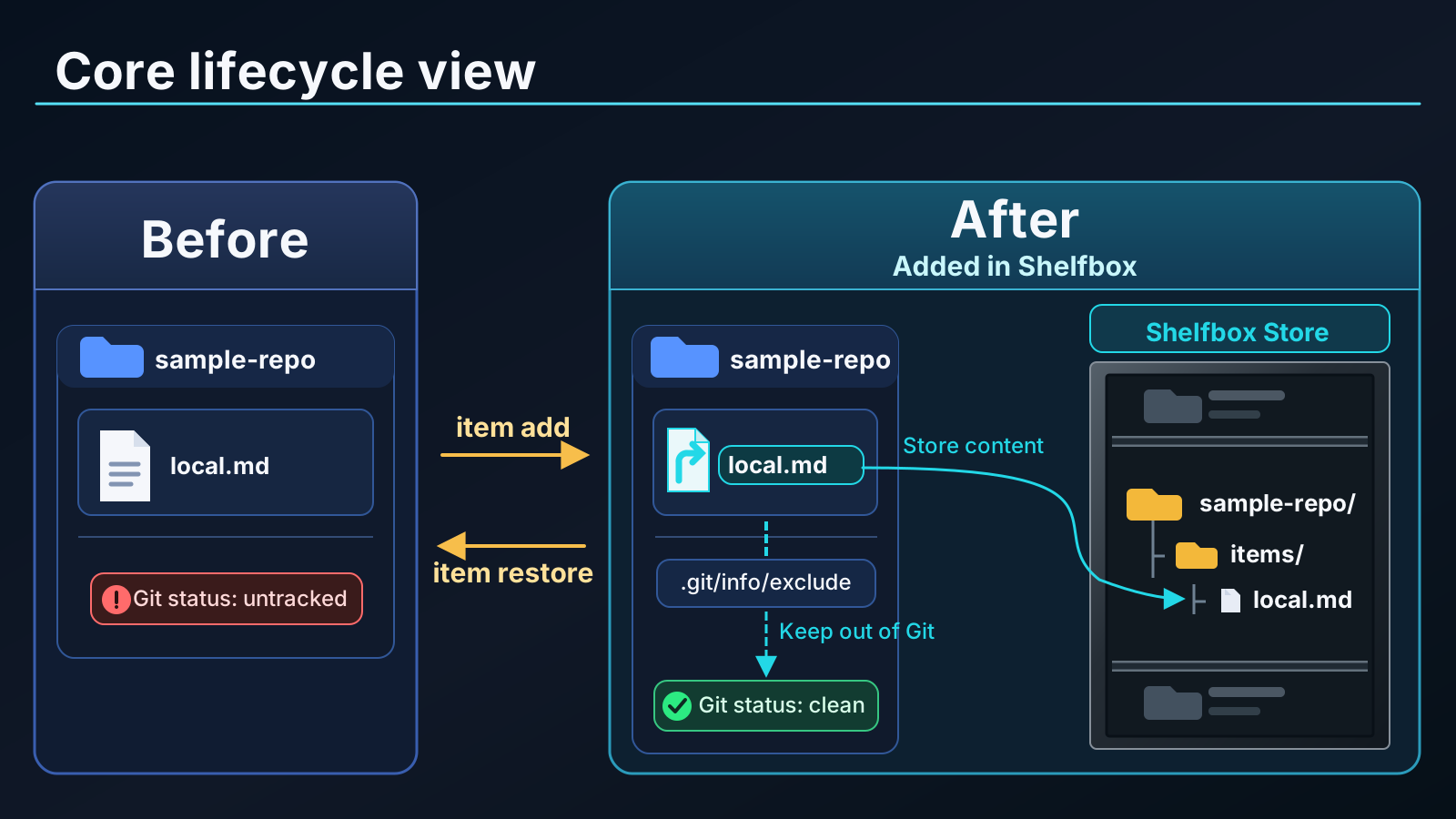
Shelfbox keeps personal files—AI agent instructions and skills, notes, scripts, and machine-local configuration—visible in your editor but out of Git. It stores canonical content in a local store and helps restore it after recloning or in a worktree.
Why Shelfbox
AI agent instructions, skills, notes, scripts, and machine-local configuration often need to live inside a repository tree so editors and tools can discover them—but they shouldn't be committed.
Common workarounds have limits:
.gitignore — works for untracked files, but it is shared repository policy rather than a personal local-file mechanism..git/info/exclude — keeps ignore rules local, but only records paths. It does not preserve the files themselves or help restore them after a reclone.- Manual move-and-symlink setups — keep files outside the repository, but leave ownership, recovery, and cleanup to the user.
Shelfbox manages that lifecycle explicitly: it stores canonical content outside the repository, materializes files at their original paths, keeps them excluded from Git, and can repair or recover that local context across worktrees and after recloning.
Quick Start
# Create a local-only file in your repository
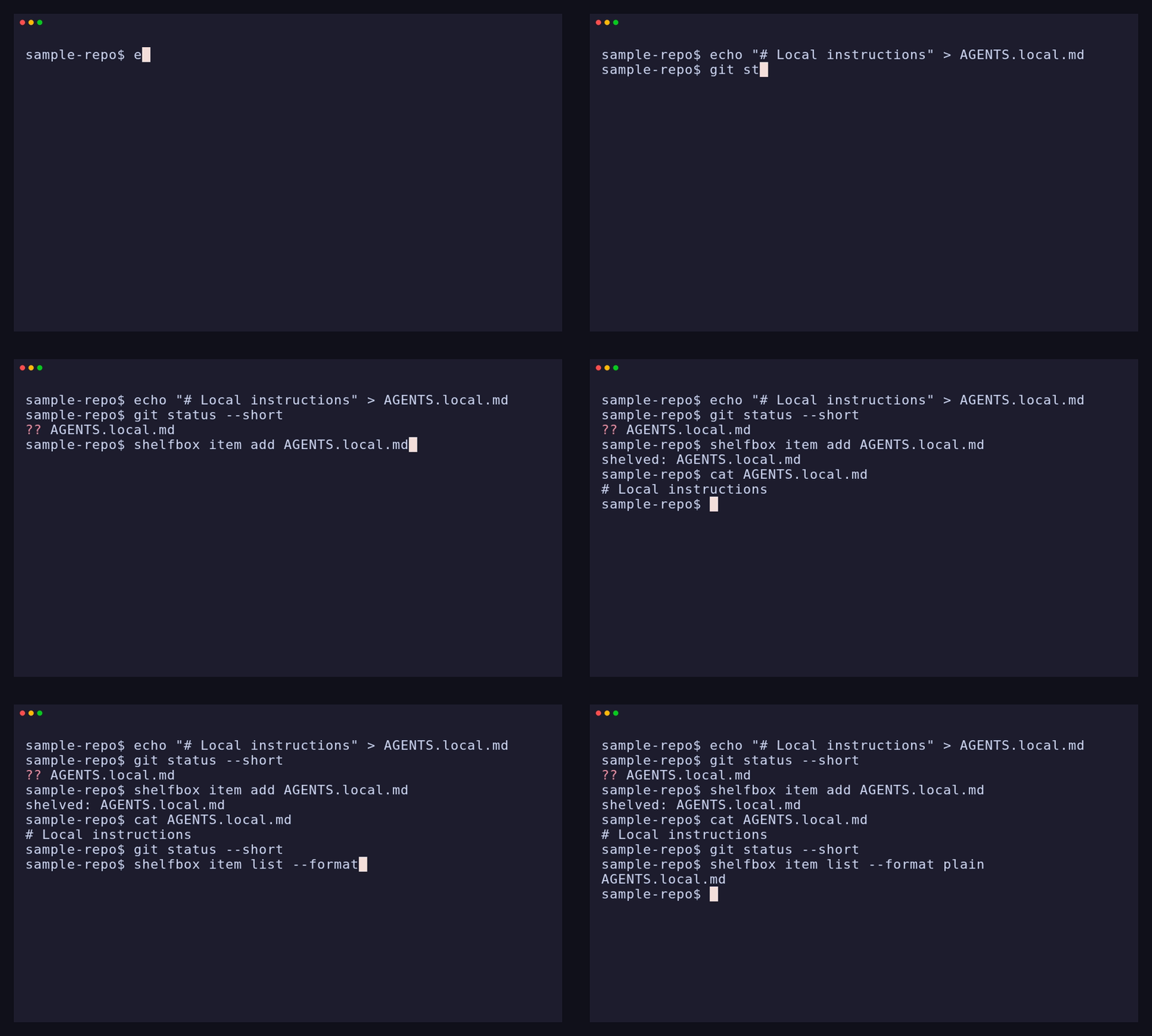
echo "# Local instructions" > AGENTS.local.md

# Confirm it exists and is still untracked
git status --short

# Shelve it (keeps the path visible, stores canonical content outside Git)
shelfbox item add AGENTS.local.md

# The file remains available at its original path
cat AGENTS.local.md

# Confirm Git no longer reports it
git status --short

# Confirm shelfbox is managing it
shelfbox item list --format plain
For an annotated first workflow, see Start Managing a Local File.
For linked Git worktrees, run shelfbox repo repair in the new worktree to restore managed files. See Use a Linked Git Worktree.
Installation
For source builds and installation script options, see the installation guide.
To remove shelfbox and optionally clean up its local data, see Uninstallation.
Linux and macOS
Homebrew
brew install masa-kjm/tap/shelfbox
Pre-built binary
Download a pre-built binary from GitHub Releases.
The Unix installer uses ~/.local/bin by default.
curl -fsSL https://raw.githubusercontent.com/masa-kjm/shelfbox/main/scripts/install.sh | sh
Windows
Scoop
scoop bucket add masa-kjm https://github.com/masa-kjm/scoop-bucket
scoop install shelfbox
Pre-built binary
Download a pre-built binary from GitHub Releases.
The PowerShell installer uses $Env:LOCALAPPDATA\Programs\shelfbox\bin by default.
irm https://raw.githubusercontent.com/masa-kjm/shelfbox/main/scripts/install.ps1 | iex
> [!IMPORTANT]
> Windows setup: Before using shelfbox, enable best-effort durability:
>
> powershell > shelfbox config set mutation_durability best-effort >
>
> Windows does not provide the directory-level durability guarantees required by the default require mode.
> Symlink materialization also requires Developer Mode or an elevated shell. If symlinks are unavailable, use copy mode.
Other Installation Methods
Cargo
With Rust 1.75 or later installed:
cargo install shelfbox --locked
More Features
- Recovery after reclone — re-associate a new clone with an existing shelf after restoring
repos/: repo reclaim
- Linked Git worktrees — reuse shelved items across worktrees by running
repo repair in a newly created worktree: Use a Linked Git Worktree
- Directory shelving — shelve eligible files under a directory; each file remains an independent item:
item add
- Copy mode — leave an independent regular file instead of a symlink, useful when symlink creation is restricted: Copy mode spec
- Store recovery — rebuild local cache files from canonical manifests:
store rebuild-index
Configuration
Optional config at ~/.config/shelfbox/config.toml (respects $XDG_CONFIG_HOME):
# store = "/mnt/data/shelfbox-store"   # default: ~/.local/share/shelfbox
# default_format = "table"             # table | plain | json
# materialization = "symlink"          # symlink (default) | copy
# mutation_durability = "require"      # require (default) | best-effort
See Config reference for all options and details.
Non-goals
Shelfbox is a single-machine tool. Placing the store on external or network-synced storage is not officially supported — sync conflicts may leave items in an inconsistent state.
Multi-machine sync, secret encryption, and team-shared files are out of scope.
Documentation
- Installation — installation methods, source builds, and Windows setup
- Workflows — start managing a local file and follow common recovery procedures
See docs/index.md for the full documentation set.
License
MIT