Snow App is a developer-focused desktop application that integrates AI-powered chat, terminal emulation, SSH remote management, Git tooling, and a built-in browser panel into a single unified workspace. It leverages a Rust native module for performance-critical operations such as SQLite storage, AI streaming, file watching, and HTTP requests. Additional capabilities include MCP support, AI image generation, a skills system, hooks, sub-agents, codebase semantic search, and AI-driven terminal sessions.
README
Snow App
> [!WARNING] > macOS Users: If the app shows "damaged" or "cannot be opened" after installation, run the following command in Terminal:
>
> bash > sudo xattr -rd com.apple.quarantine /Applications/Snow\ App.app >
>
> You will be prompted to enter your login password to remove the quarantine attribute.
> High-performance cross-platform desktop application powered by Electron, React, TypeScript, and Rust.
Snow App is a developer-focused desktop application that integrates AI-powered chat, terminal emulation, SSH remote management, Git tooling, and a built-in browser panel into a single unified workspace. It leverages a Rust native module for performance-critical operations such as SQLite storage, AI streaming, file watching, and HTTP requests.
Features
AI Chat - Streaming AI assistant with markdown rendering, syntax highlighting, and configurable system prompts
Integrated Terminal - Full PTY-based terminal emulation powered by node-pty and xterm.js
SSH Management - Connect to and manage remote servers via SSH with credential persistence
Git Panel - Visual Git diff viewer and repository management
Browser Panel - Built-in browser with proxy support, network inspection, login-state management, and AI-driven automation
MCP Support - Model Context Protocol integration for extensible AI tooling
AI Image Generation - Built-in text-to-image / image editing (OpenAI / Gemini multi-channel); generated images are persisted into an image library
Skills System - Install / enable / manage AI skills (SKILL.md) that dynamically extend the agent
Hooks - Lifecycle hooks that run custom commands or prompts before/after events like requests and compression
Sub-Agents - Independent AI execution loops for parallel, complex multi-step tasks
Codebase Semantic Search - Embedding-index-based code search plus multi-language code symbol location (codelens)
Plan / Goal Modes - Plan-first and autonomous long-running task execution modes
Interactive Terminal Sessions - The AI can drive persistent PTY sessions for long-running and interactive commands
Codebase Explorer - Project file tree with workspace directory management
i18n - Multi-language support with a locale system
Settings Management - Granular configuration for API keys, custom headers, proxy, sensitive commands, and more
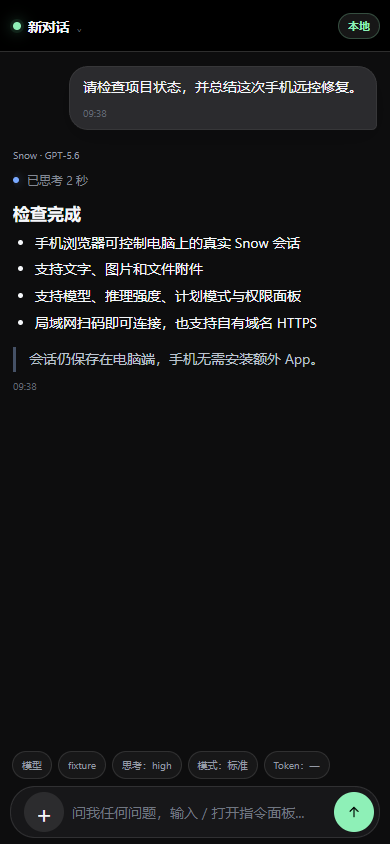
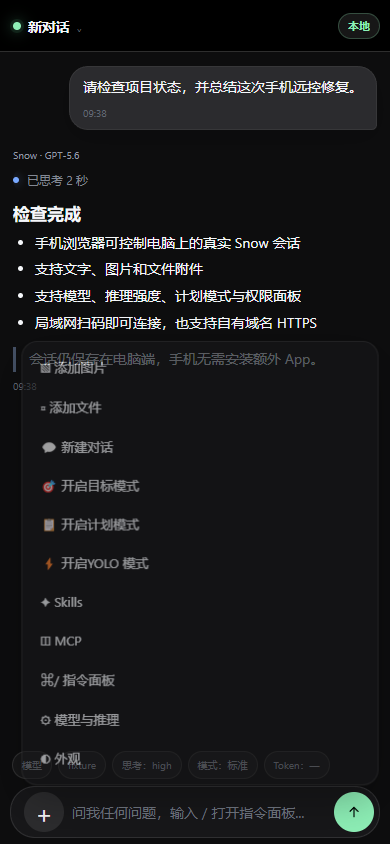
Mobile Remote Control - Continue conversations, switch workspaces and models, approve tools, answer questions, and send images/files from a phone over LAN or a self-hosted public tunnel
Cross-Platform - Runs on macOS, Windows, and Linux
Mobile Remote Control
Pair a phone from Settings → Mobile Remote Control and control the current Snow session from a mobile browser. LAN pairing works without a cloud service; optional public access uses a self-hosted, authenticated TLS tunnel and supports one-time pairing, session revocation, permission prompts, and sensitive-output redaction. See the setup guide.
The initial version of Mobile Remote Control was contributed by zerio1 through PR #130, then integrated and refined by Snow App.
Conversation and streaming
Actions, modes, and approvals
Tech Stack
Layer
Technology
Shell
Electron 37
Frontend
React 19, TypeScript 5.9
Bundler
electron-vite 4 (Vite 7)
Native
Rust 2021 Edition (napi-rs 3)
Packaging
electron-builder 26
Terminal
node-pty, xterm.js 6
SSH
ssh2
Storage
rusqlite (SQLite, bundled)
AI/HTTP
reqwest (multi-provider protocol adapters and streaming HTTP)