VookiImageViewer






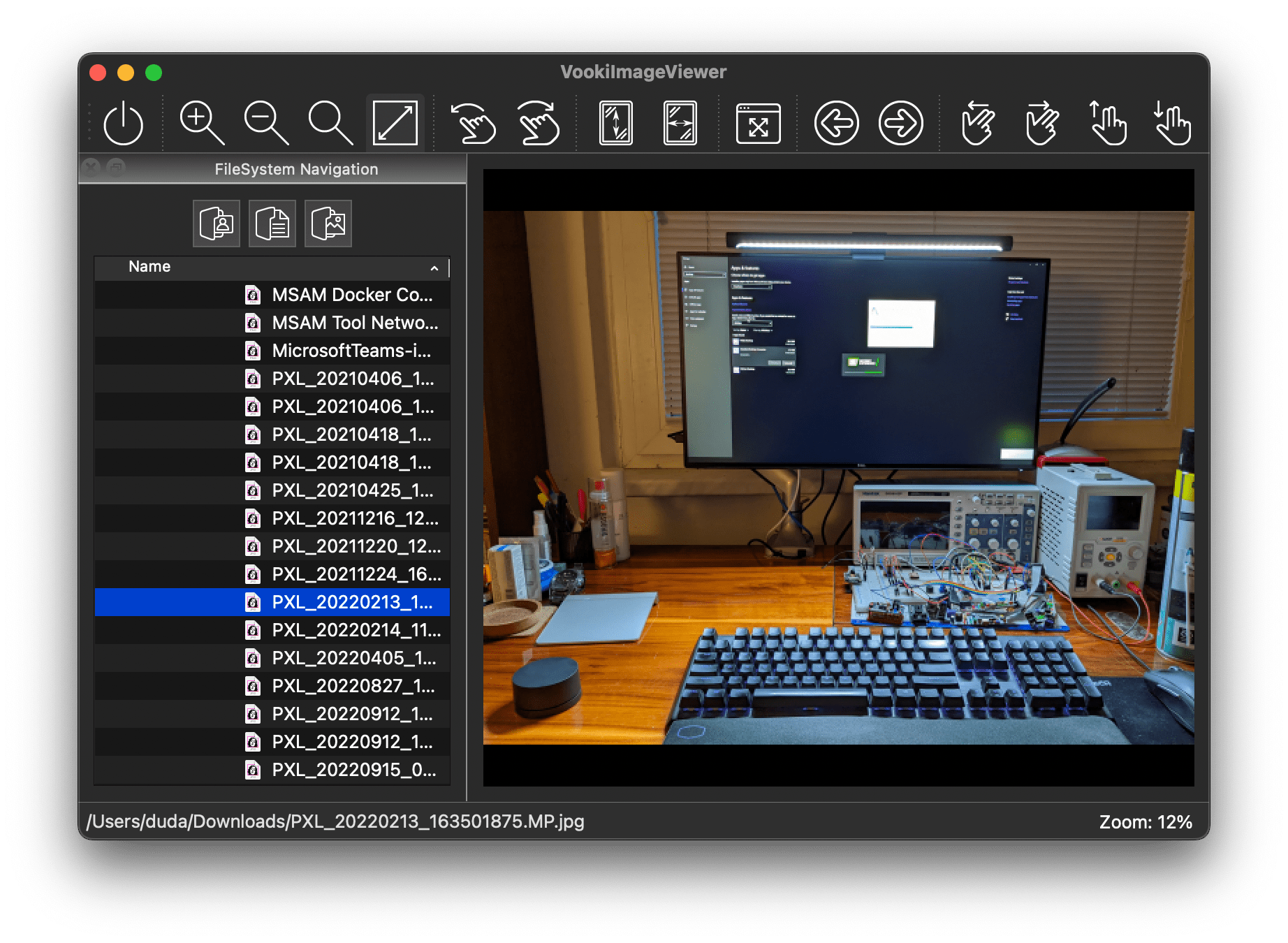
A lightweight image viewer for a fast image preview. It has been developed to have the same viewer available for all major operating systems - Microsoft Windows 11, macOS and GNU/Linux.
The main goal is to have a free-of-charge cross-platform viewer with a simple design and minimum functions that are commonly used.
- Transformations
- Flip (horizontal, vertical).
- Rotation (clockwise and counterclockwise in 90° steps).
- Zoom (in, out, original size, fit to window).
- Metadata information.
- Fullscreen or Window mode.
- Custom background color.
- Custom image border color.
- Remembers recent files.
- Supports Apple's high-definition trackpad gestures.
Looking for translators
🗒 If you are a native speaker of the non-US-English language and would like to help localize this application, please, see this guideline on how to join the localization team.
Supported image formats cover the very common formats as well as the rare ones. The viewer does not intentionally demosaic the RAW images, but only displays the embedded thumbnail.
| FORMAT | DESCRIPTION |
|---|
| ANI | Windows Animated Cursor |
| GIF | Graphic Interchange Format |
| JPG | Joint Photographic Experts Group |
| JXL | JPEG XL |
| PNG | Portable Network Graphics |
| PBM | Portable Bitmap |
| PFM | Portable FloatMap Image |
| PGM | Portable Graymap |
| PPM | Portable Pixmap |
| PXR | Pixar Image Computer |
| QOI | Quite OK Image Format |
| XBM | X11 Bitmap |
| XPM | X11 Pixmap |
| SCT | Scitex Continuous Tone Format |
| SVG | Scalable Vector Graphics |
| BMP | Windows Bitmap |
| XCF | Gimp |
| PSD | Photoshop Documents |
| RAS | Sun Raster |
| PCX | Personal Computer Exchange |
| RGB, RGBA, SGI, BW | SGI Images |
| PIC | Softimage |
| TGA | Targa |
| TIFF | Tagged Image File Format |
| ARW | Sony Alpha Raw [Inner thumbnail only] |
| CR2 | Canon Raw Version 2 [Inner thumbnail only] |
| DNG | Digital Negative [Inner thumbnail only] |
| ERF | Epson RAW File [Inner thumbnail only] |
| MOS | Leaf Raw Image File [Inner thumbnail only] |
| MRW | Konica Minolta RAW [Inner thumbnail only] |
| NEF | Nikon Raw Image File [Inner thumbnail only] |
| ORF | Olympus Raw Image File [Inner thumbnail only] |
| PEF | Pentax Raw Image File [Inner thumbnail only] |
| RAF | Fuji Raw Image File [Inner thumbnail only] |
| RW2 | Panasonic RAW Image File [Inner thumbnail only] |
| SRW | Samsung RAW Image File [Inner thumbnail only] |
| X3F | SIGMA X3F Camera RAW File [Inner thumbnail only] |
| [macOS/Windows only] HEIC | High-Efficiency Image File Format |
All operations have assigned shortcuts and all of them can be user re-assigned except the one which is used for Preferences on macOS.
| macOS | Windows | GNU/Linux | OPERATION |
|---|
| ⌥c | ALT+c | ALT+c | Clear recent file |
| q | q | q | Quit application |
| ⌘, | p | p | Preferences |
| f | f | f | Show image in fullscreen mode |
| , | , | , | Rotate left |
| . | . | . | Rotate right |
| h | h | h | Flip horizontally |
| v | v | v | Flip vertically |
| + | + | + | Zoom in |
| - | - | - | Zoom out |
| * | * | * | Zoom reset |
| w | w | w | Fit to window |
| [ | [ | [ | Previous image |
| ] | ] | ] | Next image |
| i | i | i | Scroll up |
| k | k | k | Scroll down |
| j | j | j | Scroll left |
| l | l | l | Scroll right |
| s | s | s | Toggle statusbar |
| n | n | n | Toggle filesystem navigation |
| t | t | t | Toggle toolbar |
| e | e | e | Toggle metadata information |
| F1 | F1 | F1 | About application |
| none | none | none | About components |
| none | none | none | About Qt |
| none | none | none | About supported formats |
All code developed during this project is GPLv3 licensed. Images as well as the 3rd-party components have their own licenses, see proper LICENSE files in a GitHub Source Tree.
Releases
Prebuilt binaries for Windows 11, Debian, Fedora, Ubuntu, and macOS, as well as sources, are available here..
| amd64 / x64 | arm64 / aarch 64 |
|---|
| macOS | ✅ | ✅ |
| GNU/Linux | ✅ | ✅ |
| Windows 11 | ✅ | ✅ |
Mac users can install the VookiImageViewer by the Homebrew.
brew tap vookimedlo/homebrew-vookiimageviewer
brew install --cask vookiimageviewer-macos
Windows users can install the VookiImageViewer by the Microsoft WinGet tool or by the application installer.
winget install --id MichalDuda.VookiImageViewer
Debian Trixie users can install the VookiImageViewer from the APT repository hosted by the cloudsmith.io for free.
apt-get install -y debian-keyring
apt-get install -y debian-archive-keyring
apt-get install -y apt-transport-https
keyring_location=/usr/share/keyrings/michal-duda-vookiimageviewer-archive-keyring.gpg
curl -1sLf 'https://dl.cloudsmith.io/public/michal-duda/vookiimageviewer/gpg.EF5E62B51DE78AFF.key' |  gpg --dearmor > ${keyring_location}
curl -1sLf 'https://dl.cloudsmith.io/public/michal-duda/vookiimageviewer/config.deb.txt?distro=debian&codename=trixie' > /etc/apt/sources.list.d/michal-duda-vookiimageviewer.list
apt-get update
apt-get install vookiimageviewer
Debian Forky users can install the VookiImageViewer from the APT repository hosted by the cloudsmith.io for free.
apt-get install -y debian-keyring
apt-get install -y debian-archive-keyring
apt-get install -y apt-transport-https
keyring_location=/usr/share/keyrings/michal-duda-vookiimageviewer-archive-keyring.gpg
curl -1sLf 'https://dl.cloudsmith.io/public/michal-duda/vookiimageviewer/gpg.EF5E62B51DE78AFF.key' |  gpg --dearmor > ${keyring_location}
curl -1sLf 'https://dl.cloudsmith.io/public/michal-duda/vookiimageviewer/config.deb.txt?distro=debian&codename=forky' > /etc/apt/sources.list.d/michal-duda-vookiimageviewer.list
apt-get update
apt-get install vookiimageviewer
Ubuntu Plucky users can install the VookiImageViewer from the APT repository hosted by the cloudsmith.io for free.
apt-get install -y apt-transport-https
keyring_location=/usr/share/keyrings/michal-duda-vookiimageviewer-archive-keyring.gpg
curl -1sLf 'https://dl.cloudsmith.io/public/michal-duda/vookiimageviewer/gpg.EF5E62B51DE78AFF.key' |  gpg --dearmor > ${keyring_location}
curl -1sLf 'https://dl.cloudsmith.io/public/michal-duda/vookiimageviewer/config.deb.txt?distro=ubuntu&codename=plucky' > /etc/apt/sources.list.d/michal-duda-vookiimageviewer.list
apt-get update
apt-get install vookiimageviewer
Ubuntu Questing users can install the VookiImageViewer from the APT repository hosted by the cloudsmith.io for free.
apt-get install -y apt-transport-https
keyring_location=/usr/share/keyrings/michal-duda-vookiimageviewer-archive-keyring.gpg
curl -1sLf 'https://dl.cloudsmith.io/public/michal-duda/vookiimageviewer/gpg.EF5E62B51DE78AFF.key' |  gpg --dearmor > ${keyring_location}
curl -1sLf 'https://dl.cloudsmith.io/public/michal-duda/vookiimageviewer/config.deb.txt?distro=ubuntu&codename=questing' > /etc/apt/sources.list.d/michal-duda-vookiimageviewer.list
apt-get update
apt-get install vookiimageviewer
Ubuntu Resolute users can install the VookiImageViewer from the APT repository hosted by the cloudsmith.io for free.
apt-get install -y apt-transport-https
keyring_location=/usr/share/keyrings/michal-duda-vookiimageviewer-archive-keyring.gpg
curl -1sLf 'https://dl.cloudsmith.io/public/michal-duda/vookiimageviewer/gpg.EF5E62B51DE78AFF.key' |  gpg --dearmor > ${keyring_location}
curl -1sLf 'https://dl.cloudsmith.io/public/michal-duda/vookiimageviewer/config.deb.txt?distro=ubuntu&codename=resolute' > /etc/apt/sources.list.d/michal-duda-vookiimageviewer.list
apt-get update
apt-get install vookiimageviewer
Fedora 42 users can install the VookiImageViewer from the repository hosted by the cloudsmith.io for free.
dnf install yum-utils pygpgme
rpm --import 'https://dl.cloudsmith.io/public/michal-duda/vookiimageviewer/gpg.EF5E62B51DE78AFF.key'
curl -1sLf 'https://dl.cloudsmith.io/public/michal-duda/vookiimageviewer/config.rpm.txt?distro=fedora&codename=42' > /tmp/michal-duda-vookiimageviewer.repo
dnf config-manager --add-repo '/tmp/michal-duda-vookiimageviewer.repo'
dnf -q makecache -y --disablerepo='*' --enablerepo='michal-duda-vookiimageviewer' --enablerepo='michal-duda-vookiimageviewer-source'
dnf install vookiimageviewer
Fedora 43 users can install the VookiImageViewer from the repository hosted by the cloudsmith.io for free.
dnf install yum-utils pygpgme
rpm --import 'https://dl.cloudsmith.io/public/michal-duda/vookiimageviewer/gpg.EF5E62B51DE78AFF.key'
curl -1sLf 'https://dl.cloudsmith.io/public/michal-duda/vookiimageviewer/config.rpm.txt?distro=fedora&codename=43' > /tmp/michal-duda-vookiimageviewer.repo
dnf config-manager --add-repo '/tmp/michal-duda-vookiimageviewer.repo'
dnf -q makecache -y --disablerepo='*' --enablerepo='michal-duda-vookiimageviewer' --enablerepo='michal-duda-vookiimageviewer-source'
dnf install vookiimageviewer
Builds
All binaries could be built easily. For your convenience, GitHub's Actions are used to continuously check if the current source code is buildable on the Linux and macOS.
Homepage: https://vookiimageviewer.cz/