
eBPF for Windows




eBPF is a well-known technology for providing programmability and agility, especially for extending an
OS kernel, for use cases such as DoS protection and observability. This project is a work-in-progress that
allows existing eBPF
toolchains and APIs familiar in the Linux ecosystem to be used on top of Windows. That is, this project
takes existing eBPF projects as submodules and adds the layer in between to make them run on top of Windows.
New to eBPF?
See our basic eBPF tutorial and our
tutorial on debugging eBPF verification failures.
Architectural Overview
The following diagram shows the basic architecture of this project and related components:
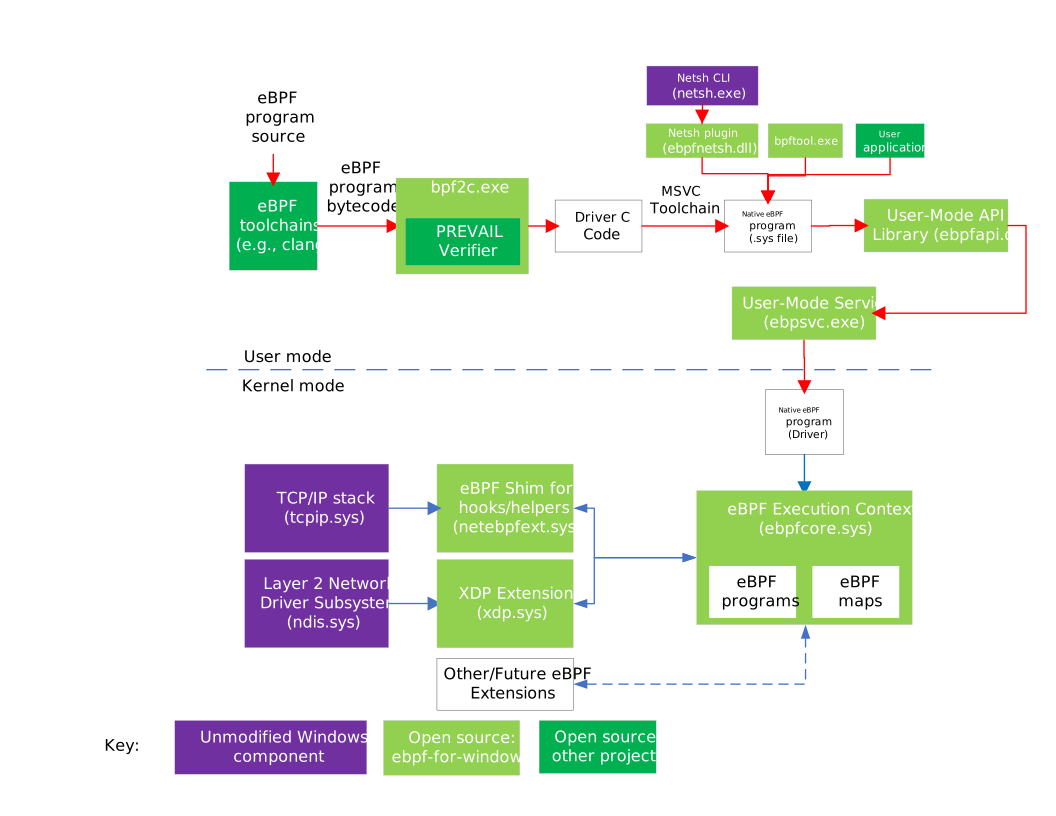
As shown in the diagram, in a typical developer workflow, the existing eBPF toolchains (clang, etc.)
can be used to generate eBPF bytecode (stored in ELF format) from source code in various languages.
There are three main approaches to process the eBPF bytecode and load it into Windows kernel.
-
Native eBPF Program:
The eBPF bytecode is sent to the bpf2c tool in the next phase of the workflow. The bpf2c tool passes the
bytecode to the PREVAIL verifier. If the eBPF program passes all the verifier checks,
the bpf2c tool converts every instruction in the bytecode to equivalent C statements as outlined in the
native code generation document. The generated C code is then built into a windows driver
module (stored in a .sys file) using the standard visual studio toolchain. The generated driver is also known as the native eBPF program.
Note: This is the preferred way of deploying eBPF programs.
See the FAQ on HVCI for details as to why this mode is
also the most secure.
-
JIT Compiler
In this approach a user mode service (eBPFSvc.exe) JIT compiles the eBPF bytecode via the uBPF JIT compiler
into native code that is passed to the kernel-mode execution context.
-
Interpreter
In this approach the bytecode can be directly loaded into an interpreter (from uBPF) in the
kernel-mode execution context.
Note: The interpreter is present only in debug builds and not in release builds as it is considered less secure.
Note: The JIT Compiler and Interpreter are not shown in the architecture diagram.
Note: For the JIT and interpreter approaches, The eBPFSvc service ensures that the eBPF programs pass all the verifier checks.
The eBPF programs can be consumed by any application, or via bpftool or the Netsh command line tool, which use a shared library (ebpfapi.dll) that exposes Libbpf APIs. These APIs can be used to load the
eBPF programs to the kernel-mode execution context.
eBPF programs that are loaded into the kernel-mode execution context can attach to various
hooks
and call various helper APIs exposed by the eBPF shim,
which internally wraps public Windows kernel APIs, allowing the use of eBPF on existing versions of Windows.
Many helpers
already exist, and more hooks and helpers will be added over time.
Getting Started
This project supports eBPF on Windows 11 or later, and on Windows Server 2022 or later.
To try out this project, see our Getting Started Guide.
Want to help? We welcome contributions! See our Contributing guidelines.
Feel free to take a look at our Good First Issues
list if you're looking for somewhere to start.
Want to chat with us? We have a:
For tracking Q&A and general discussion, we use Discussions
in github. This can also function similar to a mailing list if you subscribe to discussion notifications by
clicking "Watch" (or "Unwatch") and selecting "Custom" -> "Discussions" (or by selecting "All Activity" if
you want to receive notifications about everything else too).
If you have issues with an eBPF program, start with the Troubleshooting Guide.
Frequently Asked Questions
1. Is this a fork of eBPF?
No.
The eBPF for Windows project leverages existing projects, including
the IOVisor uBPF project and
the PREVAIL verifier,
running them on top of Windows by adding the Windows-specific hosting environment for that code.
2. Does this provide app compatibility with eBPF programs written for Linux?
The intent is to provide source code compatibility for code that uses common
hooks and helpers that apply across OS ecosystems.
Linux provides many hooks and helpers, some of which are very Linux specific (e.g., using
Linux internal data structs) that would not be applicable to other platforms.
Other hooks and helpers are generically applicable and the intent is to support them for eBPF
programs.
Similarly, the eBPF for Windows project exposes Libbpf APIs
to provide source code compatibility for applications that interact with eBPF programs.
3. Will eBPF work with HyperVisor-enforced Code Integrity (HVCI)?
Yes. With HVCI enabled, eBPF programs cannot be JIT compiled, but can be run in the native mode.
To understand why JIT compiled mode does not work, we must first understand what HVCI does.
HyperVisor-enforced Code Integrity (HVCI)
is a mechanism
whereby a hypervisor, such as Hyper-V, uses hardware virtualization to protect kernel-mode processes against
the injection and execution of malicious or unverified code. Code integrity validation is performed in a secure
environment that is resistant to attack from malicious software, and page permissions for kernel mode are set and
maintained by the hypervisor.
Since a hypervisor doing such code integrity checks will refuse to accept code pages that aren't signed by
a key that the hypervisor trusts, this does impact eBPF programs running natively. As such, when HVCI
is enabled, eBPF programs work fine in interpreted mode, but not when using JIT compilation because the JIT
compiler does not have a key that the hypervisor trusts. And since interpreted
mode is absent in release builds, neither mode will work on an HVCI-enabled production system.
Instead, a third mode is also supported by eBPF for Windows, in addition to JIT compiled and interpreted modes.
This third mode entails compiling eBPF programs into regular Windows drivers that can be accepted by HVCI.
For more discussion, see the Native Code Generation documentation.
(Technically, interpreted mode eBPF programs would run with HVCI too, but the interpreter is disabled in release builds
and is only supported in debug builds.)