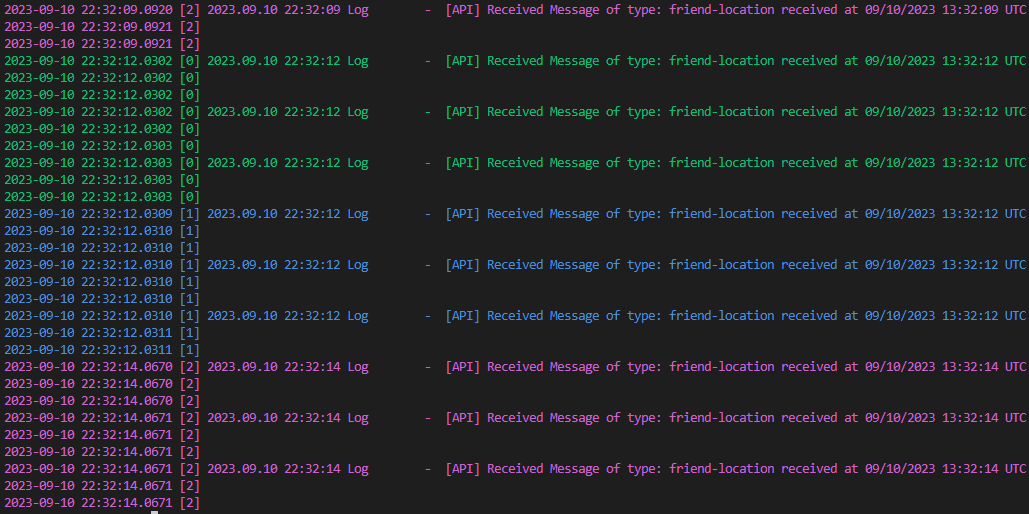
vrc-tail is a monitoring tool designed to track and display VRChat logs in real-time, providing developers and testers with essential debugging information. The software continuously reads recent log files, offering updates as new data becomes available.
Key Features:
Real-time log monitoring for VRChat worlds.
Support for filtering logs based on specific keywords or patterns.
Color-coded log levels to easily distinguish between different types of messages.
Option to suppress date/time stamps for cleaner output.
Ability to ignore blank lines or filter out irrelevant data.
Audience & Benefit:
Ideal for developers, testers, and VRChat content creators who need to monitor world activity or debug issues. vrc-tail simplifies the process of tracking logs without manually checking files, saving time and improving efficiency.
The tool can be installed via winget, making it easy to integrate into your workflow.
README
vrc-tail
A native Windows tail -f for VRChat logs.
Watches VRChat's log directory and prints lines appended after startup.
Automatically follows newly created output_log_*.txt files.
Reads logs whose start time is within 30 seconds of the newest log by default:
output_log_2023-09-10_12-12-00.txt: read as [1]
output_log_2023-09-10_12-11-40.txt: read as [0]
output_log_2023-09-10_12-11-10.txt: ignore
output_log_2023-09-10_12-10-50.txt: ignore
output_log_2023-09-10_12-10-00.txt: ignore
Colors each log file and log level when writing to a terminal.
Uses plain output when redirected or when NO_COLOR is set.
Install
Winget
winget install Narazaka.vrc-tail
Portable
Download vrc-tail.exe from the latest release and place it somewhere on PATH.
Usage
Run vrc-tail without arguments to follow the current VRChat log group. Existing content is skipped; lines appended after startup are printed.
Use --no-watch to keep following only the files selected at startup. Use --group-period to change the time window used to select the current log group.
Console Commands
When running in a terminal, press:
> Commands:
>   ? - show this help
>   q - quit
>   c - toggle case sensitive
>   s - toggle ignore blank lines
>   l - toggle colored log level
>   d - toggle suppress log date
>   / - filter
>   r - reset filter
Command-line Options
Usage: vrc-tail [OPTIONS]

Options:
  -f, --filter                    Show only matching lines
  -c, --case-sensitive                    Match filters case-sensitively
  -s, --ignore-blank-lines                Suppress blank lines
  -L, --no-colored-log-level              Disable per-level colors
  -d, --suppress-log-date                 Remove VRChat's date prefix
  -g, --group-period   Log group window [default: 30]
      --no-watch                          Do not add newly created log files
  -h, --help                              Print help
  -V, --version                           Print version
Build from Source
Install the stable Rust MSVC toolchain on Windows, then run: