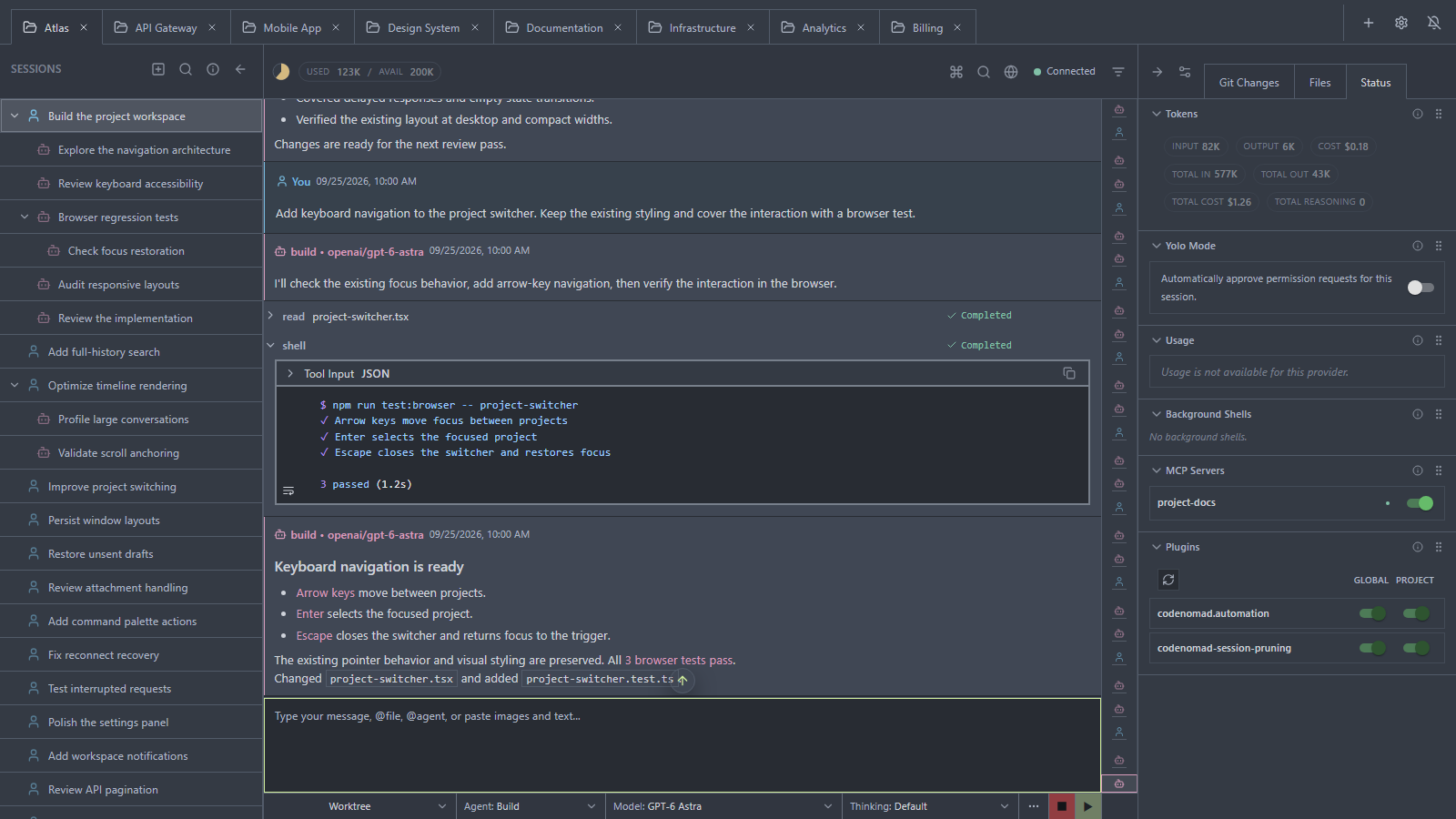
Use this command to install CodeNomad with WinGet:
winget install --id=NeuralNomadsAI.CodeNomad -e
CodeNomad is an advanced desktop application designed to serve as the command center for AI-powered coding workflows. It transforms OpenCode from a terminal tool into a premium workspace, offering developers enhanced control, speed, and clarity during extended AI-driven development sessions.
Key Features:
Multi-Instance Workspace: Manage multiple coding environments simultaneously with ease.
Remote Access: Connect to CodeNomad from any browser, enabling seamless remote development.
Session Management: Track and organize your coding sessions for improved productivity.
Voice Input & Speech: Leverage voice commands and speech-to-text capabilities for hands-free coding.
File System Browser: Navigate and manage files directly within the application interface.
Customizable Theming: Tailor the workspace to your preferences with adjustable themes.
Audience & Benefit:
Ideal for developers and AI coders who rely on continuous, high-intensity coding sessions. CodeNomad provides a centralized platform that enhances efficiency, organization, and adaptability, making it easier to manage complex projects and streamline workflows.
Available as both an Electron and Tauri desktop application, CodeNomad can be installed via winget for convenient setup.
README
CodeNomad
The AI Coding Cockpit for OpenCode
CodeNomad is a desktop and browser workspace for OpenCode V2 — built for developers who work across projects, long conversations, and Git worktrees. It connects to OpenCode's shared background service, keeping your sessions accessible from CodeNomad and compatible terminal clients.
> OpenCode gives you the engine. CodeNomad gives you the cockpit.
🚀 Projects and desktop windows — Keep multiple projects open, with per-window tabs, drafts, attachments, and view restoration.
🧠 Sessions and full-history navigation — Browse nested sessions, fork conversations, search beyond loaded messages, and jump through long histories with a timeline and previews.
🌳 Git worktrees — Create and select worktrees, move a session with its subsessions, and review Git changes without leaving the workspace.
💬 Rich conversations — Markdown, code, diffs, tool-result images, configurable reasoning/tool visibility, and /btw for a temporary side question.
📎 Files and attachments — Pick, paste, or drop device files; use @ references for project files and browse your workspace from the file panel.
🌐 Remote access — Connect to a CodeNomad server from a desktop client or browser, with password authentication and HTTPS support.
🧩 Tools and previews — Monitor native background shells, manage MCP connections and Global/Project plugin activation, and open web tools as SideCars.
🔎 Agent-driven browser previews — Let your agent open and inspect a visible web preview in Electron or Windows Tauri, without a Developer Mode switch.
🎙️ Voice input and speech — Dictate prompts and listen to responses.
⌨️ A workspace you can adapt — Command palette, notifications, customizable panels, independent light/dark palettes, and multiple interface languages.
Getting Started
🖥️ Desktop App
Available as both Electron and Tauri builds — choose based on your preference.
Download the archive or package for your platform from Releases.
Platform
Electron
Tauri
macOS
ZIP, separate Intel and Apple Silicon builds
ZIP, separate Intel and Apple Silicon builds
Windows
ZIP (x64)
ZIP containing the Windows installer (x64)
Linux
Portable tar.gz (x64)
deb (x64)
The Tauri deb is currently built and installation-tested on Ubuntu 24.04. Compatibility with older Debian-based distributions is not yet guaranteed.
Desktop builds bundle Node.js and npm; you do not need to install Node.js separately. On first launch, select an existing compatible OpenCode executable or install OpenCode through the setup screen. You can manage the executable, updates, and service later in Preferences → OpenCode.
Open a project folder, connect your model provider, and start a session. Git must be available to the CodeNomad backend for repository and worktree features; see Requirements.
💻 CodeNomad Server
Run on your development machine and access it through a browser. Install Node.js/npm and OpenCode V2 on that host first; Node.js 24 LTS is the recommended runtime (see Requirements).
The server binds to 127.0.0.1 by default. For remote access, add --host 0.0.0.0 and connect to the printed HTTPS address; see Server Documentation for binding and TLS configuration.
> Authentication: Supply --password or CODENOMAD_SERVER_PASSWORD on each start, or use the UI's persistent password setup. auth.json is managed by CodeNomad; see Authentication.
> Self-signed certificate: On first launch with HTTPS enabled (the default), your browser will show a "Your connection is not private" warning. This is expected — the server generates a local self-signed certificate automatically. Click Advanced → Proceed to localhost to continue. For local-only use without the warning, run with --https=false --http=true.
CodeNomad 0.20.0 requires OpenCode V2: 2.0.7 minimum, with 2.0.21 recommended and qualified for this release. OpenCode V1 and the former V2 beta protocol are not supported. The current requirements are maintained in runtime-support.ts.
One shared OpenCode service owns sessions and messages. Closing a CodeNomad tab, window, or backend leaves that service running. Desktop tabs, drafts, and layout are restored separately for each window.
Use an existing CLI or install from CodeNomad. Executables on PATH are preferred; the setup screen also supports a selected executable and a shared user npm installation. The former private CodeNomad OpenCode installation is no longer used.
Updating the CLI and restarting its service are separate actions. Use the explicit service controls in Preferences when you want the running daemon to use an updated executable.
Remote users should upgrade their CodeNomad server too. The 0.20 UI requires CodeNomad server 0.20.0 or later.
For a manual CLI installation, follow the OpenCode V2 installation guide. The npm package is @opencode/cli and the command is opencode.
SideCars
SideCars let you open web tools running on the CodeNomad server host inside CodeNomad as tabs. Start the service separately, then add it in Preferences → SideCars.
Session web previews are also available from the conversation toolbar. Agent-driven native browser automation is supported in Electron and Windows Tauri; other Tauri platforms use an iframe preview. See Browser Automation for platform details.
Configuration
Name: Display name used in CodeNomad
Port: Numeric port of the service on the server host, at 127.0.0.1:
Protocol: Select HTTP or HTTPS to match the service
Base path: Derived from the name and displayed as /sidecars/:id
Prefix mode:
Preserve prefix forwards the full /sidecars/:id/... path upstream
Strip prefix removes /sidecars/:id before forwarding the request upstream
OpenCode V2 — 2.0.7 minimum; 2.0.21 recommended for CodeNomad 0.20.0. Install/select it through desktop setup or provide a compatible CLI on the server host.
Git — a prerequisite for full functionality (repository identity, Git operations and worktrees). Git must be executable in the CodeNomad backend's PATH; it is not bundled with the desktop installers.
Node.js and npm — required for the standalone npm server and source builds, bundled with desktop releases. Use Node.js 24 LTS; development and release builds use the version in .node-version (currently 24.20.0).
On Windows, install Git for Windows with the option to use Git from the command line and third-party software. A per-user installation is sufficient and does not require administrator rights; install into a user-writable directory and make Git available in the user PATH. On macOS or Linux, follow the platform installation instructions. Fully quit and restart CodeNomad after installation so its backend inherits the updated PATH. For a remote server, install Git on the server host for the account running CodeNomad and restart that server process, not just the browser. A Git installation available only inside WSL does not satisfy the Windows backend's requirement.
Without Git, CodeNomad tolerates a degraded, directory-only mode. You can open a folder and talk to your agent, including asking it to help install Git. The backend supplies the agent with Git availability and backend platform context before prompts and custom commands; there is no blocking Git installation screen. Git operations and worktree management require Git. Session access is restricted to the explicitly opened physical folder; open another checkout separately to access its conversations. The agent's shell and the CodeNomad backend can run on different hosts, so installation help must target the backend account and environment. Git availability is rechecked on subsequent sends and the agent context is removed once it is available.
Tauri desktop shell — native windows, integration, and packaging
Quick Start
git clone --branch dev https://github.com/NeuralNomadsAI/CodeNomad.git
cd CodeNomad
npm ci --workspaces --include=optional
npm run dev
npm run dev starts the Electron development host. Use Node.js from .node-version, Git, and a compatible OpenCode V2 CLI. For Tauri, install the platform build prerequisites and run npm run dev:tauri. See CONTRIBUTING.md for the development and PR workflow.
Troubleshooting
macOS: "CodeNomad.app is damaged and can't be opened"
Gatekeeper flag due to missing notarization. Clear the quarantine attribute: