LightTable
Highly performant digital darkroom with realistic film stock effects.
A free, open-source photo browser and RAW editor with a native macOS app, a
Rust and GPU-driven render core, and physical film simulation built on
spektrafilm.
Website ·
Screenshots ·
Features ·
Get started ·
Contribute ·
Contact
For searchable guides inside the app, click Help in the top bar or press
F1 or ?. Help is bundled for offline use and linked from inspector
sections. Contributors can follow Maintaining in-app help
to keep articles and their implementation evidence current.
Maintainers wanted
LightTable needs platform maintainers for Windows, macOS, and Linux. A
maintainer builds and tests releases on real hardware, triages bugs specific to
that platform, and keeps its packaging channels current. Linux help is welcome
across the Debian/Ubuntu and Arch families and the common desktops.
Open an issue
and tell us which platform you'd like to maintain.
What makes LightTable great?
The photograph comes first
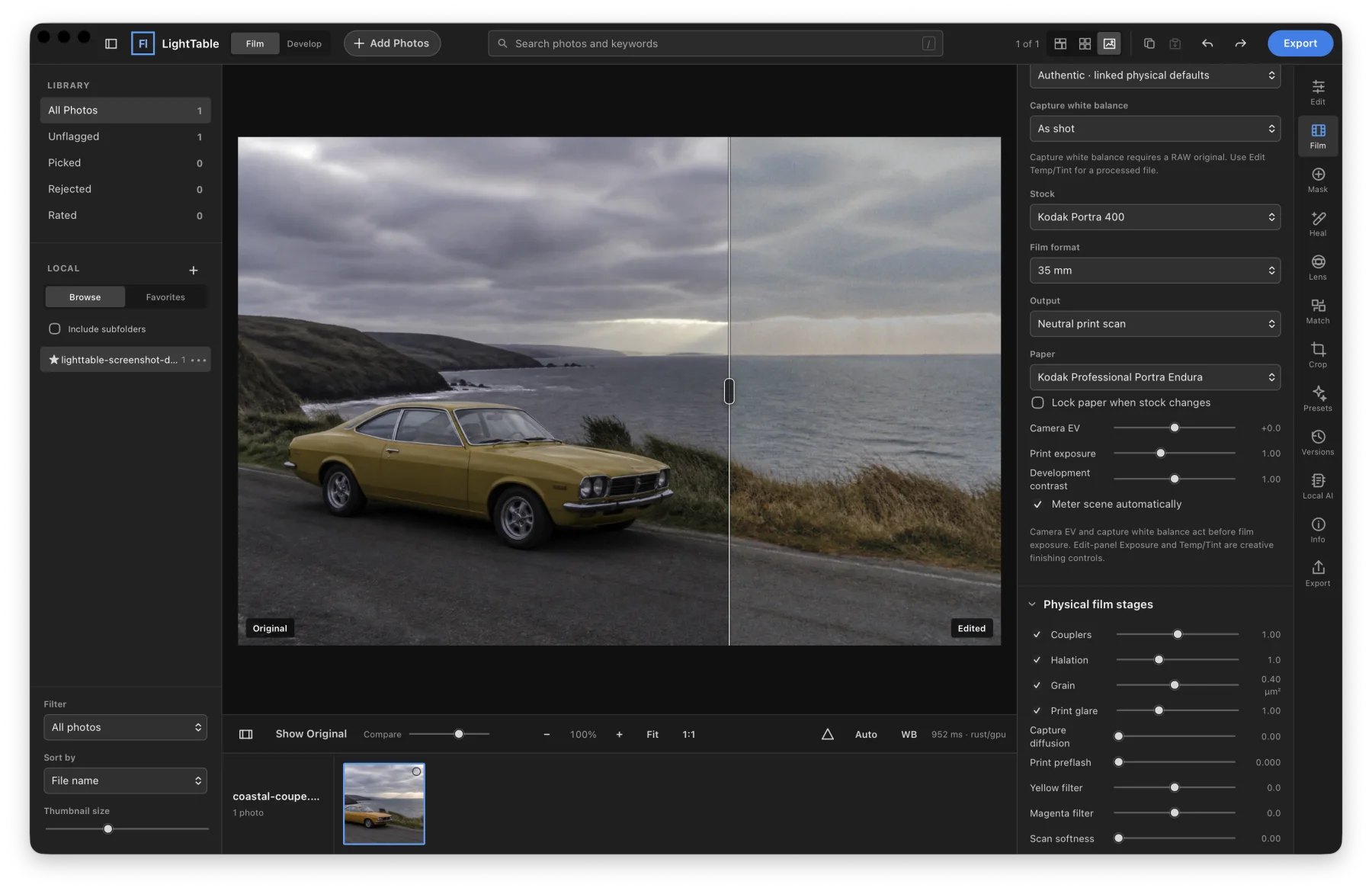
The photograph stays large while the library, film controls, and editor share
one quiet workspace. Catalog originals in place, keep edits separate, and use
ratings, flags, collections, stacks, and virtual copies to organize your work.
Film can be switched off for conventional RAW development.
Use Copy Settings... and Paste below the photo in Detail view to choose adjustment
groups and transfer them to other selected photos.
Find and curate a shoot
Combine camera, lens, ISO, focal length, aperture, shutter time, capture date,
and hierarchical keyword filters with ratings and flags. Save the combination
as a smart collection. Open Info beside either grid to add or remove keywords
across a selection while keeping each photo's other tags, with batch undo.
Optional XMP writing preserves unrelated sidecar metadata, detects conflicting
external changes, and keeps failed writes queued for retry. Supported Photo
Mechanic and digiKam metadata conventions have representative fixture coverage;
this does not establish complete compatibility with either application. See
Digital asset management for the workflow and
catalog measurements for the performance evidence.
The interface and searchable Help support 20 languages. Choose a language in
Settings → General; applying it saves pending edits and reloads the window.
See localization maintenance for contributing
translations and keeping Help current.
Film is a complete image pipeline
Choose from 23 film stocks, each with its own spectral response, density
curves, and grain. Spektrafilm models the photograph from exposure through
scan, using published sensitivity and density data.
- Capture: stock, film format, exposure, white balance, and diffusion.
- Development: development controls, halation, and physical grain scaled
to the stock and film format.
- Print: paper, exposure, preflash, and yellow/magenta filtration.
- Scan: glare, softness, and sharpening, levelled to the paper's own black
and white the way a lab scanner is calibrated. Reversal film goes straight to scan.
Processed JPEG, HEIF, and TIFF sources are expanded back toward scene light
around middle grey before filming, so a finished photograph keeps its contrast
instead of being toned twice. The print and scan stages remain editable. Profile sources and the distinction
between measured data and modeled assumptions are documented in
Film profiles and the calibration guide.
LightTable tuned versions of Portra 160, 400, and 800 appear first in the
stock list. They reduce the yellowward shift of yellow-green foliage while
keeping paper, output, and physical film controls available. These are visual
interpretations informed by reference photographs and numerical color checks,
not measured matches to real film. Spektrafilm original keeps all original
stock renderings and remains the default. Existing edits and older stock presets
keep their original rendering; edits and native presets save the selected
variant and tuning version.
Bring your Lightroom library
LightTable reads a copy of a Lightroom Classic catalog. Ratings, flags,
labels, keywords, collections, stacks, virtual copies, metadata, and supported
develop settings can come across without changing the original catalog.
It also imports Lightroom / Camera Raw XMP, legacy .lrtemplate presets, and
Capture One styles. A conversion report names what was mapped and what was
skipped, and labels converted settings as approximate:
different render engines produce different results. See
preset interchange for compatibility details.
In Detail, pinch on the trackpad over the photo to zoom around the pointer.
Switching photos keeps the current zoom level and restores each
photo’s pan position for the current window session. New photos start centered.
A full editing workflow
RGB curves, Point Color, four-way Color Grading, local masks, heal and clone,
lens correction, crop and perspective, versions, and reusable export recipes
sit alongside the film controls. HDR, panorama, and focus merge create new
masters. Soft proofing covers sRGB, Display P3, matte paper, and gloss paper.
Linear gradients stay adjustable: drag either endpoint to change the transition,
or drag the connecting line to move the whole gradient.
Local masks support gradual dodging and burning with cumulative brush Flow,
a Density ceiling, and Auto Mask color matching. Radial gradients can be oval
and rotated. Each mask has Whites, Blacks, and RGB or individual-channel tone
curves. Subject, Sky, and Object selections retain up to 1,024 pixels along
their longest edge, with edges refined against the source image. Automatic
selections remain starting points that need inspection and painted refinement.
Hair uses a bundled local segmentation model that follows hair below the face
and distinguishes it from skin and clothing. Fine strands, bright highlights,
and small distant people can still be missed.
Remove paints strokes as well as spots and can fill them from matching texture
elsewhere in the photo. Dust and scratches clears small marks from film scans
across the whole photo and shows what it found before you keep it. Masks add
Lens blur, whose radius follows the mask’s strength, and luminosity-only tone
curves. Curve eyedroppers set black, grey, and white points, and up to four
colour samplers read RGB and L* values as you edit. Exports can add a plain
border, and Contact Sheet lays a selection out on one captioned JPEG.
In Effects, Vignette darkens or brightens the edges. Size controls how much of
the center stays clear, and Feather controls how softly the effect blends in.
Existing edits keep their original vignette appearance with the default Size
and Feather values; setting Vignette to zero turns the effect off.
RAW decoding uses rawpy and LibRaw. Capture white balance and demosaicing happen
before film; processing stays floating point until the final encoder. A RAW
starts with capture sharpening and colour noise reduction. Its Film-off
develop starts from the bundled LightTable Standard look, a modelled generic
rendition, or from a DCP camera profile in your own profile folder, applied
following the DNG specification: the profile's colour matrices replace the
decoder's at the RAW decode and its tables and tone curve shape the develop.
See docs/camera-profiles.md. Export
JPEG, PNG, macOS HEIF, or true RGB16 TIFF with an embedded ICC profile for sRGB,
Display P3, or ProPhoto RGB.
Export recipes can use one destination, a subfolder beside each original, or
the original folder hierarchy beneath a destination. The dialog previews paths
across source folders before starting. Optional capture-time file timestamps
use the embedded timezone; missing timezones are reported unless you explicitly
choose this computer's local timezone. Metadata and recipe-sidecar policies are
saved with the recipe. Cancel stops queued work, waits for active cleanup, and
retains completed files. Export details list skipped files, errors and warnings.
The 23 built-in presets work offline and are grouped into collapsible packs.
Click a preset to apply it, adjust Amount, or click it again to disable it.
The selected preset and amount are saved with each photo.
The Film Simulation Drama preset pack includes eight looks that enable film
simulation and layer creative effects over it: Cinema Teal, Tungsten Rain, Portra
Ember, Gold Rush, Velvia Storm, Faded Epic, Silver Noir, and Velvet Dusk. Each
combines a film stock with tone, color, grain, glow, or vignette adjustments.
Local by design
Photos, the SQLite catalog, edit history, and render caches stay on your machine.
Optional Apple Vision analysis runs on your Mac and adds searchable scene and
object tags, visible text, face counts, and subject masks. It does not identify
people or upload the analysis.
One RAW, three paths
The same Nikon Z6 RAW feeds all three renders, with no manual matching
after the render.
| Neutral conversion | Imported preset | LightTable film process |
|---|
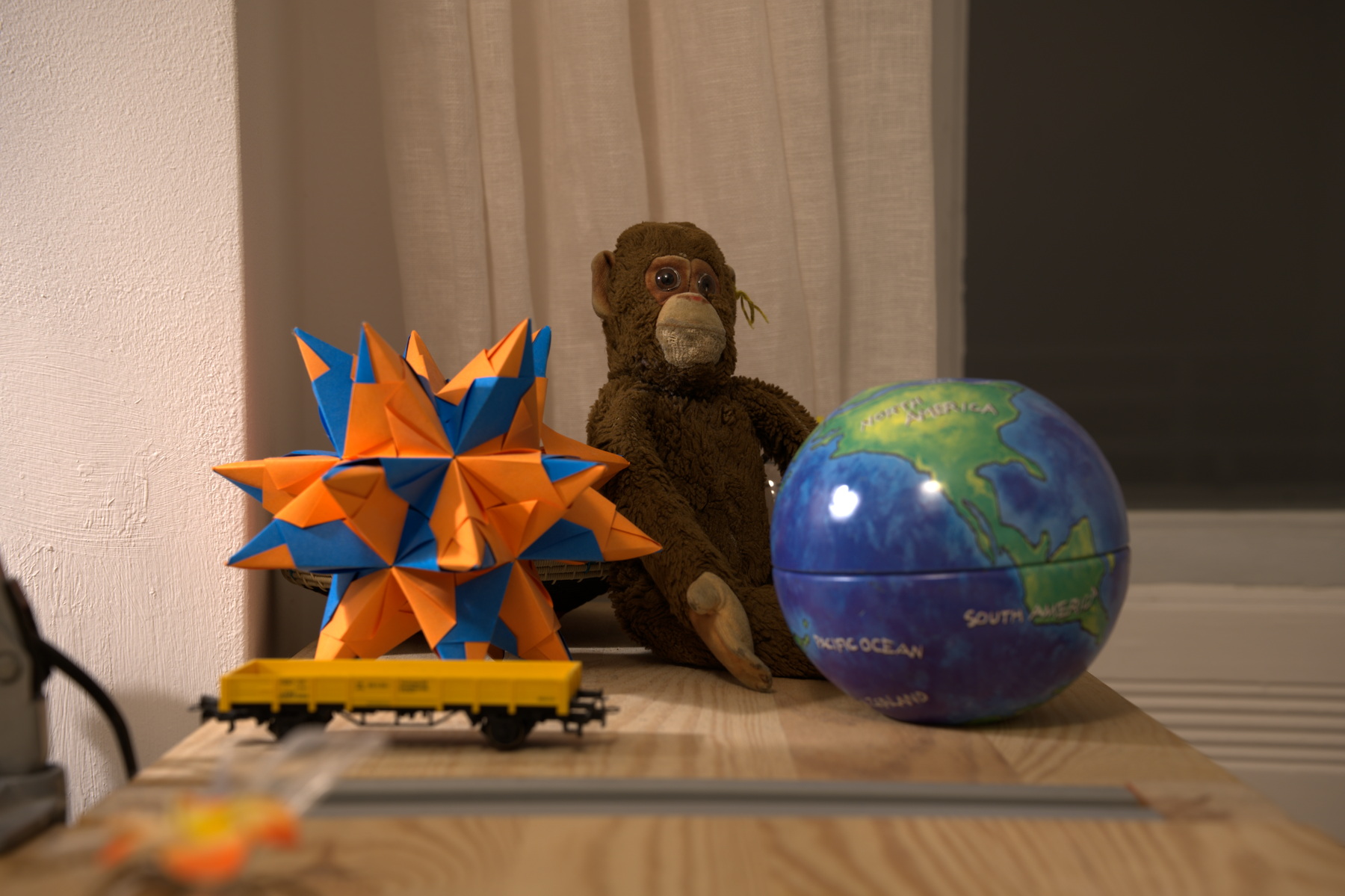 | 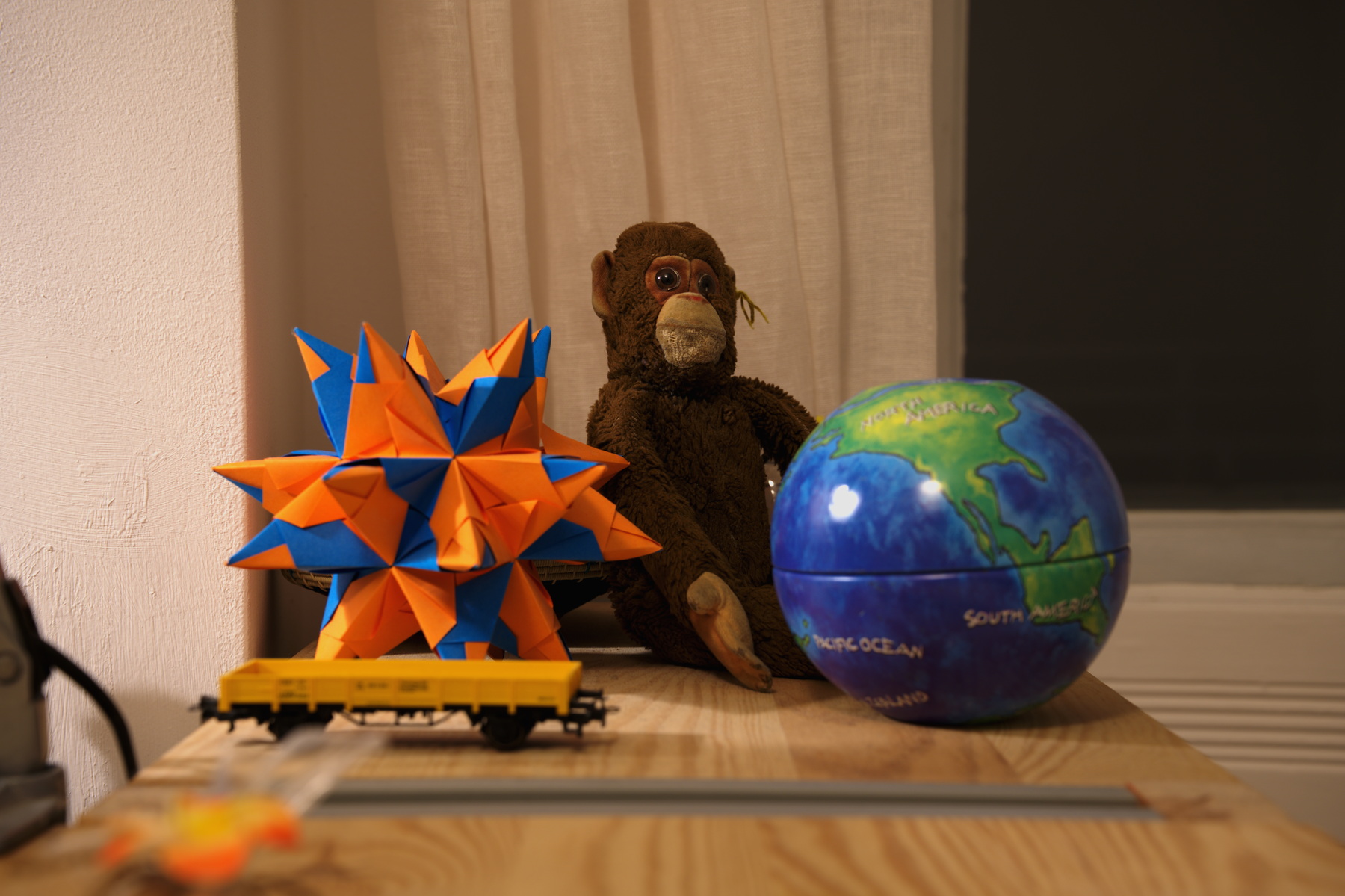 | 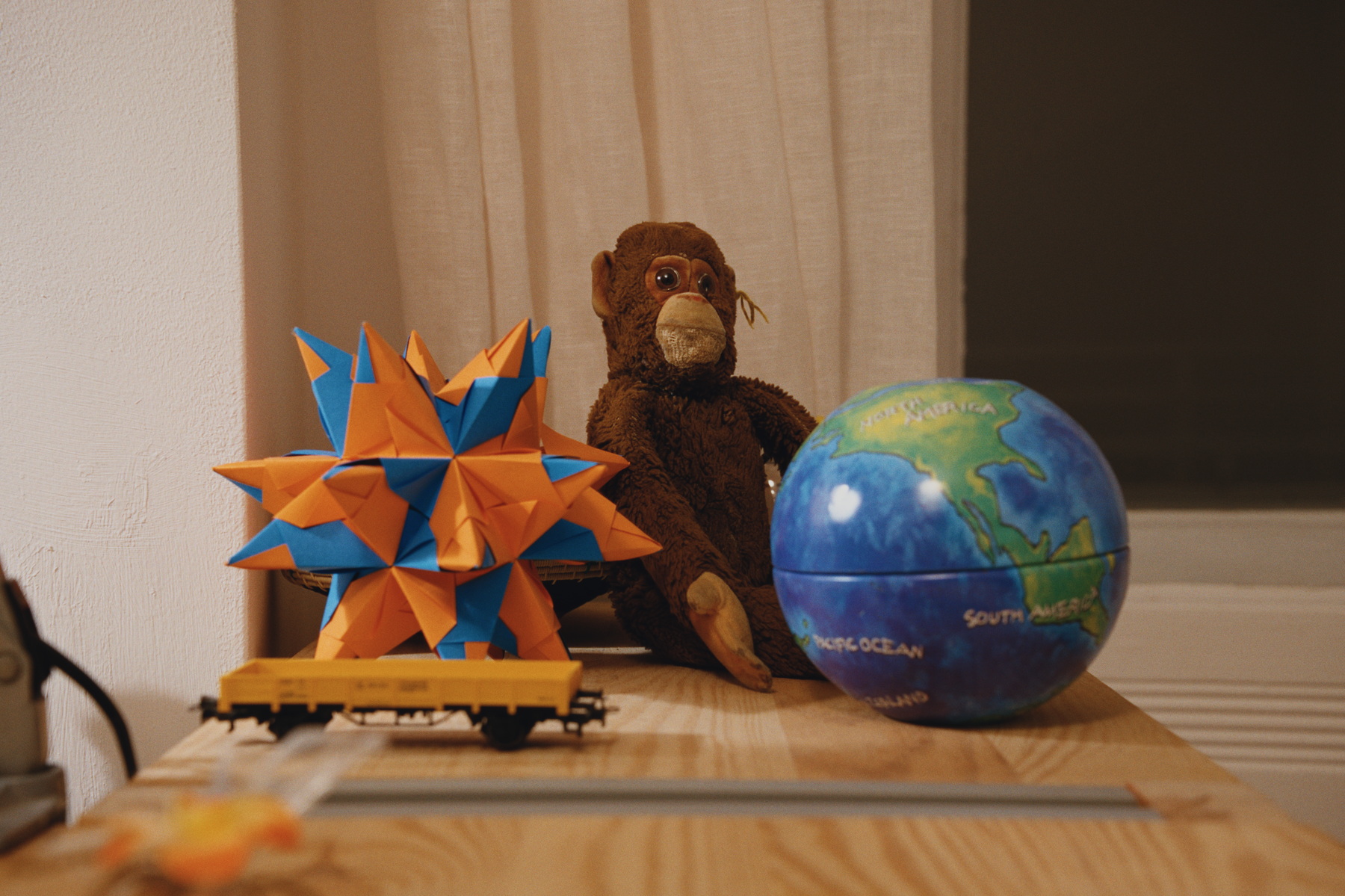 |
| Film off, standard base curve | 16 controls mapped, Film off | Gold 200 → Portra Endura paper → modeled neutral scan |
The middle image is a Lightroom-compatible XMP imported and rendered by
LightTable, not an Adobe Lightroom render. The
homepage comparison includes matched
100% crops and print/scan variations. Its
build manifest
records the source, parameters, crop coordinates, hashes, and renderer revision.
Get started
LightTable is in active development. The first public desktop release is still
being prepared. Check Releases
for published downloads; package-manager installers are not available yet.
| Platform | Current status |
|---|
| macOS 13+, Apple silicon | Native AppKit/WebKit app with a Metal preview. Source builds are available; signed public packages are being prepared. |
| Windows 10/11, x64 | Windows shell and installer build tooling are present, using WGPU/DirectX 12. Public packages and broader platform validation are still needed. |
| Linux, x86-64 | Experimental GTK/WebKitGTK desktop port, Vulkan rendering, and portable-bundle build tooling. The initial targets are Ubuntu 24.04+ and current Arch. Hardware and desktop validation remain; no supported Linux release yet. |
For development, follow the source setup guide.
A fresh clone needs the Python runtime dependencies and pinned film data before
it can run. See release setup for bundled builds and
Windows and Linux for their build instructions and platform boundaries.
Signed Windows installations and configured Linux portable bundles include
in-app update checks. Package-manager installations use their manager for
updates; Windows portable ZIPs are upgraded manually. The update flow saves
pending edits, backs up the catalog, and waits for active work before closing.
Signing, feed publication, and native upgrade validation are release requirements;
the source integration does not make a public update available.
How it's made
| Layer | Implementation |
|---|
| Desktop hosts | Swift, AppKit, WebKit, and Metal on macOS; Rust with Tao/Wry, WebView2 on Windows, and GTK/WebKitGTK on Linux. |
| Interface | HTML, CSS, and native JavaScript modules in web/. No frontend bundler or build step. |
| Local application | Python handles the HTTP API, catalog, imports, edit state, render scheduling, and exports. SQLite stores the library. |
| Film renderer | A resident Rust/WGPU process in rust-engine/, adapted from spektrafilm-rs. The Python spektrafilm implementation provides a reference and fallback. |
| Image processing | rawpy/LibRaw decode RAW; NumPy and the native GPU paths implement grading and finishing. Platform image services handle decoding and color management where available. |
The render order is RAW decode → film (optional) → optical/healing corrections
→ global grade → local masks → crop and resize → encoded output.
The resident engine keeps its GPU device, image buffers, and pipelines warm;
ordinary grade changes run in the live Metal preview or WebGL fallback.
The WebGL viewer reuses recently displayed textures by render identity, with
a six-preview / 256 MiB texture budget (one larger current preview can stand
alone). Original loads on demand when Compare or held Original is active.
When switching photos while zoomed in, LightTable reuses an accurate cached
preview with matching edits, then loads sharper detail in the background.
Neighboring photos preload a small accurate preview before detail for the
retained zoom level. A first uncached RAW conversion can still take a moment.
On the documented benchmark Mac,
a warmed 1100 px film render had a median of 50.5 ms across 30 runs.
That measures the film stage for that workload, not total application latency.
Engineering choices
- One edit contract across renderers. Metal, WebGL, and export must agree on
operation order and grading behavior. Pixel changes need parity checks.
- Originals stay separate from edits. Edits live in the catalog; exports
produce new files. Catalog recovery and backups have an explicit
recovery workflow.
- No silent approximation. Imports report unsupported controls. Automatic
lens correction requires a confident profile match; manual controls remain
available when profile data is missing.
- Reproducible output. Cache identity includes the source, recipe, profile
catalog, and renderer. Saved edits and export sidecars record provenance.
Modeled film parameters are labeled as modeled.
- Native platform strengths. macOS keeps its Metal and image-services paths;
other hosts share the film and edit model while providing their own integration.
Command line and MCP
The app exposes a local API, a command-line client, and an MCP server. With the
source environment prepared and an app running:
./lighttable status --json
./lighttable photos list --limit 5 --json
./lighttable schema
Use ./lighttable mcp for the stdio MCP server. Programmatic edits appear in
History and support Undo. See the CLI reference for commands,
installation on your PATH, and isolated review profiles.
Contributing
Platform maintenance, RAW compatibility reports, renderer work, documentation,
and reproducible bug reports are welcome. For a substantial change,
open an issue
to discuss the approach before building it. For bugs, include your platform,
app revision, reproduction steps, and a sample image you have permission to share
when the problem depends on a particular file.
The contributor guide covers source setup, local builds,
tests, and what to include in a pull request. The repository has Python unit
and contract tests, Rust tests, renderer parity checks, and real macOS
product journeys. Run the checks that exercise your change
and report what you verified.
The processing correctness pipeline compares film
stages, exports, and displayed previews with independent numerical references,
and saves per-case pixel differences and CI reports.
Project documentation
docs/ indexes everything: the CLI reference, catalog and film
guides, per-platform build notes, engineering notes, and the roadmaps. Start
there. Release and installer setup covers publishing.
Roadmaps record implementation plans, not release guarantees; check
Releases for
what has shipped.
License and credits
LightTable is free software under the GNU GPL v3, distributed as
GPL-3.0-only. You can inspect, modify, and redistribute it under that license.
The film pipeline builds on Andrea Volpato's
agx-emulsion / spektrafilm
and the spektrafilm-rs Rust port.
See third-party notices for pinned upstream revisions,
component licenses, and test-image attribution. The
website source is maintained separately.
Cloud placeholders and lens matching: LightTable recognizes macOS File Provider
dataless photos, legacy Dropbox placeholders on Mac, and Windows offline or recall
attributes as cloud-only without reading their content. On Windows, the
RECALL_ON_OPEN bit requires a Cloud Files reparse tag because that bit can also
mean an extended attribute. Existing metadata, edits and identities survive
eviction. Recognized Google Drive, Dropbox, OneDrive, iCloud Drive, and Box sync
locations receive provider-specific download instructions; unknown or custom
locations receive general guidance. Location names choose the message but never
determine whether a photo is cloud-only.
Make the photo available offline in the storage provider's app, wait for its
download to finish, then choose Retry. Box Drive may require making the containing
folder available offline. Rescan the source to refresh catalog availability; it
updates even if the file size and timestamp did not change. Import previews count
and explain skipped cloud-only photos; watched folders wait for a download and
two stable polls before importing. Older virtual drives that expose none of the
supported indicators may still block on filesystem I/O; these checks are not a
general network timeout or download manager.
Lens correction requires one compatible automatic match. Missing or ambiguous
metadata leaves automatic correction off and explains the reason. The Lens profile
selector offers compatible bundled profiles and stores the explicit choice with the
photo's optics, so preview and export use the same choice. A saved profile that is
no longer compatible stays unavailable rather than silently choosing another lens.
Run .venv/bin/python bench/storage_readiness.py --output /tmp/storage.json for a
reproducible 10,000-record cold/mixed catalog benchmark. It uses distinct synthetic
file headers, 20% injected cloud flags and a configurable delay per fingerprint and
metadata operation. Results include first-page latency, concurrent query median/p95,
scan time and content-read counts, followed by a warm scan and hydration rescan.
This measures the actual scanner and SQLite query path with simulated slow reads;
it does not establish physical HDD, network-drive, 8 GB RAM, cloud-provider, RAW
render or UI performance. “Cold” means an empty catalog, not a flushed OS disk cache.
Apple Photos on macOS
The Apple Photos sidebar source browses photos and albums with Photos
permission. Select up to 500 photos across pages or albums and choose Import
selected originals. Originals (including RAW resources) are copied into
Pictures / LightTable Imports / Apple Photos; iCloud originals download as
needed. Completed original copies are reused on retry. Stop Import keeps
completed copies, and View imported photos opens them for editing.
The Photos library remains unchanged. Albums, videos, and Photos edits are not
copied by this browser. Refresh updates photos and albums after library
changes. This source and Photos setup actions are hidden on Windows and Linux.
Ordinary directories appear under Folders on every platform.