Audits every page a sitemap lists rather than only the homepage, and groups what it finds by the thing that has to change. Reports the checks that passed and the ones that did not apply, so a missing finding cannot be mistaken for a passing one. The crawl runs on your machine: it fetches the site you point it at, and your audit results are never sent to the publisher. Features you turn on yourself contact Google PageSpeed Insights and Search Console, and the app checks GitHub for new versions.
README
Crawl a site's sitemap and check every page for the SEO, metadata and
structured-data problems that single-page graders miss.
Zero dependencies · one command · works in CI.
# In a workflow — https://github.com/marketplace/actions/full-site-seo-audit
- uses: nurkamol/seo-audit@v1
  with:
    url: https://example.com
# Or anywhere, with nothing installed
npx @nurkamol/seo-audit https://example.com

# Or from the repository, pinned to a major version. Same tool — but this clones
# 16 MB of app sources and tests to get at a 115 kB crawler.
npx github:nurkamol/seo-audit@v1 https://example.com

# Or keep it, if you would rather just type `seo-audit`
npm install -g @nurkamol/seo-audit
Every npx github:… in the examples below works as npx @nurkamol/seo-audit
or as a plain seo-audit; they are the same bytes, fetched differently.
> ### Not a terminal person? There is a window.
>
> SEO Audit for macOS is the same tool with a window instead of a prompt:
> type a domain, press return, watch it crawl, and read the report as cards you
> can expand, filter and search. No flags to learn, no output to redirect, and
> nothing leaves your machine.
>
> bash > brew tap nurkamol/seo-audit https://github.com/nurkamol/seo-audit > brew trust nurkamol/seo-audit > brew install --cask seo-audit >
>
> It is a window over this engine, never a second copy of it — the checks are
> the same ones the command line and the Action run, so the reports match. See
> A window instead of a terminal, or
> download it if you
> would rather not use Homebrew.
Why
Free SEO graders audit one URL, almost always the homepage. They will tell
you your title tag is 48 characters and your homepage loads in 0.38 seconds,
and happily award a B+ to a site where page 23 has a duplicate description,
page 31 is 112 words long, and the language switcher links to a 404.
That last one is real. This tool's first run against a production site found
the EN/RU switcher on every translated article pointing at a page that did not
exist. Three commercial graders had audited the same site that morning; none
could see it, because the link is only broken on pages they never opened.
What it owns: technical correctness, on every page, every deploy.
What it will not pretend to own: rankings. Those are decided by backlinks,
a Business Profile and content people want — none of which a crawler can fix.
It also refuses to estimate performance; with --psi it asks Google for the
real measurement instead.
seo-audit
Typical free grader
Pages checked
Every URL in the sitemap
One
Cross-page checks
Duplicates, hreflang pairs, orphans
—
Broken links
Whole-site sweep
—
Regression guard
Baseline diff, fails CI on new findings only
—
Performance
Google's own numbers via --psi
Estimated, or Lighthouse on one page
Output
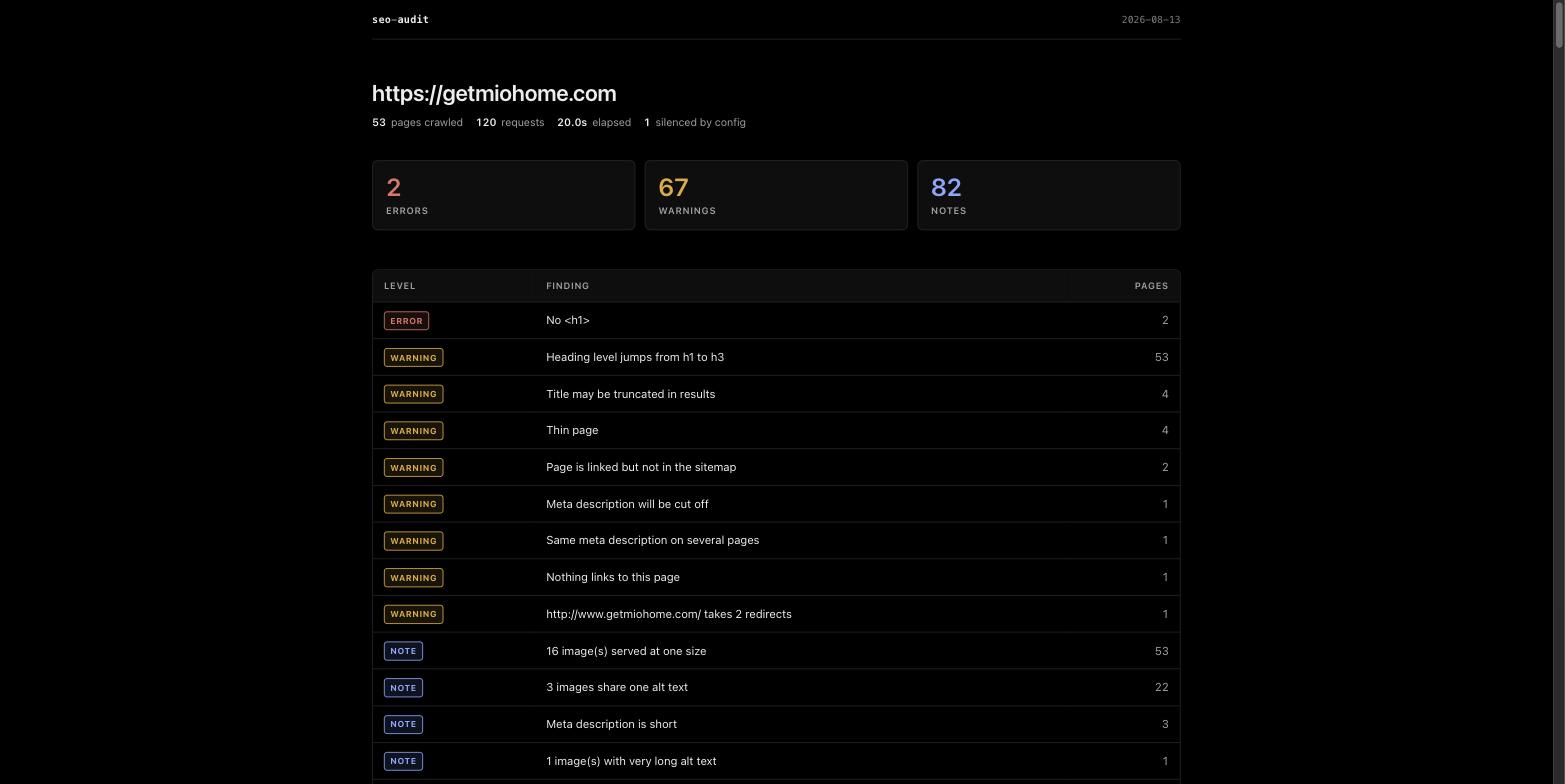
Terminal · Markdown · HTML · JSON
A web page and a PDF upsell
Cost
Free, no account
Free tier, then a subscription
The playbook
The tool verifies about two thirds of what a site needs. The rest is judgement,
content and off-site work, and it is written down:
A checklist for taking a site from "probably fine" to genuinely clean —
crawlability, internal linking, multilingual, images, social previews,
structured data, performance, credibility and local search. Ordered by impact
and written from what was actually broken on real projects, including the traps
that only show up once you have hit them.
# In a new project
curl -o docs/SEO-PLAYBOOK.md \
  https://raw.githubusercontent.com/nurkamol/seo-audit/main/docs/SEO-PLAYBOOK.md
curl -o seo-audit.config.json \
  https://raw.githubusercontent.com/nurkamol/seo-audit/main/docs/seo-audit.config.example.json

npx github:nurkamol/seo-audit@v1 https://example.com --html audit.html
Then work down the checklist. It ends with a prompt for handing the whole
thing to an AI agent, including the two instructions that keep an enthusiastic
pass from doing damage: don't invent business facts, and don't declare success
against a stale cache.
Usage
# Crawl and print to the terminal
npx github:nurkamol/seo-audit https://example.com

# Save a Markdown report you can commit, diff, or send to a client
npx github:nurkamol/seo-audit https://example.com --md audit.md

# Audit a local build before it ships
npm run preview &
npx github:nurkamol/seo-audit http://localhost:4321 --limit 50

# A whole portfolio, one table
npx github:nurkamol/seo-audit one.example two.example three.example
How the report is organised
Findings are grouped by area, not just by severity — Indexability, Content,
Links, Redirects, Images, Social, Structured data, Multilingual, Sitemap &
robots, Site & security, Performance. Severity says how loudly to complain; the
area says who fixes it. Thirty findings sorted only by severity is a list you
read once; the same thirty under Images and Multilingual is a list you can
hand to two people.
Findings on a page that won't be indexed — it carries noindex, or its
canonical points somewhere else — are marked not indexable. The same thin
page is a problem when Google will index it and noise when it won't, and that
distinction is often more useful than the severity.
What to fix first
Every report opens with the work rather than the findings. The same check on
pages of one section is one piece of work — that is how a generated site is
built — so a store's 2,081 findings read as 62 things to change, ordered worst
first and then by how much of the site points at them:
✗  No <h1>                              10 pages under /pages/
!  Heading level jumps from h1 to h3   225 pages under /products/, 69% of the crawl
!  Structured data is missing headline   7 pages across the site, 1,047 links in
The link counts and the distance from the homepage are counts of links that
were actually read, not a score: seven pages the site points at constantly are
worth more than ten it mentions once, and that is an ordering rather than a
number out of a hundred.
The same form the hosted version serves, on this machine: no account, no bill,
and none of a Worker's limits — the crawl is bounded by what this computer will
do, which is the only place a five-thousand-page site with maxImageChecks
past a thousand fits.
It is not a second implementation. worker/index.mjs is written against
Request and Response, which Node has too, so the same file answers both and
src/serve.mjs is thirty lines of adapter. Bound to the loopback address,
which is the whole of its security model.
brew tap nurkamol/seo-audit https://github.com/nurkamol/seo-audit
brew trust nurkamol/seo-audit          # Homebrew asks before running a third party's code
brew install --cask seo-audit
# or build it yourself — swiftc and the command line tools, nothing else
./mac/build.sh --run
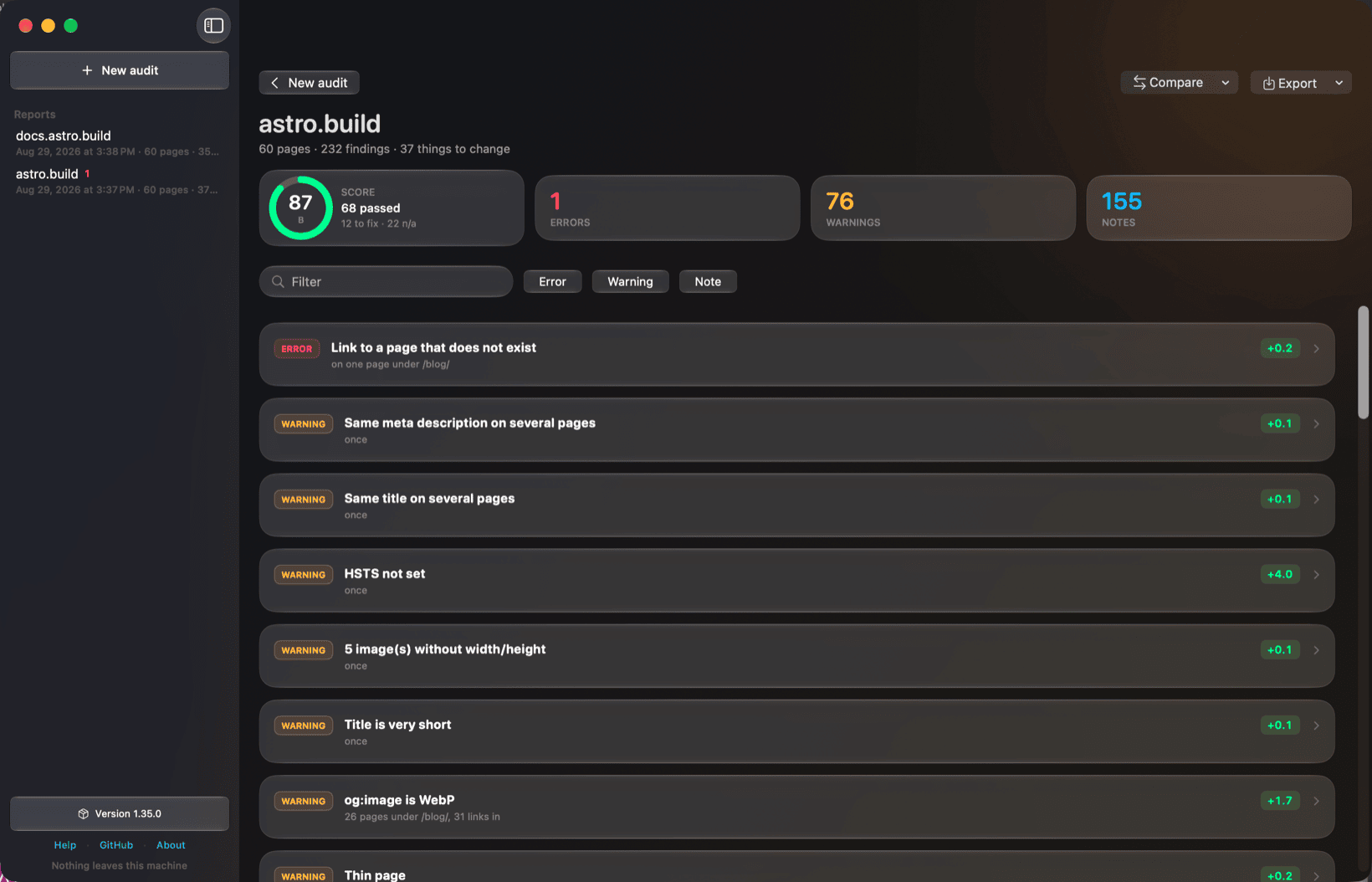
A real run against astro.build — and the one error at the top is a link to a page that does not exist, which is the bug this tool was written to catch.
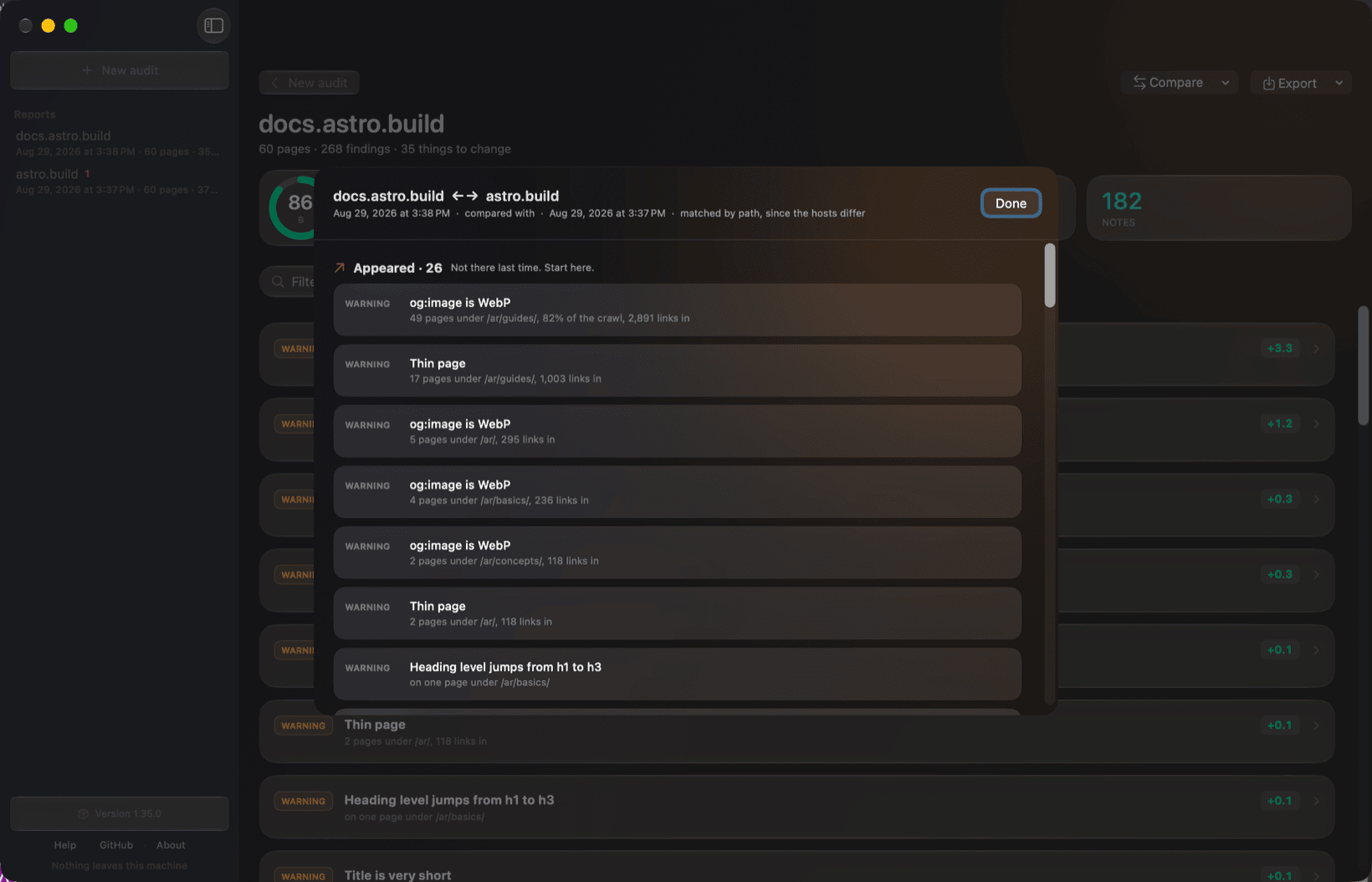
Compare two runs: a site against itself last week, or one property against another. Different hosts are matched by path.
If you downloaded the zip instead: "SEO Audit is damaged and can't be opened"
It is not damaged. The app is ad-hoc signed rather than notarised, because
notarising needs a paid Apple Developer account this project does not have.
macOS puts a com.apple.quarantine flag on anything a browser downloads, and
for an app without a notarisation ticket Gatekeeper refuses it — with a message
that says "damaged" and offers to move it to the Trash, which reads exactly like
malware and is the single most confusing thing about installing this.
brew install --cask seo-audit does not have this problem. Homebrew checks
the download against a checksum written by the build that produced it, then
clears the flag for you. That is the recommended route, and the rest of this
section is for people who would rather not use Homebrew.
If you downloaded the zip by hand, verify it first. Every release attaches a
SHA256SUMS.txt covering all four downloads, and lists the same checksums in
its notes — save it next to the file and:
shasum -a 256 --ignore-missing -c SHA256SUMS.txt
--ignore-missing because you almost certainly downloaded one of the four, not
all of them. The same command verifies the .deb, the .AppImage and the
setup.exe, which matters most on Windows, where the advice for SmartScreen is
otherwise just "run it anyway".
No sudo: the app is yours, in a directory you can write to, and the command
works as you. If it ever answers Operation not permitted, the copy is owned by
another user — sudo xattr -dr com.apple.quarantine "/Applications/SEO Audit.app"
is the fallback, but reach for it second, not first.
This is exactly what right-click → Open does in the Finder, minus the
dialog. Do it because the checksum matched, not because a README said to — the
same command on a file you have not checked is how people get hurt.
Or avoid the question entirely and build it yourself, which produces a signature
your own machine already trusts:
./mac/build.sh --run
SwiftUI throughout, Liquid Glass, and the report drawn natively: cause cards
that expand into the pages they affect, filtering, search, and export as PDF,
HTML, Markdown, CSV or JSON. Every finished run is kept, so a seven-minute
crawl survives closing the window. No web view in it.
It is a window over this engine and not a second one. The app runs
node bin/seo-audit.mjs --serve as a child process and reads its stream, and
the grouping into causes travels with the findings rather than being recomputed
in Swift — a check written twice is a check that drifts. Report.swift keeps
that seam explicit, so a Swift engine would be one more conformance and no
change to anything above it.
In Raycast
Preview a Site     how big is this, and is it the right one — ~1s, 3 requests
Audit a Site       crawl it and list what to change, worst first
Recent Reports     runs the desktop app has already kept
raycast/ is a Raycast extension for macOS and Windows. It imports the engine
as the published @nurkamol/seo-audit package, so it re-implements nothing and
its reports match the terminal's. Raycast runs Node, so unlike the hosted
version the certificate checks work there.
It is waiting for review in the Raycast Store. Until it is listed,
docs/raycast.md explains how to run it from this repository
in about two minutes, on either platform.
Preview is the command it exists for. A crawl takes minutes and a launcher
is built for the second you spend in it, so the headline command is the engine's
--dry-run: how many URLs the sitemap lists, how many would be checked, and
where the weight of the site is. Auditing is capped by preference, and a
thousand-page site is told to use the app or the terminal rather than left
spinning.
Every other ordering here is derived from the site's own markup — how many
links point at a page, how far it is from the homepage. Those are proxies.
Impressions are not: a broken canonical on a page with four thousand
impressions a month is a different sentence from the same canonical on a page
nobody has been shown.
Opt-in, and the only thing in this tool that needs an account. It reads
GSC_CLIENT_ID, GSC_CLIENT_SECRET and GSC_REFRESH_TOKEN from the
environment or from ~/.config/seo-audit/.env, deliberately outside any
repository.
Getting the third one used to be left as an exercise, which is why this had
never run against the live API. Now:
# once, in console.cloud.google.com:
#   enable the Search Console API, then create an OAuth client of type
#   "Desktop app", and put its two values in ~/.config/seo-audit/.env
#     GSC_CLIENT_ID=…apps.googleusercontent.com
#     GSC_CLIENT_SECRET=…

npx @nurkamol/seo-audit --search-console-login
That opens a browser, you sign in, and the refresh token is written to the same
file at mode 600. It is never printed — a token echoed to a terminal is a
token in a scrollback buffer and probably in a shell history file. The scope is
read-only. Afterwards it lists the properties the account can actually read,
because a token that can read nothing looks exactly like one that works, right
up until an audit reports the property was not found.
Interactive by nature, so it is deliberately not a GitHub Action input: a
flag CI can accept and never satisfy is worse than no flag. In CI, set the
three variables as secrets.
It also brings back where Google puts each page, and what it is found for:
Every finding on a page Google ranks carries that page's average position, so
the report can put a template on page two ahead of one nobody has been shown.
Positions were in every response Google has ever sent and were being discarded.
search-console-striking names the crawled pages sitting at positions 11
to 20 — page two, where the click-through rate is roughly nothing and the
ranking is already earned — with the query each one is closest on. It is the
only list in this tool that is an opportunity rather than a fault, and every
number in it was measured by Google. Moving one of those up two places is
usually less work than a new page.
Neither needs a second account, a scrape, or a keyword provider: it is the same
connection, asked one more question. Google withholds any search too rare to be
anonymous, so a low-traffic property gets positions and no queries — and the
report says so rather than leaving silence to read as "found for nothing".
The whole setup, the property-naming trap and what each failure note means:
docs/search-console.md. A domain property is named sc-domain:example.com rather than by
its URL. Missing credentials, or a property the account cannot read, are a note
and the rest of the audit is unaffected.
Fetches a sample of pages a second time as somebody else and reports what
changed. Not a byte comparison — a nonce, a timestamp and a cart count all
differ between two fetches of the same page by the same client. What is
compared is what a search engine reads: status, title, canonical, robots meta,
word count and link count.
forbes.com serves Googlebot roughly half the words it serves Chrome on every
page sampled. jekyllrb.com is identical on all ten, and says so rather than
staying silent.
Crawling as something else
# What Google is served, which is not always what a person gets
node bin/seo-audit.mjs https://example.com --browser googlebot

# What a host that blocks crawlers will answer at all
node bin/seo-audit.mjs https://example.com --browser chrome --os windows
Three reasons this matters, and none of them is dressing up. A site that
answers a browser and blocks everything else is common, and the report from a
blocked crawl is a report about the block. Some sites serve different HTML to a
crawler than to a person, and fetching as Googlebot is the only way to see it.
And Google indexes what its smartphone crawler sees — --browser googlebot
is that one, googlebot-desktop is the other.
--os says which system the browser is running on and defaults to yours.
A combination that does not exist is refused rather than approximated:
$ … --browser safari --os windows
  safari does not run on windows. It runs on: macos, ios.
The strings are a snapshot and will age — browser versions move every few weeks
and nothing here can know that. They are close enough for a server deciding
whether to answer, and --user-agent still takes a literal string for anything
that has to be exact. It outranks --browser when both are given.
Shopify stores
Since 30 May 2026 Shopify gives crawlers it cannot identify its strictest
limits, and how a crawl behaves does not get it through: one request a second
is still refused. A run against a Shopify store slows itself to one page at a
time from the first response that says it is Shopify, waits as long as it is
asked, and reports what it could not read as not checked — never as a
broken page — but on most stores that still leaves most of the products unread.
The way through is the store's own permission. If the store is yours:
In the Shopify admin, Online Store → Preferences → Crawler access → Create
signature. Pick the domain the store is actually served from — www. and
the bare domain each need their own — and a validity of up to three months.
Copy the two values into a file, each on a line with its name:
Save it as ~/.config/seo-audit/signatures/.txt — for example
~/.config/seo-audit/signatures/www.example.com.txt — and every run against
that host uses it, from the terminal, the window or the local server. Or
name it for one run with --signature .
It is a credential, and treated as one. It is sent to the one origin it was
made for and to nothing else — not to outbound links, not to the CDN, not to
the bare domain when it was made for www. — and it is never written into a
report, a kept run or a progress line; the report says only that the crawl was
signed and when the signature expires. An expired one is not sent, and the run
says so. A signature made for the host a store redirects away from is not sent
either, and the run says that too, because a crawl that went out unsigned looks
exactly like a signed one being refused.
In CI, keep it in a repository secret and pass it to the Action's signature
input. A named --signature file is refused for a portfolio or --serve, where
it would reach every site audited; per-host files have no such problem.
Checking outbound links
Off by default, and that's a judgement rather than an omission:
These are other people's servers. They rate-limit, they bot-block, and plenty
answer 403 to anything without a browser's fingerprint — so only a 404, a
410, or no answer at all is ever reported as broken. An outbound link that
merely redirects is a note, not a problem. maxExternalChecks bounds the sweep
(default 100), because one machine hammering a hundred third parties is rude at
scale.
Watching a run
A crawl of any size is otherwise silent from the first line to the last, which
makes a slow site look exactly like a hung one. --verbose prints each request
as it happens:
Plain lines rather than a spinner, deliberately: a long run is exactly the one
whose output gets piped to a file or read back out of a CI log, and neither can
show a cursor trick. It also means the page a crawl is stuck on stays on screen
instead of being overwritten — a timeout arrives as status 0, so a stall is
visible rather than blank.
Everything goes to stderr, so --json and --md are unaffected and
… --verbose --json report.json still writes clean JSON. --quiet wins over
--verbose: asking for silence and getting a running commentary would be the
more surprising of the two.
Checking a migration's redirects
A redirect map is written once, verified once, and then rots quietly: a later
change to a destination turns an entry into a hop through a 404, and nothing
tells anyone. The old URLs are the ones carrying the links and the rankings, so
this is one of the few SEO failures that is both expensive and completely
silent.
Every old URL is asked for, and what actually happens is reported:
redirect-dead
error — the old URL 404s. The rule never shipped
redirect-broken
error — it redirects, and lands on nothing. Worse than no rule, because it looks handled
redirect-not-applied
warning — the old URL still answers 200
redirect-hops
warning — more than one hop to arrive
redirect-elsewhere
warning — lands somewhere the map does not expect
redirect-temporary
warning — served as 302 where the map says 301
Rules with a * or a :placeholder match a shape rather than a URL, so asking
for them literally proves nothing. They are counted and reported, never guessed
at. A rule that works in one hop reports nothing at all.
The rest of the domain
Every check above audits the site it was pointed at. --hosts asks a different
question: what else is on this domain, and is any of it damaging the site that
was.
Discovery is certificate transparency —
the public log of every certificate ever issued, which is the only free, keyless
source of hostnames there is. Two logs are asked, certspotter first and crt.sh
second, because one is not dependable enough: asked five times in forty seconds,
crt.sh answered twice. Verification is DNS and this tool's own fetcher, and that
split is the whole design. The log is a terrible list of live hosts:
it holds 3,425 distinct names for one large domain and roughly three thousand of
them stopped existing years ago. So nothing from the log is ever reported. It
produces candidates; a lookup and a request decide which of them are facts.
Three things come out of it, and all three are invisible to a crawl of the site
itself:
a staging copy nobody remembered to close — indexable, competing with
production for its own results, publishing whatever is being tested;
a subdomain whose CNAME points at a service that is gone, which anybody
can claim and then serve from a host on your domain;
a second host serving the same site, splitting every signal it earns.
Plus an inventory, printed whether or not anything was wrong with it, because
"what else is on this domain" is worth an answer on a healthy domain too:
  ── Hosts on example.com ──────────────────────────────────────
  214 hostnames in certificate transparency, 9 of them resolving, 174 not looked up

  ✗ staging.example.com   198.51.100.9    200  Example — Staging
  ✗ blog.example.com                      CNAME → old-tenant.wpengine.net (gone)
  · shop.example.com      198.51.100.20   200  Example Shop
  · www.example.com       198.51.100.1    301 → the canonical host
  · preview.example.com   198.51.100.31   200, noindex

  Nameservers  ns1.cloudflare.com, ns2.cloudflare.com
  Mail         aspmx.l.google.com
  Policies     v=spf1 include:_spf.google.com ~all
It is off by default and stays that way. These logs are free, unauthenticated
and rate-limited by IP, and gov.uk's 4,674 hostnames took 89 seconds to sweep —
a crawl should not quietly spend that. When no log answers, the report says
hosts-not-checked rather than showing a domain with nothing on it, for the same
reason tls-not-checked exists: a missing finding reads exactly like a passing
one. Across ten real domains that note fired twice, so it is not a rare branch.
The staging check is also silent on any host that does not answer for its own
root. Two real domains taught that one, in different disguises:
dev.gtm.github.com answers 307 to /login, and that login page answers 200
with HTML and no noindex; dev.jquery.com 301s to bugs.jquery.com, a
different sibling entirely. In both cases every other clause passed and a host
serving nothing was reported as a leaked copy of the site. One condition covers
both, and it needs no vocabulary of login paths — which would only ever be the
paths somebody thought of. The trade is a staging site redirecting / to /en/
that goes unreported, which is the right way round to be wrong.
It is on by default in the macOS window and the Raycast extension, and off by
default on the command line. That is deliberate rather than an inconsistency:
those two are watched by a person, where a few seconds buys a finding a crawl
cannot otherwise see, and npx is a build step, where the same seconds are spent
unasked and a third party gets called that nobody chose to call.
The inventory travels with every format the engine writes — terminal, Markdown,
HTML, JSON, the baseline, the macOS window and its PDF export. In CSV it arrives
as rows at level host, the same way passing and not-checked rows already do,
because a CSV holding two shapes is a CSV nothing can read in one go.
The window reaches it from Settings → Crawl, and the Raycast extension from
its preferences. The hosted deployment leaves it off unless ALLOW_HOSTS is set,
because there a stranger would be spending one shared address's allowance.
Sites without a sitemap
If no sitemap can be found, the crawl follows links from the homepage instead
of stopping — the sites least likely to have been looked after were the ones
this used to refuse to look at. no-sitemap is still reported, as a warning
rather than an error, because the pages get audited either way.
The link crawl obeys robots.txt, follows a redirecting homepage (plenty of
sites send / to a locale), skips assets, and treats two URLs redirecting to
one page as one page. missing-from-sitemap stays quiet, since every page
found this way is by definition absent from a sitemap that does not exist.
A portfolio
Name more than one site and the report becomes a table, worst site first —
which is the question a per-site report can never answer, because each one
only ever sees itself.
--md and --html write one file with the table on top and each site's full
report underneath, so a single section can be lifted out and sent to whoever
owns that site. --json writes one object with a sites array. The run exits
1 if any site fails, because a portfolio check that passes while a site in
it is broken is a check nobody can trust.
Sites run one at a time: interleaved progress from twenty hosts is unreadable,
and each audit is already parallel inside itself.
--baseline, --against and --update-baseline compare a site against
itself, so they refuse to run across a portfolio rather than half-answering the
question. Run those per site. The GitHub Action is single-site for the same
reason.
Options
Option
Default
--md
—
Write a Markdown report
--html
—
Write a self-contained HTML report — one file, no assets
--reports [date]
—
List the runs kept on this machine and stop. With a date, only those finished on or after it
--since
—
Crawl only URLs the sitemap says changed on or after this date. Refuses when lastmod cannot answer it
--exclude
—
Leave URLs out of the crawl. Repeatable; * stops at a slash, ** does not
--hosts
—
Also audit the rest of the domain: what other hosts exist, which resolve, and what they serve. Off by default — one slow third-party lookup plus one per candidate host
--dry-run
—
Say what would be crawled and stop. A handful of requests instead of hundreds
--write-sitemap
—
Write the sitemap this site should have had. Refuses on a crawl that did not see the whole site
--write-llms
—
Write the llms.txt this site should have had, in the llmstxt.org format, from the site's own titles and descriptions. Nothing is generated or rewritten. Refuses on a partial crawl, for the same reason
--write-schema
—
Write the JSON-LD this site could add — WebSite, Organization, BreadcrumbList — built only from strings the crawl read off the site. A step it cannot name from the site's own words is skipped, never invented from a slug
--json
—
Write a JSON report — findings, the grouped causes with their scope lines, and meta. Also usable as a baseline, which carries the findings only
--csv
—
Write the checklist as a spreadsheet: one row per finding with a points column for what fixing it is worth, then the checks that passed (pass) and the ones that did not apply (not-checked)
--baseline
—
Compare against a previous --json run; show only what changed
--update-baseline
—
Rewrite the baseline after comparing
--limit
200
Maximum pages to check
--concurrency
6
Parallel requests. Drops to one, with starts spaced a second apart, the first time the server answers 429 — or from the first response, on a Shopify store
--sitemap
auto
If robots.txt doesn't declare one and it isn't at a usual path. Without any sitemap, the crawl follows links instead
--signature
~/.config/seo-audit/signatures/.txt
A crawler signature from the store's own Shopify admin, sent to the audited host and nowhere else — see Shopify stores
--redirects
—
Check a migration's redirect map against the live site (see below)
--check-external
—
Also check links pointing off the site (see below)
--browser
—
Crawl as chrome, firefox, safari, edge, googlebot, googlebot-desktop or bingbot
--os
this one
The system that browser runs on: macos, windows, linux, android, ios
--user-agent
seo-audit …
Identify as something else. A literal string, and it outranks --browser
--config
seo-audit.config.json
Per-site configuration
--ignore
—
Comma-separated check ids to silence for this run
--psi
—
Measure these pages with PageSpeed Insights. A path glob names a section (see below)
--psi-sample
3
Pages measured per section glob
--psi-strategy
mobile
mobile or desktop
--against
—
Compare against another deployment now — a rebuild against the site it replaces. Findings are matched by path, so the two hosts need not be the same
--settle
—
Wait until the site serves consistent HTML before crawling
--fail-on
error
Exit 1 at error, warn, new, or never
--version
—
Print the version
--quiet
—
Print nothing; use the exit code and the files
--verbose
—
Print each request as it happens, to stderr (see below)
Configuration
Every site has findings that are true and deliberate. A contact page is meant
to be short; a privacy policy has no business carrying editorial links. Left
unsaid, those fill the report with noise nobody reads, and the one new finding
that matters gets lost.
Drop a seo-audit.config.json next to where you run it:
sites — a portfolio. Each entry is a URL, or an object with a url and
whatever that site overrides — a portfolio is not a list of interchangeable
sites, and one of them has a deliberately short contact page. Overrides land
on top of the shared config; ignore accumulates rather than replacing,
since a portfolio-wide rule and a site rule are both meant to apply. URLs
given on the command line replace this list entirely, which is how you audit
a subset.
limits — thresholds this site disagrees with: titleMin, titleMax,
descMin, descMax, thinWords, slowMs, maxClickDepth.
maxLinkChecks — how many distinct link targets the site-wide sweep
fetches, default 200. The sweep checks every internal link on every crawled
page, so a large site can present thousands of targets; this bounds the run.
When it bites, the report says how many were left unchecked rather than
quietly describing a fraction of the site.
maxImageChecks — the same bound for the image sweep, default 200,
counted in distinct files rather than URLs. An image CDN serves one file
at every size asked for, so photo.avif?width=150 and ?width=750 are one
image and one request; width, height, w, h and dpr are dropped
before counting, and v is not, because a different version is a different
asset. On a real store this was 488 files behind 767 URLs. The report names
the number to set if the cap was reached.
maxExternalChecks — how many outbound links --check-external fetches,
default 100. Third-party hosts are somebody else's to hammer.
redirects — path to a redirect map, the same as --redirects.
maxRedirectChecks bounds how many of its rules are tested, default 200.
psi — pages to measure with PageSpeed Insights, as paths. A path glob
names a section: /journal/** measures a sample of the crawled pages under
it, three by default, spread across the section rather than taken off the
front. PageSpeed Insights costs about 12 seconds a page, so a section of
forty measured whole is eight minutes — the report says how many of the
matched pages were actually measured, because a sample that stayed quiet
about the rest would read as a clean bill of health for the whole section.
Raise it with --psi-sample, and expect the wait. The sample is the same on
every run, so a --baseline comparison stays meaningful.
ignore — a bare check id silences it everywhere; { id, urls } silences
it only where it is intended. * stops at a slash, ** does not. The id is
printed with every finding.
expect — which schema types a group of pages must carry. This is the
difference between "the JSON-LD parses" and "this article is actually marked
up as an article", and it is the check that catches a template quietly
dropping its structured data.
Catching regressions
The useful question after the first run is not "how many warnings" — that
number stops moving. It is "did this deploy break something that worked
yesterday".
# First run writes the baseline
seo-audit https://example.com --baseline seo-baseline.json

# Later runs report only the difference
seo-audit https://example.com --baseline seo-baseline.json
  ✓ 3 fixed since 2026-08-08
    · Link to a page that does not exist  https://example.com/ru/journal/…

  ✗ 1 new since 2026-08-08
    ✗ Missing expected structured data: BlogPosting
      Page declares WebSite.
      · https://example.com/journal/new-article/

  12 unchanged
Commit the baseline. --fail-on new then fails a build on a regression while
tolerating the backlog you already know about — which is what makes the check
survivable in CI instead of being switched off in week two.
The macOS app is a thin client over a local server, and that server runs anywhere Node does:
npx @nurkamol/seo-audit --serve
It opens a browser onto the same window the macOS app draws: a sidebar of kept runs down the left, the report beside it, score ring and all. Everything the command line takes is in the form — the same table that decides what the macOS window reaches decides what this draws, so neither can quietly fall behind the other. Finished runs are kept and listed at /reports, two of them can be compared, and on macOS it is the same folder the app uses: a crawl started in the window is in the browser's list a second later, because there is one folder rather than two.
Nothing leaves the machine. It binds to the loopback address, which is the whole of its security model.
There is also a native window for Windows and Linux built on exactly this: a
Tauri shell that starts the same server and shows the same report, in
desktop/. It ships a Node inside it, so there is nothing
to install first. Every release attaches a setup.exe, a .deb and an
AppImage, each built on its own runner and then installed and run there
before it is attached. It tells you when there is a new version and offers
whatever is safe for the way you installed it — winget upgrade in place, or
the command to run, or the release page.
--no-open if you would rather it did not open a browser. It opens one when a person ran the command and never when something else did, so the macOS window — which spawns this — is unaffected.
Hosting it, for people who will not open a terminal
Optional, and off the main path. Everything above is free and runs on your own
machine; this is a small password-protected web page you deploy to your own
Cloudflare account, so a colleague can audit a site by filling in a form. It
runs the same code and produces the same report.
Needs the $5/month Workers Paid plan. Your account, your bill.
Read docs/hosting.md before you click it.
The short version:
It cannot run on Cloudflare's free plan. 10ms of CPU and 50 outbound
fetches per invocation works out at about sixteen pages — which is the exact
failure this tool exists to point at. It needs the $5/month Workers Paid
plan.
After that it is effectively free to run. Cloudflare does not bill for the
fetches a Worker makes, so the crawl costs nothing and an audit is about a
hundredth of a cent of CPU. The $5 is the whole bill for normal use.
The charge is recurring and it is yours. Your account, your card, your
agreement with Cloudflare. Deleting the Worker does not cancel the plan.
MIT licence, no warranty, at your own risk.
It will not audit anything until you set AUDIT_TOKEN. What you are
deploying is a crawler with a public address, and an open one gets pointed at
other people's sites from your account. Set ALLOWED_HOSTS too.
Two checks do not work there.tls-expiring and tls-expired need a TLS
socket the Workers runtime does not offer. Every hosted report says so, rather
than quietly coming up two checks short.
If you have a GitHub repository, the Action above is free, unlimited and
better. This is for the case where it genuinely has to be a web page.
What it checks
Findings come at three levels: error (wrong, and costing traffic), warning (worth fixing, judgement involved), note (worth knowing, may be deliberate).
Per page
Check
Level
Page returns 200 and is not a redirect listed in the sitemap
error
The body is actually HTML — an XML or JSON file served as text/html is crawled and indexed as a page
warning
A page the server answers 429 to is reported as rate limited, never as a page that failed — the crawl waits, slows down and comes back first
note
A page bot protection answers instead of — a Cloudflare challenge, Shopify's "verify your connection" page, 403 Access denied, Shopify's 430 — is reported as not checked, never as broken: visitors and Google are served it normally. A site's own 403 without those markers is still reported
note
noindex on a page the sitemap advertises
error
X-Robots-Tag: noindex — the same instruction as a header, invisible in the HTML
error
nofollow on the page — Google follows none of its links, navigation included
warning
The robots meta tag and X-Robots-Tag don't contradict each other
warning
No `` — a redirect nothing treats as one
warning
Internal links aren't rel="nofollow" — a page refusing to pass through its own site
note
`` present, 15–60 characters
error / warning
Meta description present, 70–160 characters
warning
Exactly one <h1>
error / warning
lang attribute and viewport meta
warning / error
The viewport doesn't block zooming — user-scalable=no or a maximum-scale under 2 forbids the 200% WCAG 1.4.4 asks for, and Safari has ignored it since iOS 10
warning
The viewport isn't a fixed pixel width — width=1024 lays the page out that wide on a phone and scales it down, and that is what Google indexes
warning
Canonical present, single, self-referencing
warning / error / note
The canonical target isn't noindex — a page that hands its indexing to one leaves the index with it
error
Page 2 of an archive names itself, not page 1 — Google's guidance is "Don't use the first page of a paginated sequence as the canonical page", and a sitemap almost never lists these pages, so they're read where they're linked
error
The canonical target isn't itself canonicalised elsewhere — Google needn't follow a chain
warning
og:title present — shared links otherwise fall back to the page title
og:image present — shared links otherwise preview with no picture
warning
og:image is an absolute URL — a scraper has no page to resolve a relative one against
error
og:image is not WebP — LinkedIn won't render it, WhatsApp is unreliable
warning
og:image declares width and height
note
hreflang codes are well formed — en_US with an underscore is the usual slip
error
hreflang declared in the XML sitemap counts as declared — Google reads both places, and a finding says which file to fix
—
hreflang lists the page itself, not only its translations
warning
<html lang> agrees with what the page's own hreflang calls it
warning
<html lang> agrees with the Content-Language header, compared by primary subtag — a header listing several languages agrees if the page's is one of them
warning
JSON-LD parses and carries a @type (or a @graph)
error / warning
Types Google can render carry the properties it requires — an Article with no headline gets no rich result
warning
The dates do not contradict themselves — a page modified before it was published, or dated next Tuesday, is not a freshness signal
warning
Images named in structured data actually load
warning
Every <img> has an alt attribute (empty is correct for decorative)
error
alt isn't a filename — alt="DSC_0042.jpg" is what a CMS fills in for you
warning
alt isn't a placeholder — alt="image", alt="logo" name the medium, not the content
warning
Three or more images don't share one alt
note
alt is under 125 characters — it's read in one breath, with no way to skim
note
title doesn't just repeat alt — one field filling both adds nothing and can be read twice
note
title isn't attached to an image declared decorative — the markup contradicts itself
note
Every <img> has width and height — otherwise the page reflows
warning
Images offer a srcset rather than one size for every screen
note
No image is both loading="lazy" and fetchpriority="high" — told to wait and told to hurry, and lazy decides when
note
Word count above ~300 — Japanese, Chinese and Thai are counted by character, since they don't space words
warning
At least one link inside the content, not just navigation
note
No http://subresources on an HTTPS page — a hyperlink to one is not mixed content
error
HTML arrives compressed, once it's big enough to be worth compressing
warning
Images declared decorative by alt=""orrole="presentation" are left alone
—
Across pages
Check
Level
No two pages share a title
warning
No two pages share a meta description
warning
hreflang is reciprocal — Google drops one-way pairs
error
Something in the hreflang set is an x-default
note
Pages carry the schema types expect says they should
error
Links to a section inside a page find it — /guide#installing resolves even when installing was renamed, leaving the reader at the top. Not reported for a target the crawl never fetched, or one whose ids are built after load
warning
No page is an orphan — in the sitemap but linked from nowhere
warning
Orphans are only looked for when the crawl actually saw the site — a run cut short by --limit, or with pages that never loaded, says so instead of calling a fragment full of orphans
note
Every page is within four clicks of the homepage, counted over the links actually in the HTML
note
Every page has some path from the homepage — one that hangs off an unreachable page is only found by handing Google the sitemap
warning
Every destination has at least one link that names it — an icon or an alt="" thumbnail with no text, no aria-label and no title tells Google nothing and reads a URL aloud to a screen reader
warning
No page is described only by "read more" — the words on a link are the one description of a page that does not come from the page itself
note
No phrase describes two different pages — "Collections" pointing at both the reference page and the tutorial chapter makes them compete, and only destinations this crawl fetched are compared
note
Whole site
Check
Level
robots.txt exists, does not block everything, advertises the sitemap
error / warning / note
No sitemap URL is disallowed by robots.txt — the site contradicting itself
error
Every sitemap URL is actually indexable — not noindex, not canonicalised away
warning
Each sitemap file is within the protocol's 50,000 URLs and 50MB
error
Pages that are the same page again — the bodies compared, not just titles and descriptions. Silent on a page that says noindex, on a page whose rel=canonical already points at the original, and on a page with no <main> or <article> to read content from, which it says rather than skips
warning
A sitemap is actually absent before absence is reported — a probe that answers 429 is sitemap-not-checked, not no-sitemap
warning
The sitemap declares lastmod at all
note
lastmod differs between pages — one date on every URL is a build stamp, and crawlers learn to ignore it
note
No URL is listed twice — across two files of an index, or twice in one. Image and video sitemaps are skipped, since one entry per image is the format working
note
No lastmod is in the future
warning
A favicon Google can use — the home page declares one that loads, or /favicon.ico is there
warning / note
llms.txt exists
note
Which AI crawlers robots.txt lets in — GPTBot, ClaudeBot, PerplexityBot, Google-Extended, CCBot and eight more, asked of the same parser Google's rules go through. Split by what blocking costs: an answering crawler fetches because somebody asked a question just now, a training one does not, and blocking the second changes nothing about being cited today. Always a note: refusing an AI crawler is a decision a publisher is entitled to make. It also says whether anybody made it — a block that arrives through User-agent: * is usually a CDN or plugin default
note
llms.txt and robots.txt do not contradict each other — a site that serves a file whose only purpose is to tell an assistant what to read, while disallowing the agent that would read it, has one of the two files wrong
warning
Everything once-per-domain is read on the host that answers — audit example.com when the site lives at www. and the audit moves there, saying so, rather than reading robots.txt off a 301
note
http://, www. and https://www. each reach the canonical host in one hop — a variant that answers 429 is reported as not checked, never as dead
warning / note
The TLS certificate is not expired, and not expiring within 14 days
A URL that cannot exist returns 404, not a 200 error page — the redirect chain is followed to its end
error / warning
There is something to audit at all — no sitemap and no crawlable homepage is nothing-crawlable. If the server rate-limited the run instead, it says so and claims nothing about the site
error
Every internal link resolves — the site-wide 404 sweep
error
Any linked page that turns out to be page 2 of a sequence gets its canonical read, from the response the sweep already fetched
error
Outbound links resolve, with --check-external — only a 404, 410 or no answer counts
warning / note
Every <img> actually loads — 403 is hotlink protection, not a broken file, and is not reported
error
Every hreflang alternate actually loads, including versions outside the crawl
error
Internal links point at final URLs rather than redirects
note
No page is linked but missing from the sitemap
warning
The link and image sweeps say so when they stop at their cap rather than implying they checked everything
note
Every og:image actually loads, and isn't too heavy to scrape
error / warning
A declared twitter:image loads, when it differs from og:image — its absence is fine, X falls back to Open Graph
error
A subdomain pointing at a service that is gone, with --hosts — a CNAME whose target does not resolve. Anybody can register that name at the provider and serve from a host on your domain
error
A staging copy open to the index, with --hosts — a host whose leftmost label names an environment (staging, dev, uat, qa, preview, sandbox…), answering 200 with HTML. Silent on one that says noindex, disallows crawling in its own robots.txt, canonicalises to production, or redirects there. beta. and demo. are deliberately not environments: companies ship both
warning
A second host serving the same site again, with --hosts — bodies compared, not titles, and silent when its canonical points back at the canonical host
warning
The host sweep says when the certificate log did not answer, and when it stopped at its cap — never silence in either case
note
What it can write for you
Three of the outputs are not reports. They are the fix, built from what the crawl already read:
--write-sitemap
Every page that answered 200, is HTML, is indexable and is its own canonical
--write-llms
The llms.txt — the site's own titles and descriptions, grouped by section
--write-schema
WebSite, Organization and BreadcrumbList as JSON-LD
All three follow one rule and it is absolute: every value is a string this crawl read off this site. Nothing is generated, rewritten, summarised or inferred. A page with no description gets a line without one rather than a sentence somebody made up about it; an organisation is named only when the site names itself in og:site_name, because a wrong company name is the worst thing in that file to get wrong.
Breadcrumbs make the rule concrete. A <title> is not a breadcrumb name — the first live run of this produced Assets | Jekyll • Simple, blog-aware, static sites as a step. So a step is named by the page's <h1> when it has exactly one, or by the words the site's own navigation uses to link to it, and by nothing else:
  wrote schema.json — 61 block(s) for 61 page(s)
    60   BreadcrumbList          Jekyll › Docs › Assets
    1    Organization
    skipped 142 (a step could not be named from the site's own words)
    skipped 8   (is at the top of the site, so there is no trail to describe)
    skipped 1   (already declares a WebSite)
Structured data that describes a site inaccurately is worse than none: it is a machine-readable claim the page does not support, which is a manual-action category at Google. So 142 pages were skipped rather than given a name invented from a URL.
And all three refuse outright on a crawl that did not see the whole site, because a file built from a third of a site is worse than no file — it looks complete. The refusal names the run that would work.
The score
Every report opens with a number out of 100, a grade and a ring:
  https://example.com
  31 pages · 71 requests · 12.9s

  74/100   C   ████████████████████░░░░░░░░
  26.1 points across 9 checks · 61 passed · 22 did not apply
  Clear the errors alone and it is 88.
It is a checklist that has been counted, and the arithmetic is small enough to print:
A run starts at 100 and pays for what is wrong with it
Nothing is added for passing; a clean site is at 100 because nothing took points off
An error-level check costs 12 points, a warning 4
Not a new judgement — every check already carries a level, argued over check by check when it was written. scripts/check-levels.mjs reads those levels back out of the source and a test asserts the table still matches, so a check promoted from warning to error cannot keep its old weight
A check on some pages costs its share
A missing <h1> on 3 of 40 pages costs a tenth of a warning; the same fault on all 40 costs the whole of one
Notes cost nothing
A note is "worth knowing, may be deliberate". An llms.txt nobody wanted is not a fault
A check that could not run is skipped, not passed
A site with no images has not passed the alt-text check, and a run without --psi has not passed the performance ones. Both would be free points for doing less
So the score is an amount of known, named, locatable work subtracted from a clean sheet — never a prediction of a ranking, an estimate of traffic, or a grade against anybody else's site. What a check costs is what fixing it is worth, and every piece of work under Start here carries the points it returns:
    +4.0  ✗ No <h1>                    17 pages under /classes/, 62% of the crawl
    +2.7  ! og:image is WebP           17 pages under /classes/
    +1.3  ! Meta description will be cut off   4 pages under /journal/
Two runs of the same site are directly comparable. A run of one site against another is comparable to the degree that the same checks applied to both, which the report says out loud.
What passed, and what was never checked
A missing finding reads exactly like a passing one, so both are named. Passing lists every check the site cleared, in its own words:
  ✓ Every page has a title
  ✓ Every image has an alt attribute
  ✓ No og:image is WebP
Not checked says why the rest did not apply, grouped by reason:
  · No page declares hreflang. (hreflang-invalid, hreflang-one-way, hreflang-dead, …)
  · PageSpeed was not asked — run with --psi. (psi-score, psi-lcp, psi-cls, …)
The full checklist — every scored check with its weight, its area and its pass line — is served at /checks when the hosted front end is running, so "what does this thing actually check" is a question with a fetchable answer.
Reading the output
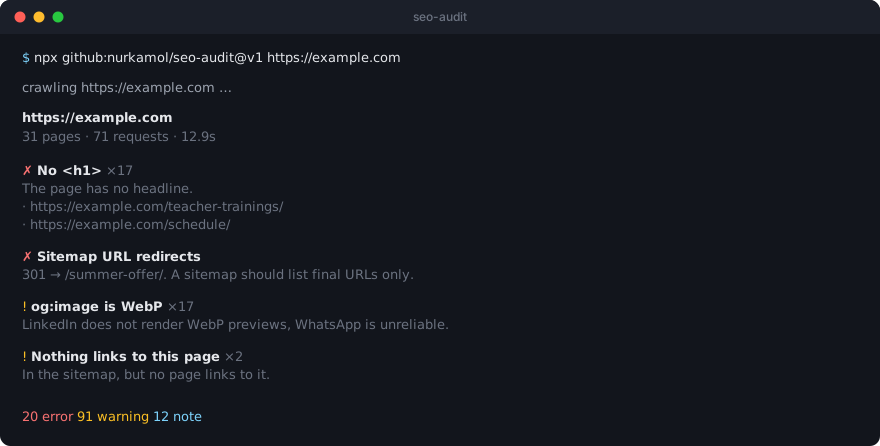
  https://example.com
  31 pages · 71 requests · 12.9s

  74/100   C   ████████████████████░░░░░░░░
  26.1 points across 9 checks · 61 passed · 22 did not apply

  ✗ No <h1> ×17
    The page has no headline.
    · https://example.com/schedule/
    · https://example.com/teacher-trainings/
    …

  ✗ Sitemap URL redirects
    301 → https://example.com/summer-offer/. A sitemap should list final URLs only.
    · https://example.com/spring-into-summer/

  ! og:image is WebP ×17
    LinkedIn does not render WebP previews and WhatsApp is unreliable with it.
    · https://example.com/reformer-classes/
    …

  20 error  91 warning  12 note
Findings are grouped by check, not by page, because the fix is usually one change applied everywhere. Errors and warnings come first; notes follow under Worth knowing, which says out loud that none of them cost the score anything.
Then Passing, then Not checked.
Some warnings are meant to be lived with. A contact page is supposed to be short; a privacy policy has no business carrying editorial links. The tool reports what is true and leaves the judgement to you — it has no way to know which pages are meant to rank.
Releases follow semver. Three ways to pin, in order of
how much you value stability over freshness:
Reference
Gets you
@v1
The latest release that is backwards compatible. Moves forward with each one. Recommended
@v1.22.0
Exactly that release, forever
@main
Whatever was last pushed, including work in progress
The same applies to npx github:nurkamol/seo-audit#v1.
Contributing
Adding a check means one entry in src/checks.mjs (per page), src/checks.mjs → crossPageChecks (needs every page), or src/site.mjs (once per domain). Each returns { level, id, title, detail, url } and that is the whole contract.
Two rules that keep the tool trustworthy:
No false positives. A check that cries wolf gets the whole report ignored. If a pattern is sometimes legitimate, it is a note, not an error.
No dependencies. It must keep running with a bare npx on a machine with nothing installed.
npm test          # the engine, the Worker and the extension — no install, any platform
npm run test:all  # and the macOS app's own Swift suite, where there is a toolchain for it
There are two suites and npm test runs one. Keeping it portable is the point — it works on a machine with nothing on it. test:all runs both and says plainly when it could not run the second, rather than exiting green having skipped half the work.