
Alice is a radical, experimental OCaml build
system, package manager, and toolchain manager for Windows and Unix-based OSes.
Its goal is to allow anyone to program in OCaml with as little friction as
possible.
Its name comes from an Australian children's
song.
Disclaimers
Alice is very early in development and is missing some important features:
- No preprocessing, so there's no way to use things like menhir or ppxes.
- Packages can only depend on other packages explicitly referred to within the
local filesystem. There's no package solver or registry and no way to
download packages.
- There's no interoperability with Opam. Alice packages can't depend on Opam
packages.
- Alice doesn't generate Opam metadata so Alice packages are difficult to
publish to Opam.
Alice is an experiment to see what building OCaml packages could be like if the
conventions set by Opam are ignored. It's not intended to replace Dune or Opam
or to split the OCaml packaging ecosystem. I don't recommend using Alice to
build real OCaml projects at this time, and instead I recommend using
Dune.
Installation
Follow the installation instructions here.
OCaml Toolchain
Alice needs an OCaml toolchain, specifically the program ocamlopt.opt. You
can use an existing toolchain installation from Opam or your system package
manager, or install the OCaml tools when prompted by Alice's install script.
Otherwise, you can install the OCaml tools with Alice by running:
alice tools install
The alice executable will be installed to ~/.alice/alice/bin, and any OCaml
tools installed by Alice or its install script will be installed to
~/.alice/roots and symlinked into ~/.alice/current. To uninstall Alice,
delete the ~/.alice directory.
The install script also offers to update your shell config file to add the
~/.alice/alice/bin directory to your PATH variable to make the alice
command available in your shell.
C Compiler
The OCaml toolchain implicitly depends on a C compiler. If you installed the
OCaml toolchain with your system package manager or Opam then you probably
already have a C compiler, but if you installed the toolchain with Alice itself
or Alice's install script then you might need to install a C compiler before
you'll be able to build OCaml projects with Alice. On Linux and macOS, either
gcc or clang will work. On Windows I recommend using
msys2.
Shell Completion
The install script will install shell completions for Alice, but if you need to
generate a completion script for Alice manually you can do so by running alice internal completions bash. Store the output in a file and source it from your
shell to install completion scripts. Currently only bash and zsh (via bash
compatibility) are supported.
Language Server Protocol (LSP)
Read about how to use LSP in Alice projects here.
Tutorial
Your First Package
Alice organizes code into packages. To make your first package, run:
alice new hello
This will create a new directory named hello, containing a package manifest
Alice.kdl and a src directory which will contain all the package's source
code. Currently there is just a single file src/main.ml.
If a package has a main.ml file then it is considered by Alice to be executable.
Executable packages can be built executed with the command alice run.
Let's try it now:
$ alice run
 Compiling hello v0.1.0
   Running hello/build/packages/hello-0.1.0/debug/executable/hello

Hello, World!
When rebuilding a package, Alice will only rebuild the files necessary based on
changes since the previous time it was built (ie. incremental builds). Built
artifacts are generated in a directory called build. To remove all build
artifacts, run alice clean.
Your Second Package
Alice packages can be either executables, libraries, or both.
In the previous section we made an executable package. In a separate directory,
outside the hello directory from the previous step, make a library package
named foo by running:
alice new --lib foo
The structure of this package is identical to the previous package, however
instead of a main.ml file there is a lib.ml file, indicating to Alice that
this package is a library. A package may also have both a main.ml and
lib.ml file, in which case Alice considers it to be both a library and an
executable package.
Modify the package's src/lib.ml file to have the following contents:
let message = "Hello, Alice!"
Build the project with alice build. Since it's a library we can't run it,
however we can modify the hello package from earlier to depend on it.
Go back to the hello package directory and make hello depend on the foo
package we just created.
Modify hello's Alice.kdl file to look like this:
package {
  name hello
  version "0.1.0"
  dependencies {
    foo path="../foo"  // replace "../foo" with the relative path to the foo package
  }
}
Modify hello's src/main.ml file to look like this:
let () = print_endline Foo.message
The Foo module is generated by Alice, and named after the foo package. Its
interface is the same as that of foo's Lib module from its lib.ml file.
Now run alice run again from the hello directory:
$ alice run
 Compiling foo v0.1.0
 Compiling hello v0.1.0
   Running hello/build/packages/hello-0.1.0/debug/executable/hello

Hello, Alice!
Visualizing Dependencies
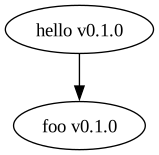
Alice can print graphviz dot files representing the
dependency graph of a package's transitive dependency closure with the command
alice dot artifacts. The hello package has a single dependency, so the
graph is quite simple:
$ alice dot packages
digraph {
  "hello v0.1.0" -> {"foo v0.1.0"}
}
If you have graphviz installed, you can visualize this by running:
alice dot packages | dot -Tsvg > packages.svg
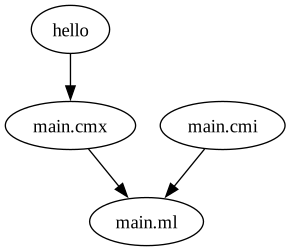
You can also visualize the build graph Alice would generate while building a
package. This can be helpful for debugging or just to better understand how
Alice will build your project.
alice dot artifacts | dot -Tsvg > artifacts.svg
Development Environment Notes
It's recommended to use direnv with the following .envrc while working on Alice:
export PATH=$PWD/scripts:$HOME/.local/share/alice/current/bin:$HOME/.local/bin:$PATH
export DUNE_CONFIG__PORTABLE_LOCK_DIR=enabled
export DUNE_CONFIG__PKG_BUILD_PROGRESS=enabled
export DUNE_CONFIG__LOCK_DEV_TOOL=disabled