FUSEN (My Sticky Notes)
Read this in other languages: English | 日本語
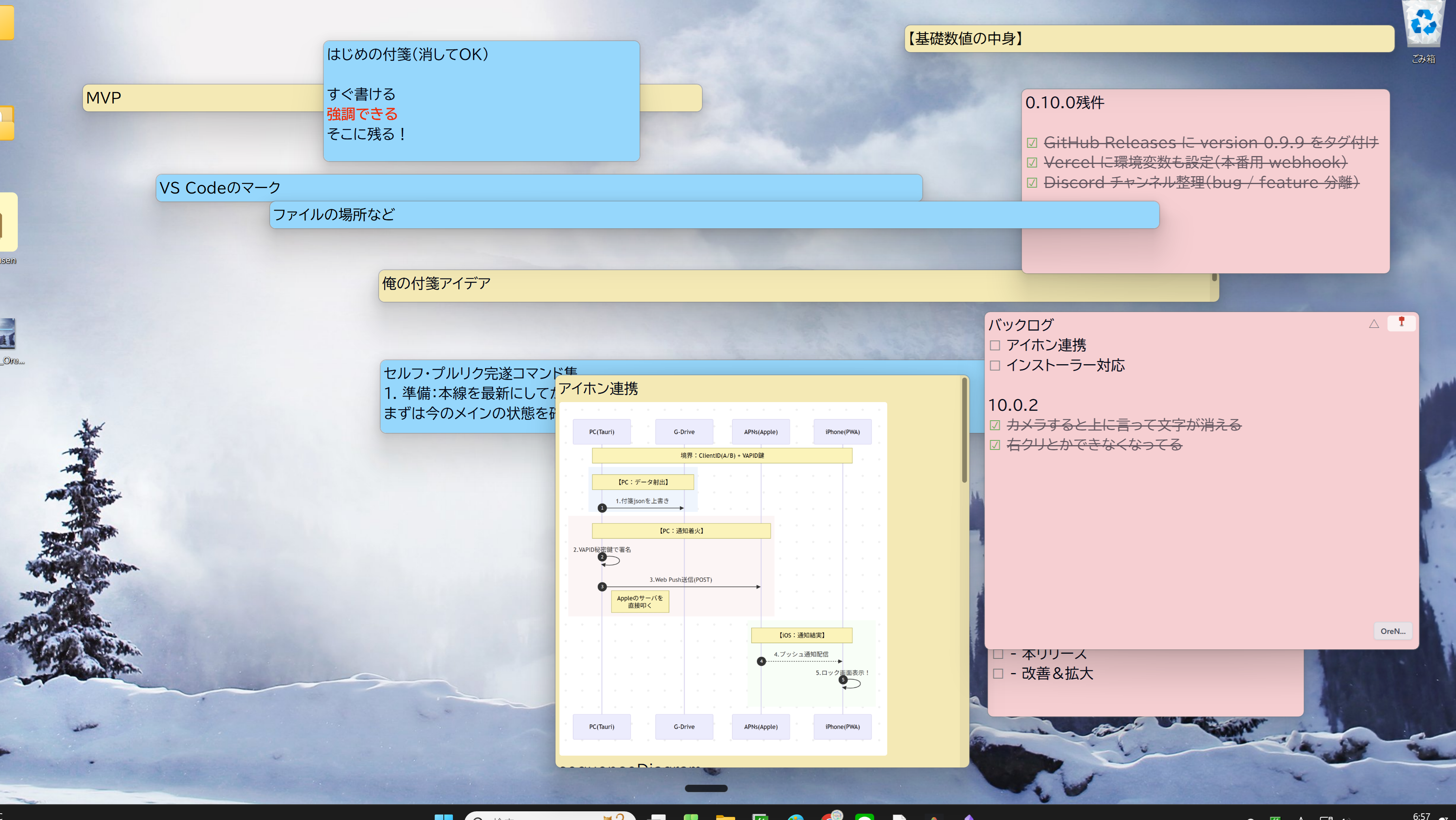
Pin your thoughts to your desktop.
A beautiful sticky notes app with Markdown support.


The former GitHub-distributed edition reached 2,800 downloads. The current official edition is distributed through Microsoft Store.
Microsoft Store • Documentation • FAQ • Landing Page • 🎥 Comic Guide
FUSEN
The fastest way to capture thoughts.
Markdown sticky notes for your desktop.
Install (10 sec)
winget install --id 9N4MW0V2MVVG --source msstore
Or install it from Microsoft Store.
Concept
Capture thoughts instantly without interrupting your thinking.
FUSEN is designed as a fast thinking canvas where ideas can appear the moment they come to mind.
✨ Features
🎯 Simple yet Powerful
- Markdown Support - Supports headings, lists, code blocks, tables, Mermaid diagrams, images, and more.
- VideoDrop - Send
mp4 / mov videos from the iPhone/iPad PWA to your PC and keep the saved path attached to the note.
- One-click Edit - Click anywhere to start typing immediately. Auto-saves so you never lose your thoughts.
- Floating Format Bar - Appears automatically when text is selected. Click to format bold, headings, lists, and checkboxes.
- Tags & Archives - Organize your sticky notes. Folder structure for easy viewing.
- Full-Text Search - Find statements instantly with regular expression support. Auto-jumps and highlights the matching lines.
- Pin to Top - Always display in front of other windows using the 📌 button.
- System Tray Integration - Resides in the system tray for instant access anytime.
- Auto-Start - Starts automatically on system boot.
- Sound Effects - Comfortable feedback for a pleasant user experience.
🔒 Privacy Focused
- 100% Local - All data is saved locally on your device. No cloud storage is required.
- Offline Capable - Works without an internet connection.
- Open Source - Code is fully available. Use it with peace of mind.
📸 Screenshots
📥 Installation
For General Users (Recommended)
- Open the Microsoft Store listing.
- Select Get or Install.
- Select Open on the Store page after installation.
- On first launch, choose whether to create the 俺の付箋(Store版) desktop shortcut. You can also create it later from Settings.
- Future updates are delivered automatically through Microsoft Store.
System Requirements:
- OS: Windows 10/11 (64-bit)
- Disk Space: Approx. 100MB
- Memory: 4GB+ recommended
If you use an older MSI or NSIS edition, install the Store edition first, verify your notes and settings, and only then uninstall the old edition.
For Developers
Prerequisites
- Node.js 18+
- Rust (Install via rustup)
Setup Instructions
- Clone the repository:
git clone https://github.com/ore-no-fusen/ore-no-fusen.git
cd ore-no-fusen
- Install dependencies:
npm install
- Run in development mode:
npm run tauri dev
- Production build:
npm run tauri build
After building the release executable and resources, create the Store submission MSIX with packaging/msix/build-msix.ps1.
🎯 Usage
Basic Operations
- Create a Sticky Note - Right-click the system tray icon → "New Note"
- Edit - Double-click a note
- Search - Press
Ctrl+F to open the search window
- Tagging - Write
#tagname within a note to automatically tag it
For detailed usage, please see the User Guide on Wiki.
Markdown Example
# Today's Tasks

## Important
- [ ] Prepare presentation slides
- [x] Reply to emails

## Notes
**Deadline**: 2026/02/15
*Assignee*: Alex

| Item | Status |
|------|------|
| Slides | In Progress |
| Review | Pending |

#work #important
💡 Use Cases
📝 Task Management
Organize your daily tasks with checklists and tags. Move completed tasks to the archive.
💭 Idea Capture
Jot down ideas the moment you have them. Structure and organize them with Markdown.
📚 Study Notes
Categorize what you learn with tags. Easily review using the search feature.
🔖 Link Collection
Save frequently used links on sticky notes. Group them using tags.
🛠️ Technology Stack
Frontend
- Next.js 15.5 (App Router / Maintenance LTS)
- React 19.1
- TypeScript
- Tailwind CSS
- CodeMirror 6 (Markdown Editor)
Backend
- Tauri 2.x (Desktop App Framework)
- Rust (Fast & Secure Backend)
Architecture
- DOD (Data-Oriented Design) - Data-centric architecture
- Effect Pattern - Explicit management of side effects
- AppState (SSOT) - Single source of truth
📖 Documentation
🤝 Contributing
Issues and Pull Requests are welcome!
- Fork this repository
- Create a feature branch (
git checkout -b feature/amazing-feature)
- Commit your changes (
git commit -m 'Add some amazing feature')
- Push to the branch (
git push origin feature/amazing-feature)
- Open a Pull Request
📝 License
MIT License - see the LICENSE file for details.
🙏 Acknowledgements
FUSEN uses the following open-source projects:
📞 Support
Make organizing thoughts more fun with FUSEN 🎉
Made with ❤️ by ONF Studios