Open Omni OpenSelena
Use this command to install Open Omni with WinGet:
winget install --id=OpenSelena.OpenOmni -e Open Omni is a fast terminal-first media downloader and TUI for 1,800+ sites powered by yt-dlp and gallery-dl.
winget install --id=OpenSelena.OpenOmni -e Open Omni is a fast terminal-first media downloader and TUI for 1,800+ sites powered by yt-dlp and gallery-dl.

Fast terminal media downloader and TUI for 1,800+ sites. Download videos, music, and photo galleries from YouTube, Instagram, X, TikTok, and more.


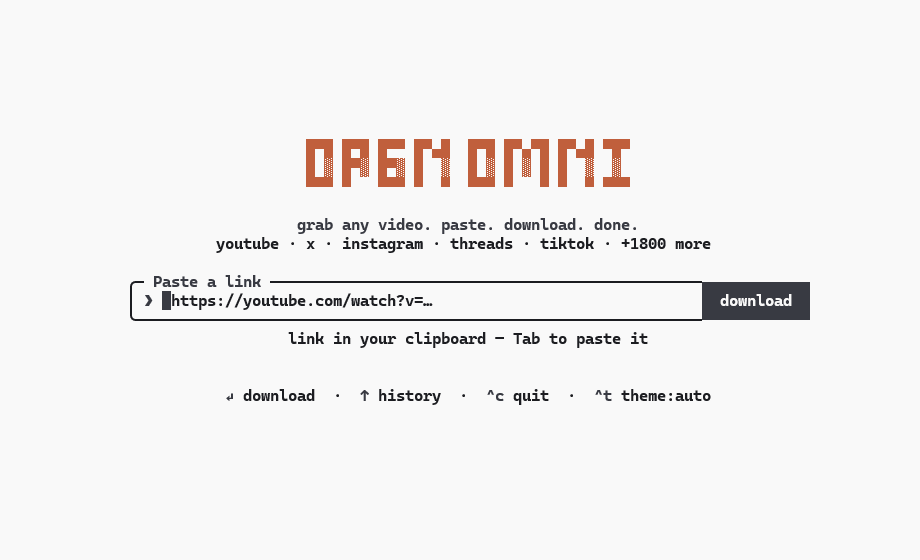
You want to download a video, an audio track, or a photo set without clicking through suspicious popups, fake download buttons, or ad-laden web converters. You also don't want to memorize dozens of complicated command-line flags.
Open Omni combines the flexibility of an interactive terminal interface with scriptable command-line speed. Paste a link from your clipboard with one key, preview available formats, and download directly to your machine.
Under the hood, Open Omni automatically provisions and manages yt-dlp, gallery-dl, and ffmpeg binaries so you never have to manually configure external dependencies.
o on completion to highlight the downloaded file in your file manager (Explorer, Finder, or Linux file managers).--proxy, or pass country codes with --geo-bypass and --geo-country. Passwords in proxy URLs are masked in logs.--limit-rate (for example, 1.5M or 500K).--sponsorblock and --sponsorblock-remove.yt-dlp and multi-photo social carousels to gallery-dl.--skip-existing by checking the local history ledger against disk.Tab), format selection, and progress bars.| Open Omni | yt-dlp | Web converters | |
|---|---|---|---|
| Interface | Keyboard-driven terminal TUI | Command-line flags | Browser UI with ads |
| Engines | Auto-provisions yt-dlp, gallery-dl, ffmpeg | Manual binary or Python setup | Hosted / unknown backends |
| Media | Video, audio, photos & carousels | Video & audio | Inconsistent / compressed |
| Selection | Interactive checklist (Space / A keys) | Index ranges (--playlist-items) | Single URL at a time |
| Workflow | Tab clipboard paste → pick format → Enter | Build flags manually | Paste → wait → download |
| Local-first | 100% local, zero telemetry | 100% local, open-source | Remote servers & ad trackers |
curl -fsSL https://mint.dev.cv | sh
brew install OpenSelena/tap/open-omni
winget install OpenSelena.OpenOmni
npm install -g open-omni
npx open-omni [url]
Once installed, Open Omni is accessible via any of these commands:
open-omni (canonical)openomni (hyphen-free)omni (concise)oo (ultra-fast alias)> Requirements: Node 20+ (when using npm or Homebrew; standalone Windows package bundles its own runtime). Extraction engines (yt-dlp, gallery-dl, and ffmpeg) are downloaded automatically to ~/.open-omni/bin on demand.
Launch interactive mode:
open-omni
Or pass a URL directly to inspect available media formats:
open-omni https://youtu.be/dQw4w9WgXcQ
Direct scriptable downloads:
# Download highest resolution video directly
open-omni  --best

# Extract audio to MP3 or lossless FLAC in a specific directory
open-omni  --mp3 -o ~/Music
open-omni  --audio-format flac -o ~/Music

# Download video in specific container format (mp4, mkv, webm)
open-omni  --video-format mkv

# Download specific time range or clip section
open-omni  --time 01:00-02:30

# Skip items already downloaded and recorded in download ledger
open-omni  --skip-existing

# Download with embedded subtitles
open-omni  --embed-subs --subs=en,es

# Embed metadata tags and chapter markers into media container
open-omni  --metadata --embed-chapters

# Download thumbnail artwork and embed into file
open-omni  --thumb --embed-thumb

# Download only photos from an Instagram or X gallery
open-omni  --photos-only

# Zero-config: extract cookies automatically from local browser session
open-omni  --cookies-from-browser auto

# Target a specific browser or profile explicitly
open-omni  --cookies-from-browser firefox

# Download using an exported Netscape cookie file
open-omni  --cookies ~/cookies.txt

# Route downloads through HTTP/HTTPS/SOCKS proxy
open-omni  --proxy http://127.0.0.1:8080

# Bypass geographic restriction with synthetic header or country code
open-omni  --geo-bypass
open-omni  --geo-country US

# Throttle bandwidth consumption
open-omni  --limit-rate 1.5M

# Remove sponsored segments using SponsorBlock
open-omni  --sponsorblock
open-omni  --sponsorblock-remove sponsor,intro

# Custom filename template
open-omni  --output-template "%(uploader)s - %(title)s.%(ext)s"

# Parallel batch downloads (e.g. 4 concurrent downloads)
open-omni  --concurrency 4

# Update bundled extraction engines (yt-dlp and gallery-dl)
open-omni -U
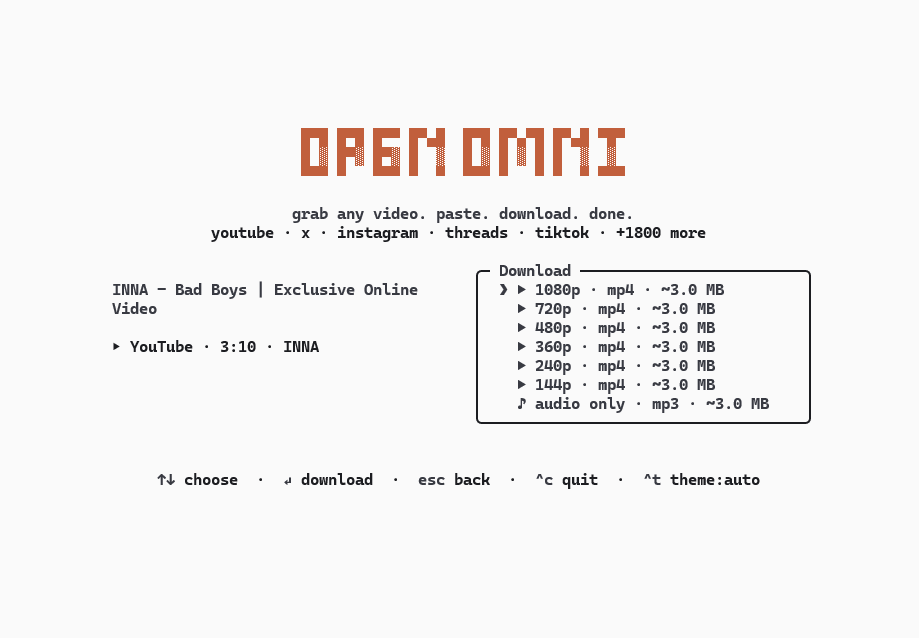
Tab to insert the current clipboard contents.Space or select all with A.dark, light, and auto terminal palette integration.O on completion screen to reveal downloaded media in your native file manager.| Flag | Description |
|---|---|
[url] | Video, playlist, or gallery URL |
--best | Download highest available video quality directly |
--mp3 | Extract audio track as MP3 directly |
--audio-format | Audio extraction format (best, aac, flac, mp3, m4a, opus, vorbis, wav, alac) |
--video-format | Video container format (mp4, mkv, webm) |
--metadata | Embed metadata (artist, title, date, etc.) into media container |
--add-metadata | Alias for --metadata |
--embed-chapters | Embed chapter markers into media container |
--subs [langs] | Download subtitles (e.g. --subs=en,es) |
--embed-subs | Mux subtitles into the video container |
--thumb | Save video thumbnail image |
--embed-thumb | Embed thumbnail artwork into media container |
--photos-only | Download only images from social post or carousel |
--videos-only | Download only videos from social post or carousel |
--skip-existing | Skip download if recorded in ledger and present on disk |
--time | Download specific time range (e.g. 01:00-02:30 or 60-150) |
--section | Alias for --time |
--cookies | Load session cookies from a Netscape format file |
--cookies-from-browser | Extract cookies from browser (auto, firefox, chrome, zen, etc.) |
--proxy | Route requests via HTTP/HTTPS/SOCKS proxy (e.g. socks5://...) |
--geo-bypass | Bypass geographic restriction via synthetic X-Forwarded-For header |
--geo-country | Bypass geographic restriction with 2-letter country code (e.g. US, DE) |
--limit-rate | Limit download bandwidth (e.g. 50K, 1.5M, 2G) |
--sponsorblock | Remove sponsored segments using SponsorBlock |
--sponsorblock-remove | SponsorBlock categories to remove (default: all) |
--output-template | Custom filename template (e.g. %(uploader)s/%(title)s.%(ext)s or {title}.{ext}) |
-c, --concurrency | Maximum parallel download workers for batch queue |
-o, --output | Destination folder (default: Downloads or $OPEN_OMNI_DIR) |
-U, --update | Update bundled yt-dlp and gallery-dl binaries |
--update-ytdlp | Update only bundled yt-dlp binary |
--update-gallerydl | Update only bundled gallery-dl binary |
--force | Force overwrite existing downloads or re-fetch binaries |
--theme | Color theme: auto, light, or dark |
--completion | Generate completions (bash, zsh, fish, powershell) |
-h, --help | Show help screen |
-v, --version | Show version number |
Settings can be customized in ~/.config/open-omni/config.json:
{
  "outputDir": "~/Downloads",
  "theme": "auto",
  "format": "best",
  "audioFormat": "mp3",
  "videoFormat": "mp4",
  "proxy": "http://127.0.0.1:8080",
  "geoBypass": true,
  "geoCountry": "US",
  "limitRate": "1.5M",
  "sponsorblock": true,
  "sponsorblockRemove": "all",
  "metadata": {
    "enabled": true,
    "embedChapters": true
  },
  "cookiesFromBrowser": "firefox",
  "subtitles": {
    "enabled": true,
    "languages": "en,es",
    "embed": false
  },
  "thumbnail": {
    "enabled": true,
    "embed": true
  }
}
Precedence: Command-line flags > Environment variables (ALL_PROXY, OPEN_OMNI_DIR) > config.json > OS default Downloads.
Add autocomplete support to your shell profile:
# Bash (~/.bashrc)
eval "$(open-omni --completion bash)"

# Zsh (~/.zshrc)
eval "$(open-omni --completion zsh)"

# Fish (~/.config/fish/config.fish)
open-omni --completion fish | source

# PowerShell ($PROFILE)
if (Get-Command open-omni -ErrorAction SilentlyContinue) {
    open-omni --completion powershell | Out-String | Invoke-Expression
}
Open Omni runs entirely on your local machine:
Open Omni is an open-source educational utility intended for personal archiving, local offline study, and fair-use research.
The software functions as an automated terminal interface to established media extraction backends (yt-dlp and gallery-dl). Analogous to a standard web browser or media player, Open Omni retrieves publicly available media streams strictly at the direct instruction of the user. Open Omni does not operate remote media servers, store or index content, bypass digital rights management (DRM) encryption, or circumvent technical access controls or digital paywalls.
Applicable copyright laws (such as Section 107 of the U.S. Copyright Act and comparable fair-dealing statutes internationally) permit the use of copyrighted works without express authorization under specific circumstances, including:
Whether a specific download or utilization qualifies as fair use depends on jurisdictional statutory factors, including the purpose and character of the use, the nature of the copyrighted work, the amount and substantiality of the portion used, and the effect upon the potential market or value of the work.
Open Omni is released under the MIT License.
For copyright concerns, legal inquiries, bug reports, security reports, or general questions regarding this project, please reach out directly: