



Picocrypt NG (new generation) is a very small (hence Pico), very simple, yet very secure encryption tool that you can use to protect your files. It's designed to be the go-to tool for file encryption, with a focus on security, simplicity, and reliability. Picocrypt NG uses the secure XChaCha20 cipher and the Argon2id key derivation function to provide a high level of security.
History
Picocrypt NG is a community-developed continuation of the archived Picocrypt project.
The original Picocrypt author does not endorse, develop, nor support Picocrypt NG.
When referencing Picocrypt NG, please always include the "NG" suffix to ensure distinction.
Downloads
ℹ️ You are highly recommended to read through the Features section below to fully understand the features and limitations of Picocrypt NG before using it. ℹ️
Make sure to only download Picocrypt NG from this repository to ensure that you get the authentic and backdoor-free Picocrypt NG. When sharing Picocrypt NG with others, be sure to link to this repository to prevent any confusion.
Windows
Windows 10/11: Download the latest installer or portable executable. A CLI-only Windows build is available here.
Windows 7/8 (Legacy Systems): The legacy release is CLI-only. If you're running Windows 7 or Windows 8, download the legacy CLI build instead. This version includes:
- Compiled with go-legacy-win7 for Windows 7/8 compatibility
- No GUI or OpenGL dependencies
⚠️ Note: The legacy build is for command-line use only. Use the standard installer or portable executable on Windows 10/11.
If your antivirus flags Picocrypt NG as a virus, please report it as a false positive to help everyone.
Code signing: Starting with Picocrypt-NG 2.19, Windows releases are Authenticode-signed through the SignPath Foundation open-source program and checked against the pinned production certificate. See the verification guide.
macOS
Download Picocrypt NG here, open the container, and drag Picocrypt NG to your Applications.
Picocrypt NG is also available through the third-party MacPorts port:
sudo port install picocrypt-ng
This port is maintained outside this repository and is not published by the Picocrypt NG maintainers, so release timing, build flags, and packaging behavior are controlled by MacPorts and its maintainers.
Apple Silicon vs Intel: The released macOS app is built for Apple Silicon and targets macOS 15.0+. Intel Mac users and users on older macOS releases need to build from source or use the CLI-only version where appropriate.
Gatekeeper Warning: The release is ad-hoc signed but not notarized (notarization needs a paid Apple Developer ID), so macOS shows a Gatekeeper warning the first time you open it. This is a Gatekeeper prompt, not a Picocrypt NG runtime error.
To open it, use one of these methods:
- Right-click → Open (instead of double-clicking), then confirm
- System Settings → Privacy & Security → scroll down → "Open Anyway"
- Terminal:
xattr -cr /Applications/Picocrypt-NG.app — most reliable, and the fix if a re-download re-applies quarantine and you see "app is damaged and can't be opened"
The CLI-only build avoids the .app bundle path and is useful for terminal-only use.
Linux
Download the raw binary for amd64 or arm64 (you may need the packages below). CLI-only builds are also available for amd64 and arm64. Alternatively, try the .deb or Flatpak.
sudo apt install -y libc6 libgcc-s1 libgl1 libgtk-3-0 libstdc++6 libx11-6
Android
The native Android app requires Android 7.0 or newer on a 64-bit ARM (arm64-v8a) or x86-64 device. Download the signed universal 64-bit APK here, or choose the smaller matching per-ABI APK from the latest GitHub release. Historical 32-bit APKs remain available with their original releases but are no longer supported. PR artifacts remain debug/testing-only.
For local Android builds and architecture details, see android/README.md.
CLI
Picocrypt NG includes a command-line interface in this repository; see CLI.md for usage. It encrypts literal file and folder operands; use quoted explicit glob patterns when pattern matching is intended. It also supports paranoid mode and Reed-Solomon encoding. You can use it on systems that don't have a GUI or can't run the GUI app.
Web
Picocrypt NG provides a browser app here for in-memory single-file encryption and decryption on modern browsers, including mobile devices. In this repository, the WASM bridge caps inputs at 1 GiB and supports comments, Paranoid mode, Reed-Solomon payload protection, force decrypt, deniability, and decryption of supported legacy keyfile volumes. Picocrypt-NG 2.19 encryption is password-only: the bridge rejects every request containing keyfiles instead of creating another v2 keyfile volume. The browser workflow is still intentionally non-streaming and single-file oriented; folder workflows, split volumes, and large streaming jobs remain desktop/CLI/native-app features. Go-owned byte buffers are wiped best-effort after use, but JavaScript engine copies and garbage-collected runtime copies cannot be guaranteed wiped. The hosted page is deployed separately and must use a consumer matching the 2.19 bridge error contract.
Translations
Community translations for Picocrypt NG are hosted in the
Picocrypt-NG Weblate project.
When the project is operationally unlocked, the desktop and native Android
components accept target-language corrections and proposals for new languages.
Component configuration disables editing the base English catalogs and
managing source string IDs. Every Weblate repository change is proposed from a
fork through a GitHub pull request; human approval and the required CI checks
remain mandatory before merge. The complete operational contract is recorded in
WEBLATE_SETUP.md.
Security-sensitive wording must preserve the meaning documented in the
translation guide. Community
linguistic review is continuous, so the bundled catalogs are not presented as
certified native-language reviews.
Current desktop and native Android builds bundle application UI catalogs for
English, Russian, German, French, Spanish, Simplified Chinese, Hindi, and Korean
(ko, with contemporary neutral South Korean wording). The desktop app has an
in-app language selector for Picocrypt-NG-owned UI; Fyne-owned dialogs and raw
backend status text may remain English. Android 13 and newer expose the system
per-app language selector; older Android versions follow the system locale. The
CLI remains English-only. Catalog structure, placeholders, plurals, and locale
registration are enforced in repository tests; translation and rendering
corrections continue through the same reviewed pull-request workflow.
File Associations
Double-click .pcv files to open Picocrypt NG in decrypt mode on Windows, macOS, and Linux. Installer/.deb/.app packages register the association automatically.
Comparison
Here's how Picocrypt NG compares to other popular encryption tools.
| Picocrypt NG | VeraCrypt | 7-Zip GUI | BitLocker | Cryptomator |
|---|
| Free | ✅ Yes | ✅ Yes | ✅ Yes | ✅ Bundled | ✅ Yes |
| Open Source | ✅ GPLv3 | ✅ Multi | ✅ LGPL | ❌ No | ✅ GPLv3 |
| Cross-Platform | ✅ Yes | ✅ Yes | ❌ No | ❌ No | ✅ Yes |
| Size | ✅ 9-10 MiB | ❌ 20 MiB | ✅ 2 MiB | ✅ N/A | ❌ 50 MiB |
| Portable | ✅ Yes | ✅ Yes | ❌ No | ✅ Yes | ❌ No |
| Permissions | ✅ None | ❌ Admin | ❌ Admin | ❌ Admin | ❌ Admin |
| Ease-Of-Use | ✅ Easy | ❌ Hard | ✅ Easy | ✅ Easy | 🟧 Medium |
| Cipher | ✅ XChaCha20 | ✅ AES-256 | ✅ AES-256 | 🟧 AES-128 | ✅ AES-256 |
| Key Derivation | ✅ Argon2 | 🟧 PBKDF2 | ❌ SHA-256 | ❓ Unknown | ✅ Scrypt |
| Data Integrity | 🟧 Authenticated* | ❌ No | ❌ No | ❓ Unknown | ✅ Always |
| Deniability | ✅ Supported | ✅ Supported | ❌ No | ❌ No | ❌ No |
| Reed-Solomon | ✅ Yes | ❌ No | ❌ No | ❌ No | ❌ No |
| Compression | ✅ Yes | ❌ No | ✅ Yes | ✅ Yes | ❌ No |
| Telemetry | ✅ None | ✅ None | ✅ None | ❓ Unknown | ✅ None |
| Audited | ✅ Historically | ✅ Yes | ❌ No | ❓ Unknown | ✅ Yes |
* Picocrypt NG normally authenticates the payload and, for v2, the header. This is not an "always" guarantee: force-decrypt may explicitly keep unverified output, v1 lacks the v2 full-header HMAC, and the authentication, Serpent, and rekey subkeys of legacy v2 keyfile volumes are derived from the password without the keyfile.
Keep in mind that while Picocrypt NG does most things better than other tools, it's not a one-size-fits-all and doesn't try to be. There are use cases such as full-disk encryption where VeraCrypt and BitLocker would be a better (and the only) choice. So while Picocrypt NG is a great choice for the majority of people doing file encryption, you should still do your own research and use what's best for you.
Features
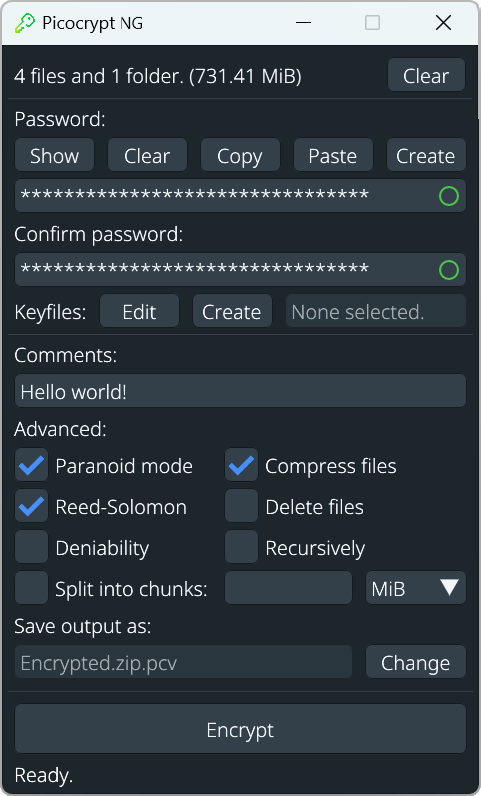
Picocrypt NG is a very simple tool and most users will intuitively understand how to use it in a few seconds. On a basic level, simply dropping your files, entering a password, and hitting Encrypt is all that's needed to encrypt your files. Dropping the output back into Picocrypt NG, entering the password, and hitting Decrypt is all that's needed to decrypt those files. Pretty simple, right?
While being simple, Picocrypt NG also strives to be powerful in the hands of knowledgeable and advanced users. Thus, there are some additional options that you may use to suit your needs. Read through their descriptions carefully as some of them can be complex to use correctly.
<strong>Password generator</strong>: Picocrypt NG provides a secure password generator that you can use to create cryptographically secure passwords. You can customize the password length, as well as the types of characters to include.
<strong>Comments</strong>: Comments are plaintext header metadata: they are not encrypted and must never contain secrets. The v2 header HMAC covers comments, so ordinary tampering is detected during normal authenticated decryption. In a legacy v2 keyfile volume that HMAC is password-derived but not keyfile-bound, and legacy v1 volumes do not have the v2 full-header HMAC. <strong>Use comments only for non-sensitive, informational text.</strong>
<strong>Keyfiles</strong>: Picocrypt-NG 2.19 preserves decryption of supported legacy v1/v2 keyfile volumes but refuses to create any new v2 volume containing keyfiles, whether the request is keyfile-only or password-plus-keyfile. In legacy v2, the keyfile changes the XChaCha20 key and therefore remains necessary for confidentiality, but it does not bind the header MAC, payload MAC, Serpent key, or HKDF rekey schedule. After decrypting a legacy keyfile volume, either re-encrypt it as a new password-only 2.19 volume or, if a keyfile factor is mandatory, wait for a reviewed v3 format; v3 is not implemented or scheduled by this release.
<strong>Paranoid mode</strong>: Paranoid mode increases the work factor and adds a Serpent-CTR layer plus HMAC-SHA3 authentication. It is useful for conservative defense in depth when performance cost is acceptable, assuming a strong password and a trusted endpoint. It does not make weak passwords safe and should not be described as beyond attack.
<strong>Reed-Solomon</strong>: Reed-Solomon adds error-correction redundancy so Picocrypt NG can detect and repair limited corruption. It cannot prevent corruption and cannot recover data after corruption exceeds the redundancy budget.
<strong>Force decrypt</strong>: Normal decryption verifies the volume MAC and removes output when verification fails. Force decrypt deliberately overrides that safeguard and may keep corrupt, attacker-controlled, or otherwise unverified plaintext; such output must not be treated as authentic. If Reed-Solomon was used, force decrypt also attempts best-effort recovery.
<strong>Split into chunks</strong>: Don't feel like dealing with gargantuan files? No worries! With Picocrypt NG, you can choose to split your output file into custom-sized chunks, so large files can become more manageable and easier to upload to cloud providers. Simply choose a unit (KiB, MiB, GiB, or TiB) and enter your desired chunk size for that unit. To decrypt the chunks, simply drag one of them into Picocrypt NG and the chunks will be automatically recombined during decryption.
<strong>Compress files</strong>: By default, Picocrypt NG uses a zip file with no compression to quickly merge files together when encrypting multiple files. If you would like to compress these files, however, simply check this box and the standard Deflate compression algorithm will be applied during encryption.
<strong>Deniability</strong>: Enabling this option wraps the regular inner volume in a headerless XChaCha20 layer whose salt, nonce, and ciphertext are intended to look random to an observer who does not know the password. It hides the recognizable Picocrypt NG header, but it is not anonymity and does not guarantee protection against forensic analysis, traffic or storage metadata, endpoint compromise, or coercion. The outer wrapper always uses the normal Argon2id parameters; if Paranoid mode is selected, its additional work factor, Serpent layer, and authentication remain part of the inner volume but do not strengthen the outer wrapper. Deniability slows encryption and decryption, requires manual output naming, and prevents the wrapped volume's comment from being read before the wrapper is removed. Picocrypt-NG 2.19 requires a non-empty password for every new volume and rejects keyfiles at every writer boundary, including when deniability is selected. Existing v1/v2 keyfile volumes, including legacy keyfile-only deniable v2 volumes made with an empty outer password, remain readable for recovery and migration. Re-encrypt recovered plaintext as password-only; do not merely rewrap the affected inner v2 volume and claim keyfile-bound integrity. Use deniability only when this limited random-looking-container property matches your threat model.
<strong>Recursively</strong>: If you want to encrypt and/or decrypt a large set of files individually, this option will tell Picocrypt NG to go through every recursive file that you drop in and encrypt/decrypt it separately. This is useful, for example, if you are encrypting thousands of large documents and want to be able to decrypt any one of them in particular without having to download and decrypt the entire set of documents. <strong>Keep in mind that this is a very complex feature that should only be used if you know what you are doing.</strong>
<strong>File associations</strong>: Double-click .pcv files to open Picocrypt NG in decrypt mode. Setup.exe (Windows), .deb (Linux), and .app (macOS) register the association automatically.
Security
For more information on how Picocrypt NG handles cryptography, see Internals for the technical details.
Picocrypt NG operates under the assumption that the host machine it is running on is safe and trusted. If that is not the case, no piece of software will be secure, and you will have much bigger problems to worry about. As such, Picocrypt NG is designed for the offline security of volumes and does not attempt to protect against side-channel analysis.
AI Usage
AI tools (LLMs) assist development in this project. The cryptographic core derives from the audited Picocrypt (Radically Open Security, 2024 — no major findings) and stays regression-pinned to the archived audited build and frozen golden vectors, so AI-assisted changes cannot silently alter the audited behavior or the volume format. All crypto-critical code receives human review before merging. See CONTRIBUTING.md for details.
FAQ
Does the "Delete files" feature shred files?
No, it doesn't shred any files and just deletes them as your file manager would. On modern storage mediums like SSDs, there is no such thing as shredding a file since wear leveling makes it impossible to overwrite a particular sector. Thus, to prevent giving users a false sense of security, Picocrypt NG doesn't include any shredding features at all.
Is Picocrypt NG quantum-secure?
Picocrypt NG uses symmetric cryptography with large security margins, which is generally less affected by known quantum speedups than public-key cryptography. This is not a guarantee against all future cryptanalytic developments; password strength and endpoint security still matter.
Acknowledgements
Thank you to the significant contributors on Open Collective who helped secure the original Picocrypt project's audit:
<strong>Mikołaj ($1674)</strong>
<strong>Guest ($842)</strong>
<strong>YellowNight ($818)</strong>
Incognito ($135)
akp ($98)
JC ($90)
evelian ($50)
jp26 ($50)
guest-116103ad ($50)
Guest ($27)
Gittan Pade ($25)
Pokabu ($20)
oli ($20)
Bright ($20)
Incognito ($20)
Guest ($20)
JokiBlue ($20)
Guest ($20)
Markus ($15)
EN ($15)
Guest ($13)
Tybbs ($10)
N. Chin ($10)
Manjot ($10)
Phil P. ($10)
Raymond ($10)
Cohen ($10)
EuA ($10)
geevade ($10)
Guest ($10)
Hilebrinest ($10)
gabu.gu ($10)
Boat ($10)
Guest ($10)