Prompt Refiner
A lightweight Windows desktop application (.NET 8, WinForms) that takes a rough prompt, sends it to a large language model via the GitHub Copilot SDK, and returns a polished, comprehensive version. Supports both a graphical interface and a headless CLI.
| Platform | Status |
|---|
| Windows 10/11 (x64) | ✅ Supported |
| macOS | ❌ Not supported (WinForms) |
| Linux | ❌ Not supported (WinForms) |
Prerequisites
Before using Prompt Refiner, ensure you have:
-
GitHub Copilot CLI — installed and available on PATH.
# Install via npm
npm install -g @anthropic-ai/sdk
# Or via the GitHub CLI extension
gh extension install github/gh-copilot
-
Active GitHub Copilot subscription — any tier (Free, Individual, Business, Enterprise). The SDK bills against your Copilot premium request quota.
-
Authentication — sign in once before first use:
gh auth login
The app auto-discovers credentials from (in order): COPILOT_GITHUB_TOKEN, GH_TOKEN, GITHUB_TOKEN environment variables, or the Copilot CLI's cached login.
-
Runtime (only if building from source):
- .NET 8.0 SDK or later.
- The self-contained release zip requires no runtime installation.
Installation
Download the latest PromptRefiner-win-x64.zip from Releases, extract anywhere, and run PromptRefiner.exe.
No installer is needed — it's a single self-contained executable.
Verify Prerequisites
After extracting, run the built-in prerequisite checker:
PromptRefiner.exe --check-prereqs
This verifies the GitHub Copilot CLI and GitHub CLI are installed and checks for auth tokens.
Usage
GUI Mode
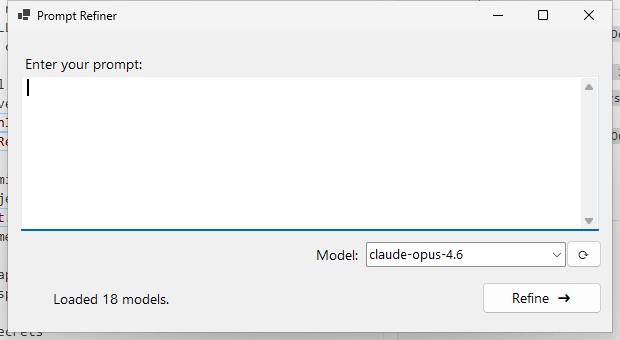
Double-click PromptRefiner.exe (or run it with no arguments):
- Type or paste a rough prompt into the input area.
- Select a model from the dropdown (default:
claude-opus-4.6). The list is fetched live from Copilot on startup.
- Click Refine ➜ (or press
Ctrl+Enter).
- A streaming output window opens showing the refined prompt in real time.
- Edit the result if needed, then click 📋 Copy to copy to clipboard.
CLI Mode
Run with arguments to operate headlessly — ideal for scripts and pipelines.
# Refine a prompt directly
PromptRefiner.exe -p "write a python script to sort a list"

# Read prompt from a file
PromptRefiner.exe -f prompt.txt

# Pipe from stdin
echo "help me debug my code" | PromptRefiner.exe

# Use a specific model
PromptRefiner.exe -p "design a REST API" -m gpt-4o

# Save output to a file (also prints to stdout)
PromptRefiner.exe -p "explain recursion" -o refined.txt

# List all available models
PromptRefiner.exe --list-models

# Show help
PromptRefiner.exe --help
CLI flags:
| Flag | Description |
|---|
-p, --prompt | Prompt text to refine |
-f, --file | Read prompt from a file |
-m, --model | Model to use (default: claude-opus-4.6) |
-o, --output | Write refined prompt to file |
--list-models | Print available models and exit |
--check-prereqs | Verify prerequisites and exit |
-h, --help | Show usage help |
Exit codes: 0 = success, 1 = error. Status messages go to stderr; refined output goes to stdout.
Build from Source
git clone https://github.com/PranavPeshwe/prompt-refiner.git
cd prompt-refiner
dotnet build prompter2.sln
Running Tests
# Unit tests only (no network, no auth needed)
.\Run-Tests.ps1 -Filter Unit

# Startup benchmark tests
.\Run-Tests.ps1 -Filter Startup

# Integration tests (requires Copilot auth + subscription)
.\Run-Tests.ps1 -Filter Integration

# All tests
.\Run-Tests.ps1 -Filter All

# Standalone startup measurement (10 iterations with bar graph)
.\Measure-Startup.ps1 -Runs 10
Test Coverage
| Category | Tests | Requires Auth |
|---|
| Unit | 10 | No |
| Integration | 12 | Yes |
| Startup Benchmark | 3 | No |
Project Structure
├── Program.cs                 # Entry point (GUI/CLI routing)
├── MainForm.cs                # Input window (WinForms)
├── ResultForm.cs              # Streaming output window
├── ErrorDialog.cs             # Copy-able error dialog
├── PromptRefinerService.cs    # Copilot SDK wrapper
├── PromptRefiner.csproj       # Project file
├── Run-Tests.ps1              # Test runner script
├── Measure-Startup.ps1        # Startup benchmark script
├── requirements.md            # Detailed requirements document
└── tests/
    └── PromptRefiner.Tests/
        ├── UnitTests.cs
        ├── IntegrationTests.cs
        └── StartupBenchmarkTests.cs
License
Private repository — not licensed for redistribution.