Rust Switcher
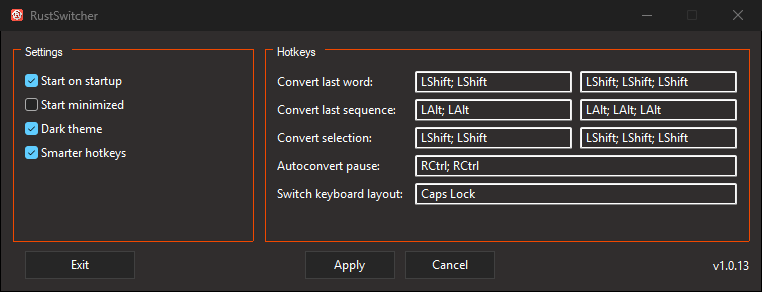
Rust Switcher is a Windows 11 utility that helps convert text between RU and EN keyboard layouts.
It was created as an open-source alternative to Punto Switcher and Caramba
Switcher with a clear privacy requirement: keyboard input stays on your device.
No telemetry, no usage analytics, and no data uploads. Text conversion works
offline; the application does not send your text or other user data to the
developer or third parties.
Features
- Convert selected text (RU↔EN)
- Convert the last typed sequence via a hotkey ("smart" conversion also handles selection)
- Auto-convert the last word while typing (can be disabled in Settings; runtime toggle starts paused)
- Tray icon and quick actions menu
- Light and dark UI themes
- Settings are saved to a config file
- Autostart
Requirements
- Windows 11
- Rust nightly (see
rust-toolchain.toml)
- MSVC toolchain (Visual Studio 2022 Build Tools)
Install
Via cargo
cargo install rust-switcher
From GitHub Releases
Download rust-switcher.exe from Releases.
Configuration
The config file is stored at:
%APPDATA%\RustSwitcher\config.json
Default hotkey sequences:
- Convert last word: double tap Left Shift
- Convert last sequence: double tap Left Alt
- Convert selection: double tap Left Shift
- Autoconvert toggle: double tap Right Ctrl
- Switch layout: CapsLock
To remove a binding, focus its hotkey field and press Backspace or Delete.
Privacy
Your input stays on your device. Rust Switcher processes keyboard input
and selected text locally and does not collect telemetry or usage analytics.
It does not upload typed text, selections, input history, or preferences to
the developer or third parties.
Recent input is held temporarily in memory to support conversion; preferences
are saved locally. The privacy policy explains this local
processing, retention, clipboard behavior, and development logging.
Pausing or disabling AutoConvert leaves keyboard tracking and manual hotkeys
running. To stop all processing, right-click the tray icon and choose Exit;
closing the settings window only hides it.
Development
This project includes a ready-to-use bacon.toml for a fast development loop.
Bacon hotkeys (from bacon.toml)
d dev-longr release-longt test-longp dushnota
What these jobs do:
- dev-long: fmt check, clippy, build (with debug tracing), run the app
- release-long: fmt check, clippy, release build, run the app
- test-long: fmt check, clippy, run tests
- dushnota: strict clippy
Logging (development only)
$env:RUST_LOG="trace"
cargo +nightly run -F debug-tracing
License
MIT