RDPilot

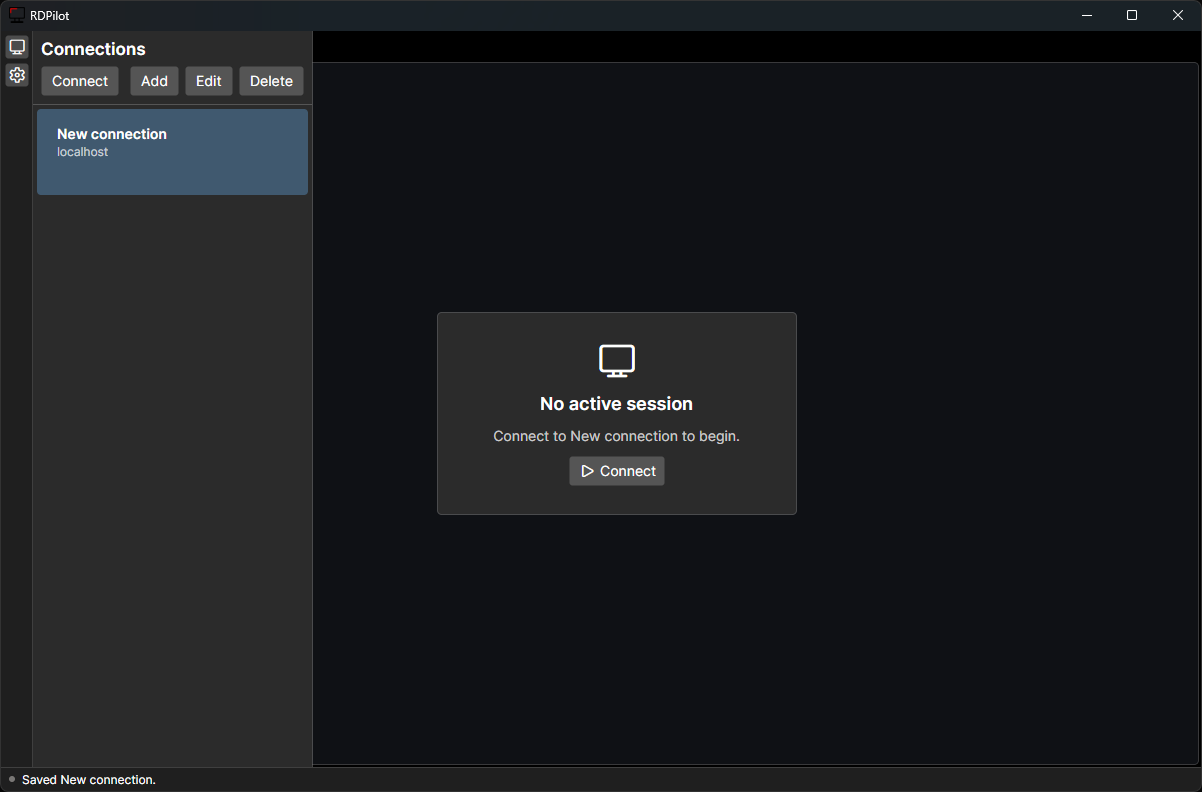
RDPilot is a fast Avalonia RDP client backed by FreeRDP. It focuses on responsive remote desktop sessions, dynamic resolution, secure saved profiles, and a clean tabbed interface.
RDPilot currently supports Windows and Linux.
Features
- Dynamic resolution when the client window changes size.
- Low-latency keyboard and mouse input with mouse-move coalescing.
- Keyboard grab (Windows only) so
Win, Alt+Tab, Ctrl+Esc and other shell chords go to the remote session instead of the local desktop, plus a toolbar action to send Ctrl+Alt+Del.
- Multiple simultaneous RDP sessions through tabs.
- Saved connection profiles with passwords stored in the OS credential vault.
- Text clipboard sync between local and remote sessions.
- Per-connection and global quality settings for color depth, font smoothing, wallpaper, themes, animations, full-window drag, compression, bitmap cache, and connection type.
Install
Install on Windows with winget:
winget install RDPilot.RDPilot
The latest Windows installer is also available from the GitHub Releases page:
https://github.com/ErnieBernie10/RDPilot/releases
The installer is per-user and installs to:
%LOCALAPPDATA%\Programs\RDPilot
On Arch Linux, RDPilot is currently available from the GitHub Release package:
curl -LO https://github.com/ErnieBernie10/RDPilot/releases/download/v0.2.0/rdpilot-0.2.0-1-x86_64.pkg.tar.zst
sudo pacman -U rdpilot-0.2.0-1-x86_64.pkg.tar.zst
A prebuilt Flatpak is published on the GitHub Releases page. Download RDPilot.flatpak and install it with:
curl -LO https://github.com/ErnieBernie10/RDPilot/releases/download/v1.3.0/RDPilot.flatpak
flatpak install --user RDPilot.flatpak
Flathub submission is in progress; once it lands you'll be able to flatpak install flathub io.github.ErnieBernie10.RDPilot instead.
Alternatively, the Flatpak manifest lives in packaging/flatpak/ and can be built and installed locally with:
flatpak run org.flatpak.Builder --force-clean --user --install --install-deps-from=flathub \
  --repo=repo build-dir packaging/flatpak/io.github.ErnieBernie10.RDPilot.yaml
Linux is supported, but the package has not been published to the AUR yet.
Usage
- Add a saved connection from the sidebar.
- Enter the remote PC, username, optional domain, and optional gateway settings.
- Save the profile. Passwords are stored in the operating system credential store, not in the profile JSON.
- Click
Connect to open a new session tab.
Each Connect action opens a separate tab. Switching tabs keeps background sessions connected and routes input, resize, and clipboard updates only to the active session.
Keyboard grab
The keyboard button in the session toolbar routes the whole physical keyboard to the active session, so Win, Alt+Tab, Ctrl+Esc and Alt+Esc act on the remote desktop instead of the local one. While grabbed, RDPilot's own UI is not reachable by keyboard — that is what grabbing means. There is no release hotkey; click the toolbar button again, or click any other window, which releases the grab automatically.
Grab is per-session and never persisted: every new connection starts ungrabbed, switching tabs releases it, and disconnecting releases it.
Ctrl+Alt+Del cannot be intercepted by any application, so use the toolbar button beside the grab toggle to send it to the remote session. Win+L likewise always locks the local machine.
Data Storage
Saved connection metadata is stored per user:
- Windows:
%APPDATA%/RDPilot.Client/connections.json
- macOS:
~/Library/Application Support/RDPilot.Client/connections.json
- Linux:
$XDG_CONFIG_HOME/RDPilot.Client/connections.json, or ~/.config/RDPilot.Client/connections.json
Passwords are stored separately:
- Windows: Credential Manager
- macOS: Keychain
- Linux: Secret Service via
secret-tool
Under Flatpak, libsecret prefers its sandboxed file backend: it takes a per-app key from
the org.freedesktop.portal.Secret portal and encrypts its own keyring inside
~/.var/app/io.github.ErnieBernie10.RDPilot/data/keyrings/. Those passwords are therefore
app-private — they do not appear in seahorse/kwalletmanager, they are not shared with
the native package, and flatpak uninstall --delete-data removes them. On desktops with
no Secret portal backend, libsecret falls back to the ordinary Secret Service and passwords
land in the system keyring as usual.
Notes
- Keyboard grab is not available on Linux; the toolbar button is shown disabled there. Wayland forbids clients from grabbing the keyboard (the sanctioned
zwp_keyboard_shortcuts_inhibit_manager_v1 protocol is not exposed by the current Avalonia Wayland backend), and the X11 XGrabKeyboard path is not implemented yet. Sending Ctrl+Alt+Del works on every platform.
- Clipboard redirection is currently text-focused.
- Audio playback and device redirection are disabled.
- The default rendering mode is
gfx-gdi.
classic-gdi is kept as a fallback: RDPILOT_RENDERING_MODE=classic-gdi.- RDPGFX codec negotiation can be overridden with
RDPILOT_GFX_CODEC_POLICY=server, avc, avc420, or sharp.
- RDPGFX frame acknowledgement pacing can be tested with
RDPILOT_GFX_FRAME_ACK=on|off. QoE acknowledgements can be enabled with RDPILOT_GFX_QOE_ACK=on.
- Console diagnostics include
[PERF_NATIVE], [PERF_UI], [PERF_INPUT], and [CLIPRDR] logs.
- Dependency/build modes are documented in
docs/dependencies.md.
Contributing
RDPilot contains two main projects:
RDPilot.Client: .NET/Avalonia desktop client.RDPilot.Wrapper: native C wrapper around FreeRDP 3 APIs.
Windows Development
Requirements:
- .NET SDK 10.0 or newer
- CMake
- Visual Studio Build Tools with the MSVC C/C++ toolchain
- vcpkg
- Inno Setup 6 for installer builds
Prepare vcpkg dependencies:
scripts/setup-windows-vcpkg.ps1
Build and run:
scripts/run-windows.ps1
Build only:
scripts/build-windows.ps1
Build a Release installer:
scripts/build-installer-windows.ps1 -AppVersion 0.1.0
The installer is written to:
artifacts/installer/RDPilot-Setup--win-x64.exe
The default vcpkg location is a sibling of this repository, for example C:/Users//Sources/vcpkg when this repo is C:/Users//Sources/rdp-client. Pass -VcpkgRoot to use a different location.
See docs/dependencies.md for the current dependency inventory.
Linux Development
Linux is supported. The notes below are for contributors working on Linux builds.
Requirements:
- .NET SDK 10.0 or newer
- CMake
- C compiler toolchain
- pkg-config
- FreeRDP 3 development packages:
freerdp3, freerdp-client3, winpr3
secret-tool and a working Secret Service session for password storage
On Arch/CachyOS:
sudo pacman -S dotnet-sdk cmake gcc pkgconf freerdp
Build and run:
scripts/run-linux.sh
Build only:
scripts/build-linux.sh
Build a Release configuration:
scripts/build-linux.sh --configuration Release
Equivalent direct commands:
dotnet build RDPilot.slnx
dotnet run --project RDPilot.Client/RDPilot.Client.csproj
The .NET project builds the native wrapper with CMake and copies the native library beside the managed output so DllImport("freerdp_wrapper") can load it. On Linux, the wrapper is built at RDPilot.Wrapper/build/native/libfreerdp_wrapper.so.
Release Process
Release versions use major.minor.patch tags. The tag version is used for the .NET assembly, Inno installer, GitHub Release asset name, and winget package version.
Create a release:
git tag v0.1.0
git push origin v0.1.0
The Windows Installer workflow publishes:
RDPilot-Setup-0.1.0-win-x64.exe
RDPilot-Setup-0.1.0-win-x64.exe.sha256
The Linux Arch Package workflow publishes:
rdpilot-0.1.0-1-x86_64.pkg.tar.zst
rdpilot-0.1.0-1-x86_64.pkg.tar.zst.sha256
PKGBUILD
.SRCINFO
The generated PKGBUILD and .SRCINFO are release artifacts for now. The package has not been published to the AUR yet.
The Flatpak workflow publishes:
RDPilot.flatpak
Flatpak releases additionally need the version bumped in packaging/flatpak/io.github.ErnieBernie10.RDPilot.yaml, a matching `` entry in the metainfo, and the module's git source repointed at the tag. See packaging/flatpak/README.md.
Submit or update winget manually with wingetcreate after testing the release installer.
New package:
wingetcreate new https://github.com/ErnieBernie10/RDPilot/releases/download/v0.1.0/RDPilot-Setup-0.1.0-win-x64.exe
Package values:
PackageIdentifier: RDPilot.RDPilot
PackageName: RDPilot
Publisher: RDPilot
PackageVersion: 0.1.0
PackageUrl: https://github.com/ErnieBernie10/RDPilot
PublisherUrl: https://github.com/ErnieBernie10/RDPilot
ShortDescription: Fast Avalonia RDP client backed by FreeRDP.
Moniker: rdpilot
InstallerType: inno
Scope: user
Architecture: x64
Update package:
wingetcreate update RDPilot.RDPilot --version 0.1.1 --urls https://github.com/ErnieBernie10/RDPilot/releases/download/v0.1.1/RDPilot-Setup-0.1.1-win-x64.exe