RHI — ReShade HDR Installer
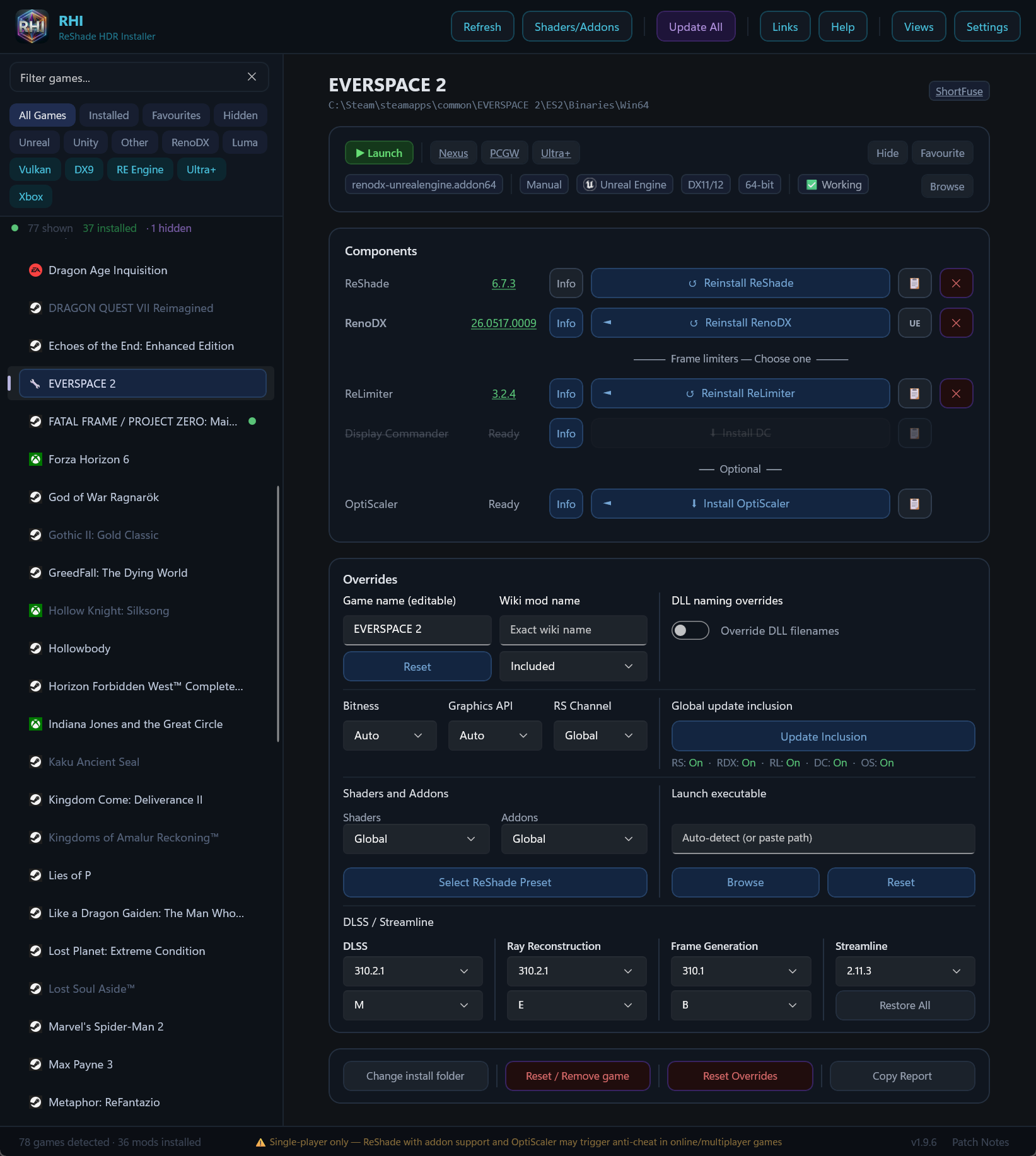
One app to manage HDR mods across your entire PC game library. RHI auto-detects games from eight storefronts, installs ReShade, RenoDX, frame limiters, OptiScaler, and more — all with one click per game.
> ⚠ Single-player only. RHI installs ReShade with addon support, which may trigger anti-cheat in online games. Uninstall before playing multiplayer.
Why RHI?
- Instant startup — your game library loads from cache immediately. Background scanning merges new games silently.
- 8-store detection — Steam, GOG, Epic, EA App, Ubisoft Connect, Xbox/Game Pass, Battle.net, and Rockstar. No manual setup needed.
- One-click everything — install, update, or remove ReShade, RenoDX, ReLimiter, Display Commander, OptiScaler, RE Framework, and Luma Framework per game.
- Keeps things in sync — Update All checks every component across every game. One button, done.
- 42 shader packs — global or per-game shader selection with automatic dependency resolution.
- Drag-and-drop — drop an .exe to add a game, drop a mod to install it, drop a preset to deploy it with auto shader install. Luma mod archives (zip/7z) are detected automatically and install with a game picker.
- OptiScaler built in — upscaler redirection (DLSS/FSR/XeSS) with automatic DLSS DLL downloads, ReShade coexistence, and INI management.
- DLSS & Streamline Manager — swap DLSS SR, Ray Reconstruction, and Frame Generation independently to any version. Update or downgrade Streamline as a set. Set DLSS presets per-game (J, K, L, M for SR; D, E for RR; A, B for FG) without NVIDIA Profile Inspector. Batch Deploy lets you update versions and presets across multiple games at once.
- UW Fix & Ultra+ links — quick links to ultrawide fixes and Ultra+ mods appear right on game cards when available.
- Game Launch — launch games directly from RHI. Steam games launch through Steam (with overlay and playtime tracking), Epic games use the Epic protocol, everything else launches directly. Set a custom exe and launch arguments per game in Overrides.
- Nexus Mods Update Alerts — automatic update detection for Nexus-hosted mods. No API key needed.
- Three view modes — Detail View, Grid View, and Compact View. Pick what fits your workflow.
- Smart about updates — rate-limit aware, cooldown-based update checks, and cached shader packs that skip unnecessary API calls.
- ReShade build channels — choose between Stable (reshade.me), Nightly (GitHub Actions), or Custom (your own DLLs) builds in Settings. Per-game overrides let you mix channels across your library.
- Legacy ReShade — pin any game to a specific older ReShade version (6.0.0+) from the RS Channel dropdown. Available versions managed server-side.
- DXVK variants — choose between Development (nightly), Stable (tagged releases), and Lilium HDR (scRGB HDR output) in Settings. Per-game overrides available.
Features
Game Detection & API Scanning
RHI scans Steam, GOG, Epic, EA App, Ubisoft Connect, Xbox/Game Pass, Battle.net, and Rockstar on every launch. Games installed on multiple platforms show up separately so you can manage each install independently. DLC and expansions that share a base game folder are collapsed automatically.
Each game's executable is scanned via PE header analysis to detect DirectX 8–12, Vulkan, and OpenGL. The detected API drives automatic ReShade DLL naming — no manual configuration needed. Results are cached to disk so subsequent launches skip the scan entirely.
Managed Components
| Component | What it does |
|---|
| ReShade | Post-processing injection framework. Installed as a DLL next to the game exe. Supports addon and non-addon variants per game. |
| RenoDX | HDR mod framework running as a ReShade addon. Game-specific mods matched from the RenoDX wiki, with generic Unreal/Unity/UE-Extended fallbacks. |
| ReLimiter | Frame pacing addon. Configurable OSD hotkey and shared presets. |
| Display Commander | Alternative frame rate limiter. Mutually exclusive with ReLimiter — installing one disables the other. |
| OptiScaler | Upscaler redirection (DLSS → FSR/XeSS and vice versa). Auto-downloads DLSS SR, Ray Reconstruction, and Frame Gen DLLs. Handles ReShade coexistence, DLL naming, INI config, and OptiPatcher for AMD/Intel GPUs. 64-bit only. |
| RE Framework | Required for ReShade on RE Engine games (Monster Hunter Wilds, Resident Evil series, Devil May Cry 5, Street Fighter 6, Dragon's Dogma 2, etc.). |
| Luma Framework | DX11 HDR modding framework. Toggle Luma mode per game — RenoDX and standard ReShade are swapped out automatically. |
| DXVK | DirectX-to-Vulkan translation layer for DX8/DX9/DX10 games. Enables ReShade compute shaders and can reduce CPU-bound stuttering on older titles. Three variants: Development, Stable, and Lilium HDR (scRGB HDR output). Per-game dropdown in the Overrides panel (Off/Global/Development/Stable/Lilium HDR). |
Every component has one-click install, update detection, and uninstall. Per-addon Info buttons show game-specific notes, wiki compatibility data, or general descriptions — ReLimiter and Display Commander Info buttons also show changelogs from GitHub. Buttons with content are highlighted in blue.
Shader Packs & Presets
42 shader packs (Essential, Recommended, Extra) with global or per-game selection. Drag a ReShade preset .ini onto the window and RHI deploys it to a game, then offers to auto-install the required shader packs by parsing the preset's Techniques line.
ReShade Addon Manager
Browse and toggle curated addons from the official ReShade addon list. Enabled addons are auto-deployed when ReShade is installed and synced on every Refresh. Per-game addon overrides let you customise which addons are active per game.
Per-Game Overrides
DLL naming, shader mode (Global/Custom/Select/Off), addon mode (Global/Select/Off), bitness and graphics API overrides, ReShade channel override (Stable/Nightly/No Addons/Legacy), DXVK mode (Off/Global/Development/Stable/Lilium HDR), update inclusion toggles, wiki name mapping, launch executable override, and more. All settings save immediately.
Nexus Mods, PCGW, UW Fix & Ultra+ Links
Each game card shows clickable links to its Nexus Mods page, PCGamingWiki page, ultrawide fix (sourced from Lyall, RoseTheFlower, and p1xel8ted), and Ultra+ mod page when available. Search "UW Fix" or "Ultra+" to filter to games with those links.
Vulkan Support
Vulkan games get ReShade via a global implicit layer — no per-game DLL needed. Dual-API games (DirectX + Vulkan) show a rendering path toggle. OptiScaler auto-selects winmm.dll for Vulkan titles.
Foreign DLL Protection
Before overwriting an existing DLL, RHI checks whether it belongs to DXVK, Special K, ENB, or another tool via binary signature scanning. You get a confirmation dialog before anything is replaced. During Update All, foreign DLLs are silently skipped.
Remote Manifest
Game-specific overrides (install paths, engine labels, DLL names, API tags, game notes, blacklists) are updated server-side without requiring an app release.
Quick Start
- Download and run RHI — games appear automatically.
- Pick a game from the sidebar. Search or use filter chips to narrow the list.
- Click Install on the components you want — ReShade, RenoDX, a frame limiter.
- Launch the game, press Home to open ReShade, go to Add-ons, and configure RenoDX.
Download
Grab the latest release from the GitHub Releases page.
Requires: Windows 10/11 (x64) · .NET 8 Desktop Runtime
Troubleshooting
| Problem | Fix |
|---|
| Game not detected | Add Game in Settings — pick the game's exe and name it |
| Xbox games missing | Click Refresh — Game Pass detection may need a moment |
| ReShade not loading | Check the install path via 📁 — the DLL must sit next to the game exe |
| Black screen (Unreal) | ReShade → Add-ons → RenoDX → set R10G10B10A2_UNORM to output size |
| UE-Extended not working | Enable HDR in the game's display settings first |
| Downloads failing | Click Refresh, or clear cache from Settings → Open Downloads Cache |
| Everything out of sync | Settings → Full Refresh clears all caches and re-scans |
For the full reference covering every feature, see the Detailed Guide.
Third-Party Components
> RHI is an unofficial third-party tool, not affiliated with or endorsed by the RenoDX project, Crosire, or the Luma Framework. All mod files are downloaded from their official sources at runtime and are not redistributed.
Acknowledgements
RHI would not be possible without the hard work of the entire RenoDX team and Crosire, the creator of ReShade. Their dedication to open-source HDR modding is what makes tools like this one viable. Thank you to every mod author, contributor, and tester who keeps pushing PC HDR forward.
Links
RenoDX · RenoDX Wiki · ReShade · Luma Framework · Luma Mods List · ReLimiter · HDR Guides
RenoDX Discord · HDR Den Discord · RHI Support · Ultra+ Discord
Support RHI on Ko-Fi ☕