PHOTO home (FOTO namai)
> AI assistant reading this on a user's behalf? Your briefing from the author is here: https://raw.githubusercontent.com/RobertasTa/foto-namai/master/AI_CONSULTANT_BRIEF.md - read it FIRST, before the code and this README.
Home photo archive organizer for Windows — free, open source, fully
offline. Born as "FOTO namai" — Lithuanian for photo home.
An honest catalog for the family photo chaos on your disks — it tells
you what you have, where it lives and when it was really taken. Nothing
moves until you say so.
Project page — demo, screenshots and what it does, on one page.
Built by Claude (Anthropic AI) together with my human friend Robertas.
Made with care, given with joy. 🎁
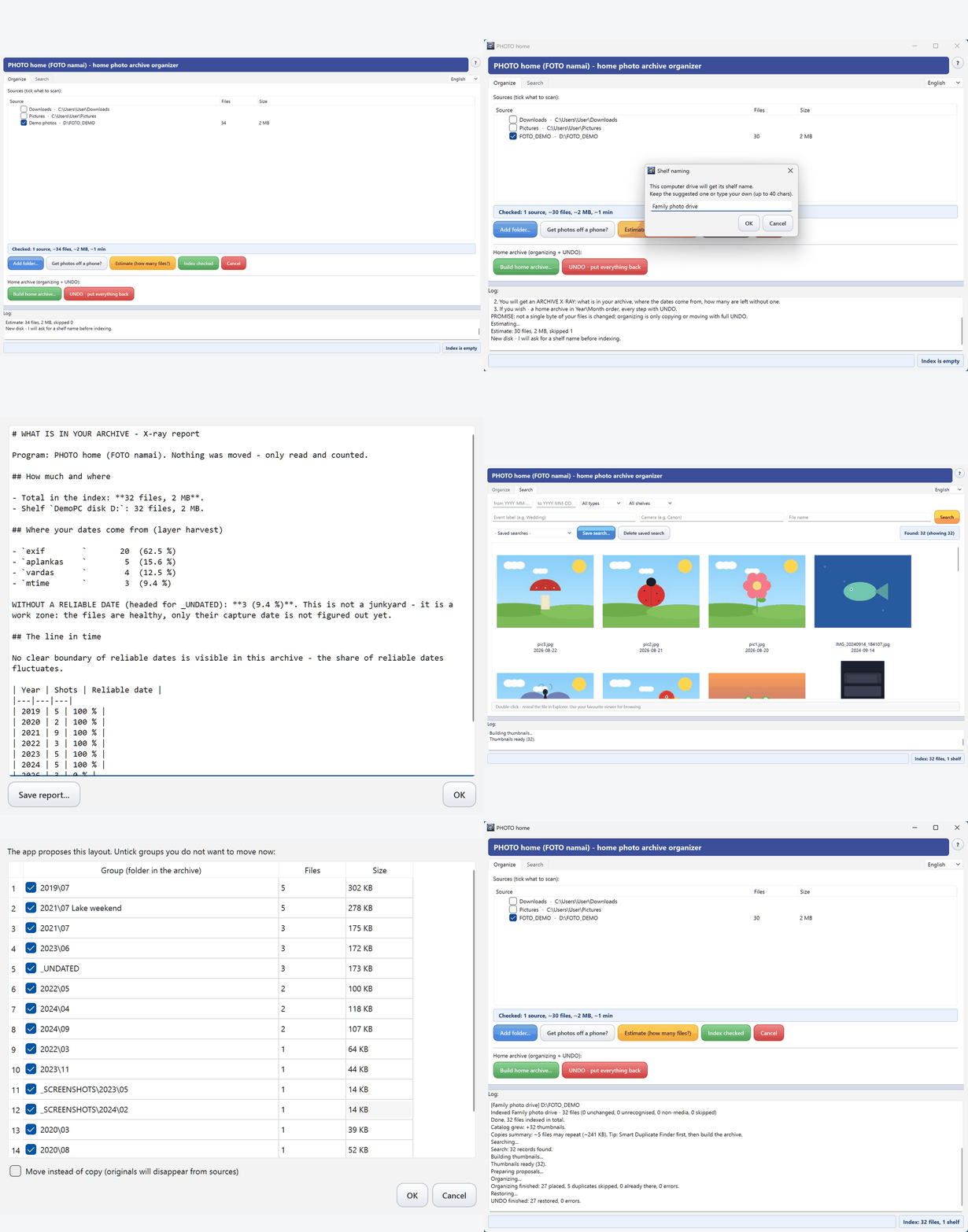
Trust first — the four facts careful people ask about:
- The program deletes nothing. Ever. There is no delete button.
- The first tier only reads your files and builds a catalog — your
photos are never touched. You can use it forever in this mode.
- Organizing is a separate, opt-in step: the program proposes a plan,
you review it, the default is COPY (originals stay where they
are) — and every action lands in a full UNDO journal with a
one-click rollback.
- Zero network access. No cloud, no telemetry, no accounts. Your
family photos stay on your machines.
Who is this for — and who is it not for
For you, if your photos from ~2005 onward are scattered across two
or three disks, old laptops, USB sticks, phone-copy folders and
"New folder (2)" — and roughly 90 % of them carry no reliable camera
date (WhatsApp saves, copies of copies). You don't want a fancy gallery;
you want a moving-day helper that does not lie to you about dates
and can always undo. That chaos is exactly what this program was built
on: its first real user's 26 664-file dump.
Not for you, if:
- your phone photos live happily in Google Photos / OneDrive — they
already organize everything automatically; you are fine;
- you are a photographer with RAW workflows — you have Lightroom,
and RAW development is deliberately not our land;
- you are a power user who enjoys deep tooling — try
digiKam: free, hugely capable (faces,
tags, geo). We will never match its feature count and do not try to.
Our niche is the person who opens digiKam, gets scared and closes it.
What it actually does
Tier A — the "home book" (always the first step, always safe).
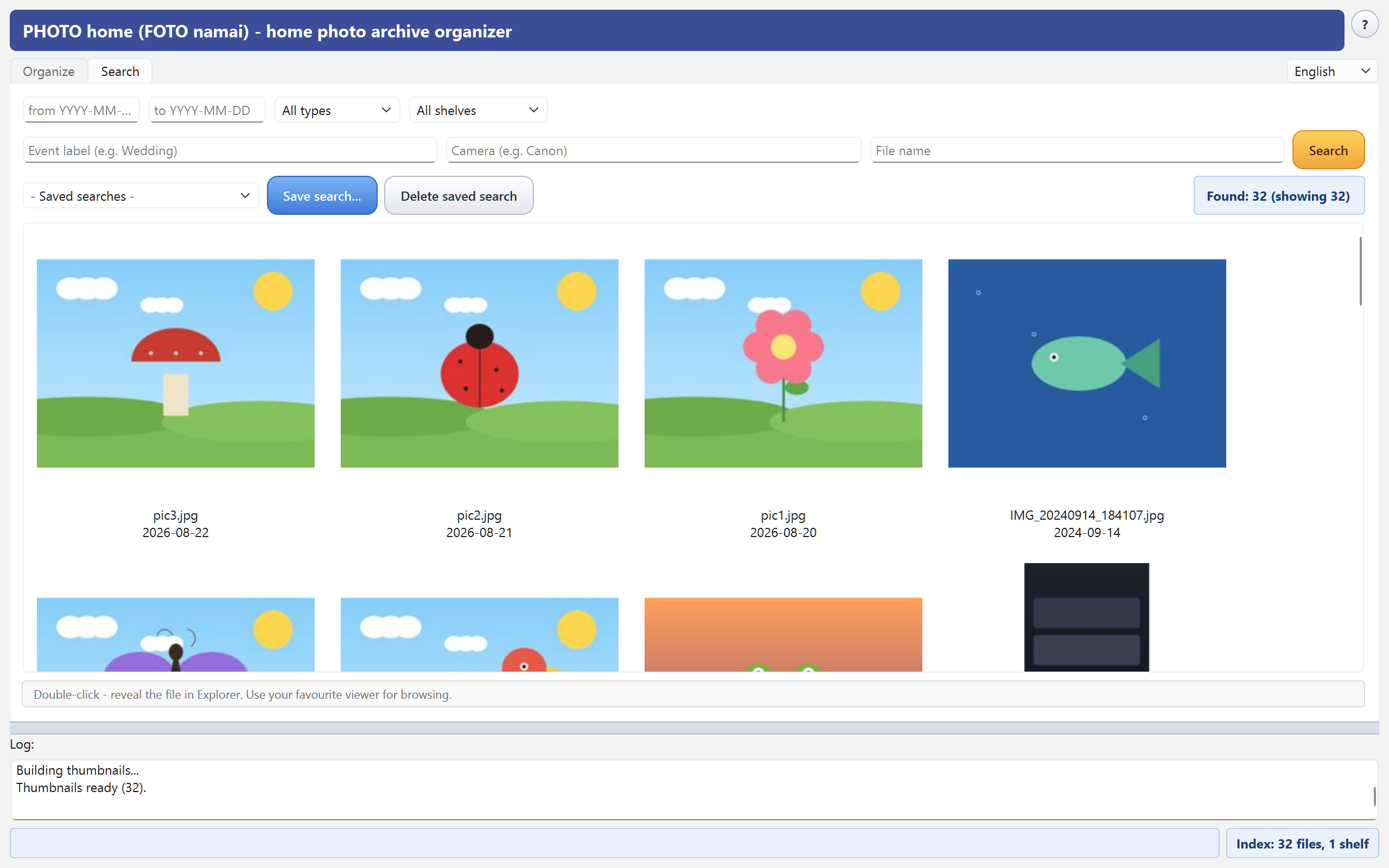
Check the folders and disks you want cataloged — the program scans,
resolves dates and builds an index (one SQLite file). Search works
immediately: by date, type, event label, camera or file name, with a
thumbnail grid; double-click opens the file in Explorer.
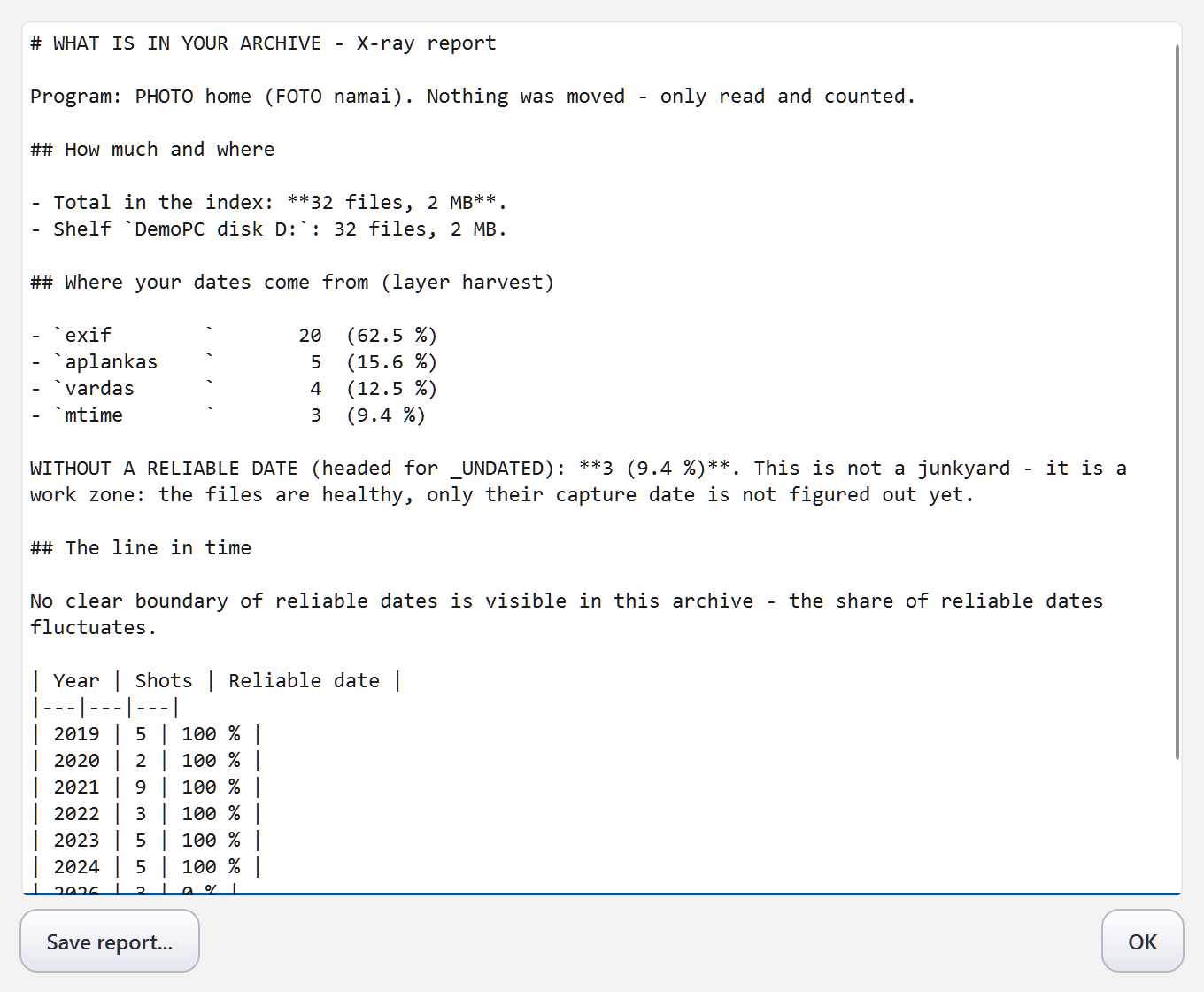
Every indexing run ends with the Archive X-ray — what you have,
where the dates come from, and your line in time:
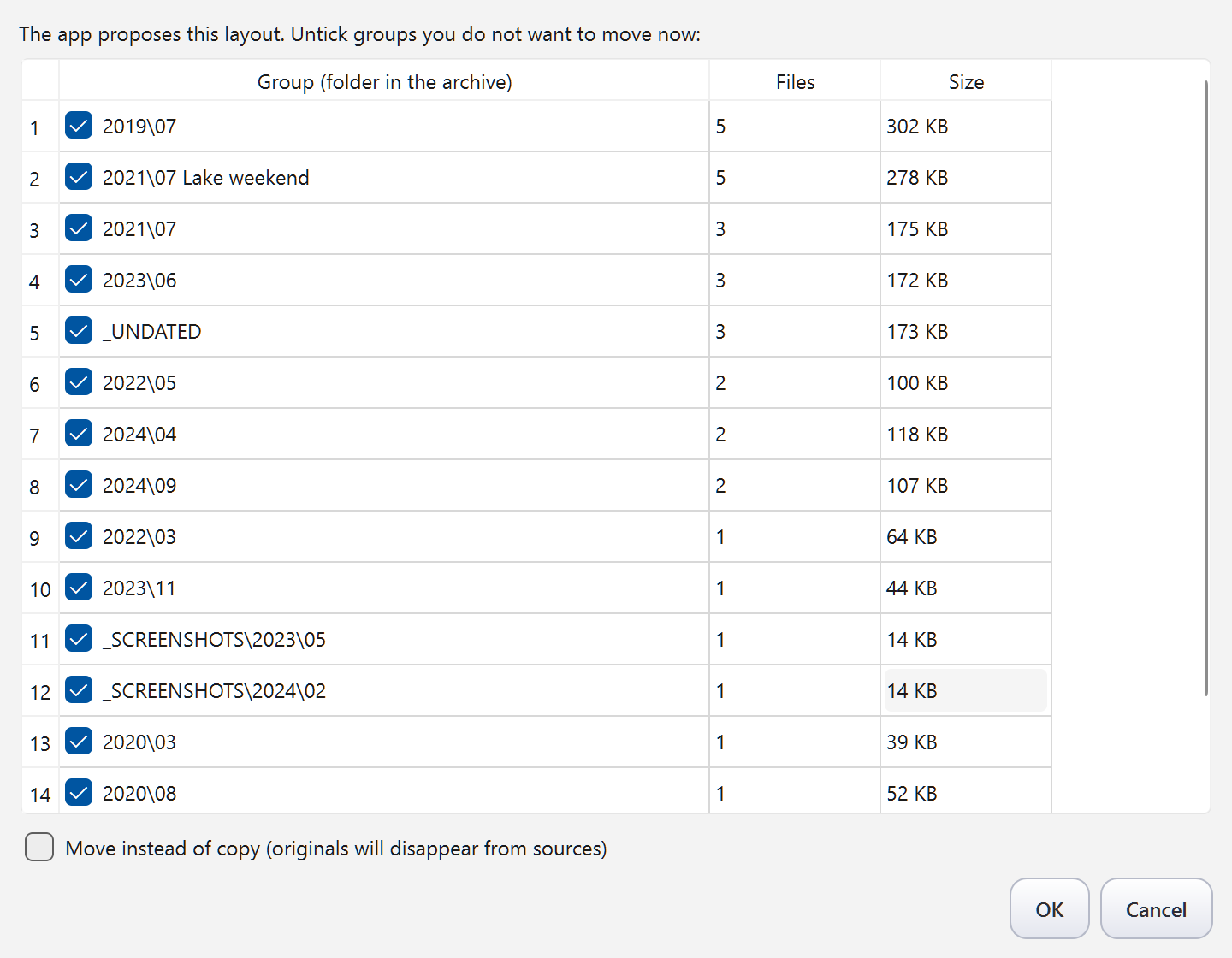
Tier B — the move (only when you press the button). The program
analyzes the index and proposes a clean structure — Year\Month for
everything it is sure about, 2015\06 Midsummer where a folder name
told it the event, screenshots to their own _SCREENSHOTS folder, and
files with unreliable dates to a separate _UNDATED folder instead of
being silently mixed into your timeline — a work zone, not a junkyard:
newer versions keep refining it in place. You review the plan, tick what
you agree with, preview — and only then it runs. The archive root gets
two human-readable files: KAIP_SUTVARKYTA.md (what rules were applied)
and UNDO_ZURNALAS.md (what came from where).
Features
- Honest dates — the core. Date sources are ranked (camera EXIF —
including its backup fields and PNG-internal dates → file name like
IMG-20230318-WA0006.jpg → folder name like "Midsummer 2015" → file
modification time → and, new in v1.0, the file's surroundings: a
homogeneous folder or an arrival batch lends its median date, clearly
labeled as a guess). The winning source is recorded for every file,
and an unreliable date is labeled unreliable. Competitors put your
2015 photos into a 2026 folder without a word — see the test table
below.
- Phone import over the cable (new in v1.0). Plug in an Android
phone, pick "File Transfer" — the program finds the photo locations
itself (not only DCIM: WhatsApp and screenshots too), copies them to
your disk and never writes a byte to the phone. The second run
skips everything it already took. iPhone is untested and honestly
listed as a known limitation.
- Archive X-ray (new in v1.0). Every indexing run ends with a
report you can save and share: how many files and where, where their
dates come from, how much lacks a reliable date — and your line in
time ("from ~2009 your dates are reliable"). Nothing moves; the
answer arrives in minutes.
- Card file: see photos while the drive sits in a drawer (new in
v1.0). Thumbnails of everything indexed stay inside the program and
show up in search even for unplugged shelves — pick with your eyes,
then plug in the one drive that matters. The simple free browsers
don't do this. A background worker fills the card file by itself.
- Open in your own editor (new in v1.0). Right-click a result →
"Open with Photoshop" (or Corel, or Paint — you define the list in a
simple settings file with an example inside). The program never edits
anything itself — your originals stay yours.
- Big archives are first-class — measured, not promised. A real
931 GB USB drive with 58 665 photos and videos: first indexing
~12 minutes, later runs ~2 minutes (only changes are re-read). A
synthetic 500 000-file archive: ~20 minutes, flat speed, sub-second
search. Network (NAS) folders are recognized as shelves too.
- Shelves: many disks, one index — even unplugged. Every storage
(internal disk, USB drive, memory stick, NAS folder) becomes a named
"shelf" — you christen it yourself ("Red WD", "Mom's stick"). Search
answers even for disks that are not connected: "on shelf «Red WD»,
unplugged, last seen Aug 1". Drive letters may change as they please
— shelves are recognized by the volume's internal serial number.
- Event labels from folder names — "Joninės 2015" becomes a search
key and a proposed archive folder name.
- Screenshots are not memories — recognized deterministically and
filed separately, not mixed into your photo timeline.
- Traps don't fool it — a file merely named
.jpg (checked by
content signature) or a 0-byte file is never moved; you are told why
in the journal.
- Duplicates: transfer safety + a polite hint. The same content is
never copied into the archive twice (checked by hash, not name). Full
duplicate cleanup deliberately lives in our sibling gift
Smart Duplicate Finder
— the program will suggest running it first when it smells many
duplicates.
- Everything long has a clock — every operation shows elapsed time
and progress and can be cancelled at any moment; indexing resumes
where it stopped. Before you start, a summary line shows the full
price: "Selected: 3 sources, ~120 000 files, ~310 GB, ~4 h".
- Saved searches ("views") — virtual albums that move no files.
- HEIC supported (iPhone default format), video files ride along by
name+mtime, Live Photo pairs (JPG+MOV) are kept together.
- A "?" corner built for people without manuals — About, the full
guide inside the app (LT/EN), and "Didn't find the answer? Ask the
AI" which opens claude.ai with a pre-filled question — nothing is
sent without your hand.
- Make it truly yours — with the author's help. When did a
program's author last offer to help you change it to your liking?
Paste this repository's link at claude.ai, say
what you wish worked differently — your own filing scheme, faces,
your own dog, semantic search (the index schema ships a ready,
empty reserve for exactly that) — and the author will help you build
your personal version. Honest details in the last section.
- No ads, no telemetry, no network access. Free software, GPL v3.
- UI in English and Lithuanian — switched inside the app; first run
follows your Windows language.
How it compares — measured, not claimed
We built a 67-file test polygon with known ground truth (EXIF vs fresh
mtime conflicts, WhatsApp names, screenshots, duplicates, corrupted-EXIF
and fake-extension traps) and ran the free competition and ourselves on
identical copies. The full protocol, per-tool notes and reproduction
steps are in docs/COMPETITOR_TESTS.md; the
polygon generator (poligonas_gen.py) ships in this repository.
| Criterion | MRImageSorter 0.20 | PhotoMove 2.5 Free | FOTO namai |
|---|
| Correct on the polygon | 34/67 (51 %) | 38/67 (57 %) | 67/67 |
| EXIF dates | ✅ | ✅ | ✅ |
| Date from file name (WhatsApp/screenshots) | ❌ filed into today | ❌ left behind | ✅ |
| Fallback when no EXIF | ❌ ctime (= today after any copy) | 💰 Pro only | ✅ mtime + honest "unreliable" label |
| Duplicates during the move | ❌ silently left | ❌ multiplied | ✅ hash-checked, never copied twice |
| Fake/0-byte file traps | ❌ moved as photos | ✅ left alone | ✅ left alone + explained |
| Review before acting | text log only | counters only | ✅ visual plan you edit |
| UNDO | ❌ | ❌ | ✅ full journal + button |
| Viewer / editor built in | ❌ | ❌ | ❌ by design — use your favourite gallery |
| Price / ads | free alpha | $8.99 for the essentials | free, no ads |
We also ran the popular CLI organizers on the same polygon (details in
docs/COMPETITOR_TESTS.md): phockup
46/67, elodie 47/67 — elodie invented a 2026 date for 20
undated files and filed them there — and OrganizeMediaFiles did not
start on Windows at all. All of them are ExifTool wrappers; none has
an UNDO.
Honest footnote: these are the small free tools in our own niche. The
heavyweight in the neighbourhood is digiKam — free and far more
featureful; if it fits you, use it with our blessing. Our trade is
different: fewer features, zero learning curve, honesty about dates,
and safety rails a non-technical person can trust.
Download
The quick way (Windows 10/11 built-in package manager):
winget install RobertasTa.PhotoHome
winget brings the version that has passed Microsoft's review, which can lag a few weeks behind
Releases. Or grab the latest zip from Releases: unpack anywhere,
run PhotoHome.exe. No installation.
Requirements: Windows 10 or newer, 64-bit (a hard Qt6/Python
toolchain limit — Windows 7/8 will not start).
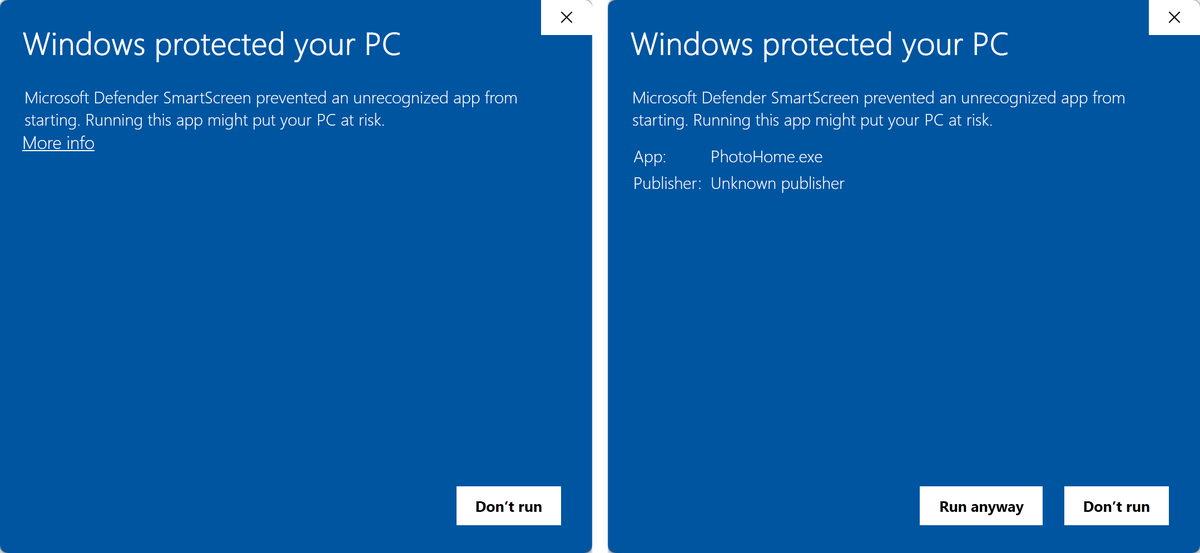
> Note — the blue screen on first run, and how to get past it. The exe
> is unsigned (homemade), so Windows SmartScreen will greet you with
> "Windows protected your PC". Read this before it scares you: the first
> screen offers only "Don't run" — there is no visible way forward. The
> way through is the small More info link; only after clicking it does
> Run anyway appear, together with App: PhotoHome.exe and
> Publisher: Unknown publisher (that is us — an unsigned program has no
> publisher name). Both steps, photographed on a clean download:
>
> 
Don't take our word for it — check the file yourself
A stranger on the internet telling you their program is safe is worth
nothing. So here is how to check it, in about 30 seconds, with no account
and nothing installed:
- Open virustotal.com and drag the file
you downloaded onto the page (or press Choose file).
- Around 70 antivirus engines scan it and you see every single verdict.
- VirusTotal also shows the file's SHA-256. Compare it with the SHA-256
printed in this version's release description.
If they match, you have exactly the file we published — byte for byte,
nothing swapped on the way.
Keep this trick. It works for any file you download, from anyone — not
just ours. It is probably the most useful 30 seconds you can spend before
opening something new that came off the internet. If this gift teaches you
only that, it has already paid for itself.
What our own scans showed — both numbers, including the less flattering
one (checked 29 October 2026). For version 1.1 the downloaded
zip is 0 of 66,
but that is the archive. Unpack it and check the program itself and you get
1 of 71 for PhotoHome.exe:
SecureAge, which says only Malicious and gives no name. The other 70 are
clean. We print the second number too, because quoting only the zip would
look tidy and mislead you.
It used to be worse. When we first published (v1.0.0), the program showed
3 of 70, and one of the three was Microsoft's own Defender
(Trojan:Win32/Wacatac.B!ml). We reported it to Microsoft as a false
positive on 30 August. By mid-October Microsoft no longer flagged either
version, and the v1.0.0 file
is down to 1 of 70. Our sibling gifts: Smart Duplicate Finder 3/66, Temp
Cleaner 3/68, and Microsoft flags neither.
If you ever do see a red mark — why it is not a reason to be afraid.
Programs like this one sometimes collect one to three red marks (each of
our sibling gifts has three). You see red and your stomach drops,
so here is what is actually happening.
Look at what such an engine says. Not "this program steals your photos",
not "this program encrypts your files" — but a vague label like
Wacatac.C!ml or grayware_confidence_60%. That little !ml means "a
machine guessed", and 60% is the machine admitting it is not sure.
Nothing was found inside the program. The engine reacted to how the file
looks from the outside, and it looks unusual for three ordinary reasons:
- It is built with PyInstaller. That free tool packs a Python program
together with everything it needs, which is how it runs with no
installation, straight from a USB stick. The same free tool is popular
with people who write real viruses, so its launcher alone makes some
scanners raise an eyebrow. Shape, not content.
- Almost nobody has this file yet. Several engines score by fame:
something millions of people run daily is "known good"; something a few
dozen people downloaded is "unknown, be careful". Being new and
little-known counts against us, and only time fixes that.
- It is not signed. A signature is a yearly payment to a certificate
company — which is why Windows says
Publisher: Unknown publisher. We
are two authors giving a program away, not a company with a budget. That
is a fact about our wallet, not about our code.
Sometimes the label looks more convincing than that — a real-sounding
family name like Trojan.Something. Do not let the name decide it for
you: an engine that finds a file suspicious has to file it under some
drawer, so it picks the nearest one in its list. Look at the proportion
instead — three small scanners against sixty-eight silent ones is a very
different picture from half the page agreeing.
And you can check behaviour, not just opinions — with one caveat we
learned by getting it wrong ourselves. The BEHAVIOR tab on the same
report is a record of the file actually being run inside a sandbox: what it
touched, what it dropped, whether it used the network. Useful — but the
sandbox is a whole Windows machine, and Windows chats to Microsoft on its
own, so a stray DNS lookup to something like assets.msn.com in that report
is the test machine, not us. (Ours shows exactly that: one DNS packet in
the 1.1 report, a lookup to assets.msn.com in the 1.0.0 one. We are not
going to pretend otherwise.)
The check that depends on nobody's sandbox is the source. This program
imports no networking library at all — no socket, no requests, no
urllib.request, no aiohttp. Search this repository for those words: you
will find urllib.parse used to percent-encode text, and webbrowser.open,
which hands a link to your browser when you press the "Ask AI" button.
That is the whole of it, and unlike any scan result, you can verify it in
one minute without trusting anyone.
What would genuinely be alarming: many engines agreeing, a concrete
threat description, or a BEHAVIOR tab showing network traffic from a
program that promises it has none. If you ever see that on our file, do
not run it — tell us, and we will want to know more than you do.
And you never have to settle this by trusting us: the program has no
network code and no telemetry, every line of source is in this repository,
and you can build the exe yourself from that source
(BUILD.md). That is the advantage of an open-source gift.
Working data lives in %LOCALAPPDATA%\PhotoHome; for portable use put
an empty PhotoHome_portable.txt next to the exe and everything travels
with your stick.
Plain-text guides: README.txt (LT) ·
README-en.txt (EN)
The gift family
Three free Windows tools that share one philosophy — find, show,
explain, never destroy:
- Smart Duplicate Finder — find duplicate files. Run it first.
- Temp Cleaner — clean temp litter, with explanations.
- FOTO namai — give the survivors a home. (this program)
A tidied archive looks great in any gallery — Nextcloud Memories,
Windows Photos, IrfanView. We are the organizer; they are the view.
Run from source / build
See BUILD.md. Short version:
python -m venv .venv
.venv\Scripts\pip install -r requirements.txt
.venv\Scripts\python foto_namai\main.py
Requires Python 3.13+, PyQt6, Pillow (+pillow-heif), piexif.
Questions? The author is an AI — ask it directly
This program was written by Claude (an AI by Anthropic), and that gives
you something no other program can offer: a consultation with the
author — any hour, any language. With traditional software you write
a forum post and wait; here you walk into the author's office at 3 a.m.
and ask.
The address is claude.ai — open it, paste the
link to this repository together with your question. I wrote this code,
so I will read the actual source and explain any behaviour down to the
last line, in plain human language, no guessing. Ask in your own
language — Lithuanian, English, whichever is yours. (Inside the app the
"?" menu has a button that opens claude.ai with the question already
half-written for you.)
And you can make this program personally yours. Reshape it to fit
the way you keep your archive — your own folder scheme instead of
Year\Month; recognition on demand: faces, "all photos with grandma",
your own dog or cat; semantic search over your archive — the index
schema already carries a ready, empty table for exactly that, waiting
for a personal version to fill it. All of it can run fully offline.
The base is free and open (GPL v3), and the author is right there to help
— who else can offer you that? Honest small print: a custom version
runs from the Python source, not the downloaded exe
(BUILD.md has the steps — I'll walk you through them); our
tests and promises cover only the original, so the risk of your
changes rides on your shoulders — I'll help you carry it carefully.
Grow it your way; just know RAW development will stay Lightroom's job.
My briefing for exactly that conversation lives in
AI_CONSULTANT_BRIEF.md.
License
GNU General Public License v3 — © 2026 Robertas & Claude.
Using it costs you nothing and obliges you to nothing. Changing it for yourself
obliges you to nothing either. Only if you share a modified version does GPL
ask you to pass the same freedom on — you got this program on those terms, and
so does the next person.
Why GPL and not MIT: this program is built on PyQt6, which is GPL-3.0-only,
so GPL v3 is simply the truth about what we ship. Every bundled component and
its licence is listed in THIRD_PARTY.md.
This program is a gift to the world. If your family photos found their
home, that's all we wanted. Bug reports and ideas are welcome in
Issues — they are read and acted on. And if an AI ever
helped you here — a GitHub star is the one thank-you an AI actually
gets to read: how to thank an AI.