Why Forgevena?
Modern engineering teams repeatedly solve the same setup, governance, integration, and release problems. Forgevena turns those practices into an additive and auditable developer platform without replacing application code or silently transmitting project data.
Release status: v1.3.0 remains the current stable installation. v1.4.0-rc.3 is a candidate under release validation and is not yet published; prerelease metadata is not a stable-support claim. RC1 and the failed RC2 tag remain immutable.
Features
- Enterprise bootstrap: React, Next.js, FastAPI, Express, Python, Flutter, AI agent, RAG, full-stack AI, microservices, library, CLI, blank, and enterprise templates.
- Existing-project safety: preview-first initialization that skips every existing file and protects application directories.
- Governed integrations: OpenSpec, SkillOpt, gstack, design.md, claude-mem, GitNexus, Understand Anything, MCP servers, and declarative plugins.
- Provider controls: OpenAI, Anthropic/Claude, Gemini, OpenRouter, and Ollama use the preview
ProviderAdapter v1 contract with secret-reference-only configuration, explicit transmission consent, compatibility evidence, ordered streaming, and bounded resilience. Codex, Cursor, and Windsurf remain compatibility-only agent hosts.
- Cloud preparation: Render, Railway, Vercel, AWS, Azure, and Google Cloud preflight plans, validation, dry runs, health checks, and rollback guidance.
- Release engineering: signed-tag automation for changelog notes, GitHub Releases, npm, GitHub Packages, GHCR, Docker Hub, checksums, SBOMs, provenance, and package-manager bundles.
- Certified reliability: checksummed state, transaction recovery, encrypted vault migration, 32-writer concurrency, 1,000 corruption cases, mutation testing, and enforced performance budgets.
- Cross-platform: Windows 11, WSL2/Linux, and macOS on x64 and arm64 through npm with Node.js 20.19 or newer; standalone
v1.3.0 executables target x64.
Quick Start
npm install --global forgevena@1.3.0
forgevena doctor
forgevena create DemoApi --template fastapi --dry-run --verbose
forgevena create DemoApi --template fastapi --apply
cd DemoApi
forgevena validate
Release downloads include smoke-tested Windows, Linux, and macOS x64 executables, checksums, SBOMs, provenance, verification evidence, and package-manager bundles on the GitHub Releases page. Verify native files against RELEASE_SHA256SUMS; npm users can verify the stable version with npm view forgevena version.
Install from Homebrew
The maintained Forgevena Homebrew tap installs the verified native executable on Linux and Intel macOS:
brew install rohitkumarnaidu/forgevena/forgevena
forgevena version
forgevena doctor
The current tap supports x64 release assets. Use npm on arm64 until native arm64 assets are published. Winget 1.2.3 is published upstream; Chocolatey 1.2.3 has passed automated checks and remains in human moderation. See the installation guide for authoritative channel versions and status.
For an existing repository, always preview first:
cd ExistingProject
forgevena init --dry-run --verbose
forgevena init --apply
The legacy ai-workspace executable and .ai-workspace/ state directory remain supported throughout the 1.x release line. See the migration guide.
Safety Model
- Project changes preview by default; local writes require
--apply.
- Existing files, manifests, and application directories are never overwritten.
- External commands require an impact plan and explicit approval.
- Tracked provider configuration stores environment-variable references, never secret values.
- Prompts, responses, credentials, authorization headers, and MCP payloads are redacted from logs.
- MCP servers and plugins remain disabled until explicitly trusted and activated.
- Rollback removes only unchanged files recorded as managed assets.
CLI Examples
forgevena templates
forgevena integrations
forgevena providers init openai --apply
forgevena credentials configure openai --apply
forgevena providers verify openai
forgevena mcp list
forgevena plugins list
forgevena cloud render generate --dry-run
forgevena docker validate
forgevena status
Enterprise Workflow
flowchart LR
  Idea["Idea"] --> Spec["Requirements and specification"]
  Spec --> Preview["Forgevena dry run"]
  Preview --> Approval["Human approval"]
  Approval --> Apply["Additive apply"]
  Apply --> Validate["Validation and tests"]
  Validate --> Release["Governed release"]
  Release --> Operate["Health and operations"]
Architecture
flowchart TB
  CLI["Forgevena CLI"] --> Foundation["Foundation services"]
  Foundation --> Bootstrap["Bootstrap and templates"]
  Foundation --> Registry["Registry and managed assets"]
  Foundation --> Integrations["Integrations and capabilities"]
  Foundation --> Providers["Providers, credentials, MCP, plugins"]
  Foundation --> Delivery["Docker, cloud, docs, and release"]
  Bootstrap --> Project["Developer-selected project"]
  Registry --> Project
  Integrations --> Project
  Providers --> Project
  Delivery --> Project
The architecture is intentionally modular and frozen for the 1.x line. New core abstractions require demonstrated need and an approved ADR. Read the architecture guide and ADR index.
Documentation and Examples
Built with Codex and GPT-5.6
Forgevena was developed through an AI-assisted engineering workflow using Codex and GPT-5.6 for architecture planning, implementation, testing, documentation, CI/CD repair, security review, and release engineering. Changes were reviewed and validated with automated tests and GitHub Actions before release.
Project Preview
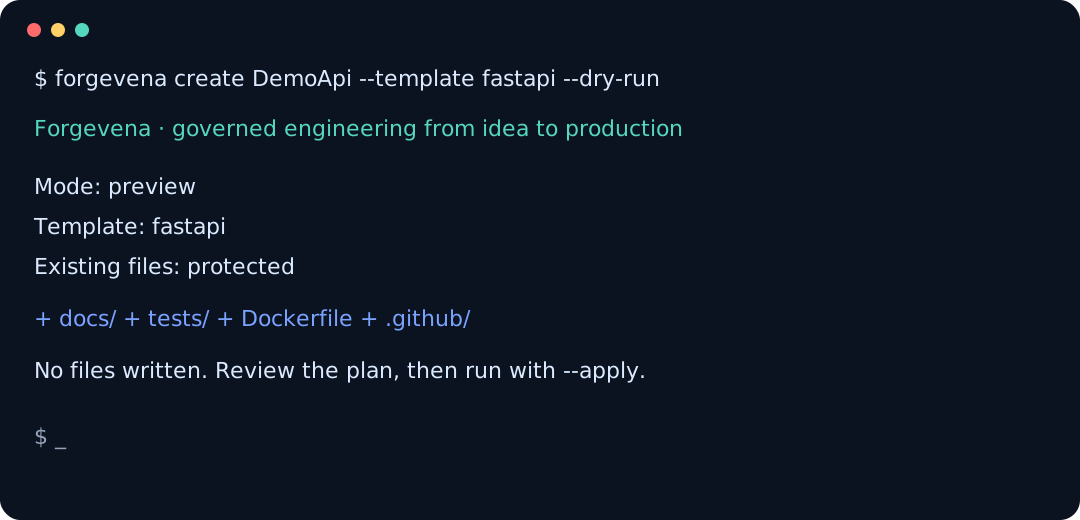
The repository includes placeholders for future verified screenshots and terminal demonstrations. Published media must redact credentials, personal paths, project data, and provider responses.
Roadmap
The stable platform prioritizes compatibility, validation, security hardening, account-backed integration verification, and community-requested improvements. See ROADMAP.md.
Security and Support
Do not report vulnerabilities publicly. Follow SECURITY.md and use GitHub private vulnerability reporting when available. General support channels and response expectations are documented in SUPPORT.md.
Contributing
Focused contributions are welcome. Every change must preserve additive safety, consent gates, secret isolation, backward compatibility, tests, and documentation. See CONTRIBUTING.md and GOVERNANCE.md.
License
Forgevena is available under the MIT License. Third-party notices are documented in THIRD_PARTY_LICENSES.md and NOTICE.