MicCamWatch
Free, open-source microphone and camera activity monitoring for Windows, Linux, and macOS.





MicCamWatch (mcw) helps you understand which applications are using your
microphone or camera. It reads operating-system metadata, reports available
process identities, and offers a terminal dashboard, native tray/menu-bar
controls, notifications, and scoped privacy actions.
Detection and controls depend on the operating system and available evidence.
An unknown or incomplete observation is not an all-clear.
Overview & Screenshots
Interactive Terminal Dashboard (mcw top) | Native Desktop Tray (mcw tray) |
|---|
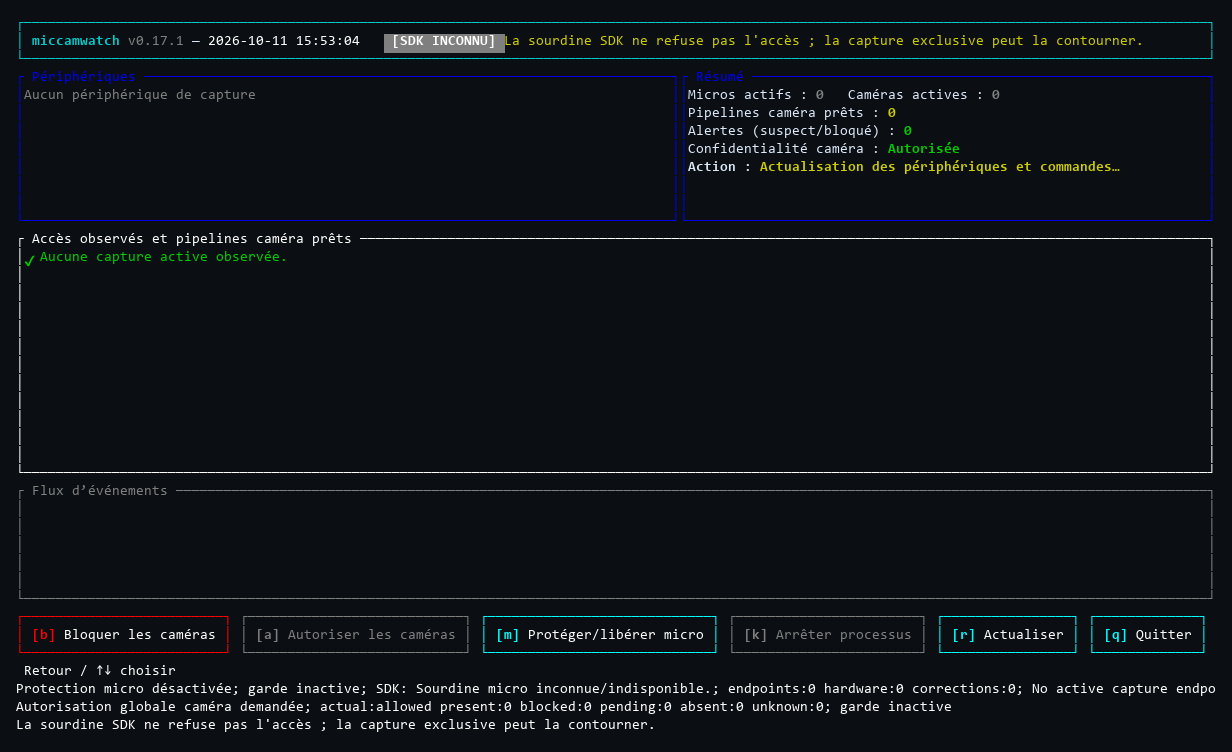 | 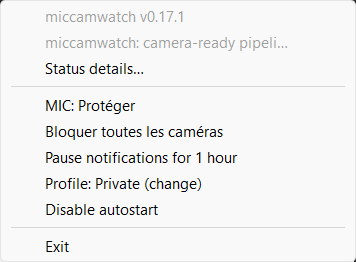 |
| Access events, process identities, and keyboard controls | Tray status, profiles, and quick controls |
These are authentic historical Windows 0.17.1 captures, not mock-ups or
screenshots of the 0.21.0 windows. Their
provenance and limits are retained.
Install · Features · Platform support ·
Usage · Safety · Documentation
Release status
| Channel | What is available |
|---|
| Public stable: 0.21.0 | Windows x64 ZIP/MSI, Linux x64/ARM64 archives, macOS Apple Silicon/Intel archives and DMGs. Redesigned native Win32/GTK/AppKit consultation windows, unified activation and retained-window behavior. |
Published on 2026-10-26 from immutable source 3d74686.
All ten public assets match the original tag-run packages; nine named checksums
and nine exact-tag build-provenance subjects were verified after download.
See validation and release status for
the recovered publication record, source-specific qualification and hardware limits.
Features
- Live observations: microphone and camera activity, with process/PID attribution when the platform can prove it.
- Readable interfaces: a live terminal dashboard, retained native consultation windows, tray/menu-bar status, notifications, and optional system sounds.
- Scoped controls: supported microphone mute and owned camera controls, with explicit permission and restoration handling.
- Profiles and preferences: Balanced, Private, Meeting, and Development; saved settings and opt-in autostart.
- Diagnostics: collector health, permissions, incomplete coverage, and requested versus effective protection.
- Automation: versioned JSON snapshots, JSONL events, local history, and TOML policy rules.
- Seven languages: English, French, German, Spanish, Japanese, Simplified Chinese, and Russian.
The core is Rust with native platform integration, not a web application or
media recorder. Runtime requirements and permissions differ by platform.
Supported Operating Systems
The following packages are available in stable 0.21.0:
| Platform | Monitoring | Controls and prerequisites |
|---|
| Windows 10 / 11, x64 | Native audio sessions and camera-activity evidence; verified process attribution where available. | Capture-endpoint mute; administrator-approved camera device control. |
| Desktop Linux, x64 / ARM64 | Running PipeWire capture links and authenticated process identity; limited direct V4L2 evidence. | glibc 2.35+, user PipeWire service; GTK3 for the consultation window; optional separately installed Polkit-authorized USB camera helper. |
| macOS 15+, Apple Silicon / Intel | CoreAudio input activity; CoreMediaIO camera running-state with unknown camera client/PID. | Writable input mute; manually approved MCW-owned camera restriction profile. |
Linux desktop effects require the appropriate notification service and a
StatusNotifierItem host. macOS notification and profile authorization remain
controlled by the operating system. Monitoring does not require running the
whole application as administrator/root.
Linux ARM64 qualification is hosted-runner software evidence only. No physical
ARM board, Raspberry Pi or ARM USB-device compatibility has been validated.
See platform limits.
Quick Start
Windows — MSI or portable ZIP
Download the 0.21.0 MSI
for a per-user installation, PATH registration, and a Start Menu entry.
Alternatively, extract the portable ZIP.
Open a new terminal after MSI installation; for a ZIP, run the executables from
its extracted directory or configure PATH explicitly.
mcw --version
mcw doctor
mcw status --lang en
mcw top
The Windows package contains mcw.exe (CLI) and mcw-tray.exe (console-free
tray host). The MSI is their installer, not a third resident application.
Start Menu activation, mcw-tray.exe --open or mcw tray open opens the retained
consultation window; plain mcw-tray.exe/autostart stays background-only.
macOS — native application
Choose the matching 0.21.0 DMG:
Apple Silicon ·
Intel.
Mount it, drag MicCamWatch.app to Applications, then open the copied application.
The menu-bar icon provides access to the native consultation and controls.
The DMG does not install the CLI on PATH or enable autostart implicitly.
Bundles are ad-hoc sealed, not Developer ID signed or notarized;
security and signing guidance explains the limits.
Do not bypass Gatekeeper or quarantine protections.
Linux and macOS — command-line installation
Download an immutable installer from the published 0.21.0 source and inspect it
before execution:
curl --proto '=https' --tlsv1.2 -fsSL \
  https://raw.githubusercontent.com/Roman-Cuisset/miccamwatch/3d74686ace7b04728794765f9eb57c0c0a8bc84c/installer/install.sh \
  -o mcw-install.sh
sh mcw-install.sh --version v0.21.0 --add-path
This installs into $HOME/.local/bin without sudo. --add-path explicitly
permits managed shell PATH configuration; use --no-modify-path to leave it alone.
The installer verifies the selected release archive against its SHA256SUMS;
that manifest does not contain a checksum for the installer script itself.
For archive verification, dependencies, custom prefixes, package-manager
ownership, and old-version migrations, see the installation guide.
Windows EXEs/MSI are unsigned, as are the macOS archive CLI binaries.
Checksums and GitHub provenance are not platform signing or a reason to ignore a security warning.
Everyday usage
| Command | Purpose |
|---|
mcw status | Show the current observation and health. |
mcw status --json | Produce a versioned machine-readable snapshot. |
mcw watch --json | Stream access events and health changes. |
mcw top | Open the interactive terminal dashboard. |
mcw tray | Run the native tray/menu-bar frontend. |
mcw doctor | Explain monitoring capabilities, prerequisites, and failures. |
mcw config settings-path | Locate saved application preferences. |
mcw history path | Locate local event history. |
Use mcw --help and each command's --help for the options in your installed
version. For example, select French with mcw status --lang fr.
Desktop profiles select policy/preferences; they do not grant capture
permissions or automatically mute/block devices. Balanced and Meeting currently
share the same policy. An explicit --config takes precedence over saved profiles.
Use mcw tray open on Windows, Linux or macOS to open/reopen the owned native
consultation window without creating another resident frontend.
See interfaces and preferences
and the full command guide.
Understanding status and controls
- Active is observed activity within the collector's scope, not a universal guarantee of frame flow or attribution.
- Ready is a possible capture pipeline/handle, not confirmed recording.
- Unknown / unavailable / partial means evidence is missing or incomplete; it must not be read as idle or safe.
- Requested protection and effective control are separate from observed activity.
- SDK mute is not capture permission denial. Exclusive, ASIO, direct-driver, ALSA, or other unsupported paths may bypass the supported scope.
Windows camera changes request administrator approval. Linux USB control needs
separate reviewed root-helper setup and explicit Polkit authorization. macOS
camera profile approval/removal is manual; it does not grant camera TCC access
or identify the camera client.
Before uninstalling or replacing an installation, explicitly restore owned
changes and resolve pending restoration. Closing a UI is not release.
Do not delete ownership journals, force-stop protection owners, or recover
quarantined files as a shortcut.
Control limits and recovery ·
Safe updates and uninstall
Privacy
Monitoring uses local OS metadata rather than microphone samples or camera frames.
Settings and history remain in application-data/XDG directories.
Local history is enabled by default and rotates by size; it has no automatic
age-based expiration. Manage it explicitly when sharing a computer or diagnostics.
MicCamWatch has no automatic telemetry/crash upload. Explicit installation and
update commands contact release hosts; an explicitly online trust policy can
also perform network checks. Cloudflare and GitHub have their own hosting and
download processing, separate from the local application.
Read the official Privacy Policy and
local storage documentation.
Documentation
| Read this for… | Guide |
|---|
| Downloads, verification, updates, uninstall, source builds | Installation |
| Commands, profiles, controls, policies, diagnostics | Usage and safety |
| Public packages, source-specific qualification, hardware limits | Validation |
| Versioned changes and historical CI/provenance evidence | Release history |
| Collector contracts, ownership, platform implementation | Architecture |
| Authenticode, Defender, provenance, security warnings | Signing and safe handling |
| Static-site build, languages, Cloudflare configuration | Website maintenance |
| Development priorities and handoff records | Roadmap |
The documentation index separates user guides, technical
references, current validation, and historical records.
Contributing and support
Report a reproducible problem
with your installed version, OS/architecture, relevant doctor output, and the
steps that trigger it. Redact usernames, paths, application identities, and
other private information before posting diagnostics.
For development, follow the platform-specific build instructions
and architecture contracts. Do not treat a successful build
or hosted CI run as proof of hardware enforcement or universal monitoring coverage.
The full release/CI narrative lives in the documentation rather than this overview.
License
Free software under the MIT License.