VistaCare is a compact Windows tray application designed to lower your screen brightness below hardware minimums, ensuring uniform dimming without overlay issues. It achieves this by scaling the GPU gamma ramp, making it ideal for those who need darker screens at night or wish to reduce eye strain.
Key Features:
Tray Slider and Hotkeys: Adjust brightness effortlessly with a tray slider or global hotkeys.
Brightness Presets: Save preferred settings for quick access.
Evening Auto-Start: Automatically dim screens in the evening, perfect for night mode use.
Pause Toggle: Temporarily revert to full brightness without losing your dimming level.
Target Audience and Benefits:
Ideal for individuals working late or concerned about eye strain, VistaCare offers a seamless way to adjust screen brightness. It ensures consistent dimming across all displays, including the cursor and taskbar, providing a comfortable viewing experience in low-light conditions.
Installation via Winget:
Easily install VistaCare using Winget with the command winget install SalvatoreSorvillo.VistaCare, ensuring quick setup without additional hassle.
VistaCare is your go-to tool for achieving optimal screen brightness and comfort, seamlessly integrated into your daily workflow.
README
VistaCare
Make your screens darker than Windows lets you.
A tiny single-.exe Windows tray app that dims all your monitors below their hardware
minimum - without the "bright cursor / bright taskbar" bugs that overlay-based dimmers have.
Working at night and your monitor's lowest brightness is still too bright? VistaCare lowers the
actual luminance of every display in software - as dark as you want. Instead of laying a black
overlay over the screen, it scales the GPU's gamma ramp, which is applied at the very last
display stage (after the cursor and taskbar are drawn). So everything dims evenly: the mouse
cursor, the taskbar, the Start menu, even fullscreen video. One 41 KB executable. No installer, no
admin, no dependencies.
Install
Option 1 - download (recommended). Grab VistaCare.exe from the
latest release and
double-click it. It lives in your system tray.
> Because the app isn't code-signed, Windows may show "Windows protected your PC." Click
> More info → Run anyway. The exe is a single 41 KB file and its SHA-256 is published with
> each release so you can verify it.
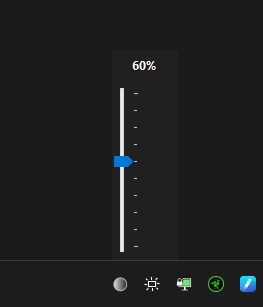
Left-click the tray icon → brightness slider (opens next to the cursor; drag down to dim).
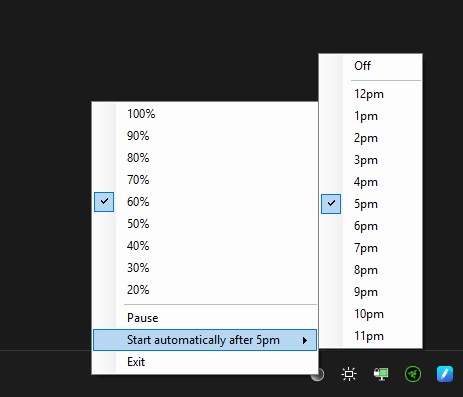
Right-click the tray icon → presets (100%…20%), Pause, Start automatically after ▸
(pick a time, or Off), Exit.
Hotkeys (work anywhere):
Ctrl+Alt+PageDown → dimmer
Ctrl+Alt+PageUp → brighter
Ctrl+Alt+Home → reset to 100%
Pause returns the screen to full brightness without forgetting your level - uncheck it (or
change the level any other way) to resume. Your last level is remembered, and exiting restores full
brightness.
Auto-start at a time you choose
Under Start automatically after, pick an hour (noon–11pm) or turn it Off. VistaCare registers
a per-user Scheduled Task (daily at that hour and at logon) - far more reliable than a
Run-key entry, which can fire before the shell/GPU/drive are ready. It only auto-opens from your
chosen hour onward (a manual launch always opens), and a slot missed while the PC was off/asleep
runs at the next opportunity. No admin required.
Notes & limits (inherent to gamma dimming, not bugs)
HDR: Windows ignores gamma changes for monitors in HDR mode - turn HDR off to dim them.
Night Light / f.lux: they drive the same single gamma table, so running them together makes
the colors fight. Use one or the other.
Dimming floor: Windows clamps how dark gamma can go. To go darker, set this DWORD and reboot:
HKLM\SOFTWARE\Microsoft\Windows NT\CurrentVersion\ICM\GdiICMGammaRange = 256
If the app is ever force-killed while dim (e.g. Task Manager → End task), just relaunch it and
press Ctrl+Alt+Home.
Build from source
No SDK or Visual Studio needed - it uses the C# compiler built into Windows.
Edit VistaCare.cs.
Make sure no VistaCare.exe is running (the running file is locked).
Run build.bat → produces a fresh VistaCare.exe.
build.bat embeds VistaCare.ico into the exe, so keep VistaCare.cs + VistaCare.ico +
build.bat together. To change the offered auto-start hours, edit FirstHour/LastHour in
VistaCare.cs.
How it works (the short version)
A standard overlay dimmer paints a semi-transparent black window over your desktop - but the cursor
and some surfaces render above it, so they stay bright. VistaCare instead rewrites the GPU's gamma
lookup table for every attached monitor, which the display pipeline applies to the final composited
image. The result is uniform and overlay-free. It re-asserts the dim after Windows resets the gamma
table (sleep/resume, unlock, resolution change) and always restores full brightness on exit.