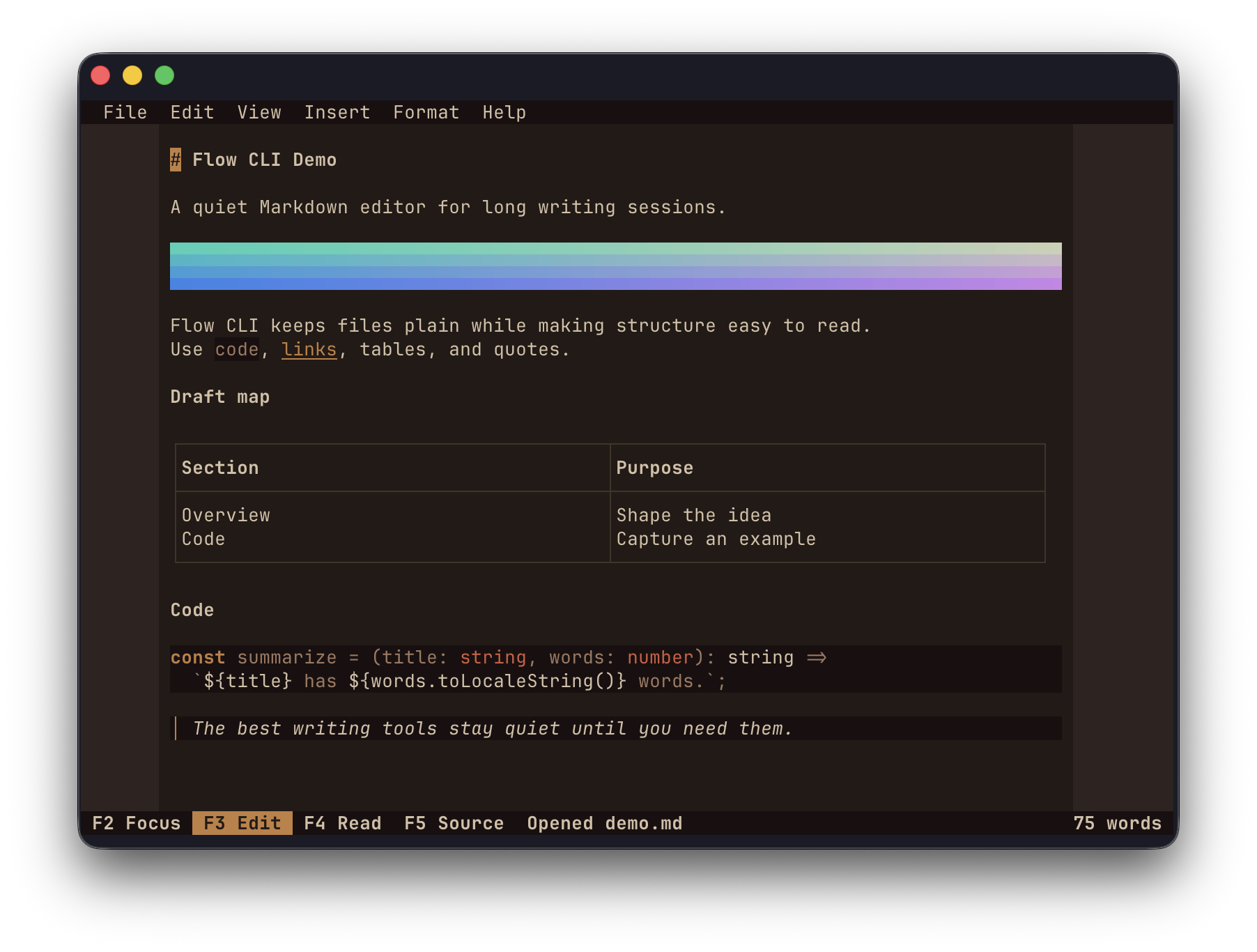
Flow CLI is a terminal-native Markdown editor designed for seamless writing and editing directly within your terminal environment. It supports modes like edit, focus, read, and source, offering features such as markdown-aware formatting, tables, links, images, math, code highlighting, and word counts.
Key Features:
Mode Flexibility: Switch between Edit, Focus, Read, and Source modes to tailor your workflow.
Rich Markdown Support: Includes tables, links, images, math, and code highlighting for comprehensive content creation.
Keyboard & Mouse Interaction: Supports selection, menus, and scrolling with both keyboard and mouse.
Command Palette: Accessible via Ctrl+P for quick commands like find/replace and clipboard integration.
Atomic Autosave & Recovery: Ensures your work is safe with snapshots and detects external changes.
Customizable Themes & Cursor Behavior: Tailor the interface to your preferences.
Target Audience and Benefits:
Ideal for writers, developers, content creators, and technical writers seeking a distraction-free Markdown editor. Flow CLI offers real-time feedback, efficient workflow through keyboard shortcuts, and customization options, enhancing productivity in a terminal environment.
README
Flow CLI
A keyboard-first Markdown editor that runs entirely in your terminal.
Flow CLI is built for writing, not just editing files. It keeps Markdown as the
source of truth while presenting headings, lists, blockquotes, code, tables,
links, and images as a quiet, readable document.
It is a real terminal editor rather than a browser view or a wrapper around
another editor: input handling, grapheme-aware layout, widgets, selection, and
incremental ANSI rendering are all implemented for the terminal.
Highlights
Edit, Focus, Read, and Source modes
Markdown-aware formatting and syntax concealment
Tables, links, images, math, code highlighting, and word counts
Keyboard and mouse selection, menus, and scrolling
Command palette, find and replace, clipboard integration, and configurable
keybindings
Atomic autosave, recovery snapshots, and external-change detection
Built-in themes and configurable cursor behavior
Native images in Kitty-compatible terminals and iTerm2, with a colored
character-cell fallback elsewhere
HTML and plain-text export
Install
On macOS and Linux, install the standalone binary with Homebrew:
brew install saturn9studio/flow-cli/flow-cli
On Windows, install the standalone binary with WinGet:
winget install Saturn9.FlowCLI
On any platform with Node.js, install with npm:
npm install -g @saturn9/flow-cli
Then open or create a Markdown document:
flow-cli document.md
Starting without a path creates an untitled draft in the current directory.
Documents are autosaved while you write.
Essential shortcuts
Shortcut
Action
Ctrl+P
Open the command palette
Ctrl+F / Ctrl+H
Find / replace
F2 / F3 / F4 / F5
Focus / Edit / Read / Source
F10
Open the menu bar
Ctrl+,
Open settings
Ctrl+C / Ctrl+X / Ctrl+V
Copy / cut / paste
Ctrl+Q
Exit
Command-modified clipboard shortcuts also work when the terminal forwards them.
Terminal support
Flow CLI works without a terminal-specific graphics or keyboard protocol.
Compatible terminals automatically gain richer keyboard reporting and native
image rendering. Images still render as colored terminal cells when native
graphics are unavailable.
Development
Run npm run verify to build the project and run the test suite.