doc-html-translate
README languages: English · Русский · Українська
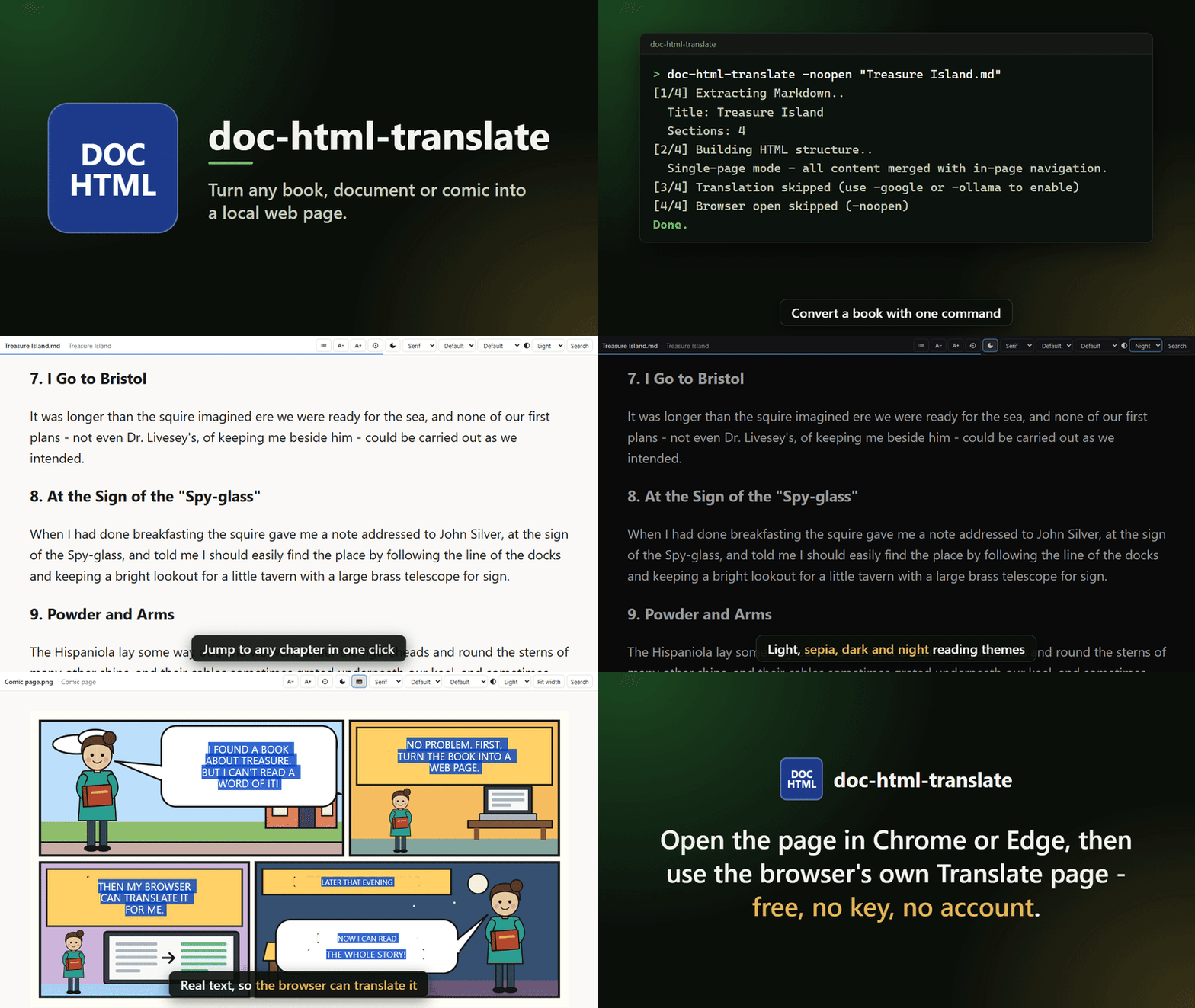
Turn any book, document or comic into a local web page, then read it, search it and translate it with your browser's own page translation - free, with no key and no account. doc-html-translate converts EPUB, PDF, MOBI, AZW3, FB2, RTF, TXT, Markdown, HTML, CBZ/CBR/CB7/CBT comics, standalone images and FileDO secret files (.fd-sec, opened through the FileDO installed on your PC) into clean HTML with a generated table of contents, reading themes and a remembered position, and recognises text in scans, pictures and comic pages (OCR) so that it can be translated too. Conversion and reading happen on your PC. Google Cloud Translation (your own key) and a local Ollama model are optional engines. Desktop app for Windows, Microsoft Store app and a browser extension for Chrome and Edge.
Topics: azw3 cbz chrome-extension cli comics ebook ebook-reader edge-extension epub epub-reader fb2 golang html-converter mobi ocr pdf translation windows windows-app winget
Project Links
Editions
doc-html-translate comes in several forms - pick whichever fits; they all share the same converter:
- Desktop app - two programs on one converter:
doc-html-translate.exe, the command-line converter and Windows file-association handler (see Quick Usage), and doc-html-ui.exe, a windowed front-end that exposes every CLI option (multi-file queue, file picker, drag & drop, options dialog, a default-handler toggle - opt-in, off by default).
- Microsoft Store app - the same desktop app (GUI + CLI) shipped as an MSIX package: Store-signed, auto-updating, no manual download. Under MSIX,
-register is a no-op (file associations come from the package manifest). Packaging details: msix/README.md.
- Browser extension - a Chromium MV3 extension that re-renders documents (PDF, EPUB, MOBI, AZW3, FB2, RTF, TXT, Markdown, local HTML, and CBZ/CBT comics) as clean HTML right in the browser, so the built-in Translate page works on them without installing the app. Get it on the Chrome Web Store or Edge Add-ons; source and docs in
extension/ and extension/README.md. It also reads the text in every picture on an ordinary web page from the right-click menu and lays it over the pictures as real text without leaving the page - a webcomic or a scanned archive keeps its layout, its links and its reading order, and "Translate page" translates the recognized words along with the rest.
The website and the documentation: the landing page, multi-language documentation, and a dedicated extension page.
The desktop app and the extension are independent and complementary: the app converts a file into a local HTML folder you keep; the extension does the same reflow live inside a browser tab. Both lean on the same "free" idea - hand the browser clean HTML and let its built-in translator do the rest.
Features
- Browser extension site mode: automatic interception starts off; when enabled, it can cover all sites except disabled ones or only sites you list. The popup switch manages the active list, and both lists survive mode changes.
- Convert: EPUB, PDF, TXT, Markdown, FB2, RTF, HTML, MOBI, AZW3
- Open FileDO secret files (
.fd-sec): the app recognises a .fd-sec, asks for its password (in the console without echo, or in the app window - once per queue), decrypts it with the FileDO installed on your computer (winget install SerZhyAle.FileDO, or the Microsoft Store) and converts the document or picture inside exactly as it would convert the original, then removes the decrypted copy. The converted pages are not encrypted. A folder inside a secret file is opened with FileDO instead. For unattended runs name an environment variable that holds the password with -fdsec-password-env NAME.
- Read comics: CBZ / CBR / CB7 / CBT comic archives open page by page, with the text in speech bubbles recognized (OCR) and laid over each page as translatable plates - so Chrome's "Translate page" works on the bubbles. OCR is automatic (a comic has no text layer to translate otherwise)
- Translate a standalone image: pass a PNG/JPG/JPEG/WebP/GIF/BMP/TIFF/JPEG XL (.jxl) and the app OCRs it and lays translatable text plates over the picture (Chrome's built-in page translation then works in place - the same behaviour as the browser extension). OCR needs a
tesseract engine (see -ocr-lang)
JPEG XL (.jxl) pictures are decoded locally with the bundled codec into PNG before display and OCR, including pictures inside books and comics. Transparency is preserved; animated JPEG XL uses its first displayed frame. No additional image program or browser codec is needed.
- Local HTML output with generated navigation and TOC
- Real multi-level table of contents: imports the authored EPUB2
toc.ncx, EPUB3 nav.xhtml, or PDF bookmarks; falls back to scanning headings (h1-h6) and injecting anchors. Rendered as a collapsible tree with deep links; depth is configurable (-toc-depth)
- Optional translation:
- Google Cloud Translation API (
-google)
- Local Ollama (
-ollama)
- Hard spending guard for paid engines:
-max-cost N aborts before sending if the estimated cost in USD exceeds N
- Reader experience baked into the output HTML (no server, works on
file://):
- Reading themes - Light / Sepia / Dark / Night toggle, remembered across sessions, plus a one-click Night mode button and a text-size reset beside the theme and size controls
- Reading position - scroll is saved per book;
index.html shows a "Continue reading" link, and the navbar carries a thin progress bar whose percentage shows on hover or keyboard focus
- Reading comfort - line spacing and column width adjust from the reader controls and are remembered across sessions; comic and scanned-page output gains a Fit width mode that fills the window without hand-tuning a zoom percentage (per session, like the Ctrl+wheel zoom)
- Keyboard - the arrow keys and the space bar turn pages at the scroll edges, exactly where PageUp/PageDown do, and never take a key away from a focused control or an in-book link
- Search - choose this page or the whole book; Ctrl+F opens it with the field focused (press Ctrl+F again inside the field for the browser's own find bar); multi-page output uses a local text index on
file://. Results show context and highlight the selected match. OCR text plates are searchable when recognition found text; image-only pages without plates have no text to match
- Interface in 13 languages:
en ru uk de it es fr pt ar hi bn ur zh - the -ui-lang flag in the CLI, a language selector in the GUI and in the extension. The default follows the system language (the browser's language in the extension). The interface language never changes the document's language: the generated page keeps the book's own ``, because otherwise Chrome would stop offering to translate the page
- In-app help: press F1, or the ? button at the top right of the desktop window (and of the paid-translation, secret-file and failure questions), and a help page opens for the part of the window you are in - a picture of the real window with numbered markers, what each part is for and in what order to use it. The pages exist in English, Russian and Ukrainian (the other interface languages open the English pages), are built into the app and open without a network. They are generated from the window itself (
tools/helpgen), so a renamed button is renamed in its help.
- The desktop window keeps its settings on pages listed at its start - Convert, Ollama, Image OCR, Windows, Interface, Advanced and About; a narrow window opens the same list from a Pages button. The Interface page sets the interface size (compact to huge), the text size and the controls profile - mouse and keyboard, or touch (Automatic picks once when the window opens): every button, option, header and menu row scales together, and the window never resizes itself when you change page.
- Send logs to the author when something breaks: the app keeps its recent run logs on disk, and the GUI's About page, in its Support and diagnostics group (or
-report on the command line) packs them with an environment summary and the last run's settings into one archive, opens the archive's folder with the file selected and puts its path on the clipboard, and opens a pre-addressed message in your own mail program. Nothing is ever sent automatically - you attach the archive and press Send yourself, and you can open the archive first to see exactly what it holds. The Google API key is never in it. The browser extension, which has no log store, offers the same intent as a Copy diagnostics button on its options page
- Re-open existing extracted book instantly (idempotent behavior - it remembers, so you don't have to)
- The desktop GUI shows conversion stages beside Convert and Cancel: checking, extracting, building HTML, recognizing image text, translating and saving. It shows page or image counts when the total is known; no percentage or remaining time is guessed. The log stays available for details, and the final status distinguishes reuse, warnings, cancellation and failure.
- After a file is selected, the desktop GUI checks conversion readiness. MOBI/AZW3 need Calibre; CBR/CB7 need 7-Zip; a
.fd-sec secret file needs FileDO. A standalone image or comic needs Tesseract and language data for translatable image text; optional OCR on other formats needs the same. Missing optional OCR leaves the images without text plates. Google translation needs a saved API key, and Ollama translation needs a running local service with the selected model; if unavailable, the book still converts without that translation. The GUI checks again when Convert is pressed. For Google, the exact character count and cost estimate are calculated after extraction and before any paid request; the configured -max-cost limit remains a hard guard, and the readiness summary does not authorize payment.
- Several documents convert in one desktop queue: choose or drop multiple files and the window lists them in order with each one's outcome, offers Retry failed after a run, and never lets one file's failure or cancellation touch another file's completed output. Details under the
doc-html-ui notes below.
- Windows integration is asked for, never assumed: nothing is written to Windows until you say yes. The one-time first-run question (in the GUI, and in the CLI started with no arguments) offers a "Convert to HTML" right-click entry plus "Open with" for all supported types, and - separately - becoming the default handler; "No, thanks" leaves a working app. Both can be changed later on the GUI's Windows page (
-register-openwith, -register, -unregister)
- On Windows 10/11 the choice you once made yourself ("Always use this app", or Settings > Default apps) wins over any program's registration, and no program may overwrite it. If such a choice exists,
-register and the GUI toggle say so, list the types it holds, and point you to Settings > Apps > Default apps (the GUI has an "Open Default apps" button) instead of claiming success. -unregister puts back the per-user handler that was there before registering; a registration made by an older version, which kept no record of it, can only be removed
- MOBI/AZW3: requires Calibre installed (non-DRM files only)
- CBR/CB7 comics: require 7-Zip installed (CBZ and CBT need nothing extra)
Installation
FAQ: How do I check for updates?
Open the About page of the desktop GUI, then its Updates group, and select Check for updates. The app compares its
version with the latest published GitHub release and links to that release when a newer one exists.
You can enable Check automatically (once a day) there; it is off by default and can be turned off
at any time. The check requests only public release information, sends no document or install ID,
and never downloads or starts an installer. Microsoft Store installs updates for its edition.
Build from source:
go build -tags nodynamic -o build/doc-html-translate.exe ./cmd/doc-html-translate
-tags nodynamic is required: it keeps the JPEG XL decoder on its bundled WebAssembly build, and without it the build stops with a message naming the tag.
Or use project scripts:
./scripts/build.ps1
Download Application
Prebuilt Windows x64 binaries are published on the Releases page:
Each release contains:
doc-html-translate-setup-.exe - universal installer (x86 + x64, per-user, no admin) - the easiest option: installs the GUI + CLI, with optional "Open with" + right-click "Convert to HTML" and browser-extension tasksdoc-html-translate--windows-x64.exe - command-line tool (portable)doc-html-ui--windows-x64.exe - the desktop app window (portable)doc-html-translate--windows-x64.zip - full archive (both binaries + LICENSE + README)
The installer runs on both 32- and 64-bit Windows and needs no administrator rights (it installs into your user profile). The portable exe/zip stay available for a no-install workflow.
Install via winget (portable build):
winget install SerZhyAle.DocHtmlTranslate
"Windows protected your PC"? The installer and the portable programs are not code-signed, so Windows
SmartScreen may stop the first launch: click More info, then Run anyway. The Microsoft Store version
is signed by Microsoft and shows no such window. Why it happens, and what the app never does:
install-trust.html.
Quick Usage
# Default open flow: convert + open in browser (no translation unless -google or -ollama is set)
doc-html-translate.exe "book.epub"

# Convert + Google translation
doc-html-translate.exe -google "book.epub"

# Convert + Ollama translation
doc-html-translate.exe -ollama -ollama-model gemma3:12b "book.epub"

# Specify language direction
doc-html-translate.exe -src en -dst ru "book.epub"

# Put output under a custom folder
doc-html-translate.exe -folder "D:\out" "book.pdf"

# Force full rebuild even if output already exists
doc-html-translate.exe -force "book.epub"

# Cap paid (Google) translation: skip if the estimate exceeds $2.00
doc-html-translate.exe -google -max-cost 2 "book.epub"

# Opt in to becoming the default handler for supported types (off by default)
doc-html-translate.exe -register

# Undo that - release the default-handler association (keeps the right-click entry + "Open with")
doc-html-translate.exe -unregister
Fastest Free Workflow (Recommended)
The most convenient scenario for many users is:
- Open the file with the app or run the default command:
doc-html-translate.exe "book.epub"
or
doc-html-translate.exe "book.pdf"
- Let the tool open
index.html in Chrome.
- Use Chrome built-in page translation to your language.
-notranslate is still available, but it is only the explicit form of the default non-API flow.
Why this workflow is popular (besides the obvious):
- Free (no Google Cloud API billing, no invoices to dread)
- Fast to start (single command, no ceremony required)
- Comfortable reading flow in browser with page navigation
Flags
| Flag | Default | Description |
|---|
-register | false | Opt in to becoming the default handler in HKCU for all supported types (off by default - the first run asks, and only writes on a yes) |
-unregister | false | Release the default-handler association (leaves the "Convert to HTML" right-click entry and "Open with") |
-register-openwith | false | Add app to the Windows "Open with" list + the "Convert to HTML" right-click menu, without making it the default handler (the doc-html-ui GUI offers the same as an option on its Windows page; it never adds it on its own) |
-notranslate | false | Convert only, skip translation |
-noopen | false | Do not open browser after conversion (batch mode: warnings such as missing JPEG2000 support are logged instead of shown in a dialog) |
-google | false | Translate via Google Cloud Translation API |
-ollama | false | Translate via local Ollama |
-free | false | Alias of -ollama |
-ollama-model | gemma3:12b | Ollama model name |
-ollama-parallel | 1 | Parallel batch requests |
-ollama-ctx | 8192 | Ollama context size |
-max-cost | 0 | Abort paid translation before sending if estimated cost in USD exceeds N; within N it runs without the cost dialog (0 = no limit; negative, NaN or Inf is refused) |
-ocr | false | OCR text inside document images and overlay it as translatable HTML (needs Tesseract) |
-ocr-lang | (-src) | OCR language(s), e.g. eng or eng+rus. Left empty it defaults from -src (else eng) and the app checks the page's writing system: it adds a language rather than replacing one (rus+eng) where the data is installed, and leaves the page without text plates - naming the pack to install - where it is not. Passing the flag turns that check off |
-ocr-langs | false | List installed/available OCR languages and exit |
-ocr-download | empty | Download an OCR language pack (e.g. -ocr-download rus) and exit |
-split | 5000 | Split pages at N chars (0 disables split) |
-toc-depth | 0 | Table-of-contents nesting depth on index.html (0 = unlimited, 1 = chapters only) |
-multipage | false | Produce multiple HTML pages with a table of contents instead of the default single page |
-folder | empty | Output parent folder |
-force | false | Re-extract and re-translate even if output exists |
-ui-lang | empty | Interface language: en ru uk de it es fr pt ar hi bn ur zh (empty = follow the system language) |
-v | false | Verbose output |
-src | en | Source language |
-dst | ru | Target language |
-report | false | Pack the recent run logs plus an environment summary into an archive for the author, then exit |
-fdsec-password-env | empty | For a FileDO secret file (.fd-sec): the name of an environment variable that holds its password, for unattended runs (never the password itself; the console and the app window ask instead) |
-version | false | Print version and exit |
Google API Key
For -google on Windows, save the key in doc-html-ui: tick Google Translate, paste the key and click Save. The app stores an encrypted DPAPI blob at %LOCALAPPDATA%\doc-html-translate\google_api.key.dpapi for the current Windows user. CLI and MSIX use the same per-user location. An older plaintext google_api.key next to the executable or in that app folder is migrated on first use and deleted. CLI-only users can put the key in that plaintext file for one-time migration. If Windows cannot open the protected key, paste and save it again; CLI-only users must remove the unusable blob before repeating the migration. DPAPI protects the file at rest; software already running as your user can still access the key. Non-Windows builds retain plaintext file behavior.
If no usable key is found, the app logs a warning and skips translation - it would rather say so than guess.
OCR image overlay (-ocr)
Text baked into a document's images (scanned pages, comics, screenshots) is invisible to any text
translator. With -ocr, the app recognizes that text and overlays it as real, translatable HTML
positioned over each image, so the app's own translation (-google / -ollama) or the browser's
"Translate page" translates the pictures too. Works for formats whose images reach the HTML stage (EPUB
and PDF); other formats are unaffected.
- Engine: the external Tesseract binary. The app finds it via
DOCHT_TESSERACT, then a
tesseract\tesseract.exe next to the app, then PATH. If none is found, conversion still completes
(without overlays) and logs a hint.
- Languages: English (
eng.traineddata) ships with the app and works offline. Other languages are
downloaded on demand into the per-user folder %LOCALAPPDATA%\doc-html-translate\tessdata\ (writable
in the Store build too) and installed only after their size and SHA-256 match the published file; packs
already in the app's own tessdata\ folder keep working:
doc-html-translate.exe -ocr-langs - list installed and available languages.doc-html-translate.exe -ocr-download rus - download Russian (etc.).- In
doc-html-ui, use the Image OCR section: tick the toggle, leave the OCR language on
Automatic (it follows the source language and checks the page's writing system) or pick one,
and use Download to add languages.
- Usage:
doc-html-translate.exe -ocr -src ja -google "manga.pdf" (OCR Japanese, then translate).
-ocr-lang overrides the OCR language (accepts Tesseract codes like eng+rus); by default it follows
-src where the catalog has that language, and is eng otherwise.
Behavior Notes
- Output directory name is derived from input filename and sanitized for Windows compatibility.
- An existing output is reopened instead of converted again only when the run that made it finished, from the same document (same path, size and modification time), with the same settings that shape the result: translation engine,
-src/-dst, Ollama model, -ocr/-ocr-lang, -multipage, -split and -toc-depth. Otherwise it is rebuilt, and the log says why (interrupted, source changed, different settings, only partially translated). -force always rebuilds. Pages are written atomically, so an interrupted run never leaves a half-written page.
- Exit codes:
0 done, 1 bad arguments, 2 I/O error, 3 the document could not be parsed, 4 translation failed, stopped part-way or could not start because the requested engine is unavailable - no Google key, Ollama not running (the book is still produced and opened, with the text left in the source language; a partial run says partially translated, N of M pages, and a segment the engine returned empty counts as untranslated), 130 interrupted with Ctrl+C (the next run rebuilds the output).
- Every output folder carries a small hidden ownership record (
.doc-html-translate.json). The converter only reuses, rebuilds (-force) or cleans up after a failure a folder that it created for that same document. A folder of your own that happens to share the book's name is never touched: the output then goes to a sibling such as book (pdf). The same happens when book.epub and book.pdf sit side by side, so each gets its own output.
- The input must be a document file: a folder or a 0-byte file is refused before anything is written. A second conversion of the same output while one is running is refused rather than interleaved.
- Plain-text (
.txt) input is decoded by sniffing its leading bytes: a UTF-8/UTF-16 byte-order mark first, then valid UTF-8, then a legacy Cyrillic code page (Windows-1251, KOI8-R, CP866) by detection - so a DOS-era or Notepad "Unicode" .txt reads as text, not mojibake.
- An unreadable binary (a
.docx, .djvu, or a comic archive with no 7-Zip) is refused with a named format instead of being converted into a garbage document.
- EPUB table-of-contents snippets are generated correctly even when chapter files live under subfolders such as
OEBPS/.
- The table of contents prefers the book's authored navigation (EPUB2
toc.ncx navMap, EPUB3 nav.xhtml, or PDF bookmarks) and renders it as a collapsible multi-level tree with deep links. When a document has no authored TOC, headings (h1-h6) on each page are scanned and given stable id anchors so the generated TOC still links into sections. Use -toc-depth N to cap the nesting in either output mode (0 = unlimited).
- The generated HTML carries a small reader layer: a theme toggle (Light/Sepia/Dark/Night, stored in
localStorage), a night-mode quick toggle, a text-size reset, line-spacing and column-width selects (also in localStorage), and a reading-position tracker (scroll saved per book, a "Continue reading" link on a multi-page index.html, and a progress bar in the navbar that reads as a percentage on hover or keyboard focus). Comic and scanned-page output adds a per-session Fit width mode beside the Ctrl+wheel zoom, and the arrow keys and space bar turn pages at the scroll edges. It is pure client-side JS and works on file://. The default single-page output has a compact contents panel using authored EPUB navigation or PDF bookmarks, with heading links as a fallback. Image-only pages without meaningful titles keep their page selector instead.
- For paid engines the estimated cost is
characters / 1e6 * $20, counted in characters (not bytes) over everything that is sent: the pages, the book title and the table-of-contents labels. -max-cost N is a hard pre-flight guard at any document size: if the estimate exceeds N, translation is skipped and the book is still produced untranslated. A set limit is also the approval: an estimate within N translates without the cost dialog, so an unattended or scripted run (-google -max-cost 2 -noopen book.epub) never stops to ask. Without -max-cost the dialog asks for anything over 1000 characters, and "do not spend" is its default: Enter and Escape both decline. Started from the GUI, the question is asked in the GUI's own window. A negative, NaN or infinite -max-cost is refused at startup (exit code 1).
- The Google API key is sent in a request header, never in the URL, and it is removed from any error text and from the run log.
- PDF extraction is best-effort and includes fallback flows for difficult files (PDFs have opinions, and they are rarely kind).
- PDF text comes from
pdftotext (Poppler), bundled with the Windows app. Nothing is ever installed automatically. If antivirus blocks the bundled copy, the converter uses a Poppler you installed yourself; otherwise it falls back to its built-in reader and says how to install Poppler manually: winget install ossia.poppler on Windows, the poppler-utils package on Linux, brew install poppler on macOS. The bundled copy is unpacked per app version into %LOCALAPPDATA%\doc-html-translate\pdftotext-\, so an upgrade always uses the new one; older folders are removed.
- Every external helper (pdftotext, Tesseract, Calibre, 7-Zip, ffmpeg/ImageMagick) runs with a deadline that grows with the input size. When it expires, the helper and anything it started are stopped, and the step falls back or fails with a message naming the tool. On a slow machine or an unusually heavy file, set the environment variable
DOCHT_TOOL_TIMEOUT_SCALE to a multiplier - for example set DOCHT_TOOL_TIMEOUT_SCALE=3 allows three times as long.
- Input limits, so one hostile or huge file cannot exhaust memory or the temp drive (the 32-bit build has a 2 GB address space). An image is decoded only when its header declares at most 100 megapixels and at most 32768 pixels per side: a larger TIFF is refused with a message naming the limit, and a larger picture on a page is still shown as is, with Tesseract reading it without plate colours or the rescue passes. An archive (EPUB, CBZ, CBT, CBR, CB7) is checked from its listing before anything is unpacked: at most 20000 entries and 4 GB unpacked in total, else it is refused; a single file over 100 MB in an EPUB, or a comic page over 200 MB, is skipped with a warning naming it. CBR/CB7 are listed with 7-Zip first and only the accepted pages are unpacked. A TXT, Markdown, FB2, RTF or HTML document over 100 MB is refused before it is read, with a message naming the limit. Symlinks inside an archive are never followed. A comic is recognized by its content, so a RAR saved as
.cbz opens through 7-Zip. The browser extension applies the same archive and document limits.
- In
doc-html-ui, Split Size = 0 now matches the CLI and disables page splitting completely.
doc-html-ui file picker and supported-format hints cover all formats, including MOBI/AZW3 (Calibre required) and CBZ/CBR/CB7/CBT comics (CBR/CB7 need 7-Zip).- In
doc-html-ui, Google Translate and Ollama are mutually exclusive, and a Google key can be saved directly from the GUI.
- A running
doc-html-ui conversion can be stopped with Cancel - Cancel current / Cancel queue while a multi-file queue runs - which also stops everything the converter started; closing the GUI stops it too. Cancelling never deletes what already converted.
- Several documents convert in one queue: the file picker and drag & drop accept multiple files, and the window lists them in order with each one's outcome - waiting, converting, done (with an Open result action), failed, cancelled. The settings apply to the whole queue and are frozen per file when its turn is prepared, so a later change never silently alters a file already running. Parallel (default 1) decides how many convert at once; one at a time keeps OCR helpers and translation engines from competing. One file failing does not stop the rest, and Retry failed runs again only the files that did not. Paid limits stay per file: the cost dialog (or the file's own max-cost limit) is decided for each conversion - a queue is never a whole-library approval.
- The
doc-html-ui window remembers its session: a Recent list of the last files you chose or dropped (a deleted one shows as unavailable), the size and position of the last window (clamped back on screen if a monitor went away), a log you can copy from and jump to the latest line of, translation-language names worded in the interface language, and keyboard shortcuts for the everyday actions - Ctrl+Enter converts, Esc cancels, Ctrl+Shift+F puts the keyboard on the file box.
- The
doc-html-ui window talks to a local server that answers only that window: every call carries a secret issued for this launch, and requests from other sites or host names are refused.
doc-html-ui exposes the full CLI surface, including -toc-depth and -max-cost, plus a default-handler toggle (the GUI equivalent of -register / -unregister; opt-in, off by default) and a one-time first-run prompt offering it. The toggle and prompt are hidden under the Microsoft Store (MSIX) build, where file associations come from the package manifest instead. The GUI always registers the non-destructive "Convert to HTML" right-click entry + "Open with" on launch. If the converter exe is missing next to the GUI, it shows a warning rather than failing silently on Convert.
Development
./scripts/test.ps1
./scripts/lint.ps1
./scripts/check.ps1
Main entry points:
cmd/doc-html-translate/main.gointernal/pipeline/pipeline.gointernal/pdf/extract.gointernal/translator/translator.go
For documents that are pictures, not text - screenshots, manga, photographed or scanned pages, the ones this tool politely cannot read - use
FastMediaSorter LITE, a free Windows app for opening and sorting images and videos with built-in OCR + on-image translation.
Press T on any image to recognize the text and overlay the translation in your language (local Ollama or
LibreTranslate). It complements doc-html-translate, which targets ebook and text formats.
Also available via winget and GitHub:
winget install SerZhyAle.FastMediaSorter
This project is also listed in the Universal Agent Kit collection:
License
This project is licensed under the MIT License. See LICENSE for details.
About the interface translations. The interface is available in 13 languages. English, Russian and
Ukrainian are author-proofread; the other ten are machine-translated and unproofread - corrections are
welcome at sza@ukr.net.