Use this command to install Github Launcher with WinGet:
winget install --id=SirDiabo.GithubLauncher -e
Github Launcher: A Modern Solution for Managing GitHub Applications
Primary Purpose:
Github Launcher is a user-friendly application designed to streamline the process of managing and running apps hosted on GitHub. It simplifies downloading, installing, and launching your favorite projects with ease.
Key Features:
Automated Updates: Seamlessly download and install the latest releases from GitHub repositories.
Version Management: Stay updated with automatic checks for new versions.
App Management: Access a clean interface to browse and launch apps efficiently.
GitHub Integration: Direct integration with GitHub releases ensures smooth updates.
Custom Configuration Support: Manage apps through a customizable apps.json file, allowing tailored setups.
Optional API Token: Enhance performance by providing a personal access token to avoid GitHub's rate limits.
Target Audience and Benefits:
Ideal for developers, gamers, and tech enthusiasts seeking a centralized tool for managing GitHub-hosted applications. Users benefit from time-saving automated updates, simplified app management, and seamless integration with their favorite projects.
SEO Optimization:
Available via the Windows Package Manager, install Github Launcher using winget commands to capture traffic from deployment queries. This tool is perfect for those looking for a .NET-based launcher, supporting games and other applications hosted on GitHub.
README
Github Launcher
>## Important
>### Migration from N64RecompLauncher to GithubLauncher
>
>This software was previously knows as the "N64Recomp Launcher", but this had to be changed due to continued requests by the N64Recomp Tool Developers. If you are interested in a version of the launcher that is primarily for N64 Recompiled Games, then check out this version.
>You can then go into the update_check.json and change the year in LastCheckTime to something like 9999 to disable self-updates.
>
>If you have an old version, and wish to update to the newer ones, you will have to update manually by dragging the new files into your launcher folder. You can then delete all files with "N64Recomp" in their names.
>Your settings will remain compatible.
A modern, user-friendly launcher application for managing and running GitHub-hosted applications. This tool streamlines the process of downloading, installing, and launching your favorite projects.
Features
Automated Updates: Seamlessly download and install the latest releases from GitHub
Version Management: Stay up-to-date with automatic version checking and updates
App Management: Easy-to-use interface for launching GitHub-hosted apps
Smart Integration: Direct integration with GitHub releases for smooth updates
Download the latest release from the Releases page
Extract the downloaded archive to your preferred location
Run the executable.
Usage
Launch the application
The launcher will automatically check for updates on startup
Browse your app library through the interface
Select an app and click "Download/Launch" to use it
Configuration
GitHub API Token
To avoid hitting GitHub's API rate limits, you can provide a personal access token.
Create a token with no special permissions needed and set it in the launcher settings.
You can create a token at GitHub Settings -> Developer settings > Personal access tokens > Tokens (classic) > Generate new token
You don't need to give it any special permissions. Then paste that Token into your Settings field. Do not share your Token!
apps.json Structure
The launcher uses an apps.json file to manage the available apps. Every entry is user-managed and editable; there are no built-in stable, experimental, or custom categories.
App Entry Properties
Each app entry requires the following properties:
name - The display name of the app as it appears in the launcher
repository - The GitHub repository in the format username/repository
folderName - The folder name where the app will be downloaded and installed
appIconUrl - URL of the app's icon image. If null, a default icon will be used.


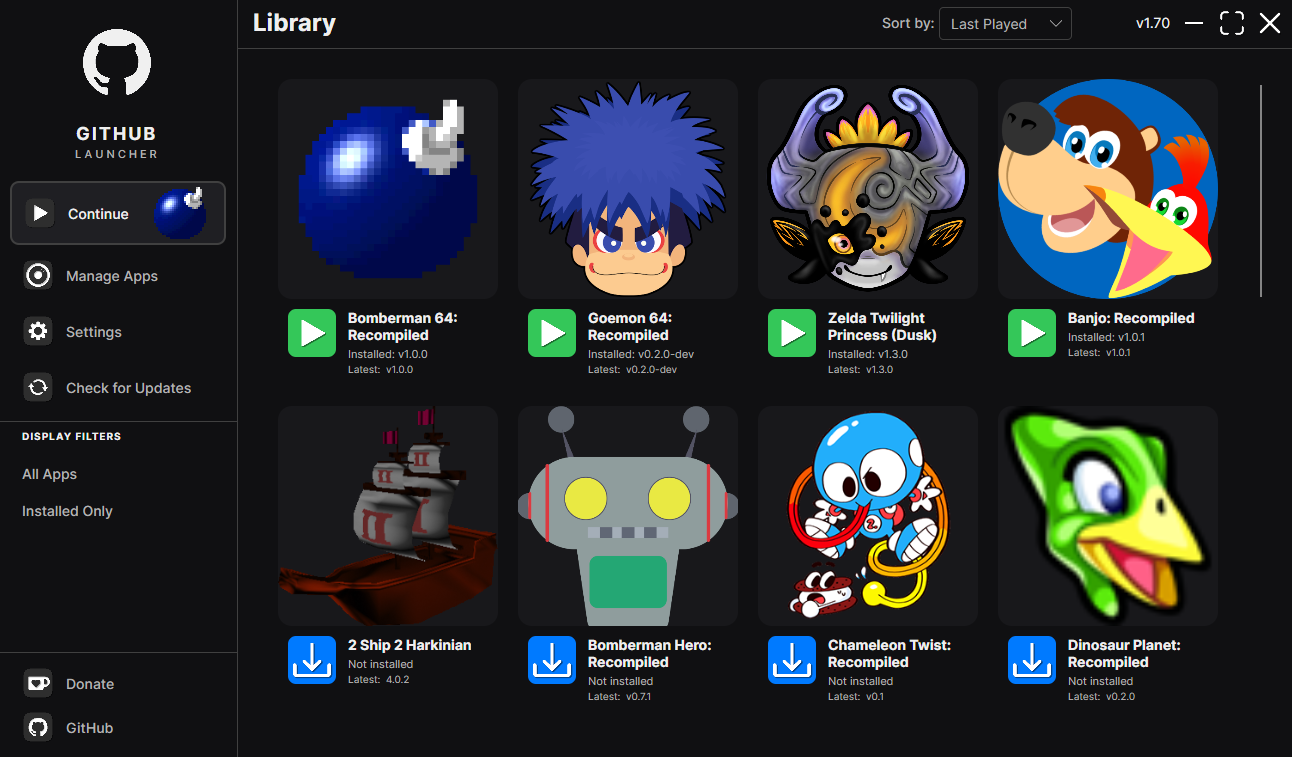 A modern, user-friendly launcher application for managing and running GitHub-hosted applications. This tool streamlines the process of downloading, installing, and launching your favorite projects.