Mnemo The Mnemo Authors
Install Mnemo with WinGet
winget install --id=SnifferLP.Mnemo -e Mnemo is a local-first study platform with flashcards, spaced repetition, adaptive learning, tests, and configurable AI assistance.
winget install --id=SnifferLP.Mnemo -e Mnemo is a local-first study platform with flashcards, spaced repetition, adaptive learning, tests, and configurable AI assistance.

A quieter way to remember.
A local-first desktop study app for flashcards, spaced repetition and deliberate practice. Windows and Linux · optional AI · no account required
Mnemo keeps your study library on your own computer. It combines a native Tauri shell with a focused React interface, stores material in a local SQLite database, and treats AI assistance as an optional extra rather than a dependency.
There is no account system, no telemetry and no vendor-hosted service. AI features call only the provider you configure, and everything else works offline.
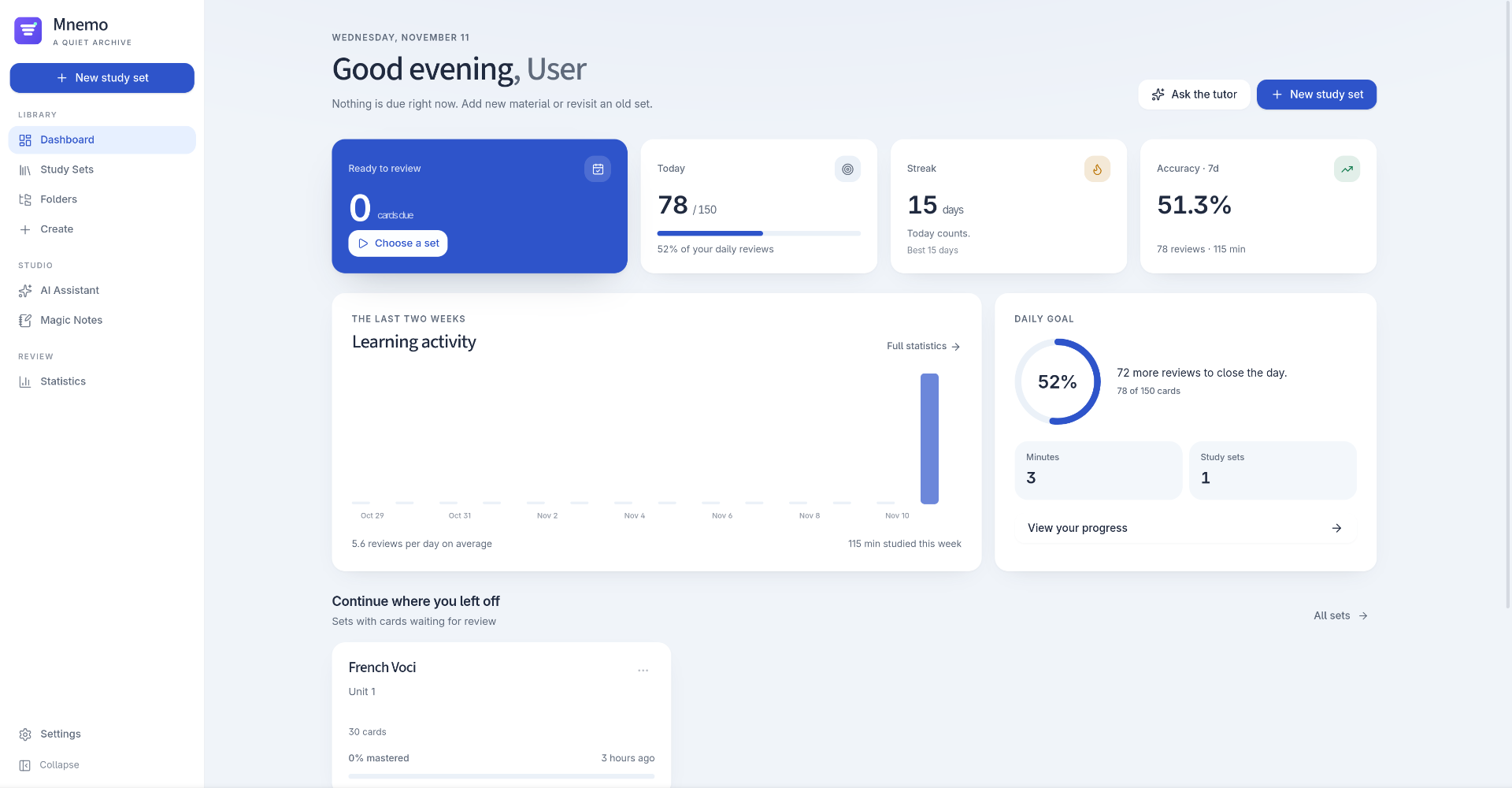
Mnemo uses a calm, card-based dashboard: a soft neutral canvas, white surfaces with rounded corners and soft elevation, a cobalt accent and a full-height navigation rail that collapses to an icon strip. Modern Sans is the default typeface, with the editorial serif still available in Settings. Light and dark themes share the same structure, and the interface adapts from smaller laptop windows to large desktop screens. The token system, sidebar and startup rules are documented in docs/DESIGN.md.
<img src="docs/screenshots/lightmode-set-overview.png" alt="Study set library with search, favourites and folder filters" width="400" />
<img src="docs/screenshots/darkmode-ai-overview.png" alt="AI study assistant in dark mode with per-set context controls" width="400" />


<img src="docs/screenshots/darkmode-settings-overview.png" alt="Appearance settings in dark mode with display font, language, theme and accent colour" width="820" />
Screenshots use neutral sample content from a development profile and show both themes. Requirements for new captures are documented in docs/screenshots/README.md. Please do not add screenshots containing real study content, personal names, API keys or machine-specific paths.
| Platform | Status | Distribution | Automatic updates |
|---|---|---|---|
| Windows 10/11 x64 | Supported | NSIS installer (.exe) | Yes |
| Linux x86_64 (Arch) | Supported | .pkg.tar.zst | Package manager only |
| Linux x86_64 (general) | Supported | AppImage | Yes |
| Debian/Ubuntu x86_64 | Supported | .deb | Package manager only |
| Linux aarch64 | Not officially released | Source build may work; no package is published | No |
| macOS | Not supported | — | No |
Windows builds are produced on windows-latest in GitHub Actions. Linux checks and package builds run on Linux runners. No macOS artifact is published.
Download the latest artifacts from the repository's Releases page. Generated packages are never committed to the repository.
Mnemo__x64-setup.exe.The installer adds a Start Menu entry, uses the Mnemo application icon and registers an uninstaller. Uninstall from Settings → Apps → Installed apps → Mnemo, or from the Start Menu shortcut's context menu.
The installer embeds the Microsoft WebView2 bootstrapper. Windows 11 and current Windows 10 installations normally already have WebView2. If it is missing, the installer downloads it from Microsoft during installation; that step requires an internet connection. No Rust, Node.js, pnpm or other development tools are required to install or run Mnemo.
> Windows code signing: the current installer is not code-signed. Windows SmartScreen may show an "Unknown publisher" warning. Verify that you downloaded the file from this repository's Releases page. Signing may be added in a future release; unsigned artifacts are never presented as signed.
sudo pacman -U mnemo--1-x86_64.pkg.tar.zst
The package installs the binary, desktop entry, hicolor icons and license notices.
chmod +x Mnemo__amd64.AppImage
./Mnemo__amd64.AppImage
The AppImage needs FUSE 2. If FUSE is unavailable, run it with:
./Mnemo__amd64.AppImage --appimage-extract-and-run
Mnemo can update itself in place on Windows x64 NSIS installations and Linux x86_64 AppImages downloaded from this repository's GitHub Releases. The .deb and Arch packages are deliberately left to apt/pacman and are not modified by the in-app updater.
Open Settings → Updates to choose a channel:
Checks run in the background at startup without blocking the app. If a compatible update is found, a dismissible notification appears in the bottom-right corner. Mnemo downloads and installs only after Download and install is selected, verifies the Tauri signature, and then restarts on Linux or lets the NSIS installer relaunch the Windows app. A failed check or installation leaves the current installation usable.
Update signing uses Tauri's minisign key. The public key is embedded in src-tauri/tauri.conf.json; the encrypted private key and its password are GitHub Actions secrets named TAURI_SIGNING_PRIVATE_KEY and TAURI_SIGNING_PRIVATE_KEY_PASSWORD. Unsigned or tampered update payloads are rejected. Do not publish a release whose updater artifacts are missing signatures.
sudo apt install ./Mnemo__amd64.deb
The Debian package depends on the standard WebKitGTK 4.1 runtime libraries provided by your distribution.
Backups created from Settings are ordinary SQLite copies. They are not encrypted; store them somewhere you trust.
AI is optional. Without a provider, the library, import/export, flashcards, spaced repetition, tests, statistics and backups all work normally.
| Provider type | Example base URL |
|---|---|
| OpenAI | https://api.openai.com/v1 |
| OpenRouter | https://openrouter.ai/api/v1 |
| Mistral | https://api.mistral.ai/v1 |
| Gemini | Google Gemini API endpoint |
| Ollama (local) | http://localhost:11434/v1 |
| Custom OpenAI-compatible | Your provider's /v1 endpoint |
Provider keys are encrypted at rest with AES-256-GCM. The master key stays on the local machine: on Linux it is written with mode 0600; on Windows it is protected with the current user's DPAPI credentials. Keys are never sent to the frontend or written to logs.
AI requests are sent directly to the provider you choose, under that provider's privacy terms. Mnemo does not proxy them through a project-operated server.
Mnemo has no accounts, telemetry, analytics, cloud sync or bundled API keys. The application creates its own data directory on first launch.
| Data | Default location |
|---|---|
| Linux data directory | $XDG_DATA_HOME/com.mnemo.study/ or ~/.local/share/com.mnemo.study/ |
| Windows data directory | %APPDATA%\com.mnemo.study\ |
| Database | /mnemo.db (SQLite, WAL mode) |
| Media attachments | /media/ |
| API-key vault | /secure.key |
| Development builds | /dev/ |
On Linux, secure.key is created with 0600 permissions. On Windows, the file is wrapped with DPAPI and can only be decrypted by the same Windows user profile. Moving the data directory to another Windows account requires removing secure.key and re-entering provider keys; the database and study content are unaffected.
To remove all local data, quit Mnemo and delete its data directory. Uninstalling the application does not delete the data directory automatically.
package.json)Install the Linux dependencies on Debian/Ubuntu:
sudo apt install libwebkit2gtk-4.1-dev libgtk-3-dev libsoup-3.0-dev \
  libayatana-appindicator3-dev librsvg2-dev patchelf build-essential \
  curl file pkg-config
On Arch Linux:
sudo pacman -S webkit2gtk-4.1 gtk3 libsoup3 librsvg patchelf base-devel
On Windows, install Rust, Node.js 22 and pnpm, then make sure the MSVC Rust toolchain is active:
rustup default stable-msvc
corepack enable
corepack prepare pnpm@12.18.0 --activate
git clone https://github.com/SnifferLP/Mnemo.git
cd Mnemo
pnpm install --frozen-lockfile
pnpm tauri dev
Vite serves the UI on http://127.0.0.1:1420; Tauri opens the native window. Development builds use a separate dev data directory so they cannot modify an installed library.
pnpm tauri build
On Linux this produces .deb and .AppImage bundles under src-tauri/target/release/bundle/. On Windows, src-tauri/tauri.windows.conf.json selects NSIS and produces an installer under src-tauri/target/release/bundle/nsis/.
These ordinary builds do not produce updater signatures. To build signed updater artifacts locally, set TAURI_SIGNING_PRIVATE_KEY and TAURI_SIGNING_PRIVATE_KEY_PASSWORD, then merge the release config:
pnpm tauri build --config src-tauri/tauri.release.conf.json
On Linux this adds Mnemo__amd64.AppImage.sig; on Windows it adds Mnemo__x64-setup.exe.sig. Release automation generates the platform manifest as latest.json and attaches it to the GitHub Release.
Build the release binary without Tauri's own Linux bundles, then create the Arch package:
pnpm tauri build --no-bundle
./packaging/arch/build-binary-package.sh
See packaging/arch/README.md and docs/RELEASING.md for source-package and release details.
Run the same checks locally that CI runs:
pnpm typecheck
pnpm test
pnpm build

cd src-tauri
cargo fmt --all --check
cargo clippy --all-targets --all-features -- -D warnings
cargo test --all-targets
The current local suite contains 33 Rust unit tests, 15 Rust integration tests and 56 frontend tests. The frontend suite covers learning-round state, activity-chart axis helpers, flashcard option helpers, card-duplicate matching, settings merging, automatic-update defaults, motion preferences, update-channel persistence and translation catalogues. Rust tests cover SM-2 scheduling, answer normalization, import/export, AI request construction, settings sanitization, database migrations, CRUD, document removal, updater channel selection, statistics, persistence, starred terms, archive round trips and upgrade behavior.
GitHub Actions also runs the Rust suite on Windows, builds the NSIS installer, builds Linux AppImage/.deb bundles and builds the Arch package. A successful compile is not a substitute for manual testing of Windows installation, display scaling, audio playback and other interactive behavior; see docs/RELEASING.md for the manual QA checklist.
Mnemo's source code is released under the MIT License; see LICENSE.
Bundled fonts are licensed separately under the SIL Open Font License 1.1. Third-party components, including windows-sys, Tauri, React and cryptography crates, are documented in THIRD_PARTY_NOTICES.md. The MIT license does not replace those terms.
SECURITY.md and use the repository's private Report a vulnerability flow. Do not open a public issue for a vulnerability.When reporting a Windows problem, please state whether it occurs with the installed NSIS build or a local development build, and whether WebView2 is installed.
.deb, Arch or other package-manager installations. Those packages must be updated through their package manager.