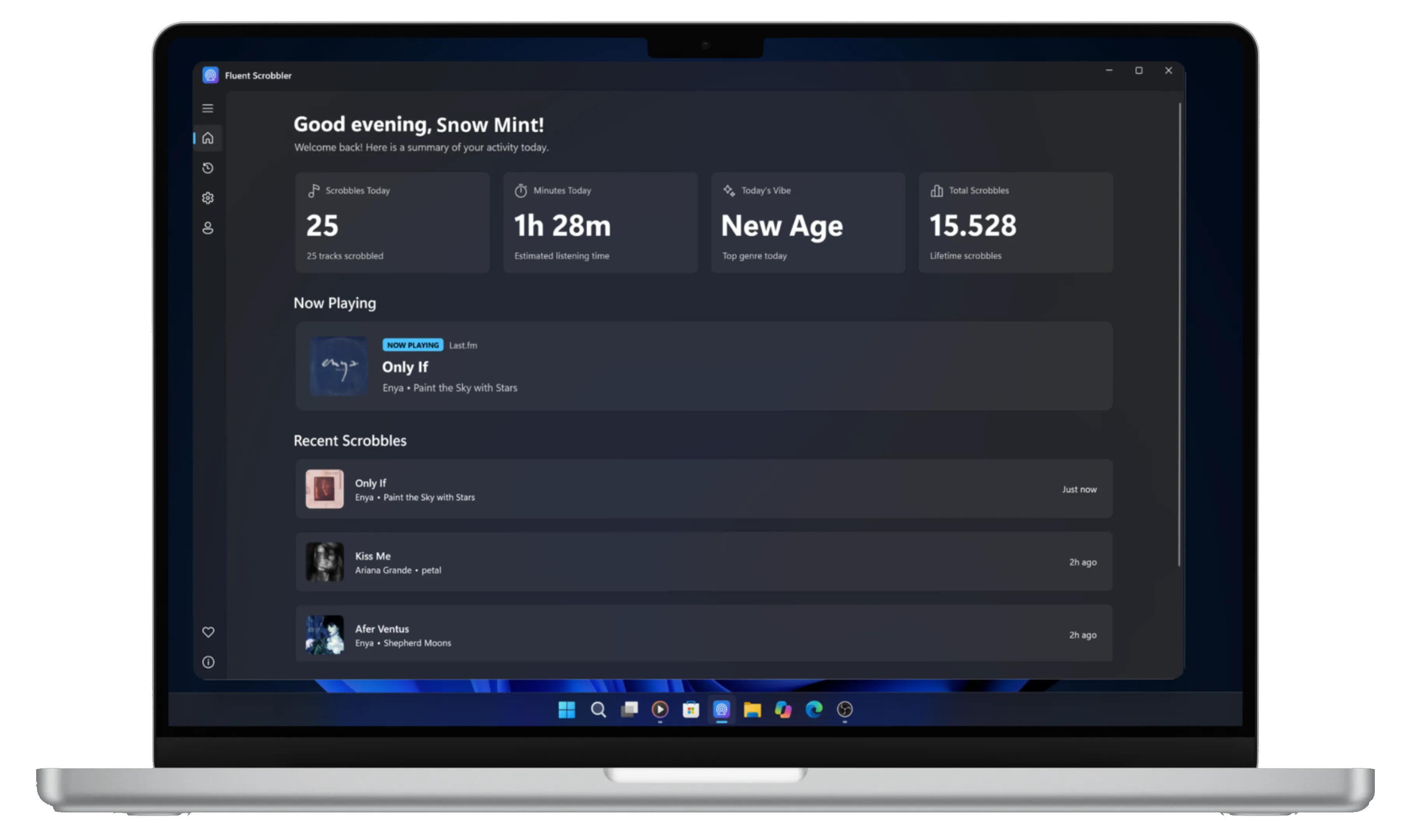
Fluent Scrobbler is a native scrobbling application for Windows 10 and 11 designed to automatically track and report your music listening activity to Last.fm. Built with WinUI 3, it offers a modern, intuitive interface while maintaining seamless integration with the Windows ecosystem.
Key Features:
Captures currently playing tracks across desktop apps and browsers using Windows System Media Transport Controls.
Integrates with Last.fm for real-time scrobbling and "Now Playing" updates.
Displays your recent scrobbles and track status directly within the app.
Runs quietly in the background with optional auto-start on Windows boot.
Features a native Fluent Design aesthetic optimized for Windows 11.
Target Audience and Benefits:
Ideal for Last.fm users on Windows 10 or 11 who want a modern, lightweight scrobbler that works across all their favorite media apps. Fluent Scrobbler provides a convenient way to track your listening habits without interrupting your workflow. Available via WinGet, it deploys using the winget command line for easy installation and setup.
Fluent Scrobbler is designed to work with any Windows media player or web browser, making it a versatile tool for music enthusiasts who value privacy and a clean user experience.
README
Fluent Scrobbler
A Lightweight, and Modern Scrobbler for Windows 11
Automatic System Media Scrobbling: Captures currently playing tracks across desktop apps and browsers using Windows System Media Transport Controls.
Last.fm Integration: Seamless authentication, real-time scrobbling, and "Now Playing" status updates.
Scrobble History: View your recent scrobbles and track status directly inside the application.
Native Fluent Design: Built with WinUI 3 for a modern Windows 11 design aesthetic with dark and light mode support.
Background Execution & Startup: Runs quietly in the system background with optional auto-start on Windows startup.
Installation & Setup
Download: Visit the Releases page and download the setup installer (FluentScrobbler-Setup.exe).
Install: Run the installer and follow the on-screen instructions.
Connect Account: Open Fluent Scrobbler, navigate to the Account section, and click Connect to Last.fm to authorize the application.
Start Scrobbling: Play music in any Windows media player or web browser, and your listening history will scrobble automatically.
> [!NOTE]
> VLC Media Player: VLC does not support Windows Media Transport Controls (SMTC) by default. To enable scrobbling from VLC, install the vlc-win10smtc plugin.
System Specifications & Tech Stack
System Requirements
Operating System: Windows 10 (version 1809 / build 17763 or higher) or Windows 11
Architecture: x64
Technical Specifications
Language: C# (.NET 8.0)
UI Framework: WinUI 3 / Windows App SDK 1.5+
Media API: Windows.Media.Control (GlobalSystemMediaTransportControlsSessionManager)
Privacy
I value your privacy. Please read the Privacy Policy to more information.
Feedback & Bug Reports
Because this project is in Beta, user feedback is very valuable to me:
To report a bug or request a new feature, please open an issue on GitHub Issues.
This project is licensed under the GNU General Public License v3.0 - see the LICENSE file for details.
Legal Disclaimer
Fluent Scrobbler is an independent open-source application developed by me. It is not affiliated with, endorsed by, or sponsored by Last.fm, CBS Interactive. All trademarks and brand names belong to their respective owners.