




Nexa Markdown Viewer
로컬과 원격 저장소의 Markdown을 GitHub 스타일로 읽는 크로스 플랫폼 데스크톱 뷰어.
빠르고 가벼운 Tauri 기반(네이티브 웹뷰, 작은 용량)이며, 소스(로컬/GitHub/…)와
렌더링 방식을 추상화해 손쉽게 확장할 수 있도록 설계되었습니다. 제작: SosomLab.
🏠 홈페이지: sosomlab.com · 📦 제품 소개: sosomlab.com/apps/nexa-markdown-viewer
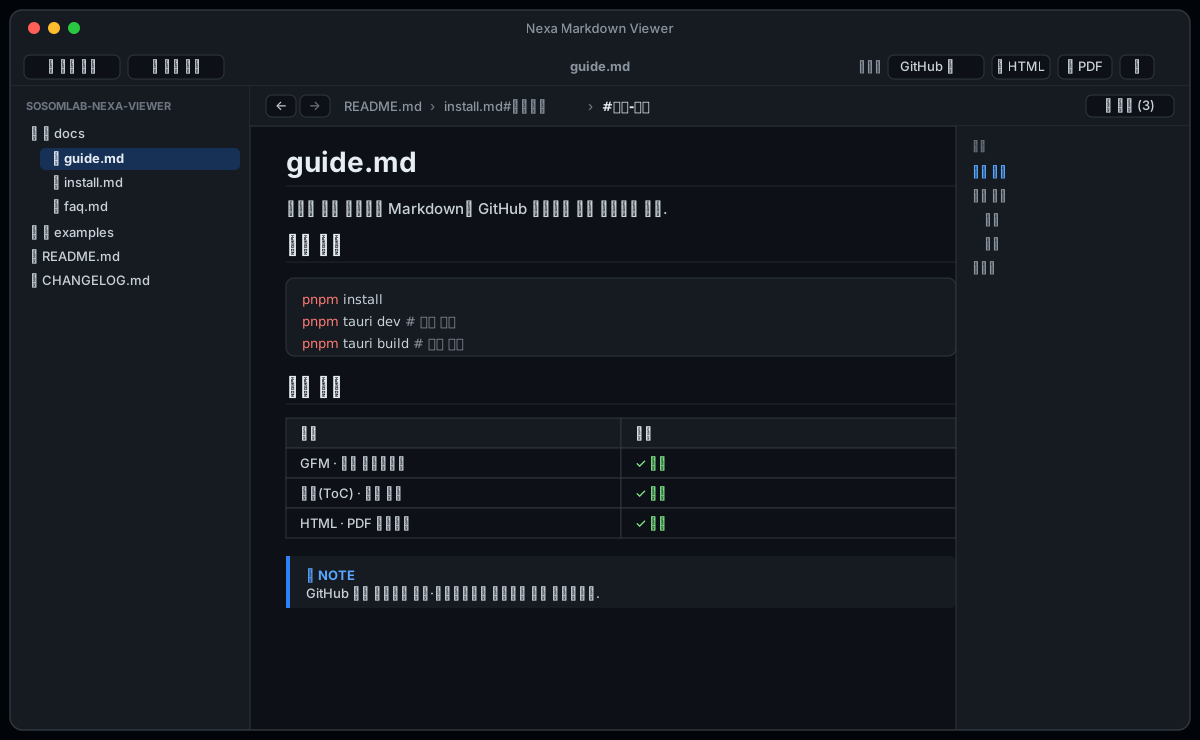
> 위 이미지는 UI 미리보기(목업)입니다. 실제 스크린샷으로 교체 가능합니다.
✨ 주요 특징
- GitHub 스타일 렌더링 — GFM(표·체크박스·취소선·자동링크),
github-markdown-css 라이트/다크 테마
- 언어별 코드 구문 강조 — highlight.js, 테마와 자동 동기화
- Mermaid 다이어그램 — ```mermaid 코드펜스 렌더링(VS Code 스타일 색/폰트, 확대/축소·이동 컨트롤)
- MD/TX 보기 모드 — 마크다운 렌더링 ↔ 원문(일반 텍스트) 전환 토글
- 서식 있는 복사 — 렌더된 모습 그대로 Word/PPT에 붙여넣기, 본문 우클릭 복사 메뉴
- 본문 확대/축소(줌 %) — Ctrl +/−/0 · Ctrl+휠, 글씨·이미지·표 일관 스케일
- 목차(ToC) 패널 — 문서 헤딩을 추출해 클릭 한 번으로 이동
- 문서 이동 기록(파일#앵커) — ←/→ 이동, 상단 브레드크럼(최대 3개), 파일별 그룹 기록에서 1-클릭 점프
- 같은 파일 내 이동은
#앵커, 다른 파일은 파일명#앵커로 기록
- 위키 스타일 문서 간 링크 — 상대
.md 링크/이미지 자동 해석, 외부 링크는 기본 브라우저로
- 내보내기 — HTML(스타일 인라인) · PDF(인쇄)
- 최근 문서 / 테마 / 렌더링 설정 기억 — 재실행해도 유지
- 교체 가능한 렌더 프로파일 — 렌더링 방식을 선택 전환(추후 수식·다이어그램 프로파일 추가 가능)
- 확장 가능한 소스 추상화 — 로컬 외에 GitHub/Bitbucket 등을 동일 인터페이스로 추가
🚀 빠른 시작
> 사전 요구: Node.js + pnpm, Rust(rustup),
> 그리고 Tauri 사전 준비물.
pnpm install
pnpm tauri dev      # 개발 실행 (창 표시)
새 터미널에서 cargo가 안 잡히면: source "$HOME/.cargo/env"
📦 빌드 & 배포
pnpm tauri build # 배포용 설치 파일 생성
산출물은 src-tauri/target/release/bundle/ 에 생성됩니다.
| OS | 산출물 |
|---|
| macOS | .dmg, .app (유니버설: --target universal-apple-darwin) |
| Windows | .msi(WiX), *-setup.exe(NSIS) |
> Windows/macOS는 각 OS에서 빌드해야 합니다. v* 태그 push로 GitHub Actions → Releases
> 자동 배포됩니다(tauri-apps/tauri-action). 산출물 예: NexaMarkdownViewer_0.1.0_universal.dmg,
> NexaMarkdownViewer_0.1.0_x64-setup.exe.
⬇️ 다운로드 & 설치
패키지 매니저로 설치 (권장)
최신 릴리스는 v0.4.0(2026-10-09)입니다.
| 채널 | OS | 게시 버전 | 상태 (2026-10-09 기준) |
|---|
| Homebrew | macOS | 0.4.0 | ✅ 최신 |
| winget | Windows | 0.3.4 | ⏳ 0.4.0 제출(PR #449305) 검증 대기 |
| Chocolatey | Windows | 0.3.3 | ⏳ 0.4.0 제출(2026-10-09) 검수 대기 |
| APT / DNF (pkg.sosomlab.com) | Linux | 0.4.0 | ✅ 최신 |
🍺 macOS — Homebrew
brew install --cask kiros33/tap/nexa-markdown-viewer
업그레이드는 brew upgrade --cask nexa-markdown-viewer, 제거는 brew uninstall --cask nexa-markdown-viewer.
Homebrew Cask는 설치 시 quarantine 속성을 자동 제거하므로 아래 서명 경고 없이 바로 실행됩니다.
(탭 저장소: kiros33/homebrew-tap)
🪟 Windows — winget
winget install SosomLab.NexaMarkdownViewer
업그레이드는 winget upgrade SosomLab.NexaMarkdownViewer, 제거는 winget uninstall SosomLab.NexaMarkdownViewer.
> 0.4.0은 winget-pkgs PR #449305 검증 대기 중이라
> 머지 전까지 winget install은 0.3.4를 설치합니다. 지금 0.4.0이 필요하면 아래 직접 내려받기를 이용하세요.
🪟 Windows — Chocolatey
choco install nexa-markdown-viewer
업그레이드는 choco upgrade nexa-markdown-viewer, 제거는 choco uninstall nexa-markdown-viewer.
> Chocolatey는 0.3.3이 2026-09-01 커뮤니티 저장소 검수를 통과해 현재 게시 버전입니다
> (2026-07-30 제출 · 미서명 바이너리 오탐으로 사람 검수를 거쳐 약 한 달 소요).
> 0.3.4는 건너뛰고 0.4.0을 2026-10-09 제출했습니다(커뮤니티 저장소 검수 대기 — 지난 0.3.3은 약 한 달 소요).
> 지금 0.4.0이 필요하면 아래 직접 내려받기를 이용하세요.
> (패키지 페이지: community.chocolatey.org)
🐧 Linux — APT (Debian/Ubuntu)
SosomLab 서명 패키지 저장소 pkg.sosomlab.com에 등록되어 있습니다.
저장소를 한 번 등록하면 이후 sudo apt upgrade로 새 버전을 받습니다.
# 저장소 등록(최초 1회) — 서명 키 + 소스
sudo curl -fsSLo /usr/share/keyrings/sosomlab-archive-keyring.gpg https://pkg.sosomlab.com/sosomlab-archive-keyring.gpg
sudo curl -fsSLo /etc/apt/sources.list.d/sosomlab.sources https://pkg.sosomlab.com/apt/sosomlab.sources
sudo apt update && sudo apt install nexa-markdown-viewer
제거는 sudo apt remove nexa-markdown-viewer. (다른 SosomLab 앱 때문에 이미 저장소를 등록했다면 마지막 줄만 실행)
🐧 Linux — DNF (Fedora/RHEL)
sudo curl -fsSLo /etc/yum.repos.d/sosomlab.repo https://pkg.sosomlab.com/rpm/sosomlab.repo
sudo dnf install nexa-markdown-viewer
업그레이드는 sudo dnf upgrade nexa-markdown-viewer, 제거는 sudo dnf remove nexa-markdown-viewer.
(색인은 GPG 서명되며, 패키지 파일 자체는 이 저장소의 GitHub Release에서 내려받습니다)
직접 내려받기
Releases 에서 OS에 맞는 파일을 받으세요.
| OS | 파일 | 설치 |
|---|
| macOS | …_universal.dmg | 열어서 앱을 Applications로 드래그 |
| Windows | …_x64-setup.exe | 실행 후 마법사 진행 |
| Linux | …_amd64.AppImage | chmod +x 후 바로 실행(설치 불필요) |
| Linux (Debian/Ubuntu) | …_amd64.deb | sudo apt install ./NexaMarkdownViewer_<버전>_amd64.deb |
| Linux (Fedora/RHEL) | …-1.x86_64.rpm | sudo dnf install ./NexaMarkdownViewer-<버전>-1.x86_64.rpm |
> 🔏 코드 서명: Windows 빌드는 SignPath Foundation이 무상 제공하는
> 코드 서명 인증서로 서명됩니다. (서명 적용 전까지는 아래 보안 경고가 나타날 수 있습니다.)
>
> ⚠️ 서명 적용 전이거나 평판 누적 전에는 첫 실행 시 OS 보안 경고가 표시될 수 있습니다.
> (신뢰할 수 있는 출처에서 받은 경우에만 진행하세요.)
>
> - macOS — "확인되지 않은 개발자" 경고 시: 앱을 우클릭 → 열기(한 번만), 또는 터미널에서
> xattr -dr com.apple.quarantine "/Applications/NexaMarkdownViewer.app"
> - Windows — SmartScreen 경고 시: 추가 정보 → 실행
>
> macOS는 정식 배포 단계에서 Apple Developer 인증서(notarization)를 적용할 예정입니다(로드맵).
🧱 기술 스택 & 구조
- 프론트엔드: React 19 · TypeScript · Vite · zustand · react-markdown(remark/rehype)
- 백엔드: Rust · Tauri 2 (dialog/fs/opener 플러그인)
src/
  sources/    # 소스 추상화 (ContentSource: local / github / …)
  renderer/   # 렌더 프로파일 + MarkdownView (교체 가능한 렌더링)
  store/      # zustand 상태 (문서/테마/이동 기록)
  components/ # FileTree · Toc · Toolbar · HistoryBar
src-tauri/
  src/providers/  # Rust ContentProvider 트레잇 + LocalProvider
  src/commands.rs # 파일/디렉터리/에셋 읽기 · 저장 커맨드
📝 변경 이력 / 릴리스 노트
최근 변경 요약(자세한 내용은 아래 링크):
- v0.4.0 — 보안 강화(문서 속 HTML 필터·CSP, 직접 연 폴더만 읽기, GitHub 토큰 OS 키체인 저장),
한글·공백 파일명 링크/이미지/앵커 수정, 큰 문서(30만 자 초과) 원문 우선 표시, 실행 파일 크기
16.0→6.2MB, Linux APT/DNF 저장소(pkg.sosomlab.com) 배포
- v0.3.4 — 탐색기 갱신 시 펼쳐둔 폴더가 유지되도록 수정. 펼침 상태를 하위 폴더까지
저장·복원(재실행 후에도 유지)
- v0.3.3 — 본문 전체 가로 폭 사용 — 920px 중앙 정렬 제한 해제, 넓은 창에서
표·다이어그램이 전체 폭으로 펼쳐짐(VS Code 프리뷰와 동일)
- v0.3.2 — Mermaid 확대(+) 미동작·드래그 시 배율 리셋 수정, 다이어그램 보기 모드
(1:1 · 화면 맞춤 · 배율%) 추가, 이동 기록 바 버튼 배치 정리
- v0.3.0 — Mermaid 다이어그램(VS Code 스타일, 확대/축소·이동), MD/TX 보기 모드,
서식 있는 복사(Word/PPT)·우클릭 메뉴, 본문 줌(%), 조직(Organization) 저장소 목록 보강
- GitHub 원격 저장소 연동 — PAT 로그인(공개 repo는 로그인 불필요), 계정 저장소 목록에서
선택 추가, 트리 탐색·열람, 온라인 갱신 감지 + 새로고침
- 패널 크기 조절 + VSCode/Eclipse 스타일 토글, 이동 기록(파일#앵커)
- 앱 아이콘/About 화면, Windows·macOS·Linux 자동 빌드/배포
> 📓 상세 변경 이력: CHANGELOG.md · 다운로드/노트: GitHub Releases
🗺 로드맵
데스크톱(Windows/macOS) 우선, 이후 Linux·모바일. 단계별 계획과 요구사항 추적은
docs/ROADMAP.md 참고.
- M1 ✅ 로컬 뷰어 · 파일트리 · ToC · 이동 기록 · 내보내기 · 테마
- M2 수식(KaTeX) · GitHub Alerts — Mermaid 다이어그램 ✅ · 본문 줌 ✅
- M3 GitHub 원격 소스 · 토큰 OS 키체인 저장 · 다중 저장소
- M4 Bitbucket/GitLab provider
- M5 검색(SEARCH.md) · 파일 변경 갱신(AUTO-REFRESH.md) ·
탭 · 백링크/링크 그래프 · 태그 · 외부 인자 열기(✅ Windows·macOS)
- M6 Git diff 비교 · M7 모바일(iOS/Android)
작업 일지: docs/PROGRESS.md
📄 라이선스
MIT License © 2026 SosomLab
© 2026 SosomLab · 제품 소개 · Built with Tauri + React