Use this command to install AWS Loggy with WinGet:
winget install --id=SteampunkLabs.AWSLoggy -e
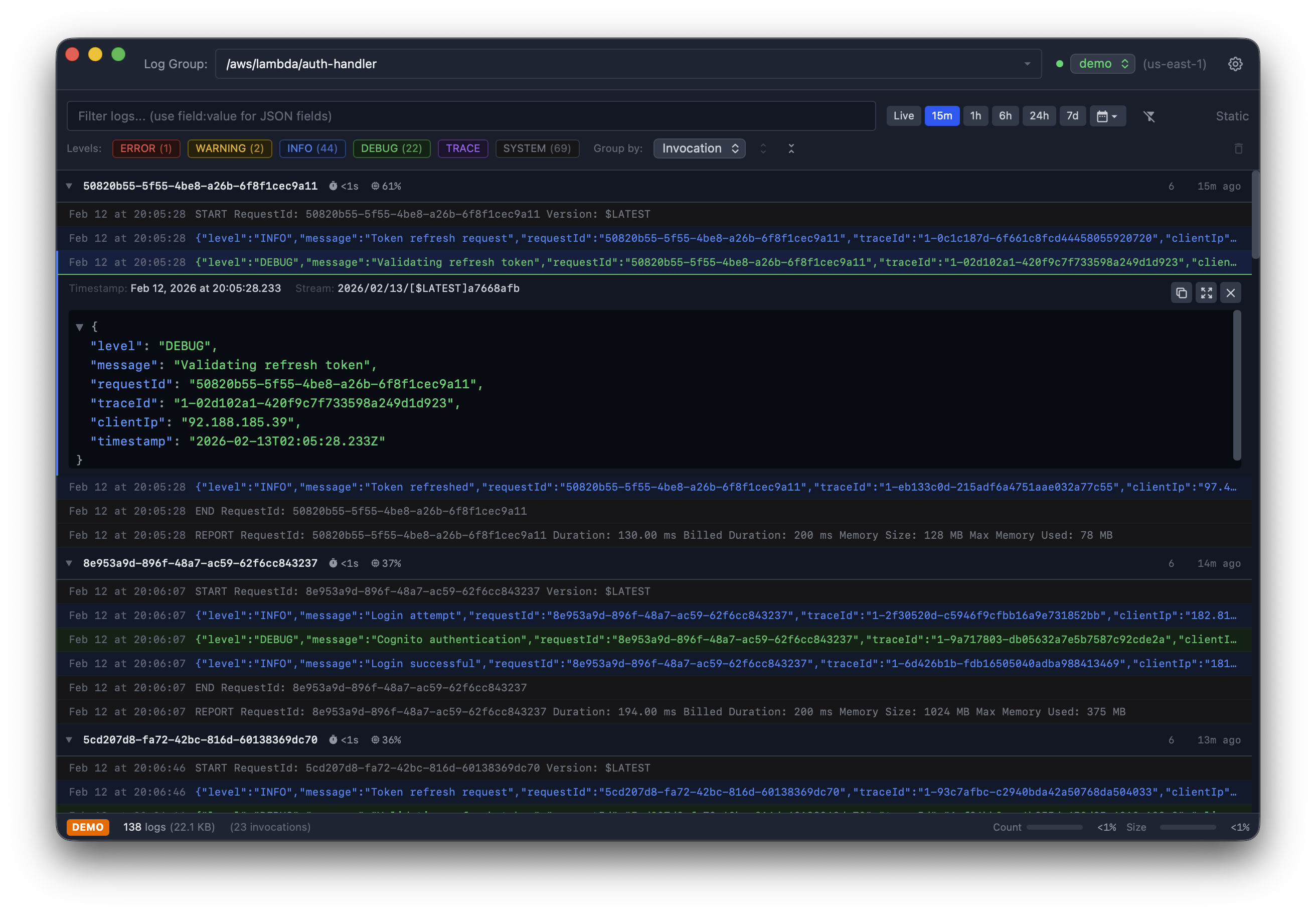
Loggy is a desktop application designed to streamline the process of viewing and managing AWS CloudWatch logs. Built with performance in mind, Loggy offers developers and DevOps engineers a powerful tool for real-time log monitoring and analysis.
Key Features:
Live Tail Streaming: View new log events as they are generated, ensuring you never miss critical updates.
Instant Filtering: Apply client-side filters to narrow down logs without waiting for AWS responses.
Log Level Detection: Automatically colorize logs based on severity levels (ERROR, WARN, INFO, DEBUG, TRACE, SYSTEM) for quick identification.
JSON Query Syntax: Filter logs using structured queries like field:value or nested.field:value.
Find-in-Log: Search within selected log entries with regex support and options for case sensitivity and whole-word matches.
Keyboard-Driven Navigation: Use shortcuts to focus on filters, find text, refresh logs, and more.
Audience & Benefit:
Ideal for developers and DevOps teams working with AWS CloudWatch, Loggy helps save time by providing instant access to relevant logs. Its native performance, built using Tauri, ensures smooth operation even when handling large volumes of data. The ability to customize log level colors and detection patterns makes it a flexible tool for different workflows.
Loggy can be installed via winget, ensuring seamless integration into your development environment.
README
Loggy
A fast, native desktop app for browsing and tailing AWS CloudWatch logs.
Features
Live Log Tailing - Stream new log events in real-time with auto-scroll
Instant Filtering - Client-side filtering as you type (no AWS roundtrip)
JSON Query Syntax - Filter by JSON fields with field:value or field.nested:value
Log Level Detection - Automatic colorization based on log level (ERROR, WARN, INFO, DEBUG, TRACE, SYSTEM)
Customizable Colors - Configure log level colors and detection patterns via Settings (Cmd-,)
brew tap aegixx/aws-loggy
brew install --cask aws-loggy
WinGet (Windows)
winget install SteampunkLabs.AWSLoggy
Pre-built Binaries
Download the latest release for your platform from the Releases page:
macOS: .dmg installer (Apple Silicon and Intel)
Windows: .msi or .exe installer
Linux: .deb, .AppImage, or .rpm
From Source
# Clone the repository
git clone https://github.com/aegixx/aws-loggy.git
cd aws-loggy

# Install dependencies
npm install

# Run in development mode
npm start

# Build for production
npm run app:build
The built application will be in src-tauri/target/release/bundle/.
Usage
Select AWS Profile - Loggy uses your default AWS credentials.
Choose Log Group - Use the dropdown to select a CloudWatch log group from your account.
Browse Logs - View historical logs with automatic time range selection.
Live Tail - Click the tail button to stream new logs in real-time.
Filter Logs - Type in the filter bar to instantly filter displayed logs:
Simple text: error matches any log containing "error"
JSON field: level:error matches logs where the level JSON field equals "error"