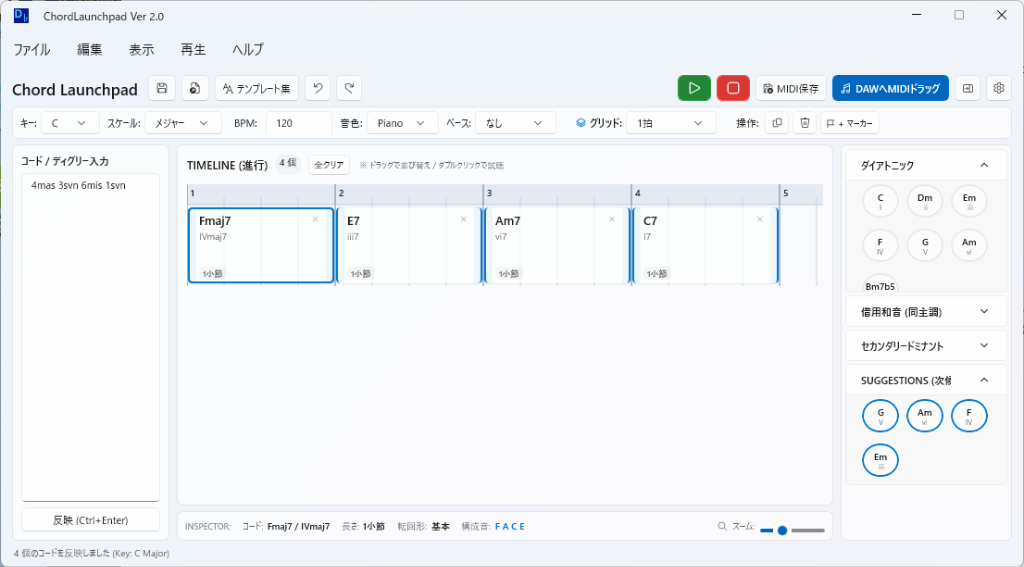
ChordLaunchpad is a Windows desktop application designed for composers, track makers, and music creators to sketch chord progressions rapidly and bring them directly into their DAWs (Digital Audio Workstations). This tool streamlines the process of composing by offering a variety of input methods, visual timelines, and direct MIDI integration.
Key Features:
Versatile Input Methods: ChordLaunchpad supports degree notation, shorthand commands, and fractional chords for quick and intuitive composition.
Visual Timeline: Displays progressions with拍数 and小節 boundaries for clear overview and real-time adjustments.
Integrated Synthesizers: Features piano, pad, and organ sounds for immediate audio feedback during composition.
Direct MIDI Drag-and-Drop: Transfers chord progressions smoothly into DAWs like Studio One, Cubase, or Pro Tools with a simple drag-and-drop action.
Template Library: Includes over 50 pre-made templates covering various genres, from classic to modern, aiding quick inspiration and composition.
Target Audience and Benefits:
Ideal for composers, track makers, and music producers seeking a streamlined workflow between sketching ideas and producing tracks. ChordLaunchpad enables users to quickly experiment with chord progressions, preview them in real time, and transfer their work directly into professional DAW environments without additional steps or exports.
SEO Integration:
ChordLaunchpad is optimized for audio production workflows, catering to musicians who prioritize composition efficiency and MIDI compatibility. Available via WinGet, you can install ChordLaunchpad effortlessly using the winget command line, ensuring a smooth deployment process tailored for developers and content creators.
This application stands out as a reliable tool for enhancing productivity in music creation, offering both simplicity and powerful features within an accessible Windows environment.
README
ChordLaunchpad Ver 2026.9.2
> コード進行作成支援アプリケーション
> 直感的なタイムライン、多彩な記法入力、豊富なテンプレート、そして DAW へのダイレクトな MIDI ドラッグ&ドロップに対応した Windows 向けコード進行アシスタントツールです。
生成AI使用表明
このアプリケーションは、Gemini 3.8 Flash を使用し、制作されたものです。
最新バージョン情報 (Ver 2026.9.2)
本バージョンでは、Microsoft Store 提出時のパッケージ受領検証エラーへの対応、ファイル書き込み処理の Atomic 化によるデータ破壊耐性の強化、および残存していた旧バージョン表記の完全一掃を実施いたしました。