SubnetDesk
A LAN-first remote desktop for fast, private, direct connections.
An independently maintained RustDesk fork built for LANs, routed private networks, and VPNs.






English · 简体中文
Why SubnetDesk ·
Features ·
Download ·
Quick start ·
Build
💡 Why SubnetDesk
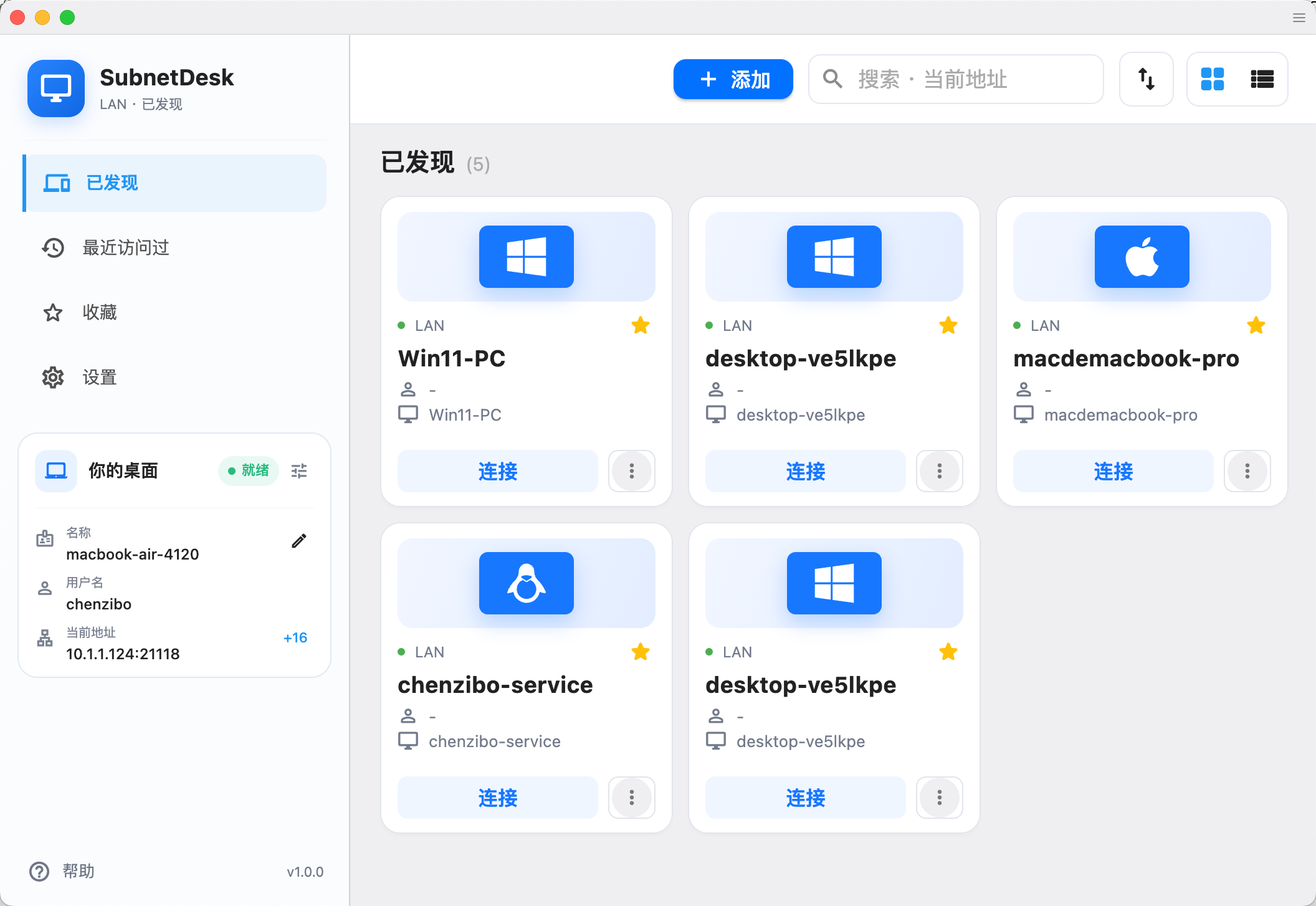
SubnetDesk focuses on one clear use case: remote control between devices that can already reach each other. It removes the public device-ID, rendezvous, relay, cloud account, proxy, and automatic public-update paths from RustDesk, replacing them with direct endpoint connections and local device discovery.
That makes it a good fit for home labs, offices, classrooms, on-site support, and private networks connected by WireGuard, Tailscale, OpenVPN, or another VPN.
| SubnetDesk | Typical RustDesk deployment |
|---|
| Connection | Direct IP address or hostname | Device ID through rendezvous, with optional relay |
| Discovery | Automatic mDNS discovery on the LAN | Device ID or address book |
| Server dependency | No coordination server required | Public or self-hosted rendezvous/relay server |
| Best suited for | LANs, routed private networks, and VPNs | Internet and cross-NAT access |
> [!IMPORTANT]
> SubnetDesk does not provide Internet rendezvous or relay services. The two devices must be reachable through the same LAN, a routed private network, or a VPN.
✨ Features
| Capability | Details |
|---|
| 🔎 | Local discovery | Find nearby devices automatically over mDNS. |
| ⚡ | Direct connections | Connect by IP address or hostname using a configurable TCP port. |
| 🔐 | Access protection | Authenticate with a username and password; passwords are stored as Argon2id hashes. |
| 🛡️ | Device verification | Verify and remember endpoint fingerprints before trusting a device. |
| 🌐 | Network allowlist | Restrict incoming connections to selected CIDR networks. |
| ⭐ | Fast reconnection | Keep recent devices, favorites, and stable device identities. |
| 🖥️ | RustDesk experience | Retain remote control, clipboard, audio, and file-transfer capabilities without a public coordination server. |
📦 Download
Download stable packages from GitHub Releases. For the newest changes, use the nightly release or artifacts from GitHub Actions.
| Platform | Architectures | Packages |
|---|
| Windows | x86_64, ARM64 | .msi installer (recommended), portable/no-install .exe |
| macOS | Intel, Apple Silicon | .dmg |
| Linux | x86_64, ARM64 | .deb, .rpm, .AppImage, .flatpak; Arch package on x86_64 |
| Android | ARM64, ARMv7, x86_64, universal | .apk |
> [!NOTE]
> Nightly packages are development builds. Prefer the latest stable release for daily use.
🚀 Quick start
- Install and open SubnetDesk on both devices.
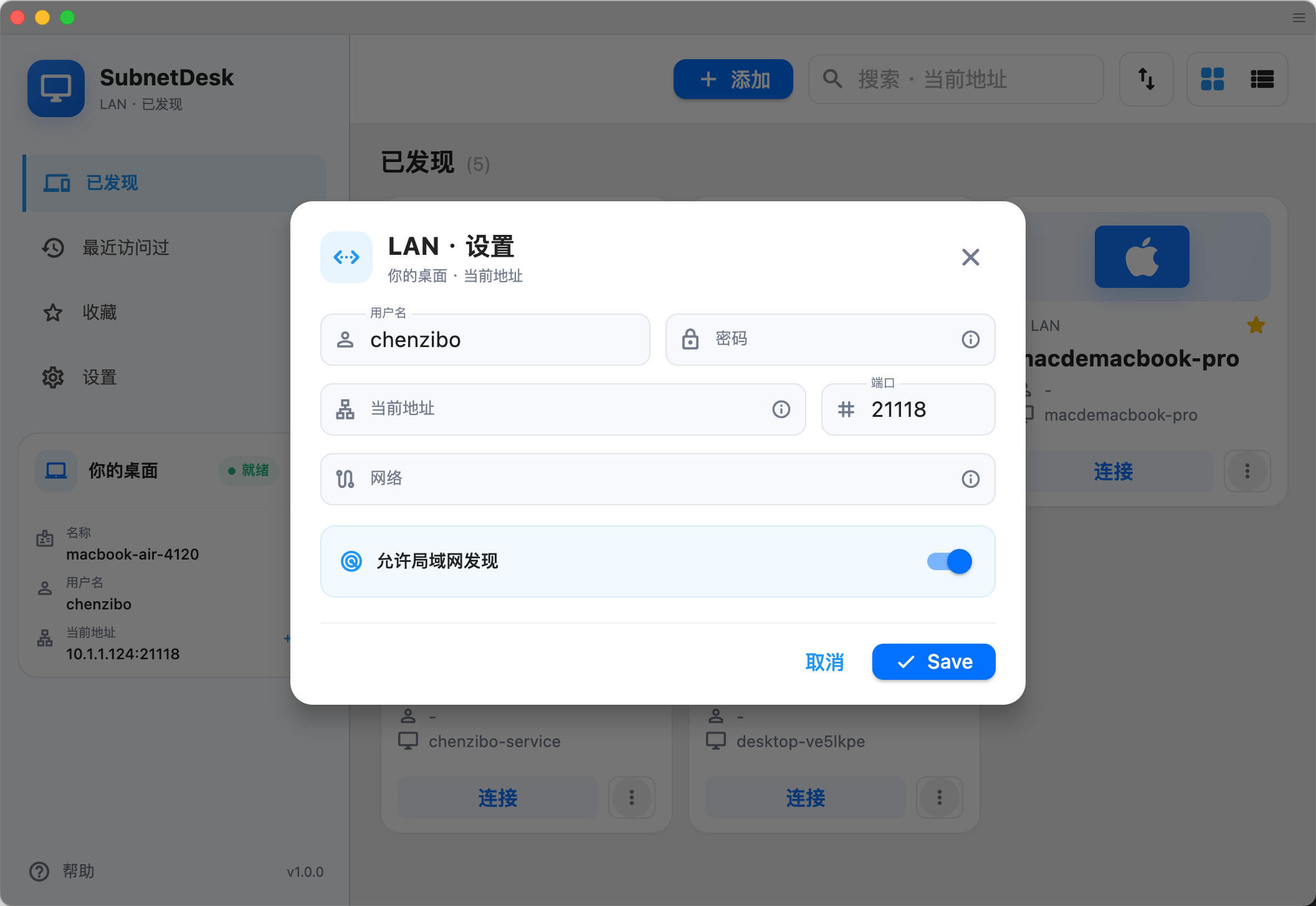
- On the controlled device, open LAN settings, set a username and password, and enable LAN discovery. The default port is
21118.
- On the controller, select a discovered device or enter
hostname:port / IP:port manually.
- Verify the device fingerprint on first connection, then connect.
Network checklist
- Both devices can route to each other.
- TCP port
21118 (or your configured port) is allowed by the host firewall.
- mDNS is available when automatic discovery is needed; direct address entry still works without it.
- The controlled device's CIDR allowlist includes the controller's network.
- On Linux, see host readiness notes for SELinux, Wayland, and login-screen guidance.
🔒 Security model
- Traffic stays on the network path between your devices; SubnetDesk does not require a public coordination service.
- Passwords are persisted as Argon2id hashes rather than plaintext.
- Device fingerprints provide trust-on-first-use verification and help detect an unexpected endpoint identity change.
- CIDR allowlists let the controlled device limit which source networks may connect.
As with any remote-control software, expose the listening port only to trusted networks, use a strong unique password, and verify fingerprints through a separate trusted channel when possible.
See the SubnetDesk Privacy Policy for session data, local storage, update requests, and deletion controls.
🛠️ Build from source
Clone the repository with its submodules, then run the Flutter desktop build:
git clone --recurse-submodules https://github.com/zibo-chen/SubnetDesk.git
cd SubnetDesk
./build.py --flutter --hwcodec
The build requires Rust, Flutter, and platform-specific native dependencies. The native package workflow is the source of truth for pinned tool versions, target architectures, and packaging steps.
🤝 Contributing
Bug reports, feature ideas, and pull requests are welcome. Before opening a change, check the existing issues and keep changes focused on the LAN/VPN-first product scope.

Join the SubnetDesk Discord community, or scan the QR code below to add me on WeChat. Mention SubnetDesk, and I will invite you to the WeChat group.

🙏 Credits and license
SubnetDesk is based on RustDesk and retains its open-source foundations. SubnetDesk is an independent project and is not an official RustDesk release.
Licensed under the GNU Affero General Public License v3.0. Use remote-control software only on systems you own or are authorized to administer.