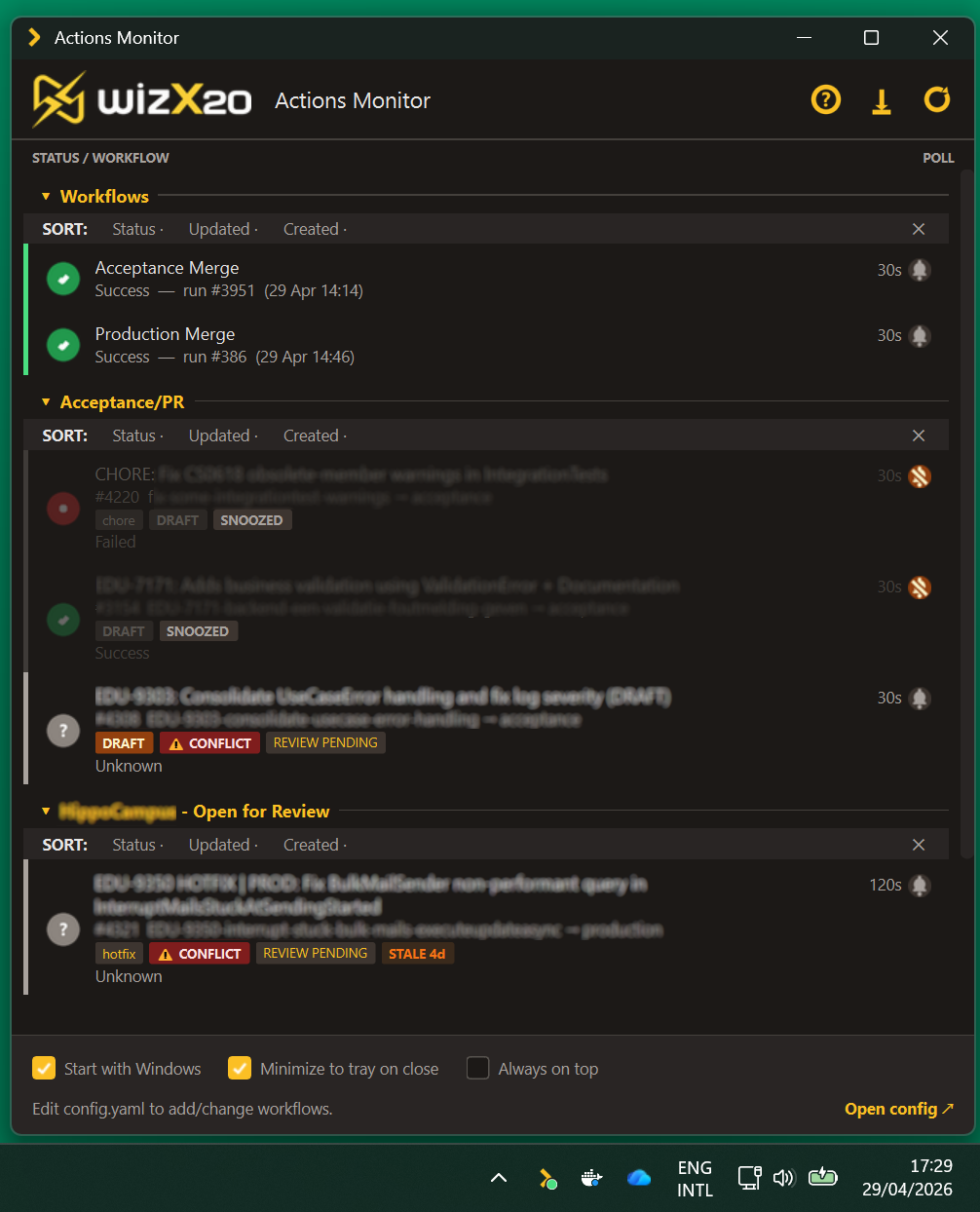
Use this command to install Actions Monitor with WinGet:
winget install --id=Summit.ActionsMonitor -e
Actions Monitor is a lightweight tray application designed to monitor GitHub Actions workflows and pull requests in real time. It provides developers and DevOps teams with a seamless way to track workflow statuses and receive notifications when changes occur, without needing to switch contexts or open multiple tabs.
Key Features:
Live Status Monitoring: Continuously tracks the status of configured workflows, displaying green, orange, or red indicators based on whether runs succeed, are in progress, or fail.
PR Mode: Monitors pull request builds, showing one row per active PR with details like branch prefixes, PR numbers, target branches, and draft status. Stale rows automatically remove after a configurable timeout.
System Tray Integration: Minimizes to the system tray with an icon color reflecting the worst combined state across all workflows.
Toast Notifications: Sends alerts when runs start, succeed, or fail, complete with an "Open workflow" button for quick access.
Per-Workflow Configuration: Allows users to set polling rates, branch filters, and notification overrides for individual workflows.
Hot-Reload of Configurations: Edits to the config file are applied within seconds without requiring a restart.
Audience & Benefit:
Ideal for developers, DevOps engineers, and anyone working with GitHub Actions who need real-time monitoring of workflow statuses. By providing immediate alerts and a consolidated view of pull request activity, it helps teams save time and stay informed about critical changes in their CI/CD pipelines.
Actions Monitor supports Windows and Linux (with GTK3) and can be installed via winget for Windows users.
README
Actions Monitor
A lightweight tray application that monitors GitHub Actions workflow statuses and notifies you when something changes. Runs on Windows and Linux.
This project is licensed under the Business Source License 1.1 (BUSL-1.1). Free for personal, internal, academic, and non-commercial redistribution use; resale or paid commercial distribution is not permitted. Converts to Apache 2.0 on the Change Date (2030-05-01). All copies and forks must retain the NOTICE file.
Requirements
Windows 10 / 11
Linux with GTK3 (Ubuntu 22.04+, Fedora, etc.) — tray icon requires gir1.2-ayatanaappindicator3-0.1
Install
> Note: screenshot is refreshed periodically and may lag the latest release; the live UI can look slightly different.
Windows — winget
> Currently broken. The winget publishing pipeline is temporarily disabled while we sort out a packaging issue, so the manifest is stale. Use Scoop or the direct download in the meantime.
Grab ActionsMonitor.zip (Windows) or ActionsMonitor-linux.zip from GitHub Releases. Unzip; the archive contains a single ActionsMonitor/ (or ActionsMonitor-linux/) folder with the executable and an _internal/ directory of bundled libraries — keep them together. Run the executable inside the folder.
> Heads up: the binary is unsigned, so the browser flags the .zip as unverified and Windows marks the executable inside as blocked. Right-click the unzipped .exe → Properties → tick Unblock → OK before running. Prefer winget or Scoop to skip this step.
Getting started
Windows
Launch Actions Monitor — on first run it creates config.yaml from the template
Add your GitHub token and workflows (see Configuration below)
The app hot-reloads the config, no restart needed
Linux
Run ./ActionsMonitor-linux — on first launch it creates config.yaml from the template
Add your GitHub token and workflows (see Configuration below)
The app hot-reloads the config, no restart needed
> Note: On Linux, named notification sounds (whistle, reminder, etc.) are Windows-only. Use "default" for a system sound via paplay/aplay, or provide a path to an .oga/.wav file.
Features
Live status — polls your configured workflows and shows green / orange / red status indicators
PR mode — monitor your own pull request builds: one row per active PR, with branch prefix tags, PR numbers, target branch indicators, and a DRAFT indicator. When a branch has multiple PRs (e.g. hotfix → acceptance and hotfix → production), each PR gets its own row. Stale rows auto-remove after a configurable timeout
System tray — minimises to tray; tray icon colour reflects the worst combined state across all workflows
Toast notifications — notified when a run starts, succeeds, or fails, with the app icon and an Open workflow button that takes you straight to the run
Per-workflow config — different polling rates, branch filters, and notification overrides per workflow
Hot-reload — edit config.yaml and the app picks up changes within seconds, no restart needed
Start with Windows — toggle in the app footer; writes a registry entry for the current user (no admin required)
Configuration
Open config.yaml (or click Open config ↗ in the app footer). The file is heavily commented — see config.template.yaml for a full example with every option documented. The key things to fill in are:
GitHub token
Required for private repositories. Without one the API returns a 404.
Use a classic token (fine-grained tokens require org admin approval):
> Note: Classic tokens have no dedicated "read Actions" scope — the Actions API for private repos falls under the broad repo scope. The token still only acts on behalf of your own account.
Adding workflows
There are four modes: branch mode (default) monitors a specific workflow+branch combo, PR mode monitors your own pull request builds, actor mode shows all your recent runs across a repo, and URL mode renders any GitHub Search query (e.g. is:pr is:open review-requested:@me) as a PR inbox. See config.template.yaml for URL-mode and actor-mode examples.
Branch mode
Paste the workflow URL straight from your browser:
Branch filters are extracted automatically from the URL query string, or you can set them explicitly:
  - url: https://github.com/your-org/your-repo/actions/workflows/ci.yml
    branch: main
PR mode
Set mode: "pr" to see one row per active PR you authored. Your GitHub username is auto-detected from the token — no extra config needed.
  - url: https://github.com/your-org/your-repo/actions/workflows/ci.yml
    name: "CI — My PRs"
    mode: "pr"
    polling_rate: 45
    max_prs: 5             # max PR rows to show (default: 5)
    pr_stale_after: "5m"   # duration before removing a stale row (default: "5m")
PR rows show:
Branch prefix tags (e.g. hotfix, feature, chore) parsed from the branch name
A colour-escalating STALE badge (yellow → orange → red) based on how long since the PR was last updated
Review status badges: APPROVED, CHANGES REQUESTED, or REVIEW PENDING
When a branch has multiple PRs targeting different branches, each PR appears as a separate row
Staleness thresholds
Global config that controls when the STALE badge appears on PR rows. Accepts human-friendly durations ("30m", "12h", "1d", "2d12h"):
staleness_thresholds:
  slightly_stale: "1d"      # yellow badge after 1 day
  moderately_stale: "3d"    # orange badge after 3 days
  very_stale: "5d"          # red badge after 5 days
Notifications
Global defaults, with optional per-workflow overrides:
notifications:
  new_run:
    enabled: true
    sound: default       # "default", "none", or path to a .wav file
  failure:
    enabled: true
    sound: default
  success:
    enabled: true
    sound: none
Beta features
Features still in development ship behind opt-in flags in the beta: block of config.yaml. Everything is off by default — a regular install behaves exactly as before until you flip a switch.
Flag
What it enables
settings_ui
The in-app Settings window: a gear button in the header and a "⚙ Settings" footer link for managing workflows, notifications, PR rules, and your GitHub token without hand-editing config.yaml. Changes are written back to config.yaml immediately (your comments are preserved).
Enable: open config.yaml (next to ActionsMonitor.exe for installed builds — the footer's "Open config ↗" link takes you there) and add:
beta:
  settings_ui: true
The app hot-reloads the config within a few seconds — no restart needed. Disable: set the flag to false (or remove the beta: block) and the app falls back to the stock UI, again without a restart.
Running from source? task run:beta (or setting the ACTIONS_MONITOR_BETA=settings_ui environment variable) force-enables flags for that run only, leaving config.yaml untouched.
Beta features may change or be promoted to default behaviour in later releases — check the changelog when updating.
Status colours
Colour
Meaning
🟢 Green
Last run succeeded
🟠 Orange
Run in progress or queued
🔴 Red
Last run failed
⚫ Grey
Unknown / no runs found
The tray icon follows the same logic, showing the worst state across all configured workflows.
Updating
Binary builds (the .exe / Linux binary) check GitHub Releases shortly after startup. If a newer release is found, a dialog offers to download the new release zip and swap the executable + _internal/ libraries in place, then restart. User files in the install folder (config.yaml, state.json) are preserved across updates.
Running from source does not auto-update — use git pull manually.
Uninstall
winget:winget uninstall WizX20.ActionsMonitor
Scoop:scoop uninstall actionsmonitor
Direct download: disable Start with Windows in the app footer, then delete the unzipped ActionsMonitor/ folder.
Contributing
Bug reports, feature ideas, and pull requests welcome — see CONTRIBUTING.md to get started. Running from source, building binaries, and the release pipeline are documented in DEVGUIDE.md. All participants are expected to follow the Code of Conduct.