CQOps







Less clicking. More radio.
CQOps is a fast, offline-first amateur radio logger for the terminal, built for portable and field operations, SOTA/POTA activations, contests, and club stations with rotating operators. Log contacts manually or automatically through WSJT-X, switch operators and logbooks instantly, synchronize with Wavelog, and use GPS-aware station positioning with APRS support and a built-in browser dashboard. CQOps runs on Raspberry Pi, older laptops, low-power computers, local terminals, and remote systems over SSH.
> 📖 Full documentation, installation guides, and translations at docs.cqops.com — English, Polski, Deutsch, Español, 日本語, Français, Italiano, Português (BR), Русский, 中文 (简体).
Installation
Windows
winget install cqops
Update:
winget upgrade cqops
> Published via microsoft/winget-pkgs — winget upgrade cqops picks up each release as the pipeline submits it. The portable ZIP and the NSIS installer are attached to every Release.
Ubuntu, Linux Mint, Debian, Pop!_OS
curl -1sLf 'https://dl.cloudsmith.io/public/szporwolik/cqops/setup.deb.sh' | sudo -E bash
sudo apt update
sudo apt install cqops
Fedora, RHEL, Rocky Linux, AlmaLinux
curl -1sLf 'https://dl.cloudsmith.io/public/szporwolik/cqops/setup.rpm.sh' | sudo -E bash
sudo dnf install cqops
Arch Linux, Manjaro, CachyOS
# CachyOS (uses paru by default)
paru -S cqops-bin

# Arch / Manjaro
yay -S cqops-bin
Also available via pacaur, aura, or any AUR helper. PKGBUILD at aur.archlinux.org/packages/cqops-bin.
Go (universal)
go install github.com/szporwolik/cqops/cmd/cqops@latest
Requires Go 1.26.9+ (the version pinned in go.mod). This is the fallback for all platforms, not the recommended method for end users.
Manual download
Grab the latest binary, installer, or package from the Releases page — Windows portable ZIP, NSIS installer, macOS binaries, Linux .deb/.rpm, and portable tarballs for all platforms including Raspberry Pi.
Features
- Fast TUI logging — three-column QSO form, dupe detection, form validation
- Multi-operator — hot-swap operators and logbooks for club stations
- Rig control — flrig and Hamlib rigctld, frequency/mode readback, spot-to-rig tuning
- Multi-provider callbook — QRZ.com, HamQTH (free global), QRZ.RU (free, RU/surrounding), Callook.info (free US) with priority-based cascading and base-call fallback; auto-fills name, QTH, grid, country
- Wavelog sync — upload, incremental download, per-logbook config
- Wavelog club stations — shared club PC with the owner's
wl2_ key: synced contacts are read-only (edits/deletes stay on the Wavelog side, no PATCH/DELETE is sent), new QSOs upload normally and are attributed per active operator; the key is stored encrypted and never displayed again once saved
- Encrypted secrets — AES-256-GCM, machine-tied, never plaintext
- DX Cluster & PSK Reporter — live spots with band/mode/time filters; PSK Reporter (F5) is opt-in via Integrations
- GPS receiver — serial or GPSD, live grid override for /P and mobile ops
- APRS — APRS-IS with live position map, station caching, GPS-aware beaconing
- APRS KISS & KISS TCP — serial KISS TNC and KISS Server (Dire Wolf).
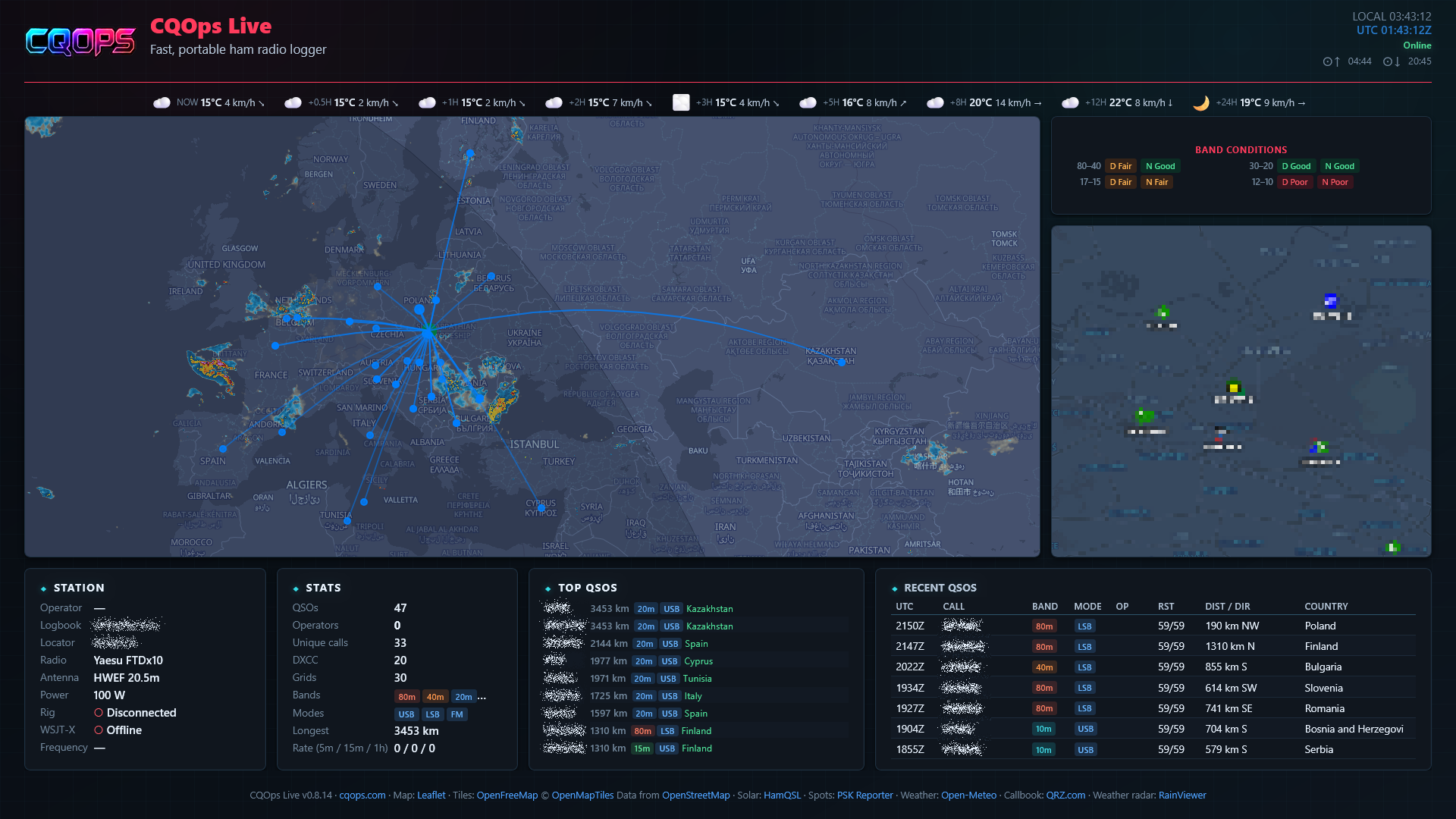
- CQOps Live — built-in browser dashboard with live map, QSO paths, stats, weather, band conditions, APRS. Great for Field Day displays or club station screens
- Contest logging — exchange markers, auto serials, ADIF contest IDs
- Offline-first — SQLite, cached reference data, embedded world map,
--offline flag, graceful no-internet degradation for dashboard, maps and weather
- ADIF 3.1.7 — full import/export, contest fields preserved
- Raspberry Pi ready — Windows, Linux, macOS, ARM; runs over SSH
- Kitty terminal graphics 🧪 — photo display via Kitty/Ghostty/WezTerm. Enable in Settings → General.
- Antenna rotator control 🧪 — manual azimuth/elevation via hamlib. Enable in Rig Profiles.
See the documentation for detailed workflows, configuration, keyboard shortcuts, and troubleshooting.
Architecture
flowchart LR
    subgraph Station["Station (optional)"]
        rig["Transceiver"]
        wsjtx["WSJT-X"]
    end
    subgraph CQOps["CQOps"]
        core["Multiple Logbooks · Contests"]
        db[("SQLite")]
    end
    subgraph Ops["Multi-Operator (optional)"]
        op1["Operator 1"]
        op2["Operator 2"]
        opN["Operator N"]
    end
    subgraph Internet["Internet (optional)"]
        callbooks["Internet callbooks"]
        dxc["DX Cluster"]
        psk["PSK Reporter"]
        solar["Solar Data"]
        wavelog["Wavelog"]
    end
    subgraph APRS["APRS (optional)"]
        aprsis["APRS-IS"]
        kissS["KISS TNC (serial)"]
        kissT["KISS Server (TCP)"]
    end
    subgraph Dash["Read-only web dashboard (optional)"]
        dash["Maps · Stats · Spots · Weather"]
    end
    subgraph FilesExport["File Export (optional)"]
        adifOut["ADIF 3.1.7"]
        bpl["Band Plan"]
    end
    subgraph FilesImport["File Import (optional)"]
        adifIn["ADIF 3.1.7"]
    end

    Ops --> CQOps
    rig <--> CQOps
    wsjtx -. UDP .-> CQOps
    CQOps <--> Internet
    CQOps <--> APRS
    CQOps -. SSE .-> Dash
    CQOps --> FilesExport
    FilesImport --> CQOps
Screenshots
App


Dashboard
Requirements
- Go 1.26.9+ (the version pinned in
go.mod)
- Terminal with 80×24 minimum
Build
git clone https://github.com/szporwolik/cqops.git
cd cqops
make build        # Build for current platform (output in build/)
make build-all    # Cross-compile for all platforms
make test         # Run tests
For smaller binaries, install UPX and run upx --best build/cqops.
See the documentation for pre-built downloads and platform-specific installation.
Usage
cqops              # Start the TUI
cqops --offline    # Start without network activity
cqops --version    # Print version and exit
cqops --help       # Show help
Full usage guide, workflows, and keyboard shortcuts are in the documentation.
Third-party party integrations and services
Integrations
Core libraries:
Data & third-party services
Reference data (loaded and cached locally):
- country-files.com — CTY.DAT DXCC prefix database by Jim Reisert AD1C (public domain factual data)
- Super Check Partial — SCP callsign database by Stu Phillips K6TU (public domain contest data)
- SOTA — Summits On The Air summit list (public data)
- POTA — Parks On The Air park list (public data)
- WWFF — World Wide Flora & Fauna directory (public data)
- IOTA — Islands On The Air directory (personal non-commercial use per RSGB IOTA Ltd terms)
Live data (online, cached locally):
- hamqsl.com — Solar conditions data (SFI, SSN, A/K indices) by Paul L Herrman N0NBH
- PSK Reporter — Real-time propagation spot data by Philip Gladstone
- Open-Meteo — Free weather forecast API (CC BY 4.0), fetched browser-side for the CQOps Live dashboard weather row
CQOps Live dashboard — map tiles, weather radar, weather forecast, Leaflet:
- Map tiles: OpenFreeMap — © OpenMapTiles Data from OpenStreetMap (ODbL). Styles: Bright (light theme), Fiord (dark theme).
- Map rendering: MapLibre GL JS (BSD-3) + MapLibre GL Leaflet (ISC), loaded from CDN.
- Weather radar overlay: RainViewer public API (browser-side, optional, offline-safe). Attribution displayed on-map and in footer.
- Weather forecast row: Open-Meteo free API (browser-side, no key required, offline-safe: hidden when disconnected). Attribution in footer. See
licenses/OPEN-METEO-CC-BY-4.0.txt.
- Leaflet 1.9.4 bundled under BSD-2. See
licenses/LEAFLET-BSD2-LICENSE.
- Leaflet.Terminator (day/night grayline overlay) bundled under MIT. See
licenses/LEAFLET-TERMINATOR-MIT-LICENSE.
- All services remain optional. CQOps and CQOps Live work offline with cached/local assets.
- Use of third-party services does not imply endorsement of CQOps by those projects.
APRS-IS & APRS symbol graphics:
- APRS symbol graphics are from the aprs.fi APRS symbol set by Heikki Hannikainen, OH7LZB. The graphics are third-party assets with mixed per-symbol copyright status — not covered by the CQOps Apache 2.0 license. Upstream copyright notes are preserved in
third_party/aprs-symbols/COPYRIGHT.md. See third_party/NOTICE.md for details.
- APRS Mic-E and Base-91 position decoding in
internal/aprs/parse.go is an independent implementation based on algorithms from go-aprs-fap (BSD-style) and the APRS 1.0.1/1.2 specifications.
Licensing
All licenses are permissive (MIT, Apache 2.0, BSD-2, BSD-3). See licenses/ directory. Third-party asset notices are in third_party/.
Special thanks
Cloudsmith
Package repository hosting is graciously provided by Cloudsmith. Cloudsmith is the only fully hosted, cloud-native, universal package management solution, that enables your organization to create, store, and share packages in any format, to any place, with total confidence.
Contributing
This is a personal project. Issues are welcome, and pull requests are accepted — please open them against the dev branch.
License
Apache-2.0
Copyright (C) 2025-2026 Szymon Porwolik