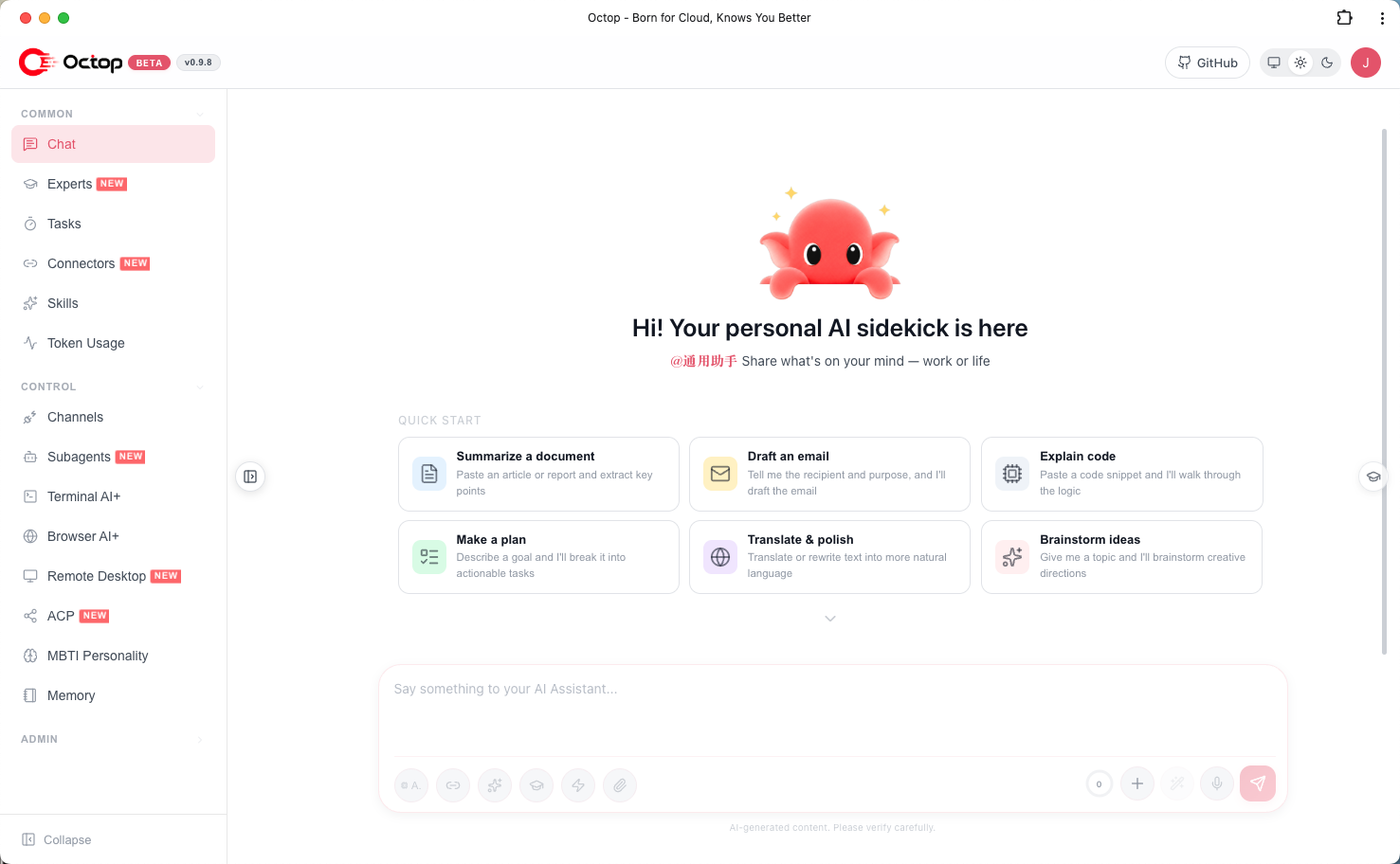
Octop is an open-source, self-hosted AI assistant. It's not just a tool — it's a digital life form that can operate in parallel. Through its multi-agent architecture, it builds an intelligent environment that is both independent and collaborative for teams, families, and individuals. Best of all, it runs entirely on your machine — the fully self-hosted design means privacy is never a compromise, while single-process startup makes the powerful web console, CLI, and IM integrations readily accessible.
Chat through the Web Dashboard, Feishu, DingTalk, QQ, Discord, WeCom, or programmatic HTTP/SSE/WebSocket. Extend capabilities with the expert library, Connectors (OAuth + MCP), and ACP integration for IDE workflows.
✨ Highlights
| | Feature | Description |
| --- | ---------------------- | ----------------------------------------------------------------------------------------------------------------------------------------------------- |
| 👥 | Multi-user expert team | One admin, shared household; built-in expert library — switch specialists per scenario |
| 🎭 | MBTI personas | 16 personality templates plus an interactive quiz — give each agent a distinct character |
| 🔒 | Security built-in | JWT multi-user isolation, tool approval, shell command guardrails, and PII redaction — data stays local |
| 🔌 | Connector ecosystem | Tencent suite (Docs, Weibo trends, News, …); OAuth and MCP gateway extend resource boundaries |
| 💾 | Pluggable backends | Local disk, Docker containers, PostgreSQL, or COS/S3 — AI operates inside isolated boundaries |
| 🧠 | Portable memory | Powered by harness-memory; memory migrates with the workspace |
| 📚 | Knowledge base | RAG over your documents; semantic retrieval grounds agent answers in your private corpus |
| 🧩 | Plugins | Extend Octop with third-party plugins; bundled plugins are seeded and toggled on demand |
| ↔️ | ACP bidirectional | octop acp for IDE/terminal AI; delegate to OpenCode / Claude Code with permission gates |
| 💻 | Terminal AI+ | Interactive shell in the browser — AI-assisted command execution and troubleshooting |
| 🌐 | Browser AI+ | Headless Chromium sessions for web automation, screenshots, and remote browsing |
| 🖥️ | Remote desktop | Live screen and input from the dashboard on Linux, Windows, and macOS — remote office work and GUI apps; one-click isolated desktop on headless Linux |
| 🏠 | Self-hosted | Dashboard, CLI, IM channels, and cron in one octop run — all data under ~/.octop/ |
🐾 What can you do with Octop
- Personal assistant — let a dedicated agent write weekly reports, organize notes, and manage your schedule; memory persists with the workspace.
- Family sharing — one admin account, the whole household; assign different agents and experts per member.
- Team helper — multiple agents collaborate in parallel, bridging Feishu / DingTalk / WeCom to route tasks into group chats.
- Developer boost — delegate coding tasks to OpenCode / Claude Code via ACP, or troubleshoot from the terminal with AI assistance.
- Web automation — use Browser AI+ to fill forms, capture screenshots, and gather public info.
- Scheduled tasks — configure cron in natural language so the agent pushes or runs jobs on time every day.
README
A smarter, self-hosted AI assistant — multi-user, multi-agent.
Octop is an open-source, self-hosted AI assistant. It's not just a tool — it's a digital life form that can operate in parallel. Through its multi-agent architecture, it builds an intelligent environment that is both independent and collaborative for teams, families, and individuals. Best of all, it runs entirely on your machine — the fully self-hosted design means privacy is never a compromise, while single-process startup makes the powerful web console, CLI, and IM integrations readily accessible.
Chat through the Web Dashboard, Feishu, DingTalk, QQ, WeChat, Telegram, Discord, WeCom, or programmatic HTTP/SSE/WebSocket. Extend capabilities with the expert library, Connectors (OAuth + MCP), and ACP integration for IDE workflows.
✨ Highlights
Feature
Description
👥
Multi-user expert team
One admin, shared household; built-in expert library and expert market — switch specialists per scenario
🤝
Cloud collaboration
Link this Octop to another instance to browse peer experts and chat across instances; history stays on the expert's side
🎭
MBTI personas
16 personality templates plus an interactive quiz — give each agent a distinct character
🎯
AgentTeams(Beta)
A coordinator schedules multiple experts on multi-step work; details
🔒
Security built-in
JWT multi-user isolation, tool approval, shell command guardrails, and PII redaction — data stays local
🔌
Connector ecosystem
Tencent suite (Docs, Meeting, News, …); OAuth and MCP gateway extend resource boundaries — supported connectors
💾
Pluggable workspace backends
Local disk, Docker sandbox, PostgreSQL, or COS/S3 for agent files — separate from the control-plane DB
🧠
Portable memory
Powered by Octop Memory; memory migrates with the workspace
📚
Knowledge base
RAG over your documents; share corpora within a deployment and ground answers in your private data
🧩
Plugins
Extend Octop with third-party plugins; bundled plugins are seeded and toggled on demand
↔️
ACP bidirectional
octop acp for IDE/terminal AI; delegate to OpenCode / Claude Code with permission gates
💻
Terminal AI+
Interactive shell in the browser — AI-assisted command execution and troubleshooting
🌐
Browser AI+
Headless Chromium sessions for web automation, screenshots, and remote browsing
🖥️
Remote desktop
Live screen and input from the dashboard on Linux, Windows, and macOS — remote office work and GUI apps; one-click isolated desktop on headless Linux
🪟
Desktop client
Native Windows / macOS / Linux apps (and FnOS packages) alongside the web dashboard
🏠
Self-hosted
Dashboard, CLI, IM channels, and cron in one octop run — all data under ~/.octop/
📌 Overview
Octop is a self-hosted AI assistant platform for households and small teams. It runs a single process that serves a web dashboard, a CLI, IM channels (Feishu, DingTalk, QQ, WeChat, Telegram, Discord, WeCom, and more), and cron automation — all sharing one control-plane database under ~/.octop/ (SQLite by default; PostgreSQL optional).
> Octop's design goal: keep every conversation, workspace, and credential on your own machine, while giving each user a personal team of specialized agents they can switch between per task.
🐾 What can you do with Octop
Personal assistant — let a dedicated agent write weekly reports, organize notes, and manage your schedule; memory persists with the workspace.
Family sharing — one admin account, the whole household; assign different agents and experts per member; share experts and knowledge bases when useful.
Team helper — AgentTeams or parallel agents, bridging Feishu / DingTalk / WeCom / WeChat to route tasks into group chats.
Developer boost — delegate coding tasks to OpenCode / Claude Code via ACP, or troubleshoot from the terminal with AI assistance.
Web automation — use Browser AI+ and remote desktop for forms, screenshots, and GUI apps.
Scheduled tasks — configure cron in natural language so the agent pushes or runs jobs on time every day.
Octop is built on the Octop Harness stack — a set of focused runtimes that Octop composes into one process:
Octop Harness — Agent runtime: model routing, tools, skills, and conversation checkpointing.
Octop Gateway — multi-platform IM channel bridge that normalizes incoming messages into a single processing pipeline.
Octop Memory — hierarchical recall with full-text search, so an agent's memory travels with its workspace.
Octop Browser — CDP-based browser automation with persistent profiles for web tasks.
Instead of an external queue or message broker, Octop routes every surface — Web UI, IM, and cron — through one in-process HarnessProcessor. The result is a single, restart-safe process whose entire state is rebuilt from the control-plane database on boot (local SQLite by default; PostgreSQL optional).
🤔 Features
Server & auth
Multi-user JWT authentication with admin role
First-run setup wizard (octop init)
Interactive API docs at /api/docs (off by default — set "enable_api_docs": true in config.json to enable)
Experts
Multiple experts per user; each has its own workspace, providers, channels, and cron
16 MBTI persona templates + custom system prompt
Expert library scanned at boot (infra/agents/experts/library/); expert market and in-deployment expert sharing
AgentTeams(Beta) — coordinator + member experts for multi-step tasks (docs/expert-teams.md)
Workspace backends (expert files): local disk, Docker sandbox, PostgreSQL, COS/S3, and other remote stores — distinct from the control-plane database
Channels & automation
IM channels: Feishu, DingTalk, QQ, WeChat, Telegram, Discord, WeCom, and more
Proactive cron jobs with natural-language and slash-command triggers
Unified message processing across Web UI, IM, and cron surfaces
Shared resource pool — a central pool of skills and sub-agents that any user can drop into a new expert without rebuilding from scratch.
Expert sharing — publish your experts to other users in the same deployment, so good configurations are reused instead of recreated.
PC client — native desktop apps for Windows / macOS / Linux alongside the web dashboard and IM channels.
In progress
AgentTeams(Beta) — let one coordinator autonomously schedule and orchestrate multiple experts to tackle multi-step tasks.
Mobile client(closed beta) — native mobile apps currently in internal testing.
Planned
Browser & terminal polishing — browser skill recording (capture a workflow and replay it as a skill) and a more capable terminal AI assistant.
Self-evolution — automatically distill everyday conversations into reusable skills, so the assistant grows with you.
Managed Agents — platform-hosted agent lifecycle (provision, scale, and operate agents without managing the full self-hosted stack yourself).
Project — project-scoped workspaces that group agents, files, and conversations around a shared goal.
Cloud–edge continuum — run Octop locally while offloading selected tasks to the cloud, so light work stays on-device and heavier jobs use remote capacity when you need it.
Plugin marketplace — a curated market to discover, install, and update third-party plugins without leaving Octop.
Conversational control plane — deepen Octop’s own skills so chat can cover the full dashboard surface: create experts, wire channels, manage knowledge bases, and scaffold plugins end-to-end.
This roadmap may shift as the community grows; treat it as indicative only.
🚀 Quick Start
Prerequisites
macOS / Linux / Windows
No pre-installed Python required — the installer uses uv to provision Python 3.12 in an isolated venv under ~/.octop/
A modern multi-core CPU with a few GB of RAM for the process plus model/embedding caches; enough disk for the database, agent workspaces, and document corpora
After installation, open a new terminal or reload your shell:
source ~/.zshrc   # Zsh
# or
source ~/.bashrc  # Bash
The installer places octop on your PATH via ~/.octop/bin. Optional extras:
# Download Playwright Chromium for browser automation (skipped if a system Chrome/Chromium is already present)
curl -fsSL https://download.octop.cloud/octop/scripts/install.sh | bash -s -- --extras browser
See scripts/README.md for all install options (--version, --from-source, --mirror, Windows flags).
Desktop app (GUI, no terminal) — grab the artifact for your platform from GitHub Releases:
Octop-fnos-docker-lite-.fpk (smaller image) / Octop-fnos-docker-.fpk (full: desktop, OCR, local models) / Octop-fnos-native-amd64-.fpk (x86_64, no Docker) / Octop-fnos-native-arm64-.fpk (ARM64 fallback if no Docker) — install via App Center
Desktop installers bundle the browser extra only. Desktop control, OCR, and local embedding stay on the Docker image tag :-full.
Alternative — PyPI (if you already manage Python yourself):
pip install octop
# optional local ONNX embedding model cache (Models → Local): pip install "octop[local-embedding]"
# Downloads catalog weights under ~/.octop/embedding_models; not chat, not Memory.
# Browser automation uses the bundled Playwright package; install Chromium via the installer --extras browser,
# the dashboard, or: python -m playwright install chromium
From a source checkout with uv:
uv sync --extra local-embedding
2. Initialize
octop init
The interactive wizard creates the SQLite database, JWT secret, and first admin account under ~/.octop/.
3. Run
# Foreground (API + Web dashboard)
octop run

# Custom host / port
octop run --host 0.0.0.0 --port 8088

# Register as a system service (systemd / launchd / Windows service)
octop service start
Open http://127.0.0.1:8088. With Docker, a valid OCTOP_DEFAULT_PASSWORD creates the admin on first boot (credentials in /data/.octop/credential.txt); if it is unset or rejected, open the setup wizard (unlock password in /data/.octop/octop-login.txt). Interactive octop init / the setup wizard asks you to choose a password (≥8 characters, letters and digits).
Docker (recommended for production)
# Build and start
docker compose -f docker/docker-compose.yml up -d

# China mirror when ghcr.io is unreachable (no local build)
docker compose -f docker/docker-compose.cn.yml up -d

# Or build manually
bash docker/docker_build.sh
docker run -d \
  -p 8088:8088 \
  -v octop-data:/data/.octop \
  -e HOME=/data \
  -e OCTOP_DEFAULT_PASSWORD="" \
  octop:latest
Open http://localhost:8088. A valid OCTOP_DEFAULT_PASSWORD creates the admin on first boot and writes credentials to /data/.octop/credential.txt. If it is unset or rejected by the password policy, no admin is created — complete the setup wizard (unlock password in /data/.octop/octop-login.txt). Override the username via OCTOP_ADMIN_USERNAME.
> Password policy: at least 8 characters with letters and digits.
To serve the dashboard under a reverse-proxy subpath (for example https://example.com/octop/), rebuild the frontend with VITE_BASE_PATH=/octop/ and strip that prefix in the proxy (nginx proxy_pass …/;). The default build assumes the domain root.
pip install octop (optional extras such as local-embedding)
Docker
Any
docker/docker-compose.yml; China mirror: docker/docker-compose.cn.yml
All install scripts provision an isolated environment at ~/.octop/venv and a ~/.octop/bin/octop wrapper — they do not touch system Python.
Upgrade
octop update replaces only the wheel/binary — your ~/.octop/ database, workspaces, secrets, and config.json are preserved:
octop update # fetch and install the latest octop, then restart the service if one is registered
The schema migrates automatically on next boot; run octop init only if the setup wizard prompts for a migration. Always back up first (octop backup) before a cross-version upgrade.
⚙️ Configuration
All runtime state lives in ~/.octop/. Manage it via CLI or edit files directly.
# LLM providers and models
octop models
octop provider list

# IM channels
octop channel list
octop channel install

# Skills (per agent)
octop skills list --agent main

# Cron jobs
octop cron list
octop cron create --help

# Users (admin)
octop user list
Supported LLM providers
OpenAI-compatible APIs, DashScope (Qwen), Ollama, and other presets — configure per agent in the dashboard or via octop provider.
Bot Token; all accessible channels allowed by default, optional channel/DM allowlists; setup and testing
WeCom
Corp ID, Agent Secret
Web Dashboard
Enabled by default
Other kinds (e.g. Yuanbao, Xiaoyi, MQTT) are available via the gateway — see channel setup in the dashboard or CLI.
Supported connectors
Built-in OAuth / MCP connectors include Tencent Docs, Tencent Meeting, Notion, TickTick, OpenAlex, Feishu CLI, WeCom CLI, Agent Mail, Obsidian, WeKnora, Dify, and more. Names and descriptions are localized (en / zh).
Full catalog, auth kinds, and MCP modes: docs/connectors.md. Custom MCP servers can be added in the dashboard.
📖 CLI reference
Command
Description
octop init
Bootstrap ~/.octop/ (DB, admin, JWT secret)
octop run
Start Octop in the foreground
octop service start
Install and start as a system service
octop service stop
Stop the system service
octop agent
Create, list, start/stop agents
octop channel
Install and manage IM channels
octop chats
REPL and session management
octop acp
Stdio ACP server for IDE integration
octop cron
Manage scheduled tasks
octop models
Provider presets and model resolution
octop skills
Enable/disable per-agent skills
octop plugin
Install and manage third-party plugins
octop backup
Export / restore backups
octop migrate
Migrate an OpenClaw or Hermes Agent setup into an expert
octop clean
Remove CLI state or wipe ~/.octop/
octop memory list
List running agents eligible for memory maintenance; no database changes.
octop memory slim [--agent ID]
Back up and slim SQLite memory through the running host; uses the selected agent or prompts by number. Shows terminal and dashboard progress. Details
octop memory slim --all
Sequentially maintain all eligible running agents, with per-agent progress; stops on the first failure.
octop update
Check for and install updates
In signed-in dashboard or local CLI chat, /memory slim explains maintenance for the current agent;
/memory slim --all lists your eligible agents. Add --confirm to start after reviewing the impact.
Use /memory status for progress/results. Chat stays available until maintenance is confirmed and begins.
External IM maintenance requires verified sender permissions and is not enabled yet.
The control plane can also use PostgreSQL — set database in config.json, or OCTOP_DATABASE_* / the first-run wizard. With PostgreSQL, agent memory reuses the same DSN by default (per-agent schema); to keep file-based memory, set "memory": { "backend": { "type": "sqlite" } } in the agent config. See docs/configuration.md and docs/adr/002-database-backends.md.
See docs/configuration.md for env vars and config.json. Hosts that cannot reach the public catalog can run a private plugin and expert market; the HTTP contract is in docs/private-market.md. A private SkillHub-compatible skill market is docs/skill-market.md (SKILL_MARKET_ORIGIN).
🏗️ Architecture
OctopServer
 ├─ DatabasePool            SQLite (WAL) or PostgreSQL
 ├─ SharedServices       DI root — every repo + config
 ├─ ExpertCatalog        scans agents/experts/library/ at boot
 ├─ UserManager
 │   └─ HarnessAgentManager (per user)
 │       └─ AgentRuntime (per agent)
 │           ├─ HarnessAgent      Agent runtime (octop-harness)
 │           ├─ HarnessProcessor  IM / UI / cron entry point
 │           ├─ ChannelManager    IM connections (octop-gateway)
 │           └─ CronManager       APScheduler
 └─ FastAPI app (uvicorn)
Single process. Restart rebuilds state from the control-plane database (local SQLite by default; PostgreSQL optional).
# Backend
make install          # pip install -e ".[dev]"
make all              # format-all + lint + typecheck + test (ship bar)

# Frontend (separate terminal)
make dev-frontend     # Vite dev server on :5173 (override with VITE_DEV_PORT)
make build-frontend   # production build → src/octop/dashboard/
cd dashboard && npx tsc -b
Individual targets: make test, make lint, make typecheck, make format.
🔒 Security & privacy
Local-first: Config, chats, workspaces, and credentials live under ~/.octop/ on your machine.
Multi-user isolation: JWT auth with per-user agents and workspaces.
PII redaction & tool approval: sensitive data is redacted before it leaves the workspace, and risky tools or shell commands require explicit approval under the guardrail rules.
Tool guardrails: User-editable shell command rules under ~/.octop/security/tool_guard/.
No vendor lock-in: Swap LLM providers, storage backends, and channels without rewriting agents.
🤝 Contributing
Contributions are welcome:
Fork the repository
Create a feature branch (git checkout -b feature/amazing-feature)
Run make all (backend) or make check-all (full stack) before submitting