tev Tom94 (Thomas Müller)
Use this command to install tev:
winget install --id=Tom94.tev -e High dynamic range (HDR) image viewer for people who care about colors
winget install --id=Tom94.tev -e High dynamic range (HDR) image viewer for people who care about colors

High dynamic range (HDR) image viewer for people who care about colors.
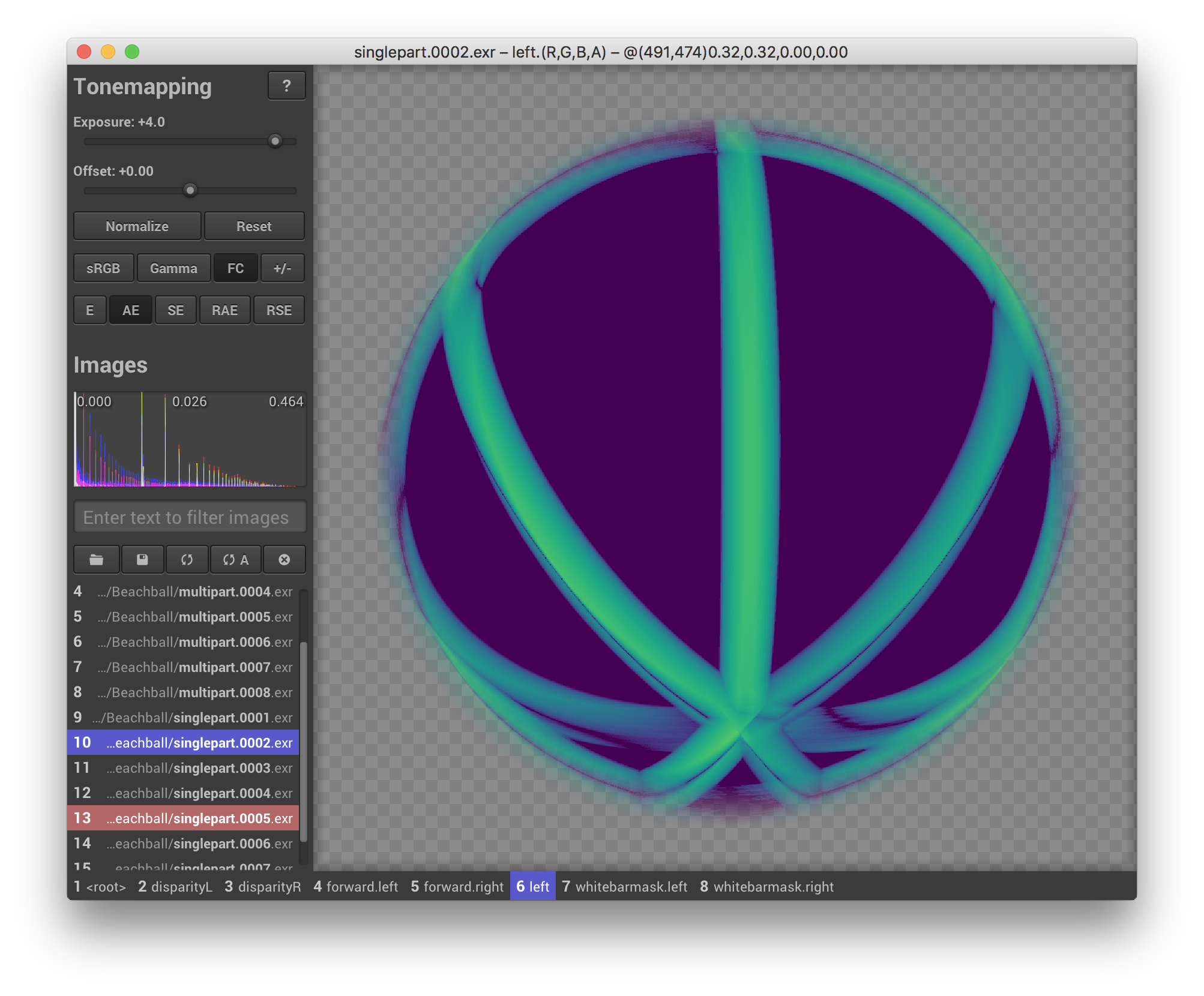 A false-color comparison of two multi-layer OpenEXR images of a beach ball. Image courtesy of openexr-images.
Download tev for
Or install tev via package managers:
yay -S tevbrew install tevflatpak install flathub io.github.tom94.tevscoop install extras/tevwinget install tevenvironment.systemPackages = with pkgs; [ tev ];
Or build and install tev from source. See the building tev section below for details. TL;DR:
$ git clone --recursive https://github.com/Tom94/tev
$ cmake . -B build -DCMAKE_BUILD_TYPE=Release
$ cmake --build build --config Release -j
$ cmake --install build
Images can be opened via a file dialog or by dragging them into tev. They can be reloaded, closed, or filtered at any time, so don't worry about opening more images than exactly needed.
Select an image by left-clicking it, and optionally select a reference image to compare the current selection to by right-clicking. For convenience, the current selection can be moved with the Up/Down or the 1-9 keys. For a comprehensive list of keyboard shortcuts click the little "?" icon at the top (or press "h") or view this online visualization.
If the interface seems overwhelming, you can hover any controls to view an explanatory tooltip.
tev takes images as positional command-line arguments:
$ tev foo.exr bar.exr
By default, all layers and channels are loaded, but individual layers or channels can also be specified. In the following example, the depth layer of foo.exr and the r, g, and b channels of foo.exr and bar.exr are loaded.
$ tev :depth foo.exr :r,g,b foo.exr bar.exr
Other command-line arguments exist (e.g. for starting tev with a pre-set exposure value). For a list of all arguments simply invoke
$ tev -h
tev can also be controlled remotely over the network using a simple TCP-based protocol.
The --host argument specifies the IP and port tev is listening to. By default, tev only accepts connections from localhost (127.0.0.1:14158), which is useful, for example, as frontend for a supported renderer like pbrt version 4.
The following operations exist:
| Operation | Function |
|---|---|
OpenImage | Opens an image from a specified path on the machine tev is running on. |
CreateImage | Creates a blank image with a specified name, size, and set of channels. If an image with the specified name already exists, it is overwritten. |
UpdateImage | Updates the pixels in a rectangular region. |
CloseImage | Closes a specified image. |
ReloadImage | Reloads an image from a specified path on the machine tev is running on. |
VectorGraphics | Draws vector graphics over a specified image. |
tev's network protocol is already implemented in the following languages:
If using these implementations is not an option, it's easy to write your own one. Each packet has the simple form
[uint32_t total_length_in_bytes][byte operation_type][byte[] operation_specific_payload]
where integers are encoded in little endian.
There are helper functions in Ipc.cpp (IpcPacket::set*) that show exactly how each packet has to be assembled. These functions do not rely on external dependencies, so you can copy and paste them into your project to interface with tev.
All that is required for building tev is CMake and a C++20-compatible compiler. On Windows, that's Visual Studio 2019 and newer. On Linux and macOS, your system's GCC or Clang compiler is likely sufficient.
Most Linux distributions additionally require xorg, wayland, gl, and dbus. On Ubuntu/Debian simply call
$ apt-get install cmake libdbus-1-dev libffi-dev libglu1-mesa-dev libwayland-dev libxkbcommon-dev nasm wayland-protocols xorg-dev
Once all dependencies are installed, begin by cloning this repository and all its submodules using the following command:
$ git clone --recursive https://github.com/Tom94/tev
Then, use CMake as follows:
$ cmake . -B build -DCMAKE_BUILD_TYPE=Release
$ cmake --build build --config Release -j
Afterwards, tev can be installed via
$ cmake --install build
or you can create a standalone installer (Windows, macOS) / AppImage (Linux) with
$ cpack --config build/CPackConfig.cmake
TEV_SUPPORT_HEIC CMake option. Check patent laws in your jurisdiction before enabling this feature.)tev is available under the GPLv3 license, which you can find in the LICENSE.txt file.
TL;DR.
Older versions of tev (v1.30 and earlier) are available under the BSD 3-Clause license. If required, use git tags to check out these older versions.