
Substrate
A desktop app for AI-generated raster slide decks where the prompt is the only editable artifact.
An image model returns pixels, and pixels can't be diffed, reviewed, or
co-authored. Substrate doesn't try to make pixels editable. The only things you
edit are two prompts:
- a per-slide prompt (the slide's substrate), and
- a deck-level main design prompt, injected ahead of every slide prompt.
A human edits these in the UI; an agent edits the exact same prompts over MCP.
The rendered image is a pure build output of mainDesignPrompt + slidePrompt.
Nothing is composited on top — no text layer, no shapes, no vector overlay.
Demo
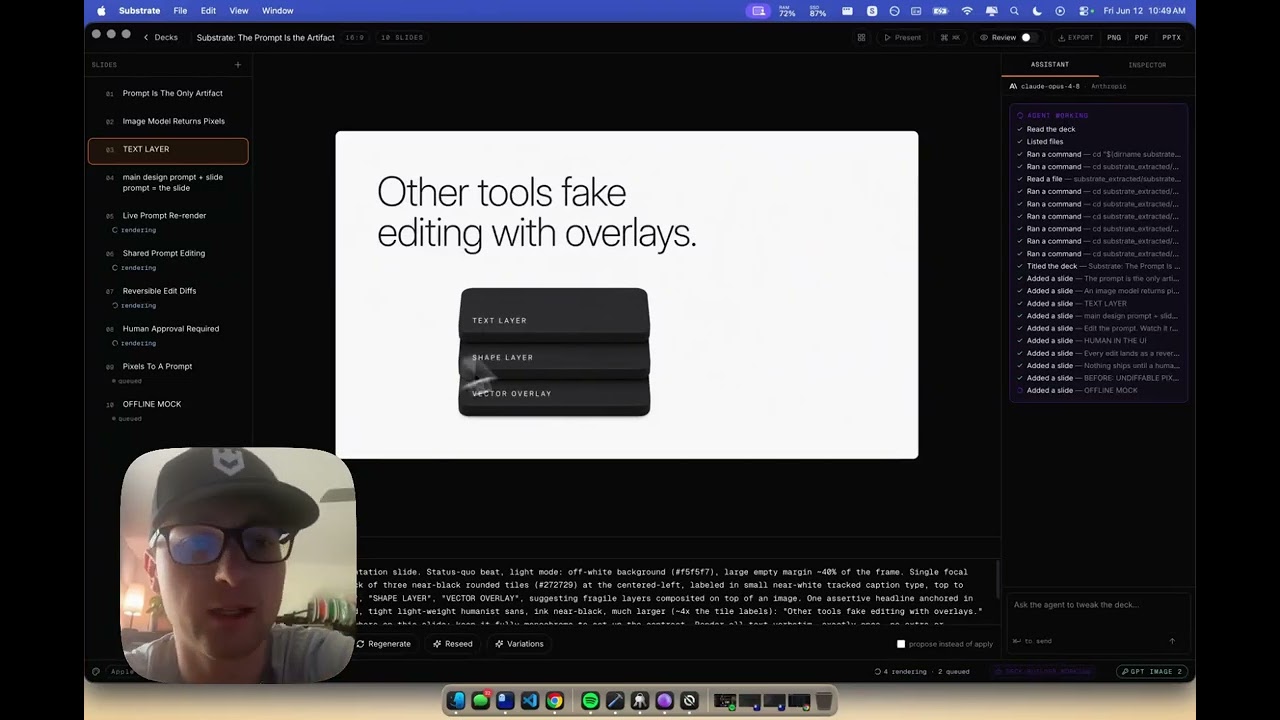
▶ Watch the demo on YouTube
This repo is a runnable vertical slice of the PRD (v0.3): the full editor
UI, an Effect server with node:sqlite persistence + a GPT Image 2 provider
adapter + a live MCP server, and an Electron shell. It runs with no API key
via a deterministic mock renderer, so you can see the whole flow offline.
Download
Grab the latest desktop build from
GitHub Releases:
- macOS —
Substrate-*.dmg (Apple Silicon)
- Windows —
Substrate-Setup-*.exe
- Linux —
Substrate-*.AppImage
Why Windows says "Windows protected your PC"
The installers are currently unsigned (no code-signing certificate yet), so
Windows SmartScreen shows a blue "Windows protected your PC" prompt on first
run. This is expected for unsigned indie apps — it is not a virus warning. To
proceed:
- Click More info.
- Click Run anyway.
Alternatively, before running: right-click Substrate-Setup-*.exe → Properties
→ check Unblock → OK.
The macOS .dmg is signed with a Developer ID and notarized by Apple, so it
opens with no Gatekeeper warning. Only the Windows installer is unsigned.
Verify your download (SHA-512)
Every release attaches electron-builder's latest.yml (Windows), latest-mac.yml
(macOS), and latest-linux.yml (Linux), each containing the base64 SHA-512 of
its installer. To confirm a download is genuine, hash the file and compare it to
the sha512: field in the matching .yml:
# Windows (PowerShell) — the .yml value is base64, so emit base64 to compare:
$bytes = [Security.Cryptography.SHA512]::Create().ComputeHash([IO.File]::ReadAllBytes("Substrate-Setup-X.Y.Z.exe"))
[Convert]::ToBase64String($bytes)
# macOS / Linux
openssl dgst -sha512 -binary Substrate-X.Y.Z.dmg | base64
The printed value must match sha512: in the release's .yml for that file.
> Add your OpenAI API key in-app to render with GPT Image 2, or use the offline
> preview.
Maintainers cut a release by pushing a tag (git tag v0.3.0 && git push --tags):
it builds installers for all three platforms and publishes them to the Release
(see .github/workflows/release.yml).
Quick start (from source)
pnpm install
pnpm dev            # starts the server (:4321) and the web editor (:5173)
To produce a packaged desktop build locally:
pnpm dist # build web + bundle the server + electron-builder → apps/desktop/dist
Open http://localhost:5173, pick a design (Apple-style is the default), type a
topic, and hit Generate deck. Edit any slide's prompt and watch it re-render.
With no OPENAI_API_KEY, Substrate uses a mock renderer that draws a
deterministic, slide-shaped SVG from (prompt + seed) — enough to exercise
seed-continuity, variations, history, and MCP. To use real GPT Image 2:
export OPENAI_API_KEY=sk-...
pnpm dev
Layout
apps/
  server/     Effect server: Context.Service + Layer, node:sqlite, generation queue, HTTP/WS, MCP
  web/        React 19 + Vite + Tailwind v4 + Base UI editor (the three-panel UI)
  desktop/    Electron shell (dev flow working)
  mobile/     Expo viewer — post-v1 stub
  marketing/  Astro site — stub
packages/
  contracts/  effect/Schema schemas — schema only, no runtime logic
  shared/     shared runtime utilities (subpath exports, no barrel): Aspect, Presets, PromptAssembly
  runtime/    shared-services extraction point — stub
  ssh/        remote MCP access helpers — stub
  tailscale/  remote MCP access helpers — stub
The two artifacts, everywhere
- Slide prompt — edited in the canvas, the work surface docked under the
rendered slide. Versioned, attributed, reversible.
- Main design prompt — edited in the deck bar at the bottom; applying it
re-renders every slide (it warns first — the most expensive interaction).
Every edit — human or agent — records its author, lands as a text diff, and is
reversible. In review mode all edits become proposals a human approves.
MCP — the app as a server
The running server hosts MCP over Streamable HTTP at http://localhost:4321/mcp,
with proper stateful sessions (mcp-session-id + per-session server) and a
bearer token — the same pattern as mandrel.
Edits made over MCP show in the editor in real time.
The token is generated on first launch, persisted across restarts in the app
data dir (mcp-token, mode 0600), printed to the server's stderr
([substrate] MCP_TOKEN=…), and available at GET /api/status. Override with
SUBSTRATE_MCP_TOKEN. Register Substrate with an agent once:
claude mcp add --transport http substrate http://localhost:4321/mcp \
  --header "Authorization: Bearer "
A stdio entry also exists for spawn-based clients (shares the same node:sqlite
store): pnpm --filter @substrate/server mcp.
Tools: list_decks, list_design_presets, create_deck, get_deck,
set_design_prompt, add_slide, edit_slide_prompt, list_pending_edits,
regenerate_slide, get_history, reorder_slides, export_deck. Agents edit
prompts only — there is no pixel-editing tool, because there are no editable
pixels.
Scripts
| Command | What |
|---|
pnpm dev | server + web in watch mode |
pnpm dev:server / pnpm dev:web | run one side |
pnpm mcp | run the stdio MCP server |
pnpm build | build the web app (server runs on Node's native TS — no build) |
pnpm desktop | launch the Electron shell (after pnpm dev) |
pnpm typecheck | tsgo --noEmit across every package |
The server runs directly with node --watch src/index.ts (Node 24 native
TypeScript), persisting via the built-in node:sqlite — no native build step.
Honest scope (what this slice does / doesn't do)
- Real: the Effect service/layer backend,
effect/Schema contracts,
node:sqlite persistence, the editor, prompt versioning + attribution +
diffs, propose/approve review flow, seed-pinned regeneration, variations,
rollback, blob storage, live WS updates, MCP over HTTP + stdio, the
Provider adapter abstraction, the GPT Image 2 adapter, and single-file
PPTX export (each slide full-bleed, its prompt in the speaker notes).
- Mocked when offline: image rendering and outline generation fall back to
deterministic local generators with no API key.
- Stubbed / follow-up: single-file PDF packaging (PDF export currently
emits an image bundle +
notes.md with the slide prompts as text-of-record);
SSH/Tailscale remote access; the Expo viewer and Astro marketing site.
(vite-plus/vp is t3code's toolchain; this slice uses Vite + tsgo directly.)
- Desktop: the Electron shell loads the editor from the server's loopback
origin (
http://localhost:4321/, which now serves the built web app) so the
packaged app's /api, /blobs, /ws, and /mcp are same-origin — never
file://. The server is currently spawned by the Electron main; running it
fully in-process (mandrel-style) is the remaining refinement.
These are deliberate boundaries, consistent with the PRD's "accepted constraints."