
A tiny always-on-desktop widget for Windows that shows what your PC is
actually drawing — live watts, Screen Time-style history, kWh, and what it
costs you. Single ~1 MB exe, no installer, no services, no network access.
Features
- Live power draw
- On battery: true whole-system watts from battery telemetry, with session
avg/peak and time remaining.
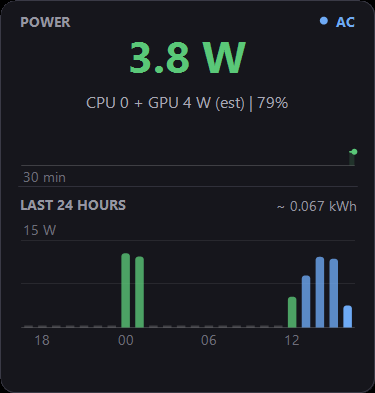
- On AC: CPU + GPU package power from LibreHardwareMonitor sensors, plus a
self-calibrating base-load offset — whenever you run on battery the
widget compares true draw against the sensor estimate and learns your
display/RAM/SSD baseline, so the AC number converges on a genuine
whole-system figure. While charging it also estimates wall draw.
- History: 30-minute sparkline always visible; double-click cycles
compact → 24-hour → 7-day views. Hour bars are colored by load on battery
(green/amber/red) and blue on AC. Per-minute history persists across
reboots (30 days, plain CSVs).
- kWh and cost: both history views total energy; set your per-kWh rate
and see it in your local currency.
- Battery health: design vs. current full-charge capacity and cycle count.
- Behaves like a desktop widget should: never steals focus, hidden from
Alt-Tab, sits above the wallpaper (including Windows Spotlight) but under
every real window, survives Win+D, and follows you across virtual desktops.
- Light/dark theme, following Windows by default.
Install
Via winget (once published):
winget install wattawidget
Or manually: grab the zip from Releases, extract
WattAWidget.exe anywhere, run it. Right-click the widget → Start with
Windows if you want it at logon.
Controls
| Action | Effect |
|---|
| Drag | Move the widget |
| Double-click | Cycle compact → 24-hour → 7-day view |
| Right-click | View, theme, electricity rate, battery health, reset stats/calibration, autostart, exit |
Build from source
No .NET SDK needed — it compiles with the C# compiler that ships in Windows:
powershell -ExecutionPolicy Bypass -File build.ps1
First run downloads LibreHardwareMonitorLib and HidSharp from nuget.org
(embedded into the exe as resources) and produces bin\WattAWidget.exe.
The icon is generated from code: tools\make-icon.ps1.
How it measures
Battery mode reads BatteryStatus WMI telemetry — that number is the whole
machine, screen included. AC mode reads CPU package and discrete-GPU power
sensors, which miss the base load; the learned offset (see above) closes most
of that gap. Treat AC numbers as good estimates, not lab measurements.
FAQ
Windows SmartScreen warns when I run it. The exe is unsigned — click
"More info → Run anyway", or build from source yourself. Code signing may come
later.
My antivirus inspects it closely. LibreHardwareMonitor's sensor library
contains a kernel driver used for reading CPU power registers; some AV
heuristics notice it. The library is a well-known open-source project (see
THIRD-PARTY-NOTICES.md).
AC watts say "no power sensors found". Sensor access sometimes requires
administrator rights — right-click → Restart as administrator. Battery-mode
readings never need admin.
How do I uninstall? Exit the widget first — right-click → Exit, or run
wattawidget --exit (winget can't remove a running exe). Then
winget uninstall wattawidget (or delete the app folder). Your data lives in
%LOCALAPPDATA%\WattAWidget — delete it too for a full cleanup, plus
schtasks /Delete /TN WattAWidget /F if you enabled autostart.
Releasing (maintainers)
powershell -ExecutionPolicy Bypass -File tools\release.ps1 -Version 1.0.1
Or from Linux / macOS / WSL:
./tools/release.sh 1.0.1
That bumps the version, builds as a sanity check (PowerShell variant only —
compilation needs Windows), commits, tags, and pushes.
CI then compiles, publishes the GitHub release, and — via wingetcreate —
submits the winget update PR automatically. One-time setup: add a repo secret
WINGET_TOKEN (classic PAT, public_repo scope). The winget job only works
once the package's initial winget-pkgs PR has been merged.
License
MIT — see LICENSE. Bundles LibreHardwareMonitorLib (MPL-2.0) and
HidSharp (Apache-2.0): THIRD-PARTY-NOTICES.md.